
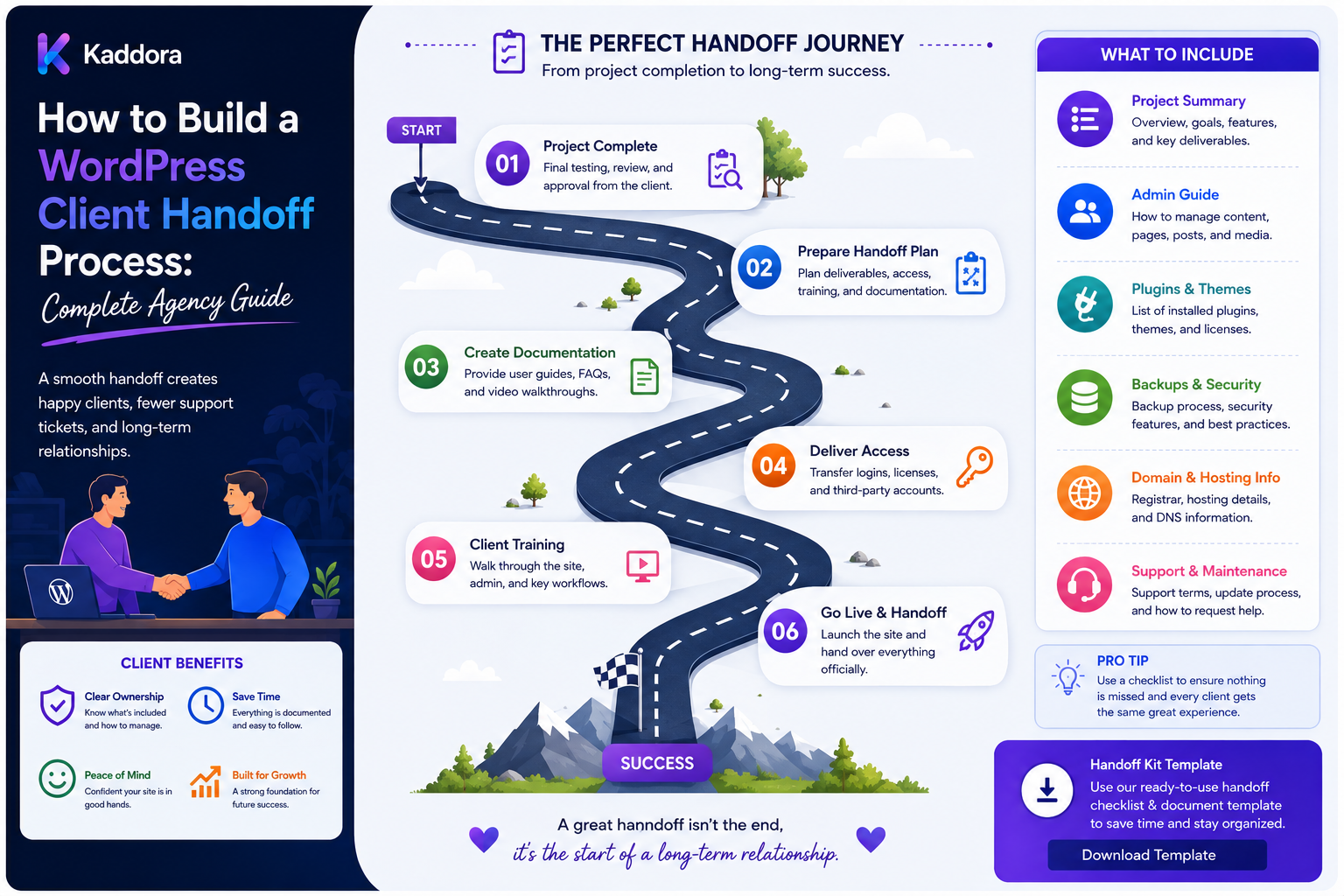
How to Build a WordPress Client Handoff Process: Complete Agency Guide
Introduction
Launching a WordPress website is not the final step of an agency project.
The project is only truly complete when the client understands:
What Was Built How It Works How To Manage It Who Owns What Where Things Are Stored How Updates Work What Happens Next
Without a structured handoff, agencies often receive avoidable support requests such as:
"Where is the WordPress login?"
"Which hosting account is connected?"
"How do I update this page?"
"Which plugins require renewal?"
"How do I restore a backup?"
"Who manages the domain?"
These questions can consume significant time after a project is technically finished.
A professional WordPress client handoff process creates a clear transition from:
Agency Development ↓ Client Delivery ↓ Client Ownership / Maintenance
The process should cover:
Access Hosting Domain WordPress Plugins Themes Licenses Documentation Backups Analytics Security Training Maintenance Support
The key principle is:
A successful handoff transfers not only the website, but also the knowledge, ownership information, operational documentation, and maintenance responsibilities required to manage it safely.
What Is a WordPress Client Handoff?
A client handoff is the structured process of transferring a completed WordPress project from the development team to the client or ongoing maintenance team.
It can include:
Technical Transfer Documentation Credentials Training Ownership Launch Details Support Information
The exact handoff depends on the agency contract and project scope.
Why Is Client Handoff Important?
A good handoff helps:
Reduce post-launch confusion
Minimize support requests
Clarify ownership
Protect credentials
Improve client confidence
Document technical decisions
Simplify future maintenance
Reduce dependency on individual developers
A handoff is therefore both a technical and operational process.
Start the Handoff Before Launch
Do not wait until the day the site goes live.
Prepare handoff documentation during development.
A useful timeline is:
Development ↓ Documentation ↓ Staging ↓ Handoff Preparation ↓ Client Review ↓ Launch ↓ Final Handoff
This avoids last-minute documentation work.
Define What the Client Owns
Before handoff, clarify ownership of:
Domain Hosting WordPress Theme Plugins Licenses Design Assets Content Analytics Third-Party Accounts Custom Code
Ownership depends on the contract, so document the actual agreement rather than assuming everything belongs to one party.
Create a Project Inventory
Prepare a centralized project summary containing:
Project Name Production URL Staging URL Hosting Provider WordPress Version PHP Version Theme Plugins Database External Integrations Analytics Maintenance Plan
Do not store passwords or private tokens in an ordinary project inventory.
Credentials Are Not Documentation
A project handoff may need access credentials, but sensitive secrets should not be included in a normal PDF or shared document.
Instead:
Documentation → Secure Credential Vault
The handoff document should explain where credentials are securely stored and who controls access.
Build a Credential Inventory
List the account types that exist:
WordPress Admin Hosting Domain DNS CDN Analytics Search Tools Email Payment Provider CRM SMTP Third-Party Services
The actual password or secret should remain in secure storage.
Transfer Ownership Properly
Whenever possible, client-owned accounts should use client-controlled email addresses and ownership.
Examples:
Client Hosting Account Client Domain Account Client Analytics Property Client Search Property
The agency can receive delegated access rather than owning everything permanently.
WordPress Administrator Accounts
Before handoff:
Create / Verify Client Account ↓ Assign Appropriate Role ↓ Test Login ↓ Confirm Access
Avoid transferring a shared agency administrator account as the client's permanent account.
Remove Unnecessary Agency Access
After handoff, review:
Agency Users Developer Accounts Temporary Admins Test Accounts
Remove or reduce access that is no longer required, subject to the ongoing maintenance agreement.
Use Least Privilege
Not every user needs administrator access.
Define roles based on actual responsibilities.
For example:
Editor Manager Developer Administrator
Use the minimum access required.
Domain and DNS Handoff
Document:
Registrar Domain Expiration DNS Provider Nameservers Important Records
Do not expose unnecessary sensitive information.
SSL Certificate
Document:
SSL Provider Renewal Method Certificate Responsibility
Automated renewal should be explained where applicable.
Hosting Handoff
Document:
Hosting Provider Server Type Environment PHP Version Database Backups Caching CDN
The client should know who is responsible for hosting support.
Staging Environment
Explain:
Staging URL Purpose Access Authentication Deployment Process
If staging is maintained by the agency, make that clear.
Production Environment
Document:
Production URL Hosting Deployment Backups Monitoring Maintenance
WordPress Version
Record the version at handoff.
Also explain:
Update Responsibility Current Support Status Known Compatibility Constraints
PHP Version
Record the production PHP version and any important compatibility considerations.
Theme Information
Document:
Theme Name Version Child Theme Customizations License Update Method
If a custom theme is used, explain its architecture at a high level.
Plugin Inventory
Create a table such as:
Plugin
Purpose
Version
License
Renewal
Owner
SEO Plugin
SEO
Current
Premium
Annual
Client
Backup Plugin
Backup
Current
Premium
Annual
Agency
Form Plugin
Forms
Current
Premium
Annual
Client
The exact values should reflect the actual project.
Explain Why Important Plugins Exist
Do not simply provide a plugin list.
Explain:
What It Does Why It Is Installed Who Maintains It What Depends On It
This prevents accidental plugin removal.
License Handoff
Document:
Product License Type License Owner Renewal Date Site Count Renewal Responsibility
Clarify which licenses are client-owned and which are covered by the agency.
Third-Party Services
List important integrations:
CRM Email Payments Analytics Search CDN Forms Automation AI Services
For each service, document ownership and responsibility.
API Keys
Do not place API keys directly into the handoff document.
Instead provide:
Service Purpose Account Owner Credential Location Rotation Process
Environment Variables
If the website uses environment-specific configuration, document:
Variable Name Purpose Environment Owner
Never expose secret values unnecessarily.
Database Information
A client may need to know:
Database Type Database Name Backup Strategy Migration Strategy
Avoid sharing raw database credentials in ordinary documentation.
Backup Documentation
Explain:
What Is Backed Up How Often Where Stored Retention Who Can Restore How Restoration Works
A backup policy without a recovery procedure is incomplete.
Test Backup Restoration
If the agency claims backups are available, the restoration process should be tested.
Document:
Last Restore Test Result Recovery Procedure
where appropriate.
Security Handoff
Include a security summary:
Admin Accounts Firewall SSL Backups Updates Security Plugin 2FA Monitoring
Do not expose secret security credentials.
Two-Factor Authentication
Document whether important accounts use:
2FA Authenticator Security Key Other Controls
and who is responsible for managing them.
Update Responsibility
One of the most important questions is:
Who updates the website?
Document responsibility for:
WordPress Themes Plugins PHP Security Content
Maintenance Plan
If the client is purchasing ongoing maintenance, document:
What's Included Update Frequency Backup Frequency Monitoring Support Response Expectations
Avoid vague descriptions.
Support Process
Explain:
How To Request Support Where To Send Requests Business Hours Emergency Process Included Work Billable Work
Client Training
A website handoff should include appropriate training.
Training may cover:
Login Dashboard Pages Posts Media Forms Menus Users Basic Settings
Don't overwhelm the client with unnecessary technical detail.
Role-Based Training
A content editor may only need:
Posts Pages Media
while an administrator may need:
Users Plugins Settings Backups
Provide training based on actual responsibilities.
Record the Training
Provide:
Video PDF Documentation Knowledge Base
where included in scope.
Website User Guide
A simple user guide can explain:
How to Log In How to Edit Content How to Upload Images How to Publish How to Manage Menus How to Handle Forms
Avoid Training the Client to Change Complex Settings
Clients should understand which settings are safe to modify and which should remain technical.
For example:
Safe: Page Content Restricted: Database Settings Caching Configuration Security Rules
Custom Functionality Documentation
If the website has custom features, document:
Feature Purpose Where Managed Dependencies Known Limitations
Custom Code Documentation
Explain where important custom code lives:
Custom Plugin Custom Theme Child Theme MU Plugin Snippet System
Avoid forcing clients to understand implementation details they do not manage.
Custom Plugin Documentation
For a custom plugin, document:
Purpose Version Settings Dependencies Data Storage API Integrations Update Process
Custom Theme Documentation
Document:
Theme Architecture Templates Components Custom Blocks Global Styles Customizations
Keep the explanation understandable.
Form Documentation
For important forms, document:
Form Purpose Recipient CRM Email Service Spam Protection Success Action
This helps diagnose problems after launch.
Email System Documentation
Explain:
SMTP Sender Provider Transactional Email Notification Flow
Do not include passwords or SMTP secrets in ordinary documents.
Analytics Handoff
Document:
Analytics Property Tracking Setup Goals / Events Account Owner Access
Ensure ownership is clear.
Search Console and SEO Tools
Where applicable, document:
Search Property Verification Method Sitemap SEO Plugin Redirect System
Account ownership should be clear.
SEO Configuration Handoff
Explain important configuration such as:
Titles Descriptions Sitemaps Indexing Redirects Structured Data
Don't encourage clients to change advanced settings without understanding the consequences.
Performance Handoff
Provide a simple summary:
Hosting Caching CDN Image Optimization Database Core Performance Work
The client should know where performance responsibility sits.
Performance Baseline
Where useful, record:
Page Speed Core Web Vitals Server Response Major Bottlenecks
The baseline provides a reference for future maintenance.
Accessibility Handoff
Document major accessibility considerations:
Keyboard Navigation Forms Images Contrast Content Structure
Do not claim full accessibility compliance unless the project was actually evaluated against the relevant requirements.
Content Handoff
Confirm what content the agency delivered:
Pages Posts Products Images Documents Forms Menus
Record any content the client still needs to provide.
Media Library
Explain:
Image Organization Compression Alt Text Upload Rules
This helps the client maintain consistent content quality.
Client Acceptance
Before final handoff:
Client Reviews Staging ↓ Issues Resolved ↓ Acceptance Confirmed ↓ Launch
Document acceptance according to the contract.
Acceptance Checklist
Confirm:
Design Approved Content Approved Forms Tested Mobile Tested SEO Reviewed Analytics Verified Client Access Ready
Launch Documentation
Record:
Launch Date Deployment Version DNS Change SSL Backup Smoke Tests Monitoring
This becomes useful later when troubleshooting.
Post-Launch Monitoring
After launch, monitor:
Uptime Errors Forms Analytics Performance Security
for an appropriate period.
Launch Support Window
Agencies may provide a short post-launch support period.
Define:
Duration Included Fixes Excluded Changes Contact Method
Avoid leaving these responsibilities ambiguous.
Final Handoff Package
A professional package may contain:
01_Project_Overview 02_Access_Information 03_Hosting_Domain 04_WordPress_Documentation 05_Plugin_Theme_Inventory 06_Custom_Functionality 07_Analytics_SEO 08_Backups_Security 09_User_Guide 10_Maintenance 11_Support 12_Launch_Record
Sensitive credentials should remain in secure systems rather than ordinary files.
Client Handoff Portal
For larger agencies, provide a secure client portal containing:
Project Details Documentation Tickets Maintenance Reports License Information Approvals
The portal should authenticate users and enforce access controls.
Secure Credential Access
A portal can link to:
Credential Manager
rather than displaying secrets directly in ordinary project documents.
Handoff Checklist Automation
A project-management system can automatically verify:
Documentation Complete Client Account Created Licenses Recorded Backup Verified Training Delivered Acceptance Signed
Handoff Status
Useful states include:
Preparing Client Review Ready for Handoff Handoff Completed Maintenance Active Closed
Handoff Ownership
Assign an internal owner:
Project Manager Technical Lead Account Manager
One person should be responsible for confirming the package is complete.
Handoff Documentation Versioning
Documentation changes after launch.
Track:
Version Updated Updated By Reason
This prevents outdated handoff documents from circulating.
Client Knowledge Base
For ongoing maintenance, a searchable knowledge base can answer:
How do I update this? Where is this configured? Which plugin controls this? Who owns this account?
This reduces repeated support requests.
Agency Internal Handoff
The client is not the only audience.
The agency should also record:
Architecture Known Issues Technical Debt Deployment Process Emergency Contacts
This helps future support developers understand the site.
Internal vs Client Documentation
Separate:
Client Documentation
from:
Internal Technical Documentation
Clients don't need internal implementation notes, security details, or developer-only troubleshooting instructions unless appropriate.
Known Limitations
Document anything the client should know:
Third-Party Dependency Known Browser Limitation Pending Feature Hosting Constraint Manual Process
Transparency reduces future misunderstandings.
Technical Debt
Don't hide known technical debt.
Record:
Issue Impact Workaround Priority
Internal records may contain greater detail than client-facing documentation.
Maintenance Transition
If another team will maintain the website:
Handoff Documentation ↓ Technical Walkthrough ↓ Questions ↓ Access Verification ↓ Maintenance Transfer
Agency-to-Agency Handoff
When ownership changes, provide:
Source Code Documentation Dependencies Deployment Database Backup Third-Party Accounts
according to the contractual scope.
Source Code Handoff
If source code is included:
Repository Branch Release Build Process Dependencies
should be documented.
Repository Access
Use proper repository permissions.
Do not send repository passwords through plain text.
Build and Deployment Documentation
Document:
Build Test Deploy Rollback
so another technical team can reproduce the release process.
WordPress Client Handoff and Security
A handoff itself is a security event.
Before transferring access:
Review Users Rotate Temporary Credentials Verify Ownership Remove Test Accounts Secure Documentation
Rotate Temporary Credentials
If development used temporary credentials:
Replace ↓ Verify ↓ Revoke Old
where appropriate.
Secure Document Sharing
Do not email sensitive passwords in plain text.
Use secure credential systems or secure sharing mechanisms appropriate to the agency.
Client Handoff and Privacy
If staging contains customer information, ensure data access and transfer are handled according to applicable privacy and contractual requirements.
Client Handoff and Backups
Ensure the client knows:
Where Backups Exist Who Can Restore What Is Covered
but do not distribute backup files containing sensitive data unnecessarily.
Client Handoff and Disaster Recovery
For important websites, document:
Backup Restore Contact Recovery Procedure
according to the service level.
Client Handoff and Change Requests
After handoff, new requests should follow a separate workflow:
Request ↓ Scope ↓ Estimate ↓ Approval ↓ Development ↓ QA ↓ Deployment
This prevents post-launch work from becoming informal support.
Client Handoff and Maintenance Contracts
If the client remains on maintenance:
Handoff → Maintenance → Monitoring → Updates → Reports
The handoff should clearly identify what is now part of ongoing service.
Monthly Reporting
For managed websites, reports can include:
Updates Backups Uptime Security Performance Changes
This extends the value of the handoff into the maintenance phase.
Client Handoff Automation
At agency scale, automate checklist verification.
For example:
Project Marked Complete ↓ Generate Handoff Checklist ↓ Check Documentation ↓ Check Access ↓ Check Backup ↓ Check Licenses ↓ Send Client Review
Automated Handoff Quality Gates
A project should not be marked complete until:
Required Documentation + Access Verification + Backup Verification + Client Acceptance
are complete.
Handoff Metrics
Agencies can track:
Handoff Completion Time Missing Items Post-Handoff Questions Support Requests Documentation Usage Client Satisfaction
Post-Handoff Support Requests
A high number of repeated questions may indicate missing documentation or insufficient training.
For example:
Question: How do I edit a service page? → Improve User Guide
Handoff Quality Improvement
After every project:
What Was Missing? What Confused the Client? What Took Too Long? What Should Be Automated?
Use the answers to improve the process.
Client Handoff Templates
Maintain reusable templates for:
Project Overview Plugin Inventory Access Guide Maintenance Guide User Guide Launch Record
This standardizes delivery.
Don't Send Everything
Clients don't need dozens of technical files.
Provide a structured package:
Quick Start + Important Documentation + Secure Access + Support Information
Keep deep technical documentation available when needed.
Quick Start Guide
The first document should answer:
Where Do I Log In? How Do I Edit Content? Who Handles Updates? How Do I Request Support? Where Are Credentials?
This is often more useful than a 100-page technical manual.
Client Handoff Dashboard
For larger agencies, a dashboard can show:
Project Handoff Status Missing Items Client Approval Maintenance Licenses Backups
Why Choose ThemeKaddora?
ThemeKaddora provides WordPress themes, plugins, HTML templates, UI kits, WooCommerce solutions, and digital products that agencies can use as part of client projects.
When a ThemeKaddora product is included in a client website, agencies should document:
Product Version Purpose License Update Responsibility Customization
This helps the client and future maintenance teams understand the delivered technology stack.
Common WordPress Client Handoff Mistakes
Avoid:
Waiting until launch day to prepare documentation.
Sending passwords through ordinary email.
Sharing one permanent agency administrator account.
Leaving temporary developer accounts active.
Failing to explain ownership.
Not documenting plugin licenses.
Not documenting custom functionality.
Giving clients a plugin list without explaining dependencies.
Failing to explain backup and restore responsibility.
Ignoring staging and production details.
Forgetting analytics and search-property ownership.
Leaving DNS and domain responsibility unclear.
Not documenting maintenance responsibility.
Failing to record known limitations.
Mixing internal technical notes with client documentation.
Providing too much technical information without a clear quick-start guide.
Failing to verify client access before closing the project.
Handing over a site without testing critical forms and integrations.
Allowing outdated documentation to remain in circulation.
Treating handoff as a one-time file transfer instead of an operational transition.
Best Practices for Building a WordPress Client Handoff Process
A professional agency should:
Start preparing handoff documentation before the website reaches production.
Define ownership of domains, hosting, WordPress, themes, plugins, content, analytics, integrations, and custom code.
Maintain a project inventory containing operational information without storing sensitive credentials in ordinary documents.
Use client-controlled accounts and delegated agency access where practical.
Create dedicated client WordPress accounts rather than transferring shared agency administrator accounts.
Remove unnecessary temporary users and access after the project is delivered, subject to ongoing maintenance requirements.
Apply least-privilege access rather than giving every stakeholder administrator permissions.
Maintain a secure credential-management process separate from ordinary documentation.
Never send passwords, private keys, API tokens, or other secrets through plain-text email or unsecured documents.
Document registrar, domain, DNS, SSL, hosting, staging, production, and deployment responsibilities clearly.
Record production WordPress, PHP, theme, plugin, and other important dependency versions.
Explain why important plugins and integrations exist instead of providing only a technical inventory.
Document license ownership, site limits, renewal dates, and renewal responsibility.
Identify third-party services such as CRM, SMTP, payment providers, analytics, CDN, search tools, automation, and AI services.
Document credential locations and ownership without exposing secret values unnecessarily.
Explain environment-specific configuration and keep secret values out of ordinary handoff documents.
Document backup frequency, retention, storage, responsibility, and restoration procedures.
Test backup restoration where the agency is responsible for backup or recovery services.
Provide a security summary covering admin access, updates, SSL, backups, monitoring, 2FA, and relevant security controls.
Clearly assign responsibility for WordPress, theme, plugin, PHP, security, content, and infrastructure updates.
Document maintenance plans with specific inclusions, exclusions, frequency, and support expectations.
Provide role-appropriate training rather than overwhelming every client user with technical administration details.
Provide a concise quick-start guide covering login, editing content, support requests, and important operational responsibilities.
Document custom plugins, custom themes, blocks, templates, integrations, and other bespoke functionality.
Explain where important custom code resides without requiring nontechnical clients to understand internal implementation details.
Document important form behavior, recipients, CRM integrations, SMTP services, spam protection, and failure paths.
Document analytics ownership, tracking configuration, events, goals, search properties, sitemap behavior, and important SEO settings where relevant.
Record a meaningful performance baseline and major performance work without promising guaranteed rankings or performance outcomes.
Document accessibility considerations honestly and avoid claiming formal compliance unless the site was actually evaluated against the applicable standard.
Document client-provided and agency-provided content separately.
Provide media guidelines for uploads, image optimization, alt text, and content maintenance.
Require client review and acceptance before final launch where applicable to the contract.
Maintain a launch record containing deployment version, launch date, DNS changes, backup, smoke tests, and monitoring setup.
Provide an appropriate post-launch support window with clearly defined responsibilities.
Maintain a structured final handoff package rather than sending a collection of unrelated technical files.
Separate client-facing documentation from internal agency technical documentation.
Record known limitations, unresolved issues, technical debt, third-party dependencies, and manual procedures where appropriate.
Use documentation versioning so teams can identify outdated handoff material.
Provide a secure client portal for larger agency operations when centralized project documentation, support, approvals, and maintenance reporting justify it.
Keep sensitive credential access behind appropriate authentication and authorization.
Use handoff status values such as preparing, client review, ready, completed, maintenance, and closed to track progress.
Assign one internal owner responsible for confirming handoff completeness.
Automate handoff quality gates where possible, including documentation checks, backup verification, access verification, license records, and acceptance.
Treat access transfer and credential changes as security-sensitive events and review them carefully.
Rotate or revoke temporary development credentials before closing the project where appropriate.
Review agency accounts after handoff and remove access that is no longer contractually or operationally necessary.
Maintain internal technical handoff notes for future agency developers, including architecture, known issues, deployment, technical debt, and emergency procedures.
For agency-to-agency transfers, provide source code, documentation, dependencies, deployment information, backups, and account ownership information according to the contractual scope.
Document repository, release, build, test, deployment, and rollback procedures when source-code transfer is included.
Use proper repository permissions rather than sharing passwords.
Keep client handoff separate from future change requests and new development work.
Use a formal change-request workflow after handoff to prevent informal scope expansion.
Connect handoff records to ongoing maintenance plans, monitoring, updates, and reporting when the client remains under agency care.
Track recurring post-handoff questions and use them to improve training and documentation.
Maintain reusable handoff templates for project overview, access, plugins, licenses, maintenance, user training, launch, and support.
Keep the quick-start guide concise and put deeper technical material behind structured documentation.
Use a centralized dashboard for larger agencies to track handoff status, missing items, licenses, maintenance, approvals, and backups.
Evaluate third-party themes, plugins, templates, UI kits, and digital products used in the project and document their version, purpose, license, customization, and maintenance responsibility.
Clearly distinguish agency-developed functionality from third-party products and client-specific configuration.
Ensure the final handoff reflects the actual delivered website and does not contain outdated or placeholder information.
Treat the handoff as an operational transition rather than simply delivering files.
Conclusion
A WordPress client handoff is more than sending a login URL and a plugin list.
A professional handoff transfers:
Access + Ownership + Documentation + Training + Security + Backups + Maintenance + Support
The first principle is prepare before launch.
Waiting until the website is already live creates unnecessary pressure and increases the chance of missing important information.
The second principle is clarify ownership.
The client and agency should know who owns domains, hosting, licenses, analytics accounts, code, content, and third-party services.
The third principle is separate credentials from documentation.
Passwords and secrets belong in secure credential systems, not ordinary handoff PDFs.
The fourth principle is use least privilege.
Clients, developers, editors, and administrators should receive only the access their responsibilities require.
The fifth principle is document the actual technology stack.
The client should know what themes, plugins, custom code, hosting, integrations, and services are running the website.
The sixth principle is explain why important components exist.
A plugin inventory is much more useful when the client understands what each important plugin does and what depends on it.
The seventh principle is make maintenance responsibility explicit.
The client should know who handles WordPress, PHP, plugin, theme, security, backup, content, and infrastructure updates.
The eighth principle is provide appropriate training.
A simple quick-start guide can often provide more practical value than a huge technical manual.
The ninth principle is maintain separate internal documentation.
Future developers need architecture, technical debt, deployment details, and troubleshooting information that clients may not need.
The tenth principle is turn handoff into a measurable workflow.
Status tracking, quality gates, documentation versioning, acceptance records, and automated checks make agency handoffs much more reliable.
A mature agency handoff process can look like:
Development ↓ Documentation ↓ Staging ↓ Client Review ↓ Acceptance ↓ Launch ↓ Access Verification ↓ Training ↓ Final Handoff ↓ Maintenance
For ThemeKaddora-based projects, agencies should also document:
ThemeKaddora Product Version Purpose License Customization Update Responsibility
alongside custom agency development and client-specific configuration.
A professional WordPress client handoff should be:
Secure
→ Documented
→ Organized
→ Role-Based
→ Ownership-Aware
→ Tested
→ Versioned
→ Client-Friendly
→ Maintainable
→ Scalable
The most important principle is:
A website is not fully handed over until the client or next maintenance team has the appropriate access, understands the important systems, knows who owns and maintains them, can follow the documented operating process, and can safely manage the website without relying entirely on undocumented agency knowledge.
When agencies build handoff into the project lifecycle, they reduce post-launch confusion, protect client accounts, improve trust, simplify maintenance, reduce repetitive support questions, and create a much more professional end-to-end WordPress delivery experience.
Frequently Asked Questions
What is a WordPress client handoff process?
It is the structured process of transferring a completed WordPress website, documentation, access, ownership information, training, support details, and maintenance responsibilities to the client or another team.
When should a WordPress agency start preparing the handoff?
During development, not only after launch. Documentation and ownership information should be collected throughout the project.
What should a client receive during handoff?
Typically project information, appropriate access, documentation, training, ownership details, maintenance information, support procedures, and important operational records.
Should passwords be included in the handoff document?
No. Store credentials in an appropriate secure credential-management system.
Can passwords be sent by email?
Avoid sending sensitive passwords through plain-text email. Use secure sharing or credential-management mechanisms.
Should clients receive a shared agency administrator account?
No. Create a client-specific account and assign appropriate permissions.
Should temporary developer accounts remain active?
Normally unnecessary access should be removed or reduced after the project, subject to ongoing support requirements.
What is least-privilege access?
It means giving each user only the permissions required to perform their responsibilities.
Who should own the domain?
Ownership should follow the client agreement, but client-controlled domain accounts are generally preferable when the client owns the website.
Should the agency own the client's hosting account?
Not necessarily. Account ownership should reflect the contract and long-term operating model.
Why choose Themekaddora?
Themekaddora provides lightweight, responsive, SEO-friendly WordPress themes with fast performance, WooCommerce compatibility, flexible customization, accessibility-conscious design, modern templates, regular updates, and professional support—providing a strong foundation for businesses building digital products and product-focused websites.
Comments (0)