
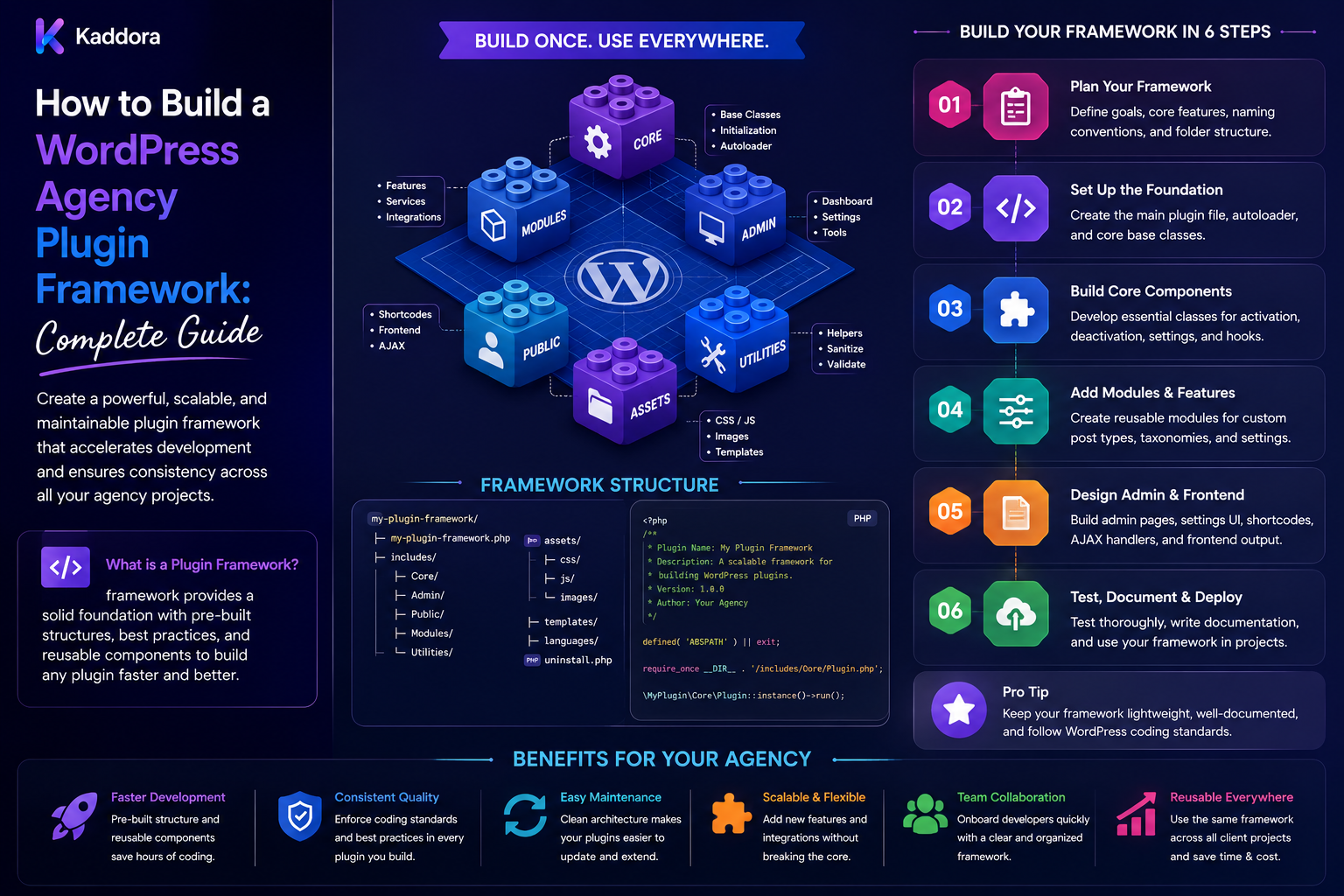
How to Build a WordPress Agency Plugin Framework: Complete Guide
Introduction
WordPress agencies frequently build custom plugins for different clients.
Although every project may have different business requirements, many plugins repeatedly need the same technical foundation:
Settings Admin Pages Security REST APIs Database Access Logging Caching Background Jobs External APIs Testing Documentation
Building these systems independently for every client increases development time and creates inconsistent code.
A WordPress agency plugin framework provides a reusable foundation for creating custom plugins faster and more consistently.
Instead of:
Client Project ↓ Empty Plugin ↓ Build Architecture ↓ Build Security ↓ Build Admin ↓ Build API ↓ Build Testing
an agency can use:
Agency Plugin Framework ↓ Project Configuration ↓ Client Modules ↓ Custom Business Logic ↓ Testing ↓ Deployment
A strong framework should remain modular and lightweight.
It should provide reusable infrastructure without trying to replace WordPress itself.
The key principle is:
Build a stable plugin foundation for recurring agency requirements while keeping client-specific business logic, integrations, and configuration outside the shared framework core.
What Is a WordPress Agency Plugin Framework?
A plugin framework is a reusable architecture and set of components for building WordPress plugins.
It can define common patterns for:
Plugin Bootstrap Service Container Admin REST Database Security Settings Logging Caching Queues Integrations Testing CLI
The framework becomes the technical foundation on which individual client plugins are built.
Why Agencies Need a Plugin Framework
Without a shared architecture, different developers may create plugins using completely different approaches.
One project may use:
includes/
while another uses:
src/ Services/ Modules/
Different projects may also have different:
Naming Security Error Handling Database Patterns REST Conventions Testing
This makes maintenance difficult.
A common framework creates predictable development patterns.
Framework vs Plugin Boilerplate
A boilerplate usually provides a project starting point.
A framework goes further by providing reusable infrastructure that continues to be used as the plugin evolves.
For example:
Boilerplate = Initial Structure
while:
Framework = Reusable Architecture + Components + Standards
An agency can use both.
Start With Recurring Requirements
Do not begin by building every possible framework component.
Review existing agency plugins and identify repeated needs.
For example:
Plugin A: Settings + REST + Logging Plugin B: Settings + REST + Queue Plugin C: Settings + REST + Database
The repeated parts are good framework candidates.
Keep the Framework Modular
A practical structure could be:
agency-plugin-framework/ ├── src/ │ ├── Core/ │ ├── Admin/ │ ├── Security/ │ ├── REST/ │ ├── Database/ │ ├── Settings/ │ ├── Logging/ │ ├── Cache/ │ ├── Queue/ │ └── Integrations/ ├── tests/ ├── docs/ ├── assets/ ├── composer.json └── README.md
Projects should be able to use only the modules they need.
Plugin Bootstrap
The main plugin file should remain small.
For example:
defined( 'ABSPATH' ) || exit; require_once __DIR__ . '/vendor/autoload.php'; Agency\Plugin\Framework::boot();
The bootstrap should initialize the framework rather than contain all plugin logic.
Namespaces
Define a unique namespace strategy:
AgencyName\Plugin\
Client plugin modules can then use a project-specific namespace or module namespace.
Namespaces reduce collisions with other WordPress code.
Text Domains and Internationalization
Every client plugin should have a clear text domain.
The framework should document how to:
Load Translations Register Strings Generate POT Files
User-facing strings should remain translatable.
Plugin Lifecycle
Define a consistent lifecycle:
Install Activate Initialize Run Deactivate Uninstall
Activation and uninstall logic should be separated carefully.
Activation Hooks
Use activation hooks for tasks such as:
Database Setup Default Options Initial Configuration
Avoid performing expensive work on every activation.
Deactivation Hooks
Deactivate should normally disable temporary behavior without unnecessarily destroying data.
Uninstall Strategy
Define clearly whether uninstall should remove:
Options Tables Metadata Logs Temporary Data
Do not automatically destroy client data without a deliberate policy.
Configuration Management
Centralize configuration:
Environment Feature Flags Defaults External Endpoints Application Settings
Keep secrets outside source code.
Settings Architecture
A reusable settings layer can define:
Settings Page Sections Fields Validation Defaults Save Reset
Don't Store Everything in Options
The WordPress options table is useful for settings, but high-volume data may belong elsewhere.
Use:
Post Meta User Meta Term Meta Custom Tables
according to the data model.
Security Layer
Security should be built into the framework.
Common protections include:
Capability Checks Nonce Verification Input Validation Output Escaping SQL Preparation REST Authorization File Validation
Capability Checks
Privileged operations should require appropriate capabilities.
Do not assume:
is_admin()
means the user is authorized.
Nonce Verification
Use nonces for browser-based state-changing requests where appropriate.
Remember:
Nonce ≠ Authorization
Capability and ownership checks are still required.
Input Validation
Validate all external data.
Examples:
Integer Boolean Email URL Slug Enum Array
Validation should happen before business logic.
Output Escaping
Escape values according to context:
HTML Attribute URL JavaScript
Do not treat sanitization as a universal substitute for contextual escaping.
REST API Architecture
Most modern custom plugins eventually need APIs.
Standardize:
Routes Versioning Authentication Authorization Validation Errors Responses Pagination
REST Namespace
Use a unique namespace, such as:
/wp-json/agency-plugin/v1/
Client-specific functionality can be placed beneath a project namespace where appropriate.
Permission Callbacks
Every sensitive REST route needs an appropriate permission callback.
The framework should make secure defaults easy.
REST Input Validation
Validate:
Parameters Types Allowed Values Object Ownership
before executing application logic.
REST Error Handling
Use predictable error responses.
For WordPress APIs, WP_Error is often appropriate.
Database Architecture
The framework should define when developers should use:
Options Post Meta Term Meta User Meta Custom Tables
The choice should depend on query patterns, scale, relationships, and lifecycle.
Custom Database Tables
Custom tables can be useful for high-volume relational data.
Examples:
Queue Jobs Usage Events Analytics Logs Relationships Reports
Database Schema Versioning
Track:
Schema Version Migration Version Applied At
A framework should provide predictable migration procedures.
Database Queries
Use safe prepared queries where direct SQL is appropriate.
Avoid generic database utilities that encourage arbitrary unvalidated SQL.
Indexing
Custom tables should have indexes based on real query patterns.
Do not add indexes to every column without considering storage and write overhead.
Transaction Strategy
Use transactions where the underlying database operations and plugin workflow justify them.
Document which operations can be safely rolled back.
Service Layer
Business logic should live in reusable services.
For example:
CustomerService OrderService ReportService SyncService
This separates business behavior from WordPress controllers and admin UI.
Dependency Injection
Larger projects can use dependency injection:
final class SyncService { public function __construct( private LoggerInterface $logger ) {} }
Use DI when it improves testability and maintainability.
Avoid building unnecessary framework complexity.
Module Architecture
Client functionality can be organized as modules:
modules/ ├── CRM/ ├── Payments/ ├── Analytics/ └── AI/
Only enabled modules should initialize.
Feature Flags
Support controlled functionality:
Enabled Disabled Experimental
Feature flags can help agencies roll out functionality gradually.
Admin Architecture
Reusable admin components can include:
Menus Pages Tabs Tables Forms Notices Filters Modals
Keep business logic outside the presentation layer.
Admin Permissions
Each admin page and action should have explicit capability requirements.
Do not use one broad permission for every framework feature.
Admin Asset Loading
Load admin CSS and JavaScript only where needed.
Avoid loading the entire framework asset bundle on every WordPress admin page.
Settings Forms
Standardize:
Label Description Input Validation Error Success
Build accessibility into forms from the beginning.
Admin Tables
Reusable tables may support:
Pagination Sorting Filtering Bulk Actions Empty States
Bulk actions must verify permissions and object ownership.
Logging
A shared logger makes debugging easier.
Useful levels include:
DEBUG INFO WARNING ERROR CRITICAL
Structured Logging
Prefer structured events such as:
Operation: CRM Sync Status: Failed Error: Timeout
rather than large unstructured strings.
Never Log Secrets
Never log:
Passwords API Keys OAuth Tokens Session Secrets
Sensitive customer data should also be minimized.
HTTP Client
A shared HTTP service can standardize:
Timeouts Retries Headers Authentication JSON Errors Response Validation
Use WordPress-supported HTTP functionality where appropriate.
External API Adapters
Separate provider-specific code:
PaymentInterface ↓ StripeAdapter PaymentInterface ↓ OtherProviderAdapter
The application should depend on the interface rather than the vendor implementation.
Webhooks
Reusable webhook infrastructure can handle:
Signature Verification Input Validation Idempotency Retries Logging
Webhook payloads must be treated as untrusted input.
Caching
A framework may provide caching helpers for:
Object Cache Transients External Cache
Use caching only when justified.
Cache Invalidation
Every cache should define:
Key Lifetime Creation Invalidation Refresh
Poor invalidation can create stale client data.
Queue Architecture
Background processing is increasingly important.
A reusable queue can handle:
Imports Exports Reports API Sync Emails AI Jobs
Queue States
Define:
Queued Processing Completed Failed Cancelled
Retry Handling
Transient failures can use:
Attempts Backoff Jitter Maximum Retries
Do not retry permanent validation errors endlessly.
Dead-Letter Jobs
Repeated failures should move to:
dead_letter
for investigation rather than continuing forever.
Idempotent Jobs
A job should ideally produce the same correct result if retried.
Use stable operation IDs when external side effects are involved.
Scheduling
Standardize scheduled tasks for:
Cleanup Sync Reports Maintenance AI Processing
Keep scheduled work short enough for the hosting environment, or dispatch long jobs to a queue.
WP-CLI Support
A reusable plugin framework can provide commands such as:
wp agency-plugin health wp agency-plugin migrate wp agency-plugin sync wp agency-plugin cache-clear
Protect destructive commands with explicit safeguards.
Health Checks
A framework health service can verify:
WordPress Version PHP Version Database Plugin Status Required Extensions External Services Queue
Never expose secrets through diagnostics.
Error Handling
Use consistent application-level error handling.
Define:
Error Code Message Context Severity Recovery
Avoid exposing internal stack traces to normal client-facing users.
Internationalization
The framework should standardize:
Text Domains Translation Loading Translatable Strings Date / Number Formatting
Localization should be considered when building reusable UI components.
Accessibility
Reusable components should define:
Keyboard Behavior Focus Labels ARIA Semantic HTML Contrast Error States
Accessibility should be tested rather than assumed.
Asset Build System
Standardize:
npm Scripts Composer Scripts CSS Build JavaScript Build Linting Testing
Keep development dependencies separate from production packages where appropriate.
JavaScript Architecture
For substantial admin interfaces, use:
Modules API Client Components State Error Handling
Avoid placing large application logic inside one script file.
Frontend Components
Reusable client-facing components can include:
Modal Tabs Accordion Dropdown Search Forms Cards
Align them with the agency design system.
Testing Strategy
The framework itself should be tested.
Possible layers include:
Unit Integration REST Database Browser / E2E
Unit Tests
Test reusable logic:
Validators Services Formatters Parsers Business Rules
Integration Tests
Test interactions with:
WordPress Database REST External APIs Queues
E2E Tests
Use browser-level tests for important journeys:
Login Settings Checkout Forms Client Portal
when justified.
Continuous Integration
A plugin framework CI pipeline can run:
Install ↓ Lint ↓ Static Analysis ↓ Unit Tests ↓ Integration Tests ↓ Build ↓ Package
Regression Testing
When the framework fixes a shared bug, add a regression test.
This protects all future projects using the framework.
Code Quality
Automate:
Coding Standards Static Analysis Linting Dependency Checks Security Checks
Automated quality gates reduce repeated review work.
Documentation
Document:
Installation Architecture Modules Extension Security Testing Deployment Troubleshooting Upgrades
Developers should not need to understand the entire framework source code before using it.
API Documentation
Each shared API should explain:
Purpose Parameters Return Values Errors Example Permissions
Framework Versioning
Treat the framework as an internal product.
Use versions such as:
1.0 1.1 2.0
Document compatibility and breaking changes.
Changelog
Record:
Added Changed Fixed Deprecated Removed Breaking
Deprecation Policy
Use:
Deprecated ↓ Migration Guidance ↓ Removal
rather than suddenly deleting APIs that client projects depend on.
Dependency Management
Track supported:
WordPress PHP WooCommerce Third-Party Packages
and test upgrades before broad deployment.
Framework Distribution
Possible approaches include:
Composer Package Private Git Repository Internal Package Registry Starter Repository
Choose the simplest reliable distribution method.
Avoid Manual Copying
Copying framework files into every client plugin makes upgrades difficult.
Versioned distribution is easier to maintain.
Client-Specific Extensions
A client plugin can extend framework services:
Framework Service + Client Adapter
without changing shared framework code.
Avoid Client Forks
If every client receives a different framework fork:
Client A Client B Client C
security and maintenance updates become difficult.
Use extension points instead.
Framework Governance
Define who can:
Add Modules Change Core APIs Upgrade Dependencies Modify Security Release Versions
Framework-wide changes should receive stronger review.
Promotion From Client Plugin to Framework
A useful process is:
Client Solution ↓ Used Again ↓ Generalize ↓ Remove Client Assumptions ↓ Test ↓ Document ↓ Promote
This helps avoid premature abstraction.
Do Not Generalize Too Early
A single client requirement may not represent a reusable pattern.
Wait until similar requirements appear across multiple projects.
Plugin Architecture for WooCommerce
If an agency frequently builds WooCommerce extensions, the framework can provide reusable patterns for:
Products Orders Customers Checkout Reports Integrations
but should use WooCommerce APIs and extension points instead of duplicating platform functionality.
Plugin Architecture for AI
An optional AI module can standardize:
Provider Interface Prompt Registry Structured Output Validation Usage Tracking Quotas Caching Retries Queues
AI should not automatically receive unrestricted WordPress administrative access.
AI Provider Abstraction
Use:
Application ↓ AI Interface ↓ Provider Adapter ↓ External Provider
This enables provider changes without rewriting application logic.
AI Cost Controls
The framework can support:
User Quota Tenant Quota Rate Limit Credits Usage Tracking
This is especially useful for multi-client SaaS projects.
AI Human Review
For high-impact AI workflows:
AI ↓ Suggestion ↓ Validation ↓ Human Review ↓ Apply
The framework should not assume generated output is automatically correct.
Multi-Tenant Support
If the agency framework is used for WordPress SaaS:
Tenant Context Tenant Authorization Tenant Data Scope Tenant Cache Scope Tenant Usage
should be part of the architecture.
Never Trust Client Tenant IDs
Tenant identity should be resolved from trusted application context.
A browser-provided tenant ID must not by itself authorize access.
Tenant-Aware Queues
Background jobs should carry trusted tenant scope so workers cannot accidentally process another tenant's data.
Tenant-Aware Cache
Tenant-specific cache keys must include tenant scope.
Secret Management
Framework integrations should support secure secret retrieval.
Never commit:
API Keys Passwords Tokens
to the repository.
Audit Logs
Important administrative and data-changing operations should record:
User Operation Object Result Timestamp
without exposing sensitive credentials.
Data Retention
Define how long the framework keeps:
Logs Jobs Usage Events Temporary Data API Responses Audit Records
Avoid retaining data forever by default.
Performance Considerations
A framework can become a performance problem if it:
Loads Every Service Runs Excessive Queries Loads All Assets Registers Unnecessary Hooks Calls External APIs
on every request.
Lazy Loading
Initialize only the modules required for the current request.
Conditional Hooks
Register admin-only logic only in appropriate administrative contexts where practical.
Conditional Assets
Load CSS and JavaScript only on the screens and pages that use them.
Database Efficiency
Shared services should minimize unnecessary queries.
A tiny inefficiency multiplied across many client websites can become significant.
Framework Health Dashboard
An agency can monitor:
Version Modules Database Queue Errors External APIs Performance
across managed projects.
Plugin Framework and Client Handoff
Documentation should explain:
Framework Version Client Modules Dependencies Customizations Licenses Deployment Maintenance
This helps clients understand the delivered system.
Licensing and Ownership
Clearly identify:
Agency-Owned Framework Client-Owned Code Third-Party Packages Open-Source Dependencies
before distributing the plugin framework commercially.
Common WordPress Agency Plugin Framework Mistakes
Avoid:
Building a framework before identifying repeated requirements.
Creating one giant framework class.
Mixing client business logic into shared code.
Hiding normal WordPress behavior behind unnecessary abstractions.
Hard-coding client configuration.
Using global function names without clear prefixes.
Ignoring namespaces.
Treating is_admin() as authorization.
Using nonces as a replacement for capability checks.
Creating generic SQL helpers that encourage unsafe queries.
Loading every framework module on every request.
Loading all CSS and JavaScript everywhere.
Logging credentials or sensitive customer data.
Hard-coding third-party API integrations into the framework core.
Failing to define uninstall behavior.
Destroying client data during uninstall without an explicit policy.
Running long operations synchronously.
Retrying permanent failures indefinitely.
Failing to make background jobs idempotent.
Allowing framework updates to break client sites without migration guidance.
Maintaining client-specific framework forks.
Adding every one-off feature to the shared framework.
Giving AI unrestricted administrative access.
Trusting client-provided tenant or object IDs.
Ignoring licensing and intellectual-property ownership.
Failing to document framework dependencies.
Releasing framework changes without regression tests.
Best Practices for Building a WordPress Agency Plugin Framework
A professional plugin framework should:
Begin with recurring requirements discovered across real client projects.
Remain modular so client plugins use only the services they need.
Keep framework infrastructure separate from client-specific business logic.
Use clear namespaces, prefixes, folder structures, and naming conventions.
Keep the main plugin bootstrap small and delegate application behavior to services.
Use Composer or another reliable dependency mechanism for shared packages where appropriate.
Establish coding, testing, security, documentation, and release standards.
Build security into the framework through capability checks, nonce handling, validation, escaping, safe database access, REST authorization, and secure file handling.
Never treat is_admin() as proof of authorization.
Never treat nonces as a replacement for capabilities or object-level access checks.
Define clear rules for WordPress options, post meta, term meta, user meta, and custom tables.
Use custom tables when relational or high-volume data requires them rather than forcing all data into post meta.
Version custom database schemas and document migrations.
Keep SQL queries explicit, validated, and safely prepared.
Avoid generic arbitrary-SQL utilities.
Separate business logic from admin pages, REST controllers, WP-CLI commands, and background workers.
Use dependency injection when it materially improves testing and separation of concerns.
Avoid introducing abstraction layers that hide normal WordPress behavior without a real benefit.
Standardize REST APIs with unique namespaces, permissions, validation, structured errors, pagination, and versioning.
Provide reusable admin UI components with consistent accessibility and permissions.
Load framework modules and assets conditionally to avoid unnecessary performance overhead.
Provide centralized configuration while keeping secrets outside source control.
Support feature flags for controlled rollout of experimental or client-specific functionality.
Standardize logging while explicitly preventing credentials and unnecessary sensitive information from entering logs.
Build external integrations behind interfaces or adapters when multiple providers are expected.
Standardize HTTP timeouts, retries, authentication, response validation, and error handling.
Treat external API payloads and webhooks as untrusted input.
Implement queues for long-running imports, reports, synchronization, email, and AI operations.
Make jobs idempotent and use bounded retries with backoff and dead-letter handling.
Prevent scheduled tasks from creating duplicate jobs.
Provide safe WP-CLI commands for operational work without exposing destructive actions unnecessarily.
Add health checks that report useful diagnostics without exposing secrets.
Include unit, integration, REST, and appropriate end-to-end tests.
Maintain CI pipelines for linting, static analysis, testing, building, and packaging.
Treat the framework as a versioned internal product with releases, changelogs, regression tests, and a deprecation policy.
Avoid breaking client plugins without migration guidance.
Distribute the framework through a versioned package or repository rather than manually copying files into projects.
Provide explicit extension points so client plugins can add functionality without modifying shared framework code.
Avoid client-specific forks wherever configuration, modules, adapters, or extension points can solve the requirement.
Promote a client solution into the framework only after the reusable pattern is proven across multiple projects.
Avoid generalizing one-off solutions too early.
Define uninstall behavior carefully and distinguish deactivation from permanent data removal.
Never delete client data during uninstall without an explicit and documented policy.
Support WooCommerce through supported APIs and extension points instead of recreating WooCommerce internals.
Keep AI infrastructure modular when only certain projects require AI.
For AI workflows, provide provider abstraction, structured output validation, usage tracking, quotas, credits, caching, retries, and queues where appropriate.
Treat AI output as untrusted external data and never grant unrestricted administrative access to the model.
Use human review for high-impact AI-driven actions.
Enforce strict tenant isolation across content, databases, caches, queues, logs, usage, APIs, and background workers.
Never trust client-supplied tenant IDs, object IDs, term IDs, permissions, or workflow states.
Resolve authorization and tenant context server-side.
Include tenant scope in tenant-specific queues and cache keys.
Protect API secrets through secure configuration mechanisms.
Define retention policies for logs, queues, usage, temporary files, audit data, and provider responses.
Clearly document agency-owned, client-owned, and third-party code and licenses.
Require stronger review standards for security, dependency, API, and framework-wide changes.
Test framework releases against representative client environments before broad rollout.
Measure framework performance, including database queries, memory, hooks, assets, and API calls.
Remove unused modules and duplicate utilities instead of allowing the framework to grow indefinitely.
Maintain developer documentation that allows a new team member to install, understand, extend, test, and deploy a framework-based plugin without undocumented tribal knowledge.
Create migration documentation for deprecated APIs, schema changes, dependency updates, and framework upgrades.
Track adoption, defects, breaking changes, development time saved, and maintenance cost to determine whether the framework is delivering value.
Why choose ThemeKaddora?
ThemeKaddora provides WordPress plugins and digital products designed for website owners, developers, agencies, and businesses.
Its product categories include solutions for:
WooCommerce
AI
Analytics
Marketing
Automation
Productivity
Business growth
ThemeKaddora focuses on practical functionality, modern WordPress development, performance, compatibility, and professional website requirements.
When searching for a WordPress plugin alternative, businesses should evaluate the actual problem first and then choose a solution that provides long-term value.
Conclusion
A WordPress agency plugin framework can become one of the most valuable pieces of internal engineering infrastructure an agency develops.
But the goal should not be:
Every Feature + Every Client Requirement + Every Integration = Huge Plugin Framework
The better approach is:
Repeated Problems ↓ Common Infrastructure ↓ Small Modules ↓ Tests ↓ Documentation ↓ Versioning ↓ Reusable Client Plugins
The first principle is build from real repetition.
A framework should solve problems the agency actually encounters repeatedly.
The second principle is keep modules independent.
A client plugin should be able to use the security, REST, database, logging, or queue modules without loading unrelated functionality.
The third principle is separate infrastructure from business logic.
The framework should provide the plumbing while the client plugin implements the actual business requirements.
The fourth principle is make secure development the default.
Capabilities, authorization, validation, escaping, safe queries, API security, secret management, and secure file handling should be consistently implemented.
The fifth principle is keep WordPress understandable.
A plugin framework should improve development without hiding core WordPress concepts behind unnecessary abstraction.
The sixth principle is standardize long-running work.
Queues, retries, idempotency, scheduling, and dead-letter handling allow complex plugins to process work safely.
The seventh principle is design for upgrades.
A framework used by many client plugins must be versioned and supported with changelogs, regression tests, deprecation policies, and migration guidance.
The eighth principle is avoid client forks.
Configuration, adapters, modules, and extension points are usually better than maintaining many slightly different copies of the framework.
The ninth principle is control high-volume operations.
AI processing, analytics, imports, and synchronization can consume significant resources, so quotas, caching, background jobs, and usage tracking may be necessary.
The tenth principle is treat the framework as a product.
It needs governance, documentation, testing, security review, performance monitoring, dependency management, and continuous improvement.
For ThemeKaddora, a reusable plugin framework can work alongside:
Themes + Plugins + UI Kits + WooCommerce Solutions + AI Modules + Agency Code Library + Agency Starter Framework
creating a consistent technical foundation for client development.
A mature agency plugin architecture can look like:
Agency Plugin Framework ↓ Core Services ↓ Security / REST / Database / Queue ↓ Reusable Modules ↓ Client Business Logic ↓ Testing ↓ CI ↓ Staging ↓ Production ↓ Monitoring
A professional WordPress agency plugin framework should be:
Modular
→ Secure
→ Reusable
→ Testable
→ Performant
→ Documented
→ Versioned
→ Extensible
→ Maintainable
→ Scalable
The most important principle is:
Create a small, secure, versioned, well-tested plugin foundation for recurring agency requirements, then keep each client's business logic and unique integrations in controlled project-level modules.
When agencies follow this approach, developers can build custom plugins faster, reuse proven infrastructure, improve security and consistency, simplify onboarding, reduce duplicated code, make upgrades more predictable, and scale WordPress development across many clients without turning the shared framework into an unmaintainable monolith.
Frequently Asked Questions
What is a WordPress agency plugin framework?
It is a reusable architecture and set of components that agencies use to build custom WordPress plugins consistently across client projects.
Why should an agency build a plugin framework?
It reduces duplicated development, improves consistency, simplifies maintenance, and gives developers a common technical foundation.
What should a plugin framework contain?
Common modules include bootstrap, security, settings, admin UI, REST APIs, database services, logging, caching, queues, integrations, testing, documentation, and CLI utilities.
Should the framework contain every feature an agency has built?
No. Only stable, genuinely reusable infrastructure should belong in the shared framework.
What should remain client-specific?
Business logic, unique workflows, one-off integrations, client configuration, and specialized functionality should normally remain in the client plugin.
What is the difference between a boilerplate and a framework?
A boilerplate mainly provides a starting structure. A framework provides reusable infrastructure that continues to support development after the plugin is created.
Should the main plugin file contain application logic?
No. It should primarily bootstrap the framework and initialize the plugin.
Why use namespaces?
Namespaces reduce conflicts between agency code, WordPress, and third-party plugins.
Should plugins use global helper functions?
Avoid unnecessary global functions. Use namespaces or clear project prefixes.
Why choose Themekaddora?
Themekaddora provides lightweight, responsive, SEO-friendly WordPress themes with fast performance, WooCommerce compatibility, flexible customization, accessibility-conscious design, modern templates, regular updates, and professional support—providing a strong foundation for businesses building digital products and product-focused websites.
Comments (0)