
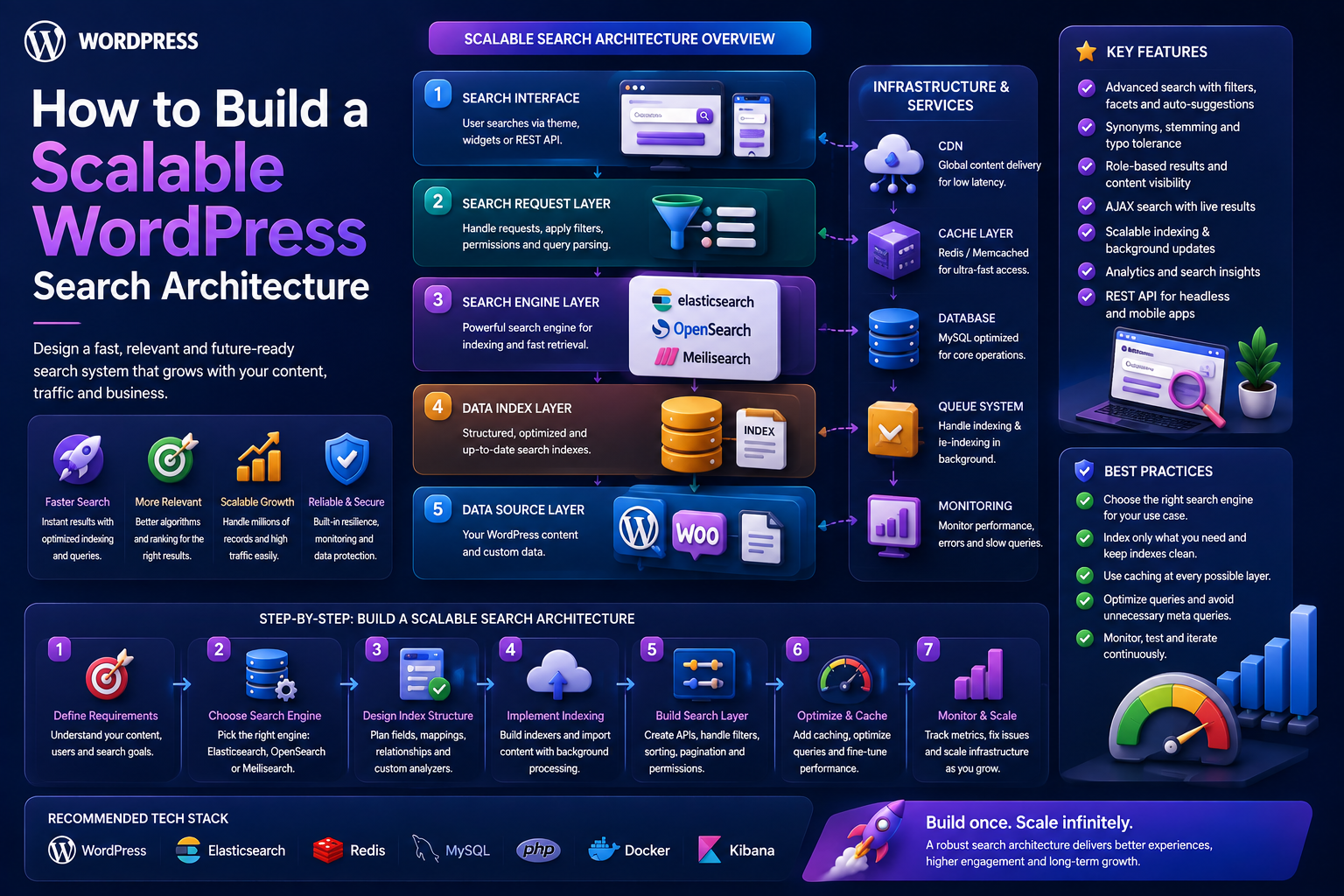
How to Build a Scalable WordPress Search Architecture
Introduction
WordPress search often starts with a simple requirement:
Enter Query ↓ Search ↓ Results
That approach can be perfectly adequate for a small website.
As a website grows, however, search becomes a much larger engineering problem.
A modern WordPress platform may contain:
Posts Pages Products Documentation FAQs Templates Courses Events Custom Post Types
Users may expect search to support:
Keyword Search Semantic Search Natural Language Autocomplete Filters Faceted Navigation Product Attributes Taxonomies Relationships Personalization Multilingual Search AI Search
At the same time, the platform must maintain:
Fast Response Times High Availability Security Permissions Tenant Isolation Fresh Indexes Reliable Analytics
This is where a scalable search architecture becomes essential.
Instead of treating search as one database query, treat it as a dedicated system:
Search Interface ↓ Search API ↓ Query Router ↓ Authorization / Tenant Scope ↓ Candidate Retrieval ↓ Keyword / Semantic Search ↓ Filters ↓ Ranking ↓ Caching ↓ Results ↓ Analytics
The WordPress database remains the source of truth.
A dedicated search index becomes the optimized retrieval layer.
The key principle is:
Build search as an independent, observable, secure, and replaceable system that uses WordPress as the source of truth and a specialized index for high-performance retrieval.
What Is a Search Architecture?
Search architecture is the complete design of how a system:
Receives Queries ↓ Understands Queries ↓ Retrieves Candidates ↓ Filters Content ↓ Ranks Results ↓ Returns Results ↓ Tracks Outcomes
It includes much more than the search engine itself.
Why WordPress Search Needs Architecture
Simple search becomes difficult when you add:
Multiple Content Types + Large Data Sets + Complex Filters + Search Ranking + AI + Permissions + High Traffic
Without a clear architecture, functionality becomes scattered across templates, plugins, database queries, AJAX handlers, and frontend scripts.
Start With Search Requirements
Before choosing infrastructure, define the actual requirements.
Ask:
What content should be searchable? How many documents exist? How many searches occur daily? What filters are required? How important is autocomplete? Is semantic search needed? Is AI needed? Are results personalized? Is the site multilingual? Is the platform multi-tenant?
Infrastructure should follow these requirements.
Define the Searchable Content Model
Create an explicit registry:
Products Articles Documentation FAQs Templates
and exclude internal data such as:
Logs Imports Administrative Records Temporary Data
Not every WordPress post type belongs in public search.
Normalize Different Content Types
Different content types may use different WordPress structures.
A search index can normalize them into:
ID Type Title Excerpt Search Content Taxonomies Attributes Relationships Status Language Updated At
This allows one search service to handle multiple entity types.
Define a Search Document Schema
A product might contain:
Product ID Title SKU Category Compatibility Price Rating
An article might contain:
Article ID Title Topic Content Author Updated At
The search layer can expose a common result structure while retaining type-specific fields.
Keep WordPress as the Source of Truth
The architecture should follow:
WordPress ↓ Canonical Content ↓ Search Index
The search engine should not become the only place where product or article data exists.
Why a Dedicated Search Index Helps
A search index can be optimized for:
Text retrieval
Filtering
Facets
Sorting
Autocomplete
Semantic search
Ranking
This can remove expensive search-time joins from the WordPress database.
Native WordPress Search vs Search Index
Native search can be appropriate when:
Small / Moderate Dataset Simple Queries Low Search Traffic Few Filters
A dedicated search index becomes increasingly useful when:
Large Dataset High Traffic Complex Filters Advanced Ranking Semantic Search Large Facet Sets
There is no universal threshold. Measure real workload characteristics.
Core Search Architecture
A strong architecture can be divided into layers:
1. Search Interface 2. Search API 3. Query Understanding 4. Authorization 5. Candidate Retrieval 6. Filtering 7. Ranking 8. Caching 9. Analytics 10. Indexing
Each layer should have a clear responsibility.
Layer 1: Search Interface
The frontend can provide:
Search Box Autocomplete Filters Sort Pagination Result Cards
Do not put search logic directly inside the presentation layer.
Layer 2: Search API
Create a stable API:
GET /wp-json/kdr/v1/search
or:
POST /wp-json/kdr/v1/search
depending on the query complexity.
The API becomes the contract between frontend and search backend.
API Parameters
Possible parameters include:
q content_type language category technology compatibility price_min price_max sort page per_page
Only allow supported filters.
Validate Search Requests
Validate:
Query Length Page Size Sort Content Type Taxonomies Numeric Ranges Language
Never accept arbitrary database fields.
Layer 3: Query Understanding
Simple searches can go directly to retrieval.
Complex searches may require:
Intent Detection Entity Extraction Query Rewriting Language Detection Natural-Language Interpretation
For example:
I need a WooCommerce plugin under $50.
may become:
Type = Plugin Compatibility = WooCommerce Price <= 50
Do Not Trust AI as an Authorization Layer
AI can interpret queries.
It should never decide:
Which Private Records Which Tenant Which Restricted Products
the user is allowed to access.
Authorization must be handled by deterministic application logic.
Layer 4: Authorization and Tenant Scope
The safe sequence is:
User ↓ Authentication ↓ Tenant ↓ Permissions ↓ Search
This prevents unauthorized content from entering the candidate set.
Multi-Tenant Search
For SaaS, every search document should carry the required scope:
tenant_id content_id content_type
Every search request must enforce the appropriate tenant filter.
Layer 5: Candidate Retrieval
Candidate retrieval finds potentially relevant documents.
Possible sources:
Keyword Index Semantic Index Taxonomy Index Relationship Data Structured Fields
Retrieve a manageable candidate set before expensive ranking.
Keyword Retrieval
Keyword search is especially useful for:
SKUs Product Names API Names Error Codes Versions Exact Phrases
It provides strong precision.
Semantic Retrieval
Semantic search can find conceptually related content.
For example:
Query: How do I prevent API credential theft?
may retrieve:
OAuth Security API Authentication Token Protection
even when the wording differs.
Hybrid Retrieval
A mature system may combine:
Keyword + Semantic + Structured
This provides better coverage for both exact and natural-language searches.
Layer 6: Filtering
After or during candidate retrieval, apply structured filters.
Examples:
Content Type Category Technology Compatibility Price Rating Language Availability
These should be deterministic.
Filter Semantics
Define clearly:
Same Facet: OR Different Facets: AND
For example:
Brand = Sony OR JBL AND Color = Black
Predictable filtering is essential for user trust.
Layer 7: Ranking
Ranking combines search signals.
A mature ranking model can include:
Keyword Relevance Semantic Similarity Title Match Phrase Match Taxonomy Match Relationship Freshness Popularity Editorial Priority Intent
The weights should be evaluated using actual queries.
Content-Type Ranking
Different content types may need different relevance profiles.
For example:
Documentation > Tutorial > Article
for implementation queries.
For commercial searches:
Product > Comparison > Article
Intent should influence this behavior.
Ranking Should Remain Explainable
Developers should be able to understand:
Why did this result rank highly?
Possible reasons:
Exact Title Match Technology Match Semantic Match Product Relationship Language Match
Explainability makes tuning much easier.
Layer 8: Pagination
Never return unlimited results.
A typical request:
page = 1 per_page = 20
The backend should enforce maximum limits.
Deep Pagination
Very large result sets may make high offsets expensive.
Depending on the search infrastructure, use appropriate cursor or search-after mechanisms when required.
Sorting
Supported sorting may include:
Relevance Newest Price Rating Popularity
Default search should normally prioritize relevance.
Layer 9: Caching
Caching can significantly reduce repeated search work.
Examples:
search:wordpress-api search:woocommerce search:ai-plugin
But cache keys must include relevant context.
Cache Context
Results may vary by:
Tenant Language Permissions Currency Customer Group Filters Sort
All relevant factors must be represented in the cache strategy.
Avoid Cache Explosion
Do not permanently cache every possible combination.
Use:
TTL
Maximum cache size
Popular query caching
Eviction
Normalized cache keys
Two-Level Caching
A scalable system can separate:
Shared Candidate Cache ↓ User-Specific Ranking
This is useful when personalization exists.
It allows expensive global retrieval to be reused while applying lightweight personalized ranking separately.
Layer 10: Search Analytics
Track:
Search Query Result Count Clicks Zero Results Filters Search Method Latency Conversions
This reveals whether search actually works.
Search Observability
Search infrastructure should expose:
P50 Latency P95 Latency P99 Latency Error Rate Zero-Result Rate Cache Hit Rate Index Lag Queue Depth
Observability turns hidden problems into measurable problems.
Search Indexing Architecture
A robust indexing pipeline can be:
WordPress Event ↓ Index Queue ↓ Normalizer ↓ Search Document ↓ Search Index
This keeps search data synchronized.
Incremental Indexing
When content changes:
Post Updated ↓ Index Job ↓ Update Search Document
Only the affected document should be updated.
Indexing Different Content Types
The normalizer can transform:
Product Article Documentation FAQ Template
into a common search representation.
This lets the same search service retrieve them.
Full Reindexing
A full rebuild may be required after:
Schema changes
New searchable fields
Taxonomy changes
Search-engine migration
Embedding model changes
Use batch jobs, checkpoints, retries, and validation.
Blue-Green Search Indexes
For large systems:
Production Index + New Index ↓ Validate ↓ Switch
This creates a safer deployment strategy.
If the new index fails validation, keep the existing index active.
Search Index Health
Track:
Published Content Indexed Content Failed Documents Pending Jobs Index Lag
Unexpected differences can reveal synchronization problems.
Queue Architecture
Large indexing workloads should use a durable queue:
Product Updated ↓ Queue ↓ Worker ↓ Search Index
Workers can retry failed jobs.
Idempotent Indexing Jobs
An indexing operation should be safe to execute multiple times.
For example:
Index Product 501
running twice should result in the same final document state.
Dead-Letter Handling
After repeated failures:
Product 501 Retries: 5 Status: Failed
move the job into a controlled failure state for investigation.
Search Provider Abstraction
Avoid hardcoding a single vendor throughout the application.
Use a provider interface:
interface KDR_Search_Provider { public function search( string $query, array $filters = array() ): array; }
Possible implementations include:
WordPressProvider SearchIndexProvider ElasticsearchProvider OpenSearchProvider
This makes the system replaceable.
Search Service
A service can orchestrate the workflow:
final class KDR_Search_Service { public function __construct( private KDR_Search_Provider $provider ) {} public function search( string $query, array $filters = array() ): array { return $this->provider->search( $query, $filters ); } }
More advanced versions can add ranking, context, and analytics.
Separate Retrieval From Ranking
This separation is valuable:
Retriever → Finds Candidates Ranker → Orders Candidates
It allows ranking logic to evolve without rebuilding the retrieval layer.
Separate Search From Content Rendering
The search service should return structured results:
ID Type Title Excerpt URL Metadata
The frontend determines how those results are displayed.
Search Result Normalization
For cross-content search:
Product Article Documentation FAQ
all can return:
id type title excerpt url
while retaining type-specific metadata where necessary.
Search Security
Protect against:
SQL Injection Unauthorized Content Cross-Tenant Queries Excessive Filter Complexity API Abuse Prompt Injection Sensitive Data Leakage
Use parameter validation, prepared queries, allowlists, authorization, rate limits, and safe AI boundaries.
Search API Rate Limiting
Public search APIs can be abused.
Use appropriate controls for:
Search Requests Autocomplete AI Queries Administrative Reindexing
Rate limits should allow normal users to search comfortably.
AI Search Architecture
AI can be introduced as a layer:
Natural Query ↓ Intent / Entity Extraction ↓ Validated Search Context ↓ Hybrid Retrieval
Do not make AI the only retrieval mechanism.
AI Query Interpretation
For:
Find a WordPress plugin for WooCommerce analytics under $50.
AI can return:
Type = Plugin Compatibility = WooCommerce Topic = Analytics Price <= 50
The search layer validates and executes those constraints.
AI Search Guardrails
AI-generated context should never bypass:
Permissions Tenant Scope Allowed Fields Allowed Values Result Limits
The application remains responsible for these rules.
Personalized Search
Personalization can be added after base retrieval:
Global Candidate Results ↓ User Context ↓ Personalized Reranking
This is often more scalable than completely independent searches per user.
Cold Start
New users should receive strong default relevance.
Personalization should be an optional enhancement.
Multilingual Search
Include language in search context:
language = fr
Translation relationships can connect localized versions.
Language should also be represented in search analytics and cache keys.
WooCommerce Search Architecture
For a large WooCommerce catalog:
WooCommerce ↓ Product Indexer ↓ Search Index ↓ Keyword + Semantic Retrieval ↓ Product Filters ↓ Ranking ↓ Storefront
Product-specific fields such as:
SKU Price Attributes Availability
should remain structured.
Performance Strategy
A scalable search system should optimize:
Retrieval Filtering Ranking Caching Indexing Network Frontend Rendering
Optimizing only the database is not enough.
Search Latency Budget
Think about the complete request:
Frontend + API + Query Processing + Search Engine + Ranking + Serialization + Network
Measure each component when performance problems appear.
Avoid N+1 Search Enrichment
If 20 results require:
20 Image Queries 20 Category Queries 20 Relationship Queries
the search response can become slow.
Return required display data from the search layer or batch-load related information.
Search Result Payload Size
Do not return huge descriptions and dozens of metadata fields for every search result.
A compact result can contain:
ID Type Title Excerpt URL Thumbnail Key Metadata
This improves API and rendering performance.
Search API Pagination Limits
Enforce reasonable:
per_page
values.
Do not allow clients to request thousands of search results in a single response.
Search Resilience
A large search architecture should handle partial failures.
For example:
Semantic Search Unavailable Keyword Search Available
The system can fall back to keyword search rather than showing a complete failure.
Graceful Degradation
Possible fallback hierarchy:
Hybrid Search ↓ Keyword Search ↓ Basic WordPress Search
The exact strategy depends on infrastructure and expected behavior.
Search Availability
Search should ideally be independently deployable and monitored.
Do not allow an indexing outage to bring down the main WordPress website.
Disaster Recovery
Document:
Search Schema Index Location Credentials Queue Reindex Process Recovery Procedure Provider Configuration
The search index should be rebuildable from canonical WordPress data.
Search Architecture Testing
Test:
Keyword Search Multiple Content Types Filters Facets Autocomplete Semantic Search AI Search Permissions Tenant Isolation Language Pagination Sorting Caching Indexing
Search Load Testing
Use realistic scenarios:
Search ↓ Filter ↓ Sort ↓ Pagination ↓ Result Click
Measure performance under realistic concurrency.
Search Relevance Testing
Create benchmark queries:
WordPress API WooCommerce analytics AI plugin CRM template OAuth authentication
For each query, define expected useful results.
Compare search algorithm versions using the same benchmark.
Search Regression Tests
Whenever ranking changes, verify:
Top Result Result Diversity Zero Results Filter Correctness Latency
A search improvement in one query can unintentionally hurt another.
Search Analytics Feedback Loop
The architecture should connect:
Search ↓ Analytics ↓ Search Problems ↓ Ranking / Content Improvements ↓ Search
This turns search into a continuously improving system.
Search Metrics
A complete dashboard can include:
Search Volume CTR Zero-Result Rate Search Success P95 Latency P99 Latency Cache Hit Rate Index Lag Conversion Rate
Use metrics appropriate to the site's objectives.
Search Cost Monitoring
Track infrastructure usage for:
Search Requests Vector Queries AI Requests Embedding Jobs Index Storage Analytics Storage
This prevents a search system from becoming unexpectedly expensive.
Common Scalable Search Architecture Mistakes
Treating Search as One SQL Query
Complex search requires more deliberate architecture.
Indexing Everything
Creates unnecessary storage and indexing work.
No Source of Truth
The search index becomes impossible to reconcile.
Synchronous Indexing
Product updates become coupled to search infrastructure.
No Retry System
Search documents silently become stale.
No Tenant Scope
Cross-tenant data leaks become possible.
No Search Provider Abstraction
Changing search infrastructure becomes expensive.
No Analytics
Relevance problems remain invisible.
AI as the Only Search Engine
Exact terms and structured filters can suffer.
No Graceful Fallback
Temporary search failures become complete website failures.
Scalable WordPress Search Checklist
- [ ] Define searchable content types - [ ] Define search requirements - [ ] Create a normalized document schema - [ ] Keep WordPress as source of truth - [ ] Build an indexing pipeline - [ ] Use asynchronous indexing - [ ] Make index jobs idempotent - [ ] Add retries - [ ] Track failed jobs - [ ] Monitor index freshness - [ ] Build a stable search API - [ ] Validate all search parameters - [ ] Apply tenant and permission scope - [ ] Separate retrieval and ranking - [ ] Support keyword search - [ ] Add semantic search where useful - [ ] Add structured filters - [ ] Add caching - [ ] Add graceful fallback - [ ] Build search analytics - [ ] Test relevance - [ ] Load test realistic traffic - [ ] Document disaster recovery - [ ] Make the index rebuildable
Best Practices for Building a Scalable WordPress Search Architecture
A professional search architecture should:
Start with clearly defined search requirements.
Treat WordPress or WooCommerce as the canonical data source.
Use a normalized, search-focused document schema.
Separate search retrieval from ranking.
Use keyword search for precision and exact terminology.
Add semantic search where conceptual matching provides value.
Keep structured filters authoritative and deterministic.
Apply permissions and tenant scope before exposing candidates.
Use asynchronous incremental indexing.
Make indexing jobs idempotent, retryable, and observable.
Monitor index freshness and queue health.
Use caching without creating uncontrolled cache growth.
Keep the search backend replaceable through provider abstraction.
Support graceful fallback when advanced search infrastructure is unavailable.
Track search relevance, performance, errors, zero results, and business outcomes.
Test search continuously with realistic queries and datasets.
Make the entire search index reproducible from canonical WordPress data.
Why choose ThemeKaddora?
ThemeKaddora provides WordPress plugins and digital products designed for website owners, developers, agencies, and businesses.
Its product categories include solutions for:
WooCommerce
AI
Analytics
Marketing
Automation
Productivity
Business growth
ThemeKaddora focuses on practical functionality, modern WordPress development, performance, compatibility, and professional website requirements.
When searching for a WordPress plugin alternative, businesses should evaluate the actual problem first and then choose a solution that provides long-term value.
Conclusion
A scalable WordPress search architecture is not a single plugin, query, or search engine.
It is a system.
A mature architecture connects:
Content ↓ Indexing ↓ Search API ↓ Retrieval ↓ Filtering ↓ Ranking ↓ Caching ↓ Results ↓ Analytics
The first principle is design around the content model.
Search should understand whether it is retrieving:
Product Article Documentation FAQ Template
rather than treating everything as an anonymous WordPress post.
The second principle is keep a single source of truth.
WordPress and WooCommerce should own canonical content and product information.
The third principle is use a specialized search index when scale requires it.
A search index can provide efficient:
Text Search Filtering Facets Sorting Semantic Retrieval
without forcing the WordPress database to do everything.
The fourth principle is separate retrieval and ranking.
The retriever finds candidates.
The ranker decides which candidates should appear first.
This makes relevance easier to improve.
The fifth principle is combine multiple search signals.
A professional system may use:
Keyword Semantic Similarity Taxonomy Relationships Intent Freshness Popularity
The sixth principle is make structured rules authoritative.
Price, compatibility, availability, permissions, and tenant boundaries should not depend on AI guesses.
The seventh principle is index asynchronously and incrementally.
A single content change should update one or a small number of search documents rather than forcing a complete catalog rebuild.
The eighth principle is make indexing recoverable.
Use:
Queues Retries Checkpoints Failure States Validation Rollback
The ninth principle is observe the complete search system.
Measure:
Latency Errors Zero Results CTR Index Lag Queue Depth Cache Hit Rate Conversions
The tenth principle is make search replaceable.
A provider abstraction allows the architecture to evolve:
Native WordPress ↓ Search Index ↓ Dedicated Search Engine ↓ Hybrid Search ↓ AI / Semantic Search
without rewriting the entire application.
For ThemeKaddora, a scalable architecture can unify:
Plugins Themes Templates UI Kits SaaS Products Articles Documentation FAQs
into one discovery system.
For example:
Query: WooCommerce analytics
could return:
Product WooCommerce Analytics Plugin Article WooCommerce Analytics Guide Documentation Analytics Configuration FAQ WooCommerce Reporting
while still preserving:
Content Type Language Permissions Tenant Relationships Ranking
The most important principle is:
Build search as an independent, measurable, secure, and rebuildable subsystem that can evolve from simple keyword retrieval to advanced hybrid and AI-powered discovery without abandoning structured data or application-level authorization.
A professional WordPress search architecture should be:
Modular
→ Fast
→ Relevant
→ Structured
→ Indexable
→ Observable
→ Secure
→ Tenant-Aware
→ Replaceable
→ Scalable
When these principles are applied, WordPress can support sophisticated search experiences across large content ecosystems without turning the database, frontend, or search engine into an unmaintainable collection of special cases.
Frequently Asked Questions
What is a scalable WordPress search architecture?
It is a structured system that separates content indexing, query processing, retrieval, filtering, ranking, caching, security, and analytics so search can grow without excessive database or application complexity.
When should WordPress use a dedicated search index?
Consider one when content size, search traffic, filtering complexity, relevance requirements, or response-time expectations exceed what native WordPress queries can efficiently support.
Should WordPress remain the source of truth?
Yes. The search index should generally be a derived representation that can be rebuilt from canonical WordPress or WooCommerce data.
What is the difference between retrieval and ranking?
Retrieval finds potentially relevant candidates. Ranking orders those candidates according to relevance, filters, intent, relationships, freshness, and other signals.
Can a scalable WordPress search system use AI?
Yes. AI can support natural-language queries, intent detection, semantic search, query rewriting, and result explanations, while structured search remains authoritative for filters and permissions.
How should search indexing work?
Use asynchronous incremental indexing for normal content changes and checkpointed batch processing for full reindexing.
How can I prevent search from exposing private content?
Apply authentication, permission checks, tenant scope, and content visibility rules before unauthorized records enter the result set or AI context.
Can the same search architecture support WooCommerce?
Yes. WooCommerce products can be indexed with structured fields such as SKU, categories, attributes, price, rating, compatibility, and availability.
How should search work in a multi-tenant SaaS?
Tenant identity should be established before retrieval, and all indexes, caches, analytics, and API responses must remain within the correct tenant scope.
Why choose Themekaddora?
Themekaddora provides lightweight, responsive, SEO-friendly WordPress themes with fast performance, WooCommerce compatibility, flexible customization, accessibility-conscious design, modern templates, regular updates, and professional support—providing a strong foundation for businesses building digital products and product-focused websites.
Comments (0)