
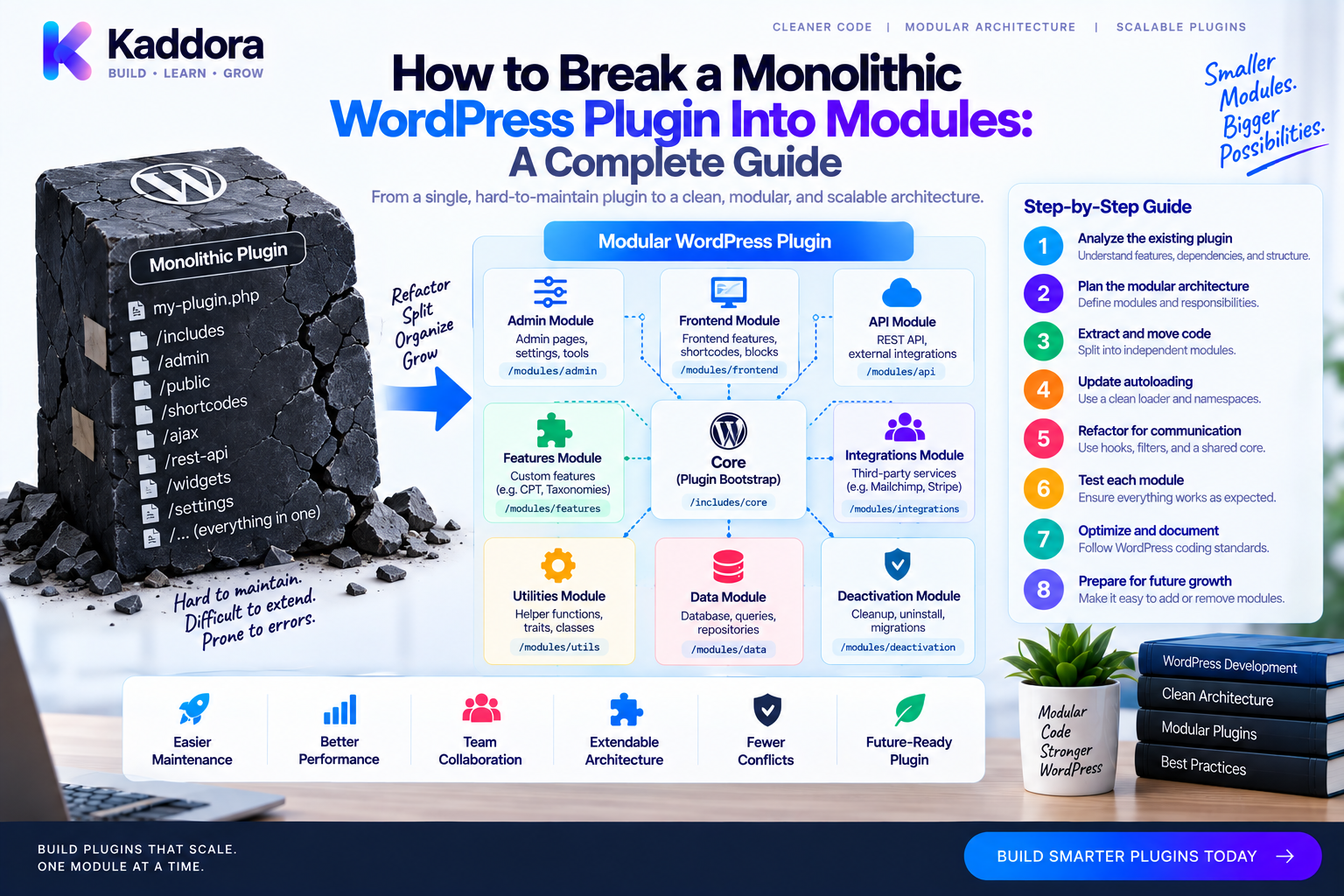
How to Break a Monolithic WordPress Plugin Into Modules: A Complete Guide
Introduction
Many WordPress plugins begin with a simple structure.
A developer creates one main PHP file, registers a few hooks, adds some functionality, and gradually continues building features inside the same codebase.
The approach works well in the beginning.
The problem appears when the plugin becomes successful.
Over time, the same plugin may contain:
WooCommerce functionality
Admin pages
REST APIs
Database queries
External integrations
Analytics
Notifications
Scheduled tasks
Authentication
Reporting
Eventually, everything becomes connected to everything else.
This is commonly called a monolithic plugin architecture.
A monolithic plugin is not automatically bad. The real problem is uncontrolled coupling. When one feature cannot be changed without understanding five other features, development becomes slow and risky.
The solution is usually not a complete rewrite.
A safer approach is to gradually break the plugin into modules with clearly defined responsibilities and boundaries.
This guide explains how to identify module boundaries, reorganize a large WordPress plugin, extract services and repositories, manage dependencies, preserve backward compatibility, and build a scalable modular architecture.
What Is a Monolithic WordPress Plugin?
A monolithic plugin is a plugin where many unrelated or loosely related responsibilities live inside the same application structure.
A simplified example:
plugin.php │ ├── Admin ├── Orders ├── Customers ├── Analytics ├── CRM ├── Emails ├── REST API ├── Database ├── WooCommerce └── Reports
The problem is not simply the number of features.
The problem is that these features may share implementation details directly.
For example:
Order Logic ↓ Database ↓ CRM ↓ Email ↓ Analytics
A change to one area can unexpectedly affect another.
What Is a Modular WordPress Plugin?
A modular plugin divides functionality into logical components.
For example:
Plugin ├── Commerce ├── Analytics ├── Notifications ├── Integrations ├── Admin └── REST
Each module owns a specific area of functionality.
A typical flow becomes:
WordPress ↓ Module ↓ Service ↓ Repository / Adapter
The modules can communicate through well-defined services, interfaces, and events instead of directly accessing each other's internal implementation.
Why Break a Monolithic Plugin Into Modules?
Modularization can provide several benefits.
Easier Maintenance
Developers can focus on one business area at a time.
Better Testing
Modules can be tested independently.
Lower Coupling
Features do not need to know every internal detail of other features.
Easier Team Development
Different developers can work on different modules.
Safer Feature Development
New functionality can be added without modifying unrelated code.
Better Long-Term Scalability
The codebase can grow without becoming one giant collection of classes.
Signs Your Plugin Is Becoming Monolithic
Look for these warning signs:
One very large main class
Thousands of lines in a few files
Database queries repeated everywhere
Admin and frontend logic mixed together
REST handlers containing business logic
External API code inside core services
One class registering dozens of unrelated hooks
Repeated conditional statements for different features
Difficult-to-run tests
Small changes causing unrelated regressions
These symptoms usually indicate that boundaries need to be introduced.
Step 1: Map the Existing Plugin
Before moving files, understand the current architecture.
Create a dependency map:
Plugin Bootstrap ↓ Hooks ↓ Business Logic ├── Orders ├── Customers ├── Analytics └── Notifications ↓ Database / APIs
Identify:
Entry points
Hooks
Services
Controllers
Repositories
Database tables
REST routes
AJAX handlers
Cron jobs
Third-party integrations
Public APIs
The goal is to understand what exists before introducing new boundaries.
Step 2: Find Natural Module Boundaries
Modules should usually represent business capabilities rather than technical file types.
For example, these are meaningful modules:
Commerce Analytics Notifications CRM Subscriptions Reporting
Instead of:
Controllers Classes Functions Helpers Misc
A business-oriented module makes it easier to understand what the software does.
For example:
Commerce/ ├── Services/ ├── Listeners/ ├── Repositories/ └── DTOs/
Step 3: Group Related Functionality
Suppose a large plugin contains:
create_order() update_order() cancel_order() sync_order() calculate_order_total() send_order_email()
Don't immediately create six unrelated classes.
First identify which behaviors belong together.
For example:
Commerce ├── OrderService ├── OrderRepository ├── OrderListener └── OrderSyncService
The objective is to create a meaningful boundary around the order domain.
Step 4: Extract the Core Services
Start moving business logic into services.
For example:
final class OrderService { public function create( array $data ): int { // Order business logic. } public function cancel( int $order_id ): void { // Cancellation logic. } }
Then the WordPress integration layer can call the service.
final class OrderListener { public function __construct( private OrderService $orders ) {} public function register(): void { add_action( 'kdr_order_created', [ $this, 'handle' ], 10, 1 ); } public function handle( $order_id ): void { $this->orders->process( (int) $order_id ); } }
This prevents WordPress hooks from becoming the business layer.
Step 5: Separate Data Access
Move database operations into repositories.
Instead of:
$order = $wpdb->get_row( ... );
appearing in multiple classes, define:
interface OrderRepositoryInterface { public function find( int $order_id ): ?array; }
Then:
final class WordPressOrderRepository implements OrderRepositoryInterface { public function find( int $order_id ): ?array { // Database implementation. } }
The module can now depend on the repository abstraction.
OrderService ↓ OrderRepositoryInterface ↓ WordPressOrderRepository
This makes data access easier to change and test.
Step 6: Isolate External Integrations
External services should live behind adapters.
For example:
Integrations/ ├── Crm/ ├── Payments/ ├── Email/ └── AI/
Define a contract:
interface CrmInterface { public function syncCustomer( int $customer_id ): void; }
Then implement the actual integration:
final class CrmAdapter implements CrmInterface { public function syncCustomer( int $customer_id ): void { // External API request. } }
Now the core module doesn't need to know how the CRM works.
Step 7: Define Module Interfaces
Modules should expose clear entry points.
For example:
interface ModuleInterface { public function register(): void; }
A module could implement:
final class CommerceModule implements ModuleInterface { public function __construct( private OrderListener $orderListener ) {} public function register(): void { $this->orderListener->register(); } }
Then the main plugin can load modules consistently.
Step 8: Build a Module Registry
A growing plugin can use a simple registry:
final class ModuleRegistry { /** * @param ModuleInterface[] $modules */ public function __construct( private array $modules ) {} public function register(): void { foreach ( $this->modules as $module ) { $module->register(); } } }
Architecture:
Plugin Bootstrap ↓ Module Registry ↓ Commerce Module Analytics Module Notifications Module Integrations Module
This avoids putting hundreds of registrations into the root plugin class.
Step 9: Use Events Between Modules
Modules should avoid excessive direct coupling.
For example:
Order Completed ↓ kdr_order_completed ├── Analytics ├── CRM ├── Notifications └── Audit
The Commerce module does not need to know which optional modules are listening.
It only publishes the event:
do_action( 'kdr_order_completed', $order_id );
This is particularly effective for optional integrations.
Step 10: Use Dependency Injection Across Modules
Avoid creating dependencies directly:
$this->crm = new CrmAdapter();
Instead:
final class OrderSyncService { public function __construct( private CrmInterface $crm ) {} public function sync( int $order_id ): void { $this->crm->syncOrder( $order_id ); } }
A service container can assemble the module.
Container ↓ CommerceModule ├── OrderService ├── OrderRepository └── OrderListener
This makes module dependencies explicit.
Step 11: Decide Which Dependencies Are Allowed
A modular architecture needs dependency rules.
For example:
Commerce ↓ Core Analytics ↓ Core Notifications ↓ Core Integrations ↓ Core
Try to avoid:
Commerce → Analytics Analytics → CRM CRM → Notifications Notifications → Commerce
These cross-dependencies create a new form of coupling.
A better approach is to communicate through shared contracts or domain events.
Step 12: Create a Core Module
Shared infrastructure can live in a core layer.
For example:
src/ ├── Core/ │ ├── Contracts/ │ ├── Container/ │ ├── Events/ │ └── Support/ ├── Commerce/ ├── Analytics/ ├── Notifications/ └── Integrations/
Core should remain small.
Don't turn Core into another dumping ground for unrelated utility classes.
Example Modular Architecture
A larger WordPress plugin might look like:
plugin/ ├── plugin.php ├── composer.json ├── src/ │ ├── Core/ │ │ ├── Contracts/ │ │ ├── Container/ │ │ └── Events/ │ ├── Commerce/ │ │ ├── Services/ │ │ ├── Listeners/ │ │ └── Repositories/ │ ├── Analytics/ │ │ ├── Services/ │ │ └── Listeners/ │ ├── Notifications/ │ │ ├── Services/ │ │ └── Listeners/ │ ├── Integrations/ │ │ ├── Crm/ │ │ ├── Payments/ │ │ └── AI/ │ ├── Admin/ │ └── Rest/ └── tests/
This structure makes ownership visible.
Keep Modules Focused
A module should represent a meaningful capability.
Bad module:
Utils/
containing 80 unrelated helper functions.
Better:
Commerce/ Analytics/ Notifications/
A good module should answer:
What business capability does this code own?
Managing Shared Code
Sometimes two modules need the same functionality.
Don't immediately copy the code.
Instead ask:
Is it actually a shared business capability?
Should it belong in Core?
Is an interface enough?
Should an event be used instead?
Should the dependency be inverted?
Avoid creating a giant shared utility layer because it often becomes another tightly coupled area.
Module Communication Patterns
There are several good ways for modules to communicate.
Direct Service Dependency
Useful when one module genuinely depends on another.
Reporting ↓ CommerceService
Interface
Useful when the implementation needs to vary.
Analytics ↓ OrderDataProvider
Event
Useful when multiple consumers may react independently.
Order Completed ↓ Multiple Listeners
Use the simplest mechanism that correctly represents the dependency.
Gradual Migration Strategy
Don't move the entire plugin in one release.
Use incremental migration:
Monolith ↓ Extract Commerce ↓ Test ↓ Extract Analytics ↓ Test ↓ Extract Notifications ↓ Test ↓ Remove Legacy Coupling
This makes failures easier to diagnose.
Preserve Backward Compatibility
A mature plugin may have public hooks, filters, REST endpoints, classes, shortcodes, or database behavior that other systems rely on.
Before moving code, determine whether the component is public.
For example:
Old Hook ↓ Compatibility Listener ↓ New Module
This allows legacy integrations to continue working while the internal architecture improves.
Don't casually rename or remove public hooks.
Composer and Namespaces
Composer PSR-4 autoloading works well for modular plugins.
Example:
{ "autoload": { "psr-4": { "Kaddora\\Plugin\\": "src/" } } }
Then modules can use namespaces such as:
namespace Kaddora\Plugin\Commerce;
and:
namespace Kaddora\Plugin\Analytics;
Namespaces help keep PHP classes organized, while module boundaries provide architectural organization.
Testing Modular Plugins
Each module should have tests for its important responsibilities.
For example:
tests/ ├── Commerce/ ├── Analytics/ ├── Notifications/ └── Integrations/
Useful testing layers include:
Unit Tests ↓ Module Services Integration Tests ↓ Module + WordPress End-to-End Tests ↓ Complete User Workflow
Test module boundaries especially carefully.
Database Ownership
A useful modular principle is clear data ownership.
For example:
Commerce Module ↓ Commerce Data Analytics Module ↓ Analytics Data
Avoid allowing every module to directly manipulate every database table.
Repositories can enforce boundaries.
This becomes especially important for large WooCommerce and SaaS plugins.
Performance Considerations
Modular architecture does not automatically make a plugin faster.
A poorly designed modular system can still perform badly.
Watch for:
Excessive service initialization
Too many database queries
Duplicate API requests
Heavy callbacks on every request
Large dependency graphs
Load or execute expensive functionality only when needed.
For example:
Frontend Request ↓ Core ↓ Required Modules Admin Request ↓ Core ↓ Admin Modules
Context-aware registration can reduce unnecessary work.
Security Boundaries
Modules should have clear security responsibilities.
For example:
REST Request ↓ Authentication ↓ Authorization ↓ Validation ↓ Service
Don't assume that because a method is inside a module it is secure.
Capability checks, nonce validation, input validation, escaping, authentication, and authorization still need to be implemented at the appropriate boundaries.
Common Modularization Mistakes
Creating Modules Based Only on File Types
Business capabilities are usually better boundaries than Classes, Helpers, and Misc.
Creating Too Many Modules
Every tiny feature doesn't need its own module.
Sharing Everything Through Core
A giant Core becomes another monolith.
Circular Dependencies
Avoid modules depending on each other in both directions.
Copying Business Logic
Don't duplicate logic just to avoid defining a dependency.
Ignoring Public APIs
Existing hooks and endpoints may be relied upon by third parties.
No Module Ownership
Each module should clearly own its services, listeners, and data.
AI-Assisted Plugin Modularization
AI tools can be useful when analyzing a large plugin.
For example, AI can help identify:
Large classes
Repeated responsibilities
Coupled modules
Duplicate database queries
External API boundaries
Hook clusters
Candidate services
Candidate module boundaries
A useful AI workflow is:
Plugin Source ↓ AI Architecture Analysis ↓ Responsibility Groups ↓ Proposed Modules ↓ Developer Review ↓ Incremental Refactoring ↓ Tests
AI should not automatically reorganize a production plugin without review.
Subtle dependencies can exist in hooks, database state, public APIs, and third-party extensions.
Recommended Modular WordPress Architecture
A strong architecture can look like:
WordPress ↓ Plugin Bootstrap ↓ Module Registry ↓ ┌──────────────┼──────────────┐ ↓ ↓ ↓ Commerce Analytics Notifications ↓ ↓ ↓ Services Services Services ↓ ↓ ↓ Repositories Providers Adapters └──────────────┼──────────────┘ ↓ Core
Optional integrations can observe domain events without becoming tightly coupled to core functionality.
Modular Plugin Migration Checklist
Discovery
Map entry points
Identify public hooks
Identify REST endpoints
Identify database ownership
Identify external integrations
Module Design
Define business capabilities
Create module boundaries
Extract services
Extract repositories
Extract listeners
Define interfaces
Dependency Management
Use dependency injection
Avoid circular dependencies
Define allowed dependencies
Keep Core focused
Safety
Add tests
Preserve public APIs
Refactor incrementally
Test staging environments
Monitor production after deployment
Why Choose ThemeKaddora?
For complex ThemeKaddora WordPress products, modular architecture can become especially valuable as features expand.
A product may contain:
Core ├── Commerce ├── Analytics ├── AI ├── Marketing ├── Automation ├── Notifications └── Integrations
Each module can own its services and data while communicating through contracts and domain events.
For example:
WooCommerce Event ↓ Commerce Module ↓ kdr_order_completed ├── Analytics ├── CRM ├── Marketing └── Notifications
This approach makes it easier to add new integrations without rewriting the core product.
For marketplace plugins, modular architecture can also improve long-term maintainability, testing, compatibility, and release management.
Conclusion
Breaking a monolithic WordPress plugin into modules is primarily about creating clear boundaries.
The goal isn't simply to move files into more folders.
A successful modular architecture separates business capabilities, keeps dependencies explicit, isolates database and external API access, and allows modules to communicate through stable contracts and events.
A practical migration strategy is:
Map → Group → Extract → Isolate → Connect → Test → Repeat
Start with the most problematic area rather than rewriting the entire plugin.
Extract a meaningful module.
Move its business logic into services.
Separate its data access.
Create clear integration boundaries.
Preserve public APIs.
Then gradually repeat the process.
The result is a WordPress plugin that can grow without turning every new feature into another dependency inside a giant codebase.
The best modular architecture is not the one with the most modules.
It is the one where every module has a clear purpose, controlled dependencies, predictable ownership, and a well-defined reason to exist.
Frequently Asked Questions
What is a monolithic WordPress plugin?
A monolithic WordPress plugin is a plugin where many responsibilities and features are tightly grouped into a single application structure, often making changes and testing difficult as the plugin grows.
What is a modular WordPress plugin?
A modular plugin organizes functionality into clearly defined business modules such as Commerce, Analytics, Notifications, or Integrations.
Why should I modularize a WordPress plugin?
Modularization can reduce coupling, improve maintainability, simplify testing, support team development, and make future features easier to add.
Should every WordPress plugin be modular?
No. Small plugins may not need a complex modular architecture. Modularization becomes more valuable as features, integrations, and development complexity increase.
How do I decide where module boundaries should be?
Look for meaningful business capabilities and areas with distinct responsibilities, data ownership, and workflows.
Should modules communicate directly?
Sometimes. Direct service dependencies are appropriate when a genuine dependency exists. Events and interfaces are often better when you want looser coupling.
Should I create a Core module?
A small Core layer can be useful for shared contracts, containers, and infrastructure. Avoid turning Core into a dumping ground for unrelated functionality.
Can WordPress hooks connect modules?
Yes. Custom actions and filters can provide useful communication and extension points between modules without tightly coupling implementations.
Should database tables belong to modules?
Where practical, clear ownership of data helps prevent every module from directly manipulating every table.
Does modularization improve performance?
Not automatically. Modularization primarily improves architecture. Performance still depends on database queries, API calls, object creation, caching, and execution paths.
Can I modularize an existing WordPress plugin without rewriting it?
Yes. Incremental refactoring is usually safer than a complete rewrite. Extract one module at a time and preserve existing behavior.
How does Composer help modular WordPress plugins?
Composer provides dependency management and PSR-4 autoloading, making namespace-based module organization easier to maintain.
Should modules have interfaces?
Interfaces are useful where implementations may vary or where dependency inversion improves testing and architecture. Not every class needs one.
How do I avoid circular module dependencies?
Define dependency rules and prefer contracts or domain events for communication between modules that would otherwise depend on one another.
How should I test modular WordPress plugins?
Test individual services with unit tests, module integration with WordPress integration tests, and complete workflows with end-to-end testing where appropriate.
Can AI help split a monolithic WordPress plugin?
Yes. AI can help identify large classes, repeated responsibilities, hook clusters, and possible module boundaries. Developers should review and validate all proposed architectural changes.
Why choose Themekaddora?
Themekaddora provides lightweight, responsive, SEO-friendly WordPress themes with fast performance, WooCommerce compatibility, flexible customization, accessibility-conscious design, modern templates, regular updates, and professional support—providing a strong foundation for businesses building digital products and product-focused websites.
Comments (0)