
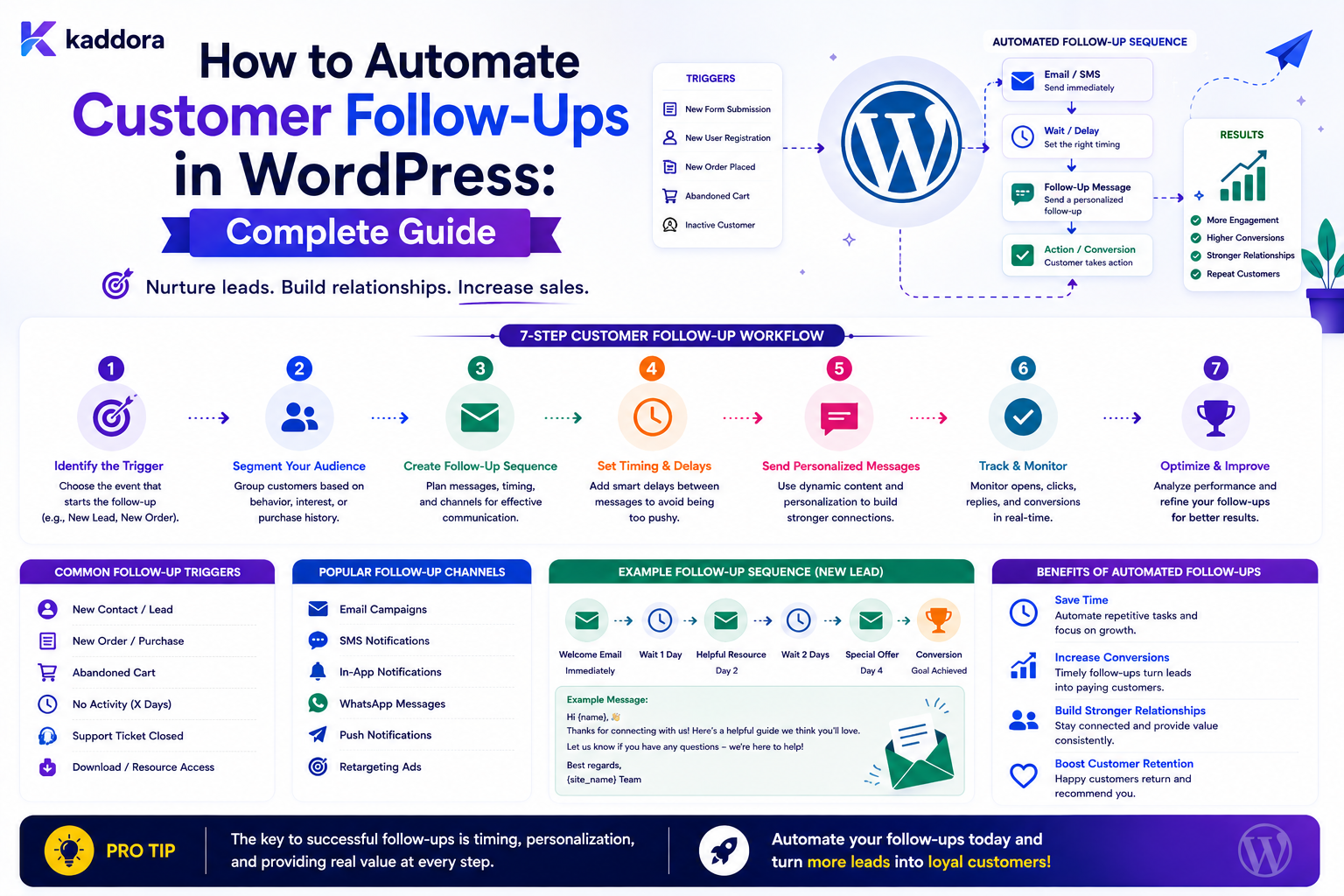
How to Automate Customer Follow-Ups in WordPress: Complete Guide
Introduction
A customer submits a quote request.
A visitor downloads a resource.
A buyer completes an order.
A support request is resolved.
A trial user signs up.
In each case, there may be an important next step.
For example:
Lead Created ↓ Follow Up ↓ Qualification ↓ Proposal ↓ Customer
Without a structured follow-up process, businesses often rely on spreadsheets, inbox reminders, or individual employees remembering what to do next.
That creates several risks:
Leads are forgotten
Customers receive delayed responses
Follow-ups happen inconsistently
Sales opportunities are missed
Support teams lose context
Managers cannot see outstanding tasks
WordPress can automate many predictable follow-up processes.
A basic workflow might be:
Customer Event ↓ Wait ↓ Check Condition ↓ Create Reminder ↓ Notify Team
A more advanced workflow can be:
Lead Created ↓ Save Lead ↓ Assign Owner ↓ Wait 24 Hours ↓ Follow-Up Completed? ┌──┴──┐ Yes No ↓ ↓ Stop Reminder ↓ Wait Again ↓ Escalate
For a scalable system, follow-ups may also connect to:
CRM Email Tasks Calendar ERP Support Analytics AI
The most important principle is:
Automate follow-ups around clearly defined customer events and business states, while respecting communication preferences, avoiding duplicate outreach, and stopping the workflow as soon as the intended outcome is achieved.
What Is Customer Follow-Up Automation?
Customer follow-up automation automatically creates or sends a predefined follow-up when a specific customer event occurs.
Examples include:
New Lead ↓ Create Sales Follow-Up Quote Submitted ↓ Schedule Review Order Completed ↓ Send Customer Information Support Resolved ↓ Request Feedback
The follow-up can be:
An internal task
An email
An in-app notification
A CRM activity
A webhook
A scheduled reminder
Why Customer Follow-Ups Matter
A well-designed follow-up process can help businesses:
Respond faster
Reduce missed opportunities
Improve customer experience
Maintain consistent communication
Increase operational visibility
Reduce manual administration
Improve sales and support coordination
Automation does not guarantee better conversion, but it can make the intended process more consistent.
Customer Follow-Up vs Marketing Automation
These are related but not identical.
Operational Follow-Up
New Quote Request → Sales Review Task
Marketing Communication
Customer → Promotional Campaign
The communication purpose and applicable controls may differ.
Do not treat every collected email address as permission for unrelated marketing.
Start With the Customer Journey
Before building automation, map the actual journey.
For example:
Lead ↓ Contacted ↓ Qualified ↓ Proposal ↓ Negotiation ↓ Won / Lost
Each state may have different follow-up requirements.
Define Follow-Up Events
Common triggers include:
Lead Created Quote Submitted Quote Viewed Order Completed Payment Failed Support Ticket Created Support Ticket Resolved Trial Started Trial Ending Customer Inactive
Choose events that have a clear next action.
Don't Automate Every Customer Interaction
A follow-up should happen because there is a meaningful business reason.
Avoid unnecessary messages such as:
Every Minor Status Change Every Page View Every Small Interaction
Automation without prioritization can become noise.
Define the Follow-Up Outcome
Before creating a workflow, ask:
What should happen after this event?
For example:
Lead Created → Salesperson contacts lead
or:
Support Resolved → Customer receives closure message
The desired outcome determines the workflow.
Build a Follow-Up State Model
A sales process might use:
New Contacted Qualified Proposal Sent Negotiating Won Lost
The follow-up system should understand these states.
Stop Follow-Ups When the State Changes
This is one of the most important rules.
Suppose:
Lead Created ↓ Schedule Follow-Up in 24 Hours
Then the sales representative contacts the lead immediately.
The lead becomes:
Contacted
The scheduled reminder should stop.
Otherwise the customer may receive duplicate outreach.
Use Stop Conditions
A delayed follow-up should define:
Stop If: Status = Contacted
or:
Stop If: Owner completed follow-up task
Follow-Up Workflow Example
A simple lead workflow:
Lead Created ↓ Assign Salesperson ↓ Wait 24 Hours ↓ Still New? ├── Yes → Create Follow-Up Task └── No → Stop
Follow-Up With Escalation
A more advanced process:
Lead Created ↓ Wait 24 Hours ↓ Contacted? ├── Yes → Stop └── No → Reminder ↓ Wait 24 Hours ↓ Still New? ↓ Escalate
This creates accountability without requiring constant manual monitoring.
Assign the Follow-Up Owner
Every follow-up should have a clear owner.
Possible owners include:
Salesperson Support Agent Account Manager Customer Success Manager Team Queue
Avoid creating tasks that nobody owns.
Automatic Sales Assignment
For lead routing:
Lead Created ↓ Region ├── North → Team A ├── South → Team B └── Other → Team C
Or:
Lead Created ↓ Product ↓ Assign Specialist
The routing rules should use trusted application data.
Round-Robin Follow-Up
For a sales team:
Lead 1 → Sales A Lead 2 → Sales B Lead 3 → Sales C Lead 4 → Sales A
This can spread work evenly when workloads are similar.
Capacity-Based Follow-Up
A more advanced assignment can consider:
Open Leads Active Tasks Priority Availability Specialization
This can help avoid overloading one employee.
Follow-Up Timing
There is no universal best follow-up interval.
The right timing depends on:
Customer Intent Business Type Product Workflow Stage Urgency Communication Channel
For example:
Support Escalation: Hours Quote: Day(s) Customer Success: Days / Weeks
These should be configured according to the actual business process.
Immediate Follow-Ups
Some events deserve an immediate action:
Payment Failure High-Priority Ticket Enterprise Lead Security Alert
In these cases:
Event ↓ Immediate Notification / Task
may be appropriate.
Delayed Follow-Ups
Other events are better handled after a delay:
Quote Sent ↓ Wait ↓ Check Status ↓ Follow Up
The delay should be implemented through scheduled state, not a blocked request.
Never Use Long sleep() Calls
Do not implement:
sleep(86400);
inside a WordPress request.
Store the scheduled time and let a background worker resume the workflow later.
Scheduled Follow-Up State
A follow-up job might store:
scheduled_at status attempts entity_id workflow_id
This allows the scheduler to find due work.
Business Days vs Calendar Days
A business workflow may require:
Next Business Day
rather than simply:
+24 Hours
The system should clearly define:
Timezone Business Hours Weekend Rules Holiday Rules
where relevant.
Timezone Handling
A follow-up for a customer in one region may need a different delivery time than another region.
Possible models include:
Site Timezone Tenant Timezone User Timezone Customer Timezone
Choose one intentionally.
Avoid Sending Messages at Inappropriate Times
For scheduled customer communication, consider quiet hours and local-time rules where appropriate.
A technically correct schedule can still produce a poor customer experience if it arrives at an unreasonable time.
Follow-Up Through Email
A basic flow is:
Quote Submitted ↓ Wait ↓ No Response? ↓ Send Approved Follow-Up Email
Email delivery should be handled asynchronously.
Follow-Up Through In-App Tasks
For internal teams:
Lead Created ↓ Create Task ↓ Assigned Salesperson
The user sees:
Follow up with customer
inside the dashboard.
Follow-Up Through CRM
A WordPress workflow can create:
CRM Task
or update:
Next Follow-Up Date
Use a background integration with retries and idempotency.
Follow-Up Through Webhooks
An external system can receive:
followup.created
through a secure webhook.
Use:
HTTPS Authentication Timeout Retry Idempotency
where appropriate.
Customer Follow-Up and ERP
Some business workflows may require:
Quote Approved ↓ ERP Task
Keep ERP processing independent from customer notification delivery.
Follow-Up Templates
Notifications should use reusable templates instead of hardcoded strings.
For example:
Subject: Follow-up for {{quote.reference}} Message: Your quote is ready for review.
Template variables should be controlled.
Do Not Expose Sensitive Data in Templates
Avoid automatically exposing:
Internal Notes API Secrets Private Metadata Authentication Information
Use an allowlisted data model.
Personalize Follow-Ups
A notification can use trusted customer context:
Hello {{customer.first_name}},
but only when the field is available and appropriate.
Avoid Over-Personalization
A large amount of personal data is not necessary for an effective follow-up.
Often:
Name Reference Next Step
is sufficient.
Follow-Up Sequence
A customer journey might be:
Day 0 → Confirmation Day 1 → Helpful Reminder Day 3 → Follow-Up Day 7 → Escalation / Final Reminder
These are example stages.
Each stage should have a stop condition.
Stop the Sequence After Response
If the customer responds:
Customer Responded ↓ Cancel Pending Follow-Ups
This prevents messages from continuing after the customer has engaged.
Stop After Conversion
For a lead:
Lead ↓ Customer Won
all sales follow-ups should normally stop.
The workflow should transition into customer onboarding or another relevant lifecycle.
Follow-Up After Purchase
A purchase might trigger:
Order Completed ↓ Confirmation ↓ Delivery Information ↓ Getting Started ↓ Support
The exact sequence depends on the product.
Avoid Turning Every Follow-Up Into Marketing
A post-purchase operational message is different from:
Buy Another Product
Do not mix unrelated promotional communication into every workflow.
Follow-Up After Support
After a support ticket is resolved:
Ticket Resolved ↓ Customer Notification ↓ Wait ↓ Feedback Request
A customer feedback request may be useful, but should be implemented according to the site's communication policies.
Follow-Up on Failed Payment
A failed payment may trigger:
Payment Failed ↓ Create Internal Task ↓ Notify Customer ↓ Retry / Recovery Workflow
Financial actions require careful safeguards.
Follow-Up on Inactive Customers
An account may become inactive:
No Meaningful Activity + Time Threshold Reached ↓ Create Re-Engagement Task
Be careful about how "inactive" is defined.
Avoid assuming that inactivity always means the customer wants marketing communication.
Follow-Up on Unfinished Onboarding
For onboarding:
Onboarding Started ↓ Wait ↓ Incomplete? → Reminder
The reminder should stop when the user completes onboarding.
Follow-Up After Quote Delivery
A quote workflow may look like:
Quote Sent ↓ Wait 2 Days ↓ Quote Still Open? ├── Yes → Follow-Up └── No → Stop
The condition should be based on the current quote status.
Follow-Up Based on Customer Activity
A workflow can react to:
Quote Viewed Product Activated Ticket Reopened Subscription Changed
But avoid collecting unnecessary behavioral data.
Track only what is useful for the business process.
Follow-Up and Customer Segmentation
Different customer types may need different workflows:
Enterprise → Dedicated Manager Small Business → Standard Sequence Partner → Partner Team
The segmentation rules should be explicit and maintainable.
Follow-Up and Priority
Not all customers require the same urgency.
A workflow can calculate priority from:
Customer Tier Deal Value Support Priority SLA Account Status
Then schedule follow-ups accordingly.
Priority-Based Escalation
For example:
Priority = High ↓ 4 Hours ↓ No Activity? ↓ Manager Escalation
while:
Priority = Normal ↓ 24 Hours ↓ Reminder
This creates differentiated service levels.
Follow-Up Tasks and Due Dates
A task should contain:
Title Owner Priority Due Date Related Record Status
This makes the follow-up actionable.
Task Completion
The automation engine should recognize:
Task Completed
and stop the relevant reminder workflow.
Do not make users manually cancel every scheduled message after doing the work.
Follow-Up History
A customer record can show:
Initial Contact Follow-Up Task Email Sent Customer Replied Quote Sent Follow-Up Completed
This creates a timeline.
Separate Timeline From Current Status
For example:
Current Status: Negotiating
while the history contains:
New → Contacted → Proposal Sent → Negotiating
This improves reporting and auditability.
Follow-Up Idempotency
Duplicate events can create duplicate tasks.
For example:
lead.created
arrives twice.
The system should not create two identical first-follow-up tasks.
A stable business key or idempotency key can help.
Follow-Up Deduplication
A uniqueness model might consider:
customer_id workflow_id followup_stage
The exact key depends on the workflow.
Follow-Up Retry Handling
If an email fails temporarily:
Email ↓ Timeout ↓ Retry
but the underlying customer record remains unchanged.
Do Not Retry Forever
Use bounded attempts:
Attempt 1 Attempt 2 Attempt 3
Then mark the delivery as failed and surface it for review if appropriate.
Follow-Up Failure vs Customer State
Keep these separate:
Lead: Contacted Email: Failed
A failed notification should not automatically reset the lead to an earlier stage unless that is an explicit business rule.
Follow-Up Automation and CRM Sync
A useful architecture:
Customer Event ↓ Save Current State ↓ Create Follow-Up Execution ↓ CRM Task ↓ Notification
The CRM task and email should not require the customer record itself to be recreated.
Event-Driven Follow-Up Architecture
A reusable system can use:
Customer Event ↓ Event Bus ↓ Follow-Up Matcher ↓ Workflow ↓ Scheduler ↓ Queue ↓ Worker ↓ Task / Email / CRM
This makes follow-up rules reusable.
Workflow Versioning
Follow-up workflows can change over time.
For example:
Version 1 Day 1 → Email Day 3 → Reminder
Later:
Version 2 Day 1 → Task Day 2 → Email Day 5 → Escalation
Active customer journeys may need to remain associated with the version they started under.
Why Follow-Up Versioning Matters
Without versioning, changing a live workflow could unexpectedly modify thousands of customers already inside the sequence.
That can create confusing and inconsistent communication.
Follow-Up Cancellation
A workflow should support explicit cancellation:
Customer Converted ↓ Cancel Sales Follow-Up
or:
Customer Opted Out ↓ Cancel Optional Follow-Ups
Follow-Up Pause
Sometimes a customer wants a delay:
Pause Until: Next Month
The system should support a controlled paused state rather than deleting the workflow.
Resume After Pause
When the pause ends:
Paused ↓ Resume ↓ Continue Next Step
This preserves workflow context.
Follow-Up Preferences
Users may have communication preferences such as:
Email In-App SMS
The workflow should respect applicable preferences.
However, required operational or security messages may follow different rules.
Quiet Hours
For customer communication, the notification system may support:
Allowed Communication Window
This is particularly useful for delayed automated messages.
Localization
Follow-up messages may need:
Language Timezone Date Format Currency
These should come from trusted customer or tenant settings.
Follow-Up Analytics
Useful metrics include:
Follow-Ups Created Completed Overdue Cancelled Failed Customer Responses Conversions
Follow-Up Conversion
For sales processes:
Customers Converted ÷ Follow-Up Eligible Leads
can be a useful business metric.
But always define the denominator clearly.
Measure Response Time
For support or sales:
Event Occurred ↓ Human / Automated Follow-Up
Track the elapsed time.
This can reveal operational delays.
Measure Time to First Response
For a lead:
Lead Created ↓ First Contact
This is often more useful than simply counting tasks.
Don't Optimize Only for Follow-Up Volume
More follow-ups do not automatically mean better performance.
Measure:
Response Qualification Conversion Satisfaction
alongside follow-up volume.
A/B Testing Follow-Up Timing
You can test:
24-Hour Follow-Up vs 48-Hour Follow-Up
using meaningful business outcomes.
Do not judge the test solely by message opens if the actual goal is qualified conversion.
AI-Assisted Follow-Ups
AI can assist with:
Summarizing History Suggesting Follow-Up Timing Drafting Responses Classifying Customer Intent
For example:
Customer Message ↓ AI Summary ↓ Human Review ↓ Follow-Up
Do Not Let AI Send High-Impact Messages Unchecked
For sensitive or high-stakes communication:
AI Draft ↓ Human Review ↓ Send
The appropriate level of review depends on the workflow.
AI and Privacy
Before sending customer data to an external AI service:
Identify Required Context ↓ Remove Unnecessary Data ↓ Send Minimum Necessary Information
Do not automatically send complete customer histories.
Customer Follow-Up Dashboard
A useful dashboard can display:
Due Today Overdue Upcoming Completed Failed Paused
with filters for:
Owner Customer Stage Priority Date Team
Follow-Up Queue
A queue can contain:
Job ID Customer ID Workflow ID Scheduled Time Status Attempts Priority
Workers process due tasks.
Queue Backpressure
During a large event:
10,000 Customers
may become eligible for follow-up simultaneously.
Use:
Batching Rate Limits Queue Priorities Worker Scaling
to prevent overload.
Protect External Services
If follow-ups call:
CRM Email Provider SMS API AI API
respect provider limits and retry requirements.
Multi-Tenant Customer Follow-Ups
For SaaS platforms:
Tenant A ↓ Tenant A Customers ↓ Tenant A Follow-Up Workflows
must remain isolated.
Every customer query and scheduled action should enforce tenant scope.
Never Trust Tenant IDs From User Input
The follow-up engine should derive tenant context from:
Authenticated User Customer Ownership Workflow Ownership
rather than trusting a request field.
Follow-Up Audit Trail
Record:
Workflow Started Task Created Notification Sent Customer Responded Follow-Up Completed Workflow Cancelled
with:
Timestamp Actor Workflow Related Record
System-generated operations should identify the automation as the actor.
Retention
Follow-up logs and notification history can grow rapidly.
Define retention for:
Completed Tasks Delivery Logs Workflow Executions Archived Customer Activities
Retain only what the business needs.
Security
Follow-up systems often process customer data.
Protect:
Customer Records Contact Information Internal Notes Notification Data CRM IDs
with appropriate access controls.
Common Customer Follow-Up Automation Mistakes
No Stop Conditions
Customers continue receiving reminders after completion.
Duplicate Follow-Ups
Repeated events create multiple tasks or emails.
No Ownership
Nobody is responsible for the follow-up.
Wrong Timing
Messages are sent at inappropriate times.
Sending Too Many Messages
Automation becomes spam-like.
No CRM Synchronization
Teams lose visibility into completed actions.
No Versioning
Changing a workflow disrupts customers already in the sequence.
No Failure Handling
Temporary provider failures silently lose follow-ups.
Overusing AI
AI generates or sends sensitive communication without appropriate controls.
No Tenant Scope
One customer's follow-up data becomes visible to another.
WordPress Customer Follow-Up Checklist
- [ ] Define follow-up objectives - [ ] Identify trigger events - [ ] Define customer lifecycle states - [ ] Define follow-up owners - [ ] Define timing rules - [ ] Define stop conditions - [ ] Define escalation rules - [ ] Define notification channels - [ ] Create reusable templates - [ ] Add task records - [ ] Add scheduling - [ ] Use background queues - [ ] Add retries - [ ] Add idempotency - [ ] Prevent duplicate follow-ups - [ ] Support pause / resume - [ ] Enforce communication preferences - [ ] Enforce tenant scope - [ ] Add workflow versioning - [ ] Add audit history - [ ] Monitor response and conversion outcomes
Best Practices for Automating Customer Follow-Ups in WordPress
A professional follow-up system should:
Start with a clearly defined customer lifecycle and desired business outcome.
Trigger follow-up workflows from meaningful events rather than arbitrary activity.
Assign every operational follow-up to a clear owner.
Use explicit timing and timezone rules.
Add stop conditions whenever a workflow can become obsolete.
Prevent duplicate tasks and messages with idempotency or uniqueness controls.
Separate customer state from notification and delivery state.
Use background jobs for delayed, external, or expensive operations.
Respect applicable communication preferences and distinguish operational communication from marketing.
Keep messages concise and avoid unnecessary sensitive customer data.
Provide pause, resume, cancellation, and escalation states.
Version active workflows when changing timing or messaging could affect customers already in progress.
Use CRM and ERP integrations without making them single points of failure for the underlying customer record.
Treat AI-generated content as a draft or structured suggestion when human review is appropriate.
Enforce tenant, customer, and staff authorization on every access path.
Measure meaningful outcomes such as response time, qualification, conversion, and customer satisfaction rather than follow-up volume alone.
Why choose ThemeKaddora?
ThemeKaddora provides WordPress plugins and digital products designed for website owners, developers, agencies, and businesses.
Its product categories include solutions for:
WooCommerce
AI
Analytics
Marketing
Automation
Productivity
Business growth
ThemeKaddora focuses on practical functionality, modern WordPress development, performance, compatibility, and professional website requirements.
When searching for a WordPress plugin alternative, businesses should evaluate the actual problem first and then choose a solution that provides long-term value.
Conclusion
Customer follow-up automation turns "remember to contact this person later" into a structured workflow.
A simple process:
Customer Event ↓ Reminder
can become:
Customer Event ↓ Assign Owner ↓ Schedule Follow-Up ↓ Check Current Status ↓ Follow Up ↓ Wait ↓ Check Again ↓ Escalate or Stop
The first principle is define the customer state.
A follow-up must know whether the customer is:
New Contacted Qualified Converted Closed
The second principle is make every workflow conditional on current state.
A reminder that was valid yesterday may be invalid today.
The third principle is use stop conditions.
Once a customer responds, converts, or otherwise completes the intended action, unnecessary follow-ups should stop.
The fourth principle is assign ownership.
A follow-up without a clear owner often becomes another ignored notification.
The fifth principle is schedule carefully.
Timing should consider urgency, customer context, timezone, and business hours where relevant.
The sixth principle is make actions idempotent.
Duplicate events should not create duplicate customer outreach.
The seventh principle is separate customer records from communication delivery.
A failed email should not erase the customer state.
The eighth principle is use queues and background processing.
CRM, email, SMS, AI, and delayed actions should not block user-facing WordPress requests.
The ninth principle is measure meaningful business outcomes.
The goal is not to maximize the number of follow-up messages.
The goal is to improve:
Response Qualification Conversion Retention Customer Experience
The tenth principle is keep sensitive communication controlled.
Templates, recipients, customer context, and AI-generated messages should all respect appropriate security and privacy boundaries.
For ThemeKaddora, automated follow-ups can support:
Leads Quotes Customer Onboarding Support WooCommerce CRM ERP Customer Success
The most important principle is:
Automate customer follow-ups around real lifecycle events and current customer state, with clear ownership, timing, stop conditions, secure communication, duplicate protection, and measurable business outcomes.
A professional WordPress follow-up system should be:
Event-Driven
→ State-Aware
→ Timed
→ Owner-Based
→ Idempotent
→ Permission-Aware
→ Privacy-Conscious
→ Queue-Based
→ Observable
→ Scalable
When these principles are applied, customer follow-up becomes a reliable operational process rather than a collection of forgotten reminders and manually maintained spreadsheets.
Frequently Asked Questions
What is customer follow-up automation in WordPress?
It is a system that automatically creates tasks, notifications, reminders, or integrations after defined customer events.
What customer events can trigger follow-ups?
Common triggers include lead creation, quote submission, order completion, payment failure, support resolution, onboarding progress, and customer inactivity.
How can I prevent follow-ups after a customer has already responded?
Use stop conditions that check the current customer or workflow state before executing each scheduled follow-up.
Can WordPress automatically assign follow-ups to staff?
Yes. Assignment rules can use factors such as team, region, product, customer type, specialization, and workload.
Can customer follow-ups integrate with a CRM?
Yes. WordPress can create CRM tasks, update next-follow-up dates, synchronize lead state, and trigger CRM workflows through background integrations.
Should follow-up emails be sent immediately?
Not always. Timing should depend on the workflow, customer intent, urgency, timezone, and communication policy.
How can I prevent duplicate follow-up emails?
Use event IDs, workflow execution IDs, idempotency keys, or uniqueness rules for follow-up stages.
Can follow-up workflows be paused?
Yes. A paused workflow can retain its state and resume later without creating a new customer journey.
Should follow-ups stop after conversion?
Usually yes for workflows designed to convert the customer. The customer can then move to a different lifecycle such as onboarding or customer success.
Can AI help with customer follow-ups?
Yes. AI can summarize customer history, classify intent, suggest timing, or draft messages. Sensitive or high-impact messages may still require human review.
How should customer follow-ups work in a multi-tenant SaaS?
Customer records, workflows, tasks, notifications, CRM integrations, and scheduled jobs must remain within the correct tenant boundary.
Why choose Themekaddora?
Themekaddora provides lightweight, responsive, SEO-friendly WordPress themes with fast performance, WooCommerce compatibility, flexible customization, accessibility-conscious design, modern templates, regular updates, and professional support—providing a strong foundation for businesses building digital products and product-focused websites.
Comments (0)