
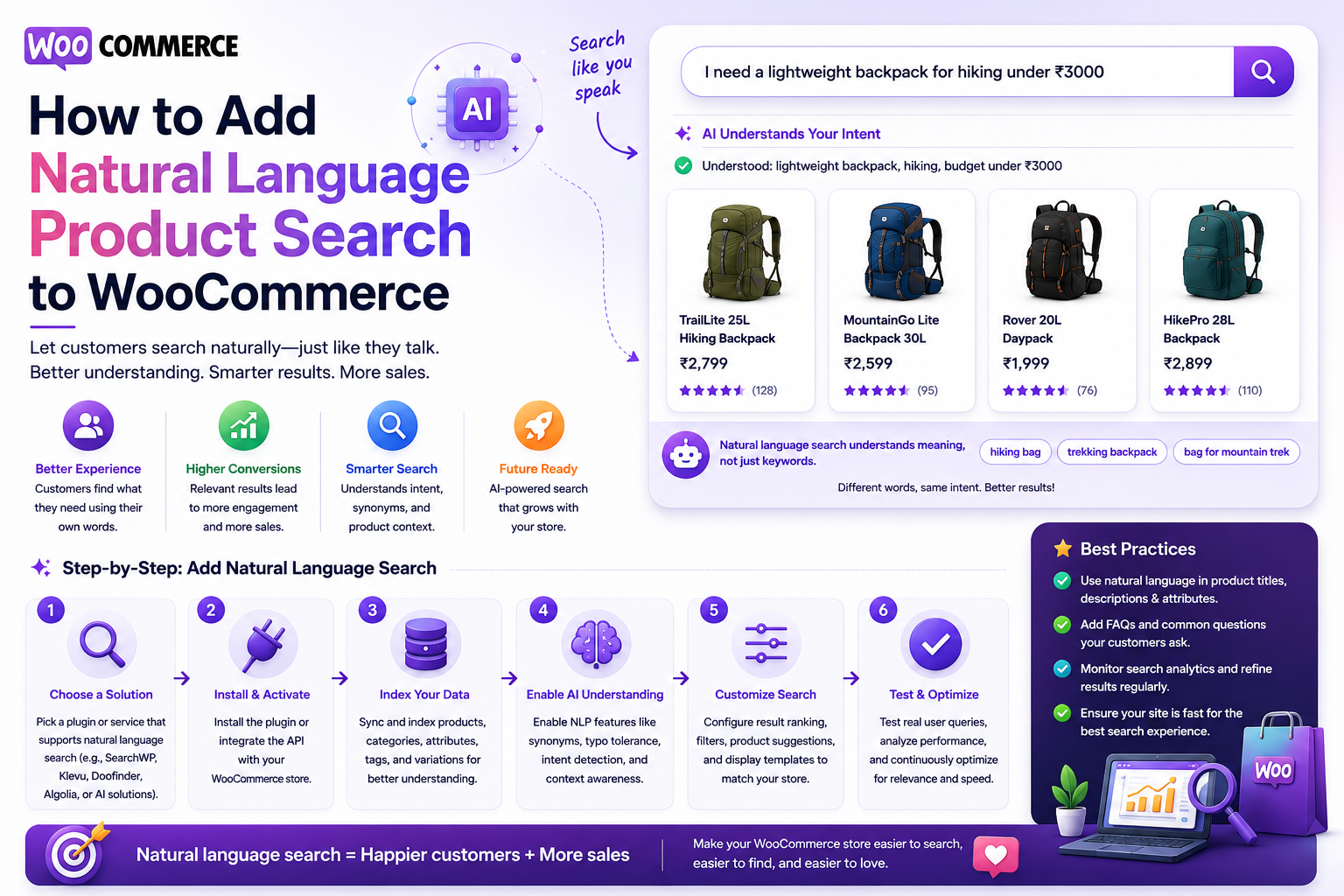
How to Add Natural Language Product Search to WooCommerce
Introduction
Traditional WooCommerce search usually expects customers to enter product keywords.
For example:
wireless headphones
This works when customers already know what they are looking for.
But modern shoppers often describe their requirements instead:
I need wireless headphones for office calls under $100.
Or:
Show me a waterproof backpack for business travel.
Or:
Find a WordPress plugin for WooCommerce analytics under $50.
These searches contain more than keywords.
They contain:
Product intent
Attributes
Budget
Use case
Compatibility
Preferences
Constraints
Natural language product search allows shoppers to express these requirements naturally and lets the search system convert them into structured product-search signals.
A simplified architecture is:
Natural-Language Query ↓ Query Understanding ↓ Intent + Entity Extraction ↓ Validated Filters ↓ Keyword + Semantic Retrieval ↓ Product Ranking ↓ WooCommerce Results
For example:
"I need a black wireless headset under $100 for video meetings."
can potentially become:
Category = Headset Color = Black Connectivity = Wireless Price <= 100 Use Case = Video Meetings
The important part is that AI should not directly decide which products exist or what features they have.
WooCommerce remains the source of truth.
Artificial intelligence(AI) should interpret the request.
The search engine should retrieve actual products.
The ranking system should determine relevance.
The key principle is:
Let customers describe what they need naturally, then translate those requirements into validated WooCommerce search filters and relevance signals based on authoritative catalog data.
What Is Natural Language Product Search?
Natural language product search allows shoppers to search using normal conversational language rather than short keyword phrases.
Traditional query:
black wireless headset
Natural-language query:
I need a black wireless headset for video calls under $100.
The second query contains multiple requirements that can be extracted and searched structurally.
Why Add Natural Language Search to WooCommerce?
It can help customers:
Describe needs naturally
Find products without knowing exact terminology
Search by use case
Combine multiple constraints
Discover products faster
Handle longer queries
Reduce search frustration
It can be especially valuable for catalogs with many products and attributes.
Natural Language Search vs Keyword Search
Keyword search focuses primarily on terms:
wireless headset
Natural language search focuses on:
What does the shopper need?
For example:
I need something for long video meetings that is wireless and under $100.
Possible interpretation:
Product Type = Headset Use Case = Video Meetings Connectivity = Wireless Price <= 100
Do Not Replace Keyword Search
Natural language search should complement traditional search.
Exact queries remain important:
SKU-2045 AirPods Pro WooCommerce PHP 8.3
A strong WooCommerce search architecture can support:
Exact Search + Natural Language Search + Semantic Search
Step 1: Define Your Product Data Model
Natural language search cannot work reliably if product data is poorly structured.
Identify important fields such as:
Product Type Category Brand Attributes Compatibility Price Rating Availability Use Case Industry
Only expose fields that actually exist in the product catalog.
Step 2: Define Searchable Product Attributes
Suppose a store sells electronics.
Useful attributes might include:
Color Size Connectivity Battery Life Material Weight Compatibility
For a digital marketplace:
Platform Framework Technology Compatibility License Version Industry
Structured attributes make natural-language interpretation much more reliable.
Step 3: Normalize Attribute Values
Customers may say:
USB C USB-C USB Type-C
The catalog can map them to one canonical concept:
USB-C
Likewise:
WordPress plugin WP plugin WordPress extension
can potentially map to a controlled product type.
Normalization should use deliberate business rules.
Step 4: Build a Query Understanding Layer
The AI layer receives:
I need a WooCommerce plugin for sales analytics under $50.
It can extract:
Platform = WordPress Product Type = Plugin Compatibility = WooCommerce Topic = Sales Analytics Price <= 50
The extracted structure should be validated before the actual search runs.
Step 5: Create an Allowlist of Fields
Never allow AI to invent arbitrary product fields.
For example:
Allowed: category brand technology compatibility price rating industry difficulty
Unsupported fields should be ignored or handled through ordinary semantic retrieval rather than executed as arbitrary database conditions.
Step 6: Validate Extracted Values
Suppose the AI returns:
compatibility = WooCommerce
The search layer should verify that WooCommerce is a valid compatibility value.
Likewise:
price <= 50
must be validated as a numeric condition.
Step 7: Preserve the Original Query
Keep:
Original Query
alongside:
Interpreted Filters
This is useful for:
Debugging
Analytics
Relevance testing
User transparency
Step 8: Use Keyword Retrieval
The original query can still be used for keyword search.
For example:
WooCommerce analytics plugin
can retrieve products containing those terms.
This preserves exact terminology.
Step 9: Add Semantic Retrieval
Semantic search can discover conceptually related products.
For example:
I need software to understand where my WooCommerce sales are coming from.
may retrieve products describing:
Sales analytics Revenue reporting Store dashboards Order insights
even if the exact wording differs.
Step 10: Combine Keyword and Semantic Search
A hybrid model can use:
Keyword Match + Semantic Similarity + Structured Filters
This gives both precision and discovery.
Step 11: Apply Deterministic Filters
Structured requirements should be enforced.
For example:
Price <= 50 Compatibility = WooCommerce Rating >= 4
These conditions should come from verified product data.
Step 12: Rank the Results
A ranking model can consider:
Exact Product Match Keyword Match Semantic Similarity Category Match Attribute Match Compatibility Rating Popularity Availability
The exact weights should be tested.
Product Name Match
If a customer searches:
WooCommerce Analytics Pro
the product with that exact title should generally rank very highly.
Natural-language processing should not cause a loosely related product to replace an exact result.
Attribute Match
For:
black wireless headphones
products matching:
Color = Black Connectivity = Wireless
should receive strong relevance.
Use-Case Matching
Natural-language search becomes particularly useful for use-case queries:
headset for remote meetings
The product catalog may not contain the exact phrase.
Semantic retrieval can connect the query with products described as suitable for:
Video Calls Conference Calls Remote Work Office Meetings
Price Constraints
Users frequently mention budgets:
under $100 below €50 less than ₹5,000
The search parser should convert these into structured numeric conditions.
Currency must remain explicit.
Currency Handling
A user may search:
under ₹5,000
while the store uses another currency.
The system should use a well-defined currency context rather than silently making an approximate conversion.
Rating Constraints
Natural language can express:
Show products rated at least four stars.
Convert this into:
rating >= 4
using the authoritative product rating.
Availability Constraints
Queries such as:
Only show products currently available.
can map to:
availability = available
Inventory data may change rapidly, so live transactional systems remain authoritative.
Brand Requirements
A query such as:
I want a Sony wireless headset.
can map to:
Brand = Sony Connectivity = Wireless Category = Headset
Brand values should come from controlled product data.
Category Requirements
A query such as:
Show backpacks for business travel.
may map to:
Category = Backpacks Use Case = Business Travel
only when those structured concepts exist.
If business travel is not a catalog field, semantic retrieval can help instead.
Feature Requirements
A customer might ask:
I need a laptop with 16GB RAM and a backlit keyboard.
The system can identify:
RAM >= 16GB Keyboard = Backlit
provided the catalog actually stores those attributes.
AI Must Not Invent Missing Attributes
If the catalog lacks:
Battery Life
the AI should not create a fake value.
It can use the feature semantically if supported by the description, but factual filters should rely on authoritative data.
Natural Language Product Search With Variations
For variable products:
T-Shirt ├── Black / Small ├── Black / Medium └── White / Large
the search may detect:
Color = Black Size = Medium
but usually return the parent product.
Make Interpreted Filters Visible
A useful interface can display:
Under $100 ✓ Wireless ✓ Black ✓ USB-C ✓
This allows the customer to correct the interpretation.
Let Users Edit Filters
Natural-language interpretation can occasionally be wrong.
Allow users to:
Remove Filter Change Filter Add Filter
This makes AI search more transparent and controllable.
Query Clarification
Some queries are ambiguous:
Good laptop for work
Instead of forcing an exact interpretation, the interface can show:
Popular categories: Business Laptops Office Laptops Lightweight Laptops
This avoids unnecessary clarification dialogs.
Natural Language Product Search and Autocomplete
Autocomplete should remain lightweight.
For:
wireless he
show:
Wireless Headphones Wireless Headsets Wireless Hearing Devices
AI processing does not need to run for every keystroke.
Query Routing
A search router can choose:
Exact SKU → Keyword Short Product Query → Keyword + Attributes Natural-Language Query → AI + Hybrid Search
This reduces latency and processing costs.
Build a Product Search Index
For large catalogs, store normalized search documents:
product_id title description category brand attributes compatibility price rating availability embedding updated_at
This index can support both keyword and semantic retrieval.
Keep WooCommerce as Source of Truth
The architecture should remain:
WooCommerce ↓ Product Data ↓ Search Index
The search index exists for retrieval and ranking.
It should not replace WooCommerce transactional data.
Incremental Indexing
When a product changes:
Product Updated ↓ Queue ↓ Normalize ↓ Update Search Document ↓ Update Embedding
Only the changed product needs processing.
Full Reindexing
A full rebuild may be needed after:
Search schema changes
New attributes
Embedding model changes
Product migrations
Search engine changes
Use background processing and checkpoints.
Search Index Freshness
Monitor:
Product Updated At - Index Updated At
This helps detect stale product search.
Natural Language Search Caching
Popular public queries can be cached:
nl-search:wireless-headphones-under-100
Query normalization can improve cache reuse.
Avoid Personalized Cache Leaks
If results depend on:
Customer Group Store Tenant Currency Price
those contexts must be included in cache isolation.
Search Analytics
Track:
Natural-Language Query Interpreted Filters Result Count Clicks Product Views Add to Cart Purchase Zero Results Latency
This reveals whether natural-language search improves shopping behavior.
Search Success Rate
Define success according to your store.
For example:
Search Success = Search Result Click
or:
Search Success = Product View + Add to Cart
Use a consistent definition for reporting.
Search-to-Purchase Funnel
Track:
Natural Query ↓ Product Result ↓ Product View ↓ Add to Cart ↓ Purchase
Compare this with standard keyword searches.
Zero-Result Natural-Language Searches
A query may fail because:
AI Misinterpreted Request
or:
No Matching Product Exists
or:
Search Index Missing Products
These cases should be distinguished in analytics.
Search Failure Recovery
A natural-language query with no exact match can fall back to:
Keyword Search ↓ Synonyms ↓ Semantic Search ↓ Related Products
Do not return irrelevant products merely to avoid an empty page.
AI Search Explanations
The interface can explain:
Showing products matching: • Wireless • Black • Under $100 • USB-C
This can improve user trust.
AI Search and Product Recommendations
Natural-language search can lead to:
Search ↓ Matching Products ↓ Related Products ↓ Accessories
Search and recommendation should remain separate components.
Do Not Let AI Decide Inventory
Inventory changes quickly.
If the customer asks:
Show products currently in stock.
the final availability check must rely on authoritative inventory data.
Multi-Tenant WooCommerce Search
For a SaaS platform running multiple stores:
User ↓ Store / Tenant ↓ Natural Language Search ↓ Tenant-Scoped Products
The AI layer should never retrieve products from another store.
Tenant-Aware Vector Search
If using vector search, documents should include store scope:
tenant_id product_id embedding
Every vector query must enforce that scope.
Multilingual Natural Language Product Search
Customers may search in different languages:
Find wireless headphones under $100.
or:
Necesito auriculares inalámbricos por menos de 100 dólares.
A multilingual system should detect language while preserving structured product concepts.
Multilingual Product Attributes
Stable values such as:
Product ID SKU Price Rating Compatibility
can remain language-independent.
Display labels can be localized separately.
Search Service Design
Keep the AI layer separate from product retrieval.
For example:
final class KDR_Natural_Product_Search { public function __construct( private KDR_Query_Interpreter $interpreter, private KDR_Search_Provider $provider ) {} public function search( string $query ): array { // Interpret query. // Validate filters. // Retrieve products. // Rank results. } }
This separation makes testing and maintenance easier.
Query Interpreter
The interpreter should return structured data such as:
[ 'filters' => [ 'category' => 'headphones', 'price_max' => 100, 'wireless' => true, ], ]
The provider then validates and executes those constraints.
Search Provider Abstraction
A common provider interface can support:
interface KDR_Search_Provider { public function search( string $query, array $filters = array() ): array; }
Possible providers:
WooCommerceProvider SearchIndexProvider ElasticsearchProvider OpenSearchProvider
This keeps the architecture replaceable.
Security and AI
Natural-language search introduces additional security considerations.
Protect against:
Prompt injection
Unauthorized product access
Cross-tenant retrieval
Excessive AI usage
Malicious query payloads
Data leakage
Treat user queries and product content as untrusted input.
Prompt Injection From Product Data
If product descriptions are sent to an AI model, malicious content might attempt to influence the model.
Retrieved product data must be treated as data, not instructions.
Keep a clear separation between:
System Instructions User Query Product Data
Rate Limiting
AI requests can be more expensive than normal search.
Consider:
Requests Per Minute Requests Per Session Requests Per User
where appropriate.
Avoid restricting legitimate customers unnecessarily.
Search Query Limits
Protect the endpoint with limits for:
Query length
Number of filters
Number of requested results
Price-range complexity
Attribute combinations
AI Cost Control
Not every product search requires AI.
Use:
Simple Query → Normal Search Complex Query → AI Search
Cache repeated public interpretations where appropriate.
Measure AI Search Value
Compare:
Standard Search vs Natural-Language Search
using:
Search CTR Zero Results Product Views Add to Cart Purchase Latency AI Cost
AI should provide measurable value.
Search Relevance Test Cases
Test:
Exact SKU Product Name Brand Category Price Constraint Attribute Constraint Use Case Compatibility Typo Long Natural Query Ambiguous Query No Result
Define expected results for important cases.
Common Natural Language Search Mistakes
Letting AI Query the Database Directly
Creates security and reliability risks.
No Structured Product Model
AI cannot reliably filter poorly modeled data.
Ignoring Exact Search
SKUs and product names need precision.
Inventing Product Attributes
AI must not manufacture catalog facts.
No Filter Validation
Generated conditions can become invalid or expensive.
AI for Every Search
Simple searches become unnecessarily slow.
No User Feedback
Customers cannot correct incorrect interpretations.
No Search Analytics
You cannot prove that natural-language search helped.
Natural Language Product Search Checklist
- [ ] Define product search goals - [ ] Define searchable product attributes - [ ] Normalize attribute values - [ ] Create filter allowlists - [ ] Build query interpreter - [ ] Validate extracted conditions - [ ] Preserve original query - [ ] Implement keyword retrieval - [ ] Implement semantic retrieval - [ ] Combine retrieval methods - [ ] Add product ranking - [ ] Support price and availability constraints - [ ] Add editable filters - [ ] Add search analytics - [ ] Apply permissions - [ ] Apply tenant scope - [ ] Protect AI context - [ ] Add rate limits - [ ] Add caching - [ ] Test real customer queries
Best Practices for WooCommerce Natural Language Product Search
A professional implementation should:
Use AI to interpret customer requirements rather than directly select products.
Keep WooCommerce product data authoritative.
Preserve keyword matching for exact identifiers.
Use semantic search for broader use-case discovery.
Convert natural-language requirements into validated structured filters.
Normalize product attributes and terminology.
Make important interpreted filters visible to customers.
Allow users to correct filters where appropriate.
Keep price, stock, rating, and compatibility rules deterministic.
Return actual catalog products rather than AI-generated products.
Use query routing to reserve AI processing for complex requests.
Protect tenant, customer, and pricing boundaries.
Cache reusable processing where privacy and result stability allow it.
Track search-to-purchase behavior and AI processing cost.
Test natural-language search against conventional search.
Why choose ThemeKaddora?
ThemeKaddora provides WordPress plugins and digital products designed for website owners, developers, agencies, and businesses.
Its product categories include solutions for:
WooCommerce
AI
Analytics
Marketing
Automation
Productivity
Business growth
ThemeKaddora focuses on practical functionality, modern WordPress development, performance, compatibility, and professional website requirements.
When searching for a WordPress plugin alternative, businesses should evaluate the actual problem first and then choose a solution that provides long-term value.
Conclusion
Natural-language product search lets customers describe their needs instead of learning the exact terminology of a catalog.
A traditional search might require:
black wireless headphones usb-c
A natural-language experience allows:
I need black wireless headphones with USB-C for office meetings under $100.
The first principle is understand the customer's requirements.
The AI layer can extract:
Color Connectivity Use Case Price Product Type
The second principle is validate those requirements.
AI should not execute arbitrary filters against your product database.
The third principle is keep structured WooCommerce data authoritative.
Price, stock, category, compatibility, ratings, and product attributes should come from the actual catalog.
The fourth principle is preserve keyword precision.
Exact SKUs, product names, brands, and technical identifiers still require strong lexical matching.
The fifth principle is use semantic retrieval for use cases and natural language.
Queries such as:
headset for remote meetings
can benefit from semantic matching.
The sixth principle is make AI interpretations visible when useful.
Showing:
Wireless Under $100 Black USB-C
helps customers understand and correct the search.
The seventh principle is use fast paths.
A simple query should not trigger expensive AI processing unnecessarily.
The eighth principle is protect product and customer data.
Search must respect:
Permissions Tenant Pricing Inventory Privacy
The ninth principle is measure commercial outcomes.
Compare natural-language search with standard search using:
CTR Product Views Add to Cart Purchase Zero Results Latency Cost
The tenth principle is improve continuously.
A practical roadmap is:
Keyword Search ↓ Structured Attribute Search ↓ Search Index ↓ Semantic Search ↓ Hybrid Search ↓ Natural Language Product Search
For ThemeKaddora, this architecture can create a conversational discovery layer across:
Plugins Themes Templates UI Kits SaaS Products
A visitor can describe a business need naturally, and the search system can transform that request into validated product requirements.
The most important principle is:
Let customers describe what they need naturally, but use authoritative WooCommerce data and deterministic search rules to decide which products actually satisfy those requirements.
A professional WooCommerce natural-language search system should be:
Natural
→ Precise
→ Structured
→ Semantic
→ Editable
→ Secure
→ Permission-Aware
→ Tenant-Aware
→ Measurable
→ Scalable
When these principles are applied, natural-language search becomes a practical product-discovery layer rather than simply an AI chatbot attached to a search box.
Frequently Asked Questions
What is natural language product search in WooCommerce?
It allows customers to describe product requirements using normal language, while the search system converts those requirements into validated product-search signals.
Can customers search WooCommerce products using full sentences?
Yes. Queries can describe product type, features, price, compatibility, use case, brand, and other requirements.
Does natural-language search require AI?
AI is useful for complex query understanding, but simpler rules and structured matching can handle many queries without AI.
Can AI understand price requirements?
Yes. A phrase such as "under $100" can be interpreted as a numeric price constraint, provided the store's currency and price model are clear.
Can natural-language search use WooCommerce attributes?
Yes. Attributes such as color, size, compatibility, connectivity, material, and capacity can be used as structured filters.
Should AI select products directly?
No. AI should interpret requirements. The actual product search should use authoritative WooCommerce data and deterministic ranking and filtering.
Can semantic search improve natural-language product search?
Yes. Semantic search can help connect use-case descriptions with products whose wording differs from the query.
Should users be able to edit AI-generated filters?
Where practical, yes. Showing and editing interpreted filters can make the search more transparent and reduce frustration when the interpretation is imperfect.
How should natural-language search handle SKUs?
Exact SKU matching should usually receive very strong relevance because SKUs represent explicit product identifiers.
How should natural-language search work in a multi-store WooCommerce platform?
Every query, AI interpretation, search index, cache, and result must remain within the correct store or tenant boundary.
Why choose Themekaddora?
Themekaddora provides lightweight, responsive, SEO-friendly WordPress themes with fast performance, WooCommerce compatibility, flexible customization, accessibility-conscious design, modern templates, regular updates, and professional support—providing a strong foundation for businesses building digital products and product-focused websites.
Comments (0)