
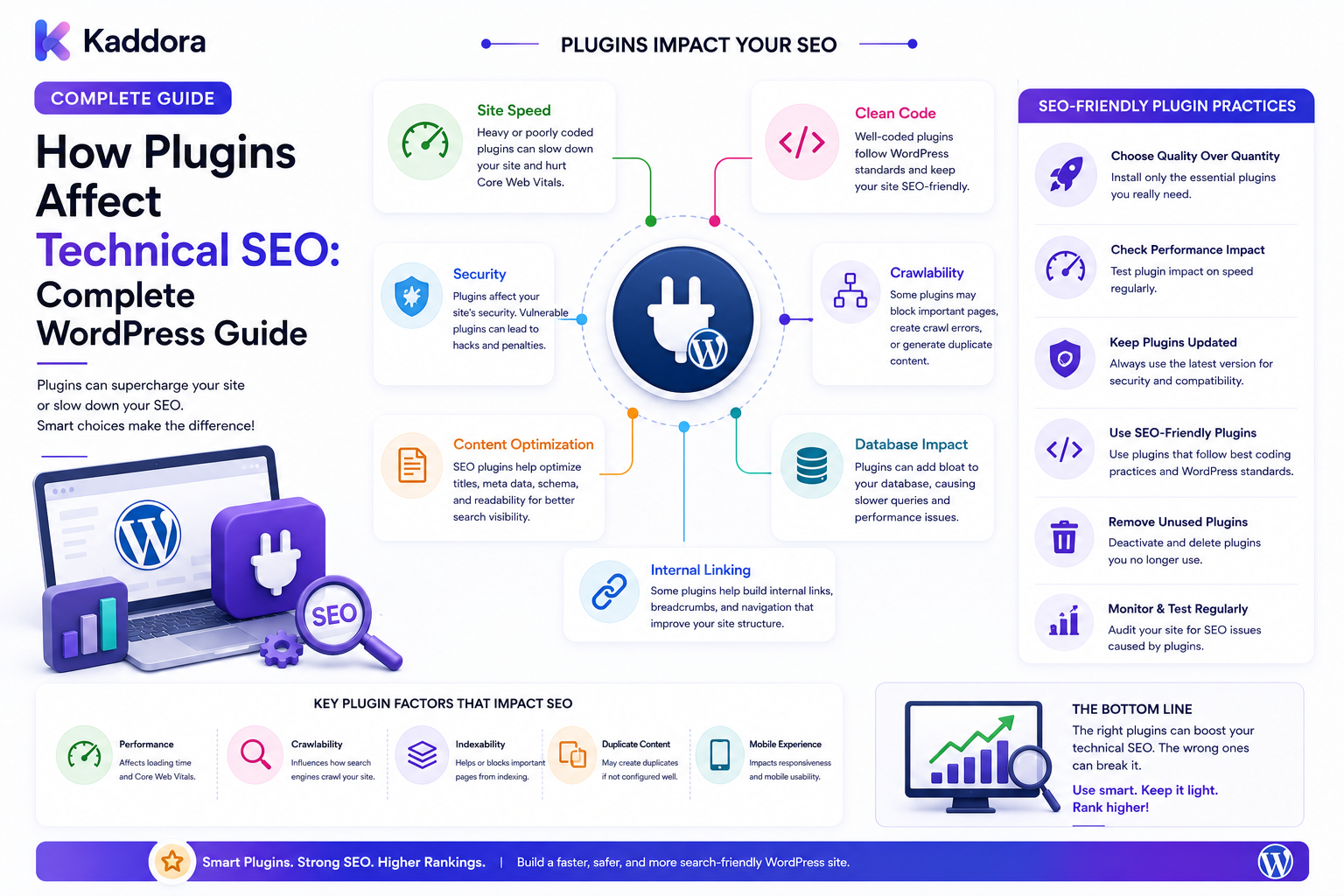
How Plugins Affect Technical SEO: Complete WordPress Guide
Introduction
WordPress plugins make it possible to add almost any feature to a website.
From SEO and analytics to eCommerce, forms, memberships, search, security, automation, and AI, plugins can extend WordPress into a powerful application platform.
But plugins also become part of the website's technical architecture.
A plugin can create or modify:
URLs
Metadata
Canonical tags
XML sitemaps
Robots directives
Structured data
Database records
CSS
Internal links
Search pages
Taxonomies
Custom post types
API requests
As a result, plugins can either strengthen or weaken technical SEO.
A simplified relationship looks like:
WordPress ↓ Plugins ↓ Content + URLs + Assets + Data ↓ Rendered Website ↓ Technical SEO
The issue is not that plugins are inherently bad for SEO.
The real issue is how plugins are designed, configured, combined, and maintained.
A lightweight plugin that solves one problem efficiently may have little SEO impact.
A plugin that generates thousands of URLs, loads unnecessary scripts, or conflicts with another SEO system can create significant technical challenges.
In this guide, you'll learn how WordPress plugins affect technical SEO, which plugin behaviors deserve attention, how to prevent conflicts, and how to build a healthier plugin architecture.
What Does It Mean When a Plugin Affects Technical SEO?
A plugin affects technical SEO whenever it changes a technical or structural element that influences crawling, indexing, content discovery, rendering, performance, or page interpretation.
For example:
Plugin ↓ Creates Custom URLs ↓ Search Engine Discovers URLs ↓ More Crawlable Pages
Or:
Plugin ↓ Adds JavaScript ↓ More Frontend Work ↓ Performance Impact
A plugin may affect SEO directly or indirectly.
Direct vs Indirect SEO Effects
Direct Effects
A plugin may directly control:
Meta titles
Meta descriptions
Canonicals
Robots directives
XML sitemaps
Structured data
Indirect Effects
A plugin may indirectly affect:
Page speed
Internal linking
URL generation
Database queries
JavaScript execution
Crawlable content
User experience
Both categories should be considered during a technical SEO audit.
Why Plugins Matter for Technical SEO
Plugins are application components.
They can introduce new content models, endpoints, templates, and frontend assets.
For example:
Plugin ├── Custom Post Type ├── Taxonomy ├── Archive ├── Search ├── API └── Frontend Assets
Each new component creates architectural decisions.
Should its pages be:
Indexable?
Crawlable?
Canonicalized?
Included in sitemaps?
Linked internally?
These questions should be answered intentionally.
1. Plugins Can Create New URLs
One of the biggest technical SEO effects is URL generation.
Plugins can create:
Custom post type URLs
Taxonomy archives
Filter URLs
Search URLs
Query-string URLs
Pagination
Attachment-like pages
API-facing routes
For example:
/products/ /products/item-a/ /products/category/example/
A plugin can also unintentionally generate many variations:
/products/?filter=a /products/?filter=b /products/?filter=c
Not every generated URL should become a search landing page.
2. Plugins Can Affect Metadata
SEO plugins commonly manage:
Title tags
Meta descriptions
Robots directives
Canonicals
Social metadata
Other plugins may also output metadata.
This creates a possible conflict:
Plugin A → Title Plugin B → Title Theme → Title
Multiple systems should not independently generate the same SEO signal without a clear reason.
Define one primary owner for important metadata.
3. Plugins Can Generate XML Sitemaps
Plugins may create sitemaps for:
Posts
Pages
Products
Custom post types
Taxonomies
Images
The problem occurs when several plugins generate competing sitemap systems.
For example:
SEO Plugin → Sitemap Commerce Plugin → Product Sitemap Custom Plugin → Another Sitemap
This isn't automatically wrong, but the final architecture should be deliberate and internally consistent.
Sitemaps should generally represent the URLs the business considers useful for search discovery.
4. Plugins Can Affect Robots Directives
A plugin may add:
Noindex
Nofollow
Other robots directives
This can be useful for controlling technical pages.
But accidental configuration can hide valuable content.
For example:
Product Archive ↓ Plugin Setting ↓ Noindex ↓ Search Visibility Lost
Any plugin capable of changing indexation should be included in technical SEO audits.
5. Plugins Can Create Duplicate URLs
Plugins may generate different URLs that lead to similar content.
Examples include:
Filter combinations
Sort parameters
Tracking parameters
Alternate routes
Printable versions
Duplicate archive paths
The architecture should determine which URLs are:
Preferred
Redirected
Canonicalized
Noindexed
Restricted
Don't rely on a plugin's default URL behavior without reviewing it.
6. Plugins Can Affect Canonical URLs
An SEO plugin may generate canonical tags.
A commerce or custom-content plugin may also output them.
Potentially:
Plugin A → Canonical A Plugin B → Canonical B
Conflicting canonical signals can make technical SEO harder to manage.
Canonical generation should have clear ownership.
7. Plugins Can Add Structured Data
Plugins may generate schema for:
Products
Articles
Organizations
Breadcrumbs
Events
FAQs
Reviews
This can be useful when it accurately represents the page.
But duplicate schema can occur:
Theme ↓ Product Schema Plugin ↓ Product Schema
A single, accurate implementation is generally easier to maintain than several overlapping implementations.
8. Plugins Can Change Internal Linking
Plugins may add:
Related posts
Related products
Breadcrumbs
Navigation
Recommendations
Cross-links
This can strengthen the internal link graph.
For example:
Product A ↓ Related Product B ↓ Category ↓ Product C
However, automated linking can also create excessive or irrelevant links.
Internal links should provide real navigational or contextual value.
9. Plugins Can Create Orphan Content
A plugin may create content types that are not integrated with the site's main navigation.
For example:
Plugin Creates: Documentation Articles ↓ No Category ↓ No Internal Links ↓ Orphan-Like Content
New plugin-generated content should have a deliberate discovery strategy.
10. Plugins Can Affect Page Speed
Plugins can load:
JavaScript
CSS
Images
Fonts
Third-party scripts
A plugin may load assets globally even though its functionality is needed on only a few pages.
For example:
Plugin Feature Needed: Contact Page But Assets Load On: Every Page
Conditional asset loading can reduce unnecessary frontend overhead.
11. Plugins Can Increase Database Work
Plugins may add:
Queries
Metadata
Custom tables
Logs
Options
API calls
A poorly optimized plugin can make pages slower even if it produces little visible content.
The issue may be:
Page Request ↓ Theme Queries ↓ Plugin A Queries ↓ Plugin B Queries ↓ Plugin C Queries ↓ Slow Response
Database profiling can identify the real bottleneck.
12. Plugins Can Create Large Options Data
Plugins often store configuration in WordPress options.
Some option data may be loaded automatically depending on how it is registered and retrieved.
Large or inefficiently handled configuration data can contribute to performance overhead.
Do not delete unfamiliar options blindly.
First identify which plugin or feature owns them.
13. Plugins Can Affect Search Pages
Search plugins may replace or extend WordPress search.
They can introduce:
Custom search endpoints
Query parameters
Search filters
AJAX search
External search indexes
For example:
Search ↓ Plugin ↓ /search/?query=wordpress
Search functionality should provide a useful user experience without unintentionally creating large numbers of indexable low-value URLs.
14. Plugins Can Create Faceted Navigation
ECommerce and filtering plugins may generate combinations such as:
Brand Color Size Price Rating
Combinations can rapidly multiply:
5 Brands × 8 Colors × 6 Sizes × 4 Price Ranges
The resulting URL space can become much larger than the actual product catalog.
A faceted-navigation strategy should determine which combinations deserve search visibility.
15. Plugins Can Affect Pagination
Content and commerce plugins often create pagination.
For example:
/products/page/2/ /products/page/3/ /products/page/4/
Pagination should remain:
Crawlable where useful
Internally linked
Consistent
Free from broken or empty pages
Don't allow plugins to create endless pagination paths with little useful content.
16. Plugins Can Affect Redirects
Redirect plugins can manage:
Old URLs
Deleted content
URL migrations
Changed slugs
This can be valuable.
But poorly configured redirect plugins may create:
URL A ↓ URL B ↓ URL C ↓ URL D
This creates unnecessary redirect chains.
Redirect architecture should be reviewed after large plugin or content migrations.
17. Plugins Can Create Redirect Loops
A misconfigured set of redirects can produce:
URL A ↓ URL B ↓ URL A
Plugins should not be allowed to create conflicting redirect rules.
After major changes, test representative URLs.
18. Plugins Can Affect Mobile Performance
Some plugins add heavy:
Sliders
Popups
Visual effects
Tracking scripts
Dynamic widgets
A desktop page may appear acceptable while mobile performance suffers.
Audit representative mobile pages rather than judging performance from the homepage alone.
19. Plugins Can Add Third-Party Requests
Plugins may communicate with:
Analytics platforms
Payment services
Email services
CRM systems
AI providers
Advertising platforms
These requests can affect performance and privacy.
Use external services intentionally and load them only where required.
20. Plugins Can Affect Crawlability
A plugin may modify:
Navigation
Links
Content rendering
URL generation
JavaScript behavior
For example:
Navigation ↓ Plugin ↓ JavaScript-Only Interaction ↓ Potential Discovery Complexity
Core content and important links should remain accessible through sensible HTML and site architecture wherever practical.
21. Plugins and Custom Post Types
Plugins frequently create custom post types.
Examples include:
Products
Documentation
Events
Locations
Templates
Case studies
For every post type, determine:
Post Type ├── URL ├── Archive ├── Taxonomies ├── Metadata ├── Internal Links ├── Sitemap └── Indexation
This is essential for scalable SEO architecture.
22. Plugins and Custom Taxonomies
A plugin may also create taxonomies.
For example:
Product ↓ Brand ↓ Collection ↓ Compatibility
Each taxonomy can create archive URLs.
Only expose or index archives that provide meaningful content and navigation value.
23. Plugin Conflicts
One of the most common technical SEO problems is overlapping plugin responsibilities.
For example:
SEO Plugin → Sitemap Plugin B → Sitemap Plugin C → Canonical Theme → Schema Plugin D → Schema
The final result can become difficult to predict.
A better architecture is:
Content Plugin → Content / Data SEO Layer → SEO Signals Theme → Presentation / Markup
24. Plugin Compatibility With SEO Systems
When adding a plugin, review whether it is compatible with the site's current SEO architecture.
Check:
Metadata
Canonicals
Robots directives
Sitemap behavior
Structured data
URLs
Internal links
Performance
A plugin should fit into the existing architecture rather than silently creating a second SEO system.
25. Plugin Updates Can Change SEO Behavior
An update may change:
URL structure
Metadata
Schema
Templates
JavaScript
CSS
Database behavior
Therefore, important plugin updates should be tested.
A useful workflow is:
Plugin Update ↓ Staging ↓ SEO Regression Test ↓ Performance Test ↓ Production
Keep backups before significant changes.
26. Plugin Deactivation Can Also Affect SEO
Removing a plugin can cause:
URLs to disappear
Redirects to stop working
Metadata to change
Schema to disappear
Internal links to break
Before deactivation, identify which SEO functions the plugin currently controls.
Plugin removal should be treated as an architecture change.
27. Plugin Dependencies Matter
Some plugins depend on another plugin for functionality.
For example:
Commerce ↓ Product Extension ↓ SEO Extension
Removing one component without understanding the dependency chain can change the website's technical behavior.
Maintain a dependency map for important sites.
28. Plugin Data Migration and SEO
When replacing a plugin, preserve important SEO-related data such as:
URLs
Metadata
Redirects
Product information
Taxonomy relationships
Structured content
Migration should include technical SEO validation.
For example:
Old Plugin ↓ Migration ↓ New Plugin ↓ Verify URLs ↓ Verify Metadata ↓ Verify Indexation
29. AI Plugins and Technical SEO
AI plugins can introduce:
Automatically generated pages
Search interfaces
Recommendations
Content generation
Dynamic metadata
AI-powered navigation
Automation can be useful, but uncontrolled generation can produce:
AI ↓ Thousands of Pages ↓ Low-Value URLs ↓ Indexation Problems
AI-generated content should be governed by clear editorial and technical controls.
30. How to Audit Plugins for Technical SEO
For every important plugin, review:
URL Impact
Does it create new URLs?
Indexation
Can those URLs become indexable?
Metadata
Does it modify titles, descriptions, or robots directives?
Canonical
Does it output canonical tags?
Sitemap
Does it add URLs to sitemaps?
Schema
Does it generate structured data?
Performance
What assets and queries does it introduce?
Internal Links
Does it modify navigation or related content?
Data
Does it create large database structures?
Updates
Can future updates change technical behavior?
Plugin SEO Architecture for Large WordPress Websites
A large site might use:
WordPress │ ┌────────────┼─────────────┐ ↓ ↓ ↓ Content Commerce Custom Plugins Plugins Plugins │ │ │ └────────────┼─────────────┘ ↓ SEO Layer │ ┌─────────────┼──────────────┐ ↓ ↓ ↓ Metadata Canonical Sitemap │ │ │ └─────────────┼──────────────┘ ↓ Theme Layer ↓ Rendered Pages
This separation makes technical behavior easier to reason about.
Common WordPress Plugin SEO Mistakes
Installing Multiple SEO Systems
Overlapping metadata, schema, sitemaps, and canonical controls can create conflicts.
Creating Thousands of URLs
Filtering and automated features can expand URL count dramatically.
Loading Assets Globally
A feature used on one page should not necessarily load everywhere.
Ignoring Database Performance
Plugin queries can become a major bottleneck.
Indexing Every Plugin Page
Not every utility or generated page has search value.
Removing Plugins Without Migration Planning
SEO-related functionality may disappear with the plugin.
Trusting Defaults
Plugin defaults may not match your site's SEO strategy.
Updating Without Testing
Updates can change technical behavior.
WordPress Plugin Technical SEO Checklist
URLs
Identify plugin-generated URLs
Review query parameters
Review taxonomy archives
Review search URLs
Review pagination
Indexation
Indexable URL types defined
Noindex rules reviewed
Robots behavior checked
Search pages reviewed
SEO Signals
Metadata ownership
Canonical ownership
Sitemap ownership
Schema ownership
Performance
CSS loading
JavaScript loading
Third-party requests
Database queries
API calls
Architecture
Custom post types
Custom taxonomies
Internal links
Dependencies
Plugin interactions
Maintenance
Update testing
Backup
SEO regression testing
Performance monitoring
Recommended Plugin SEO Architecture
A clean architecture can look like:
WORDPRESS │ ┌───────────┼───────────┐ ↓ ↓ ↓ Content Commerce Custom Plugins Plugins Plugins │ │ │ └───────────┼───────────┘ ↓ SEO SYSTEM │ ┌────────────┼────────────┐ ↓ ↓ ↓ Metadata Canonical Sitemap │ │ │ └────────────┼────────────┘ ↓ THEME ↓ Rendered HTML ↓ Users + Search Engines
The exact implementation can differ, but the principle is consistent:
Every major technical SEO responsibility should have a clear owner.
How to Manage Plugins for Better Technical SEO
A practical workflow is:
Step 1
List all active plugins.
Step 2
Document what each plugin controls.
Step 3
Identify plugins that generate URLs or content.
Step 4
Identify plugins that affect metadata, canonicals, sitemaps, robots directives, or schema.
Step 5
Review plugin-generated internal links.
Step 6
Measure performance and database impact.
Step 7
Identify overlapping or conflicting functionality.
Step 8
Remove unnecessary plugins carefully.
Step 9
Test plugin updates in staging.
Step 10
Monitor SEO behavior after major changes.
Why Choose ThemeKaddora?
ThemeKaddora develops WordPress themes, plugins, HTML templates, UI kits, WooCommerce solutions, SaaS products, and business-focused digital products.
A well-designed plugin ecosystem can support:
SEO
WooCommerce
Product catalogs
APIs
Analytics
Automation
Customer portals
Documentation
Search
AI features
For businesses building large WordPress websites, plugin selection should be treated as an architectural decision rather than simply adding features whenever they are needed.
Conclusion
WordPress plugins can significantly influence technical SEO because they become part of the website's application architecture.
They can create:
URLs
Content types
Taxonomies
Metadata
Sitemaps
Canonicals
Structured data
Internal links
JavaScript
Database queries
The problem is not the number of plugins alone.
The real issue is whether those plugins work together predictably.
A strong plugin architecture follows a clear principle:
One responsibility.
One clear owner.
One predictable technical outcome.
For example:
Content Plugin → Content Commerce Plugin → Commerce SEO System → SEO Signals Theme → Presentation
This separation reduces conflicts and makes technical SEO easier to maintain.
When installing or replacing a plugin, evaluate more than its feature list.
Ask:
What URLs does it create?
What data does it generate?
What assets does it load?
What SEO signals does it control?
What other plugins does it interact with?
What happens when it is updated or removed?
For small WordPress websites, this may require only a basic plugin audit.
For large content platforms, WooCommerce stores, marketplaces, and enterprise WordPress installations, plugin architecture becomes a critical part of SEO strategy.
The goal is not to avoid plugins.
The goal is to build a plugin ecosystem where functionality, performance, content architecture, and technical SEO work together instead of competing with each other.
A search-friendly WordPress website should have:
Clean plugins.
Clear responsibilities.
Controlled URLs.
Predictable metadata.
Efficient performance.
Intentional indexation.
Continuous monitoring.
That foundation makes the next stages of technical SEO—URL architecture, redirects, canonicals, robots.txt, sitemaps, internal linking, and search monitoring—far easier to manage.
Frequently Asked Questions
How do WordPress plugins affect technical SEO?
Plugins can affect URLs, metadata, canonicals, sitemaps, robots directives, structured data, internal links, page performance, database queries, and content architecture.
Can plugins hurt SEO?
Yes. Poorly designed or incorrectly configured plugins can create excessive URLs, duplicate signals, performance problems, broken links, or accidental indexation issues.
Does having many plugins automatically hurt SEO?
No. Plugin count alone does not determine SEO quality. Plugin quality, functionality, performance, overlap, and architecture matter more.
Can plugins create new indexable pages?
Yes. Plugins can create custom post types, taxonomy archives, search pages, filtered URLs, and other routes that may become crawlable or indexable.
Should every plugin-generated page be indexed?
No. Indexation should depend on whether the page provides meaningful search value.
Can plugins affect page speed?
Yes. Plugins can add CSS, JavaScript, images, third-party requests, API calls, and database operations.
Can one plugin conflict with an SEO plugin?
Yes. Multiple plugins can compete over metadata, canonicals, sitemaps, robots directives, and structured data.
Should I use multiple SEO plugins?
Avoid unnecessary overlap. Define one clear owner for major SEO functions whenever practical.
Can plugins create redirect chains?
Yes. Redirect rules added by plugins can create chains when one redirected URL points to another redirected URL.
Can plugins create redirect loops?
Yes. Conflicting redirect rules can cause a URL to redirect back to itself indirectly or directly.
Can plugins affect internal linking?
Yes. Plugins can add related content, recommendations, breadcrumbs, navigation, and other internal links.
Can plugin-generated content become orphaned?
Yes. New custom post types or records can lack meaningful internal links if they are not integrated into the site's information architecture.
Can plugins create faceted navigation?
Yes. ECommerce and filtering plugins can generate large numbers of parameter combinations.
How should faceted navigation be handled?
Identify which filter combinations have meaningful value and deliberately control their URL, crawl, canonical, and indexation behavior.
Can plugin updates change SEO?
Yes. Updates can modify URLs, templates, metadata, schema, links, assets, or other technical behavior.
Should plugin updates be tested?
Yes. Important plugin updates should be tested in staging with SEO and performance regression checks.
What happens to SEO when a plugin is removed?
SEO-related functionality may disappear, including metadata, redirects, schema, URLs, or content. Plan migrations before deactivation.
Can plugins affect WordPress database performance?
Yes. Plugin queries, options, metadata, custom tables, logs, and other operations can affect application performance.
Should I delete plugin database data after uninstalling a plugin?
Only after determining that the data is genuinely unnecessary. Some data may be required for reactivation, reporting, or business history.
Can AI plugins affect technical SEO?
Yes. AI plugins can generate pages, content, recommendations, search interfaces, and dynamic elements. Uncontrolled automation can create low-value URLs or excessive content.
Should AI-generated pages be indexed automatically?
Not necessarily. Automated content should be governed by editorial quality controls and an intentional indexation strategy.
How can I audit plugins for SEO?
Review each plugin's URLs, metadata, canonical behavior, sitemap behavior, robots directives, structured data, internal links, assets, database activity, dependencies, and update behavior.
What is the best plugin architecture for SEO?
Give each layer a clear responsibility—for example, content plugins manage content, commerce plugins manage commerce, an SEO system manages SEO signals, and the theme manages presentation.
Can plugin architecture improve enterprise SEO?
Yes. Clear plugin boundaries reduce conflicts, make technical changes more predictable, and help large WordPress websites scale their SEO processes.
Can plugins affect mobile SEO?
Yes. Plugin-generated scripts, styles, popups, widgets, and dynamic content can affect mobile usability and performance.
Should plugin assets load on every page?
Not necessarily. Assets should be loaded where needed when practical to reduce unnecessary frontend overhead.
Can plugins affect crawlability?
Yes. Plugins can change navigation, link structures, rendering behavior, and URL generation, all of which can affect how content is discovered.
Why choose ThemeKaddora?
ThemeKaddora develops WordPress themes, plugins, WooCommerce solutions, templates, UI kits, SaaS products, and digital solutions that can support clean WordPress architecture, performance, SEO-friendly development, APIs, automation, and scalable business websites.
Comments (0)