
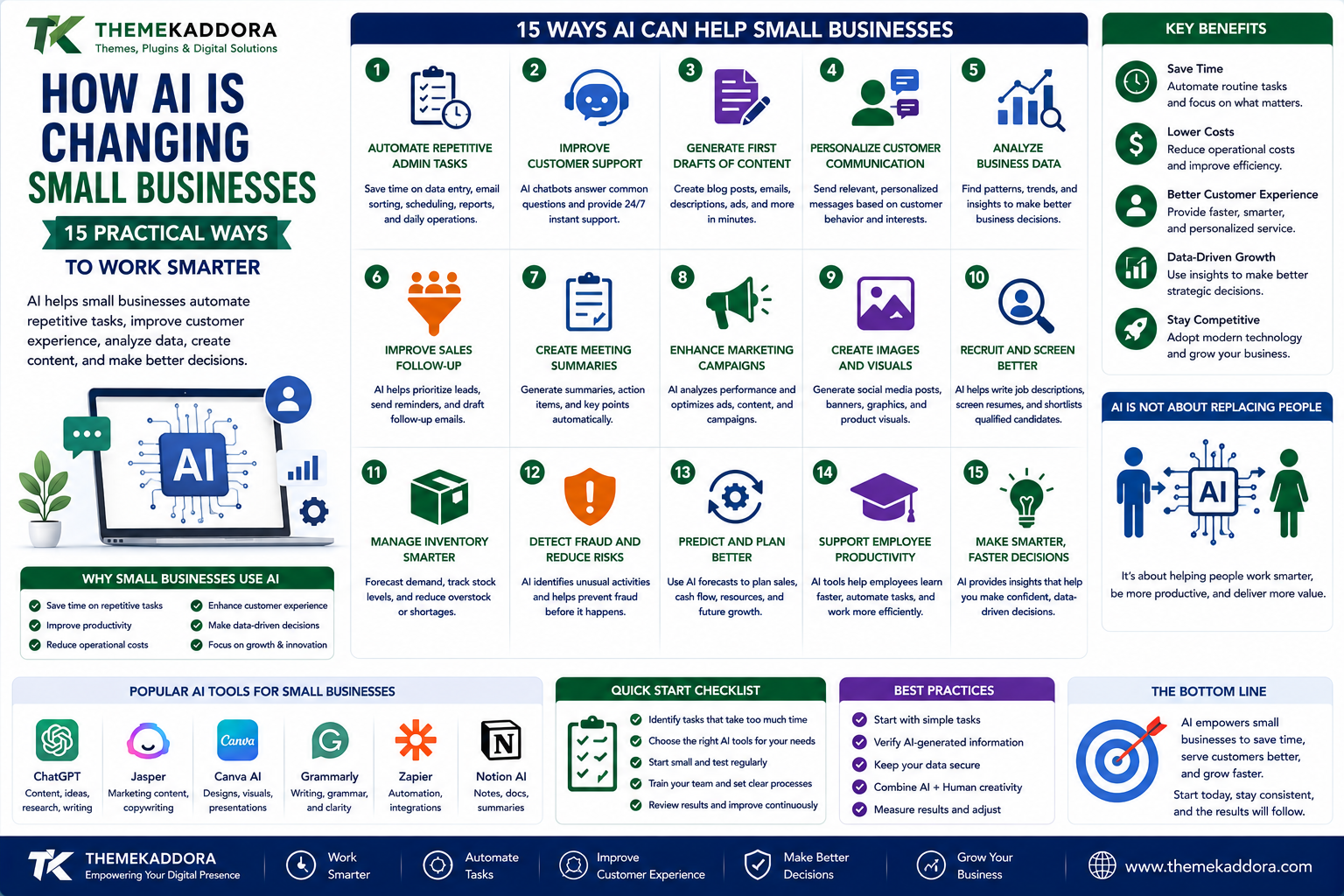
How AI Is Changing Small Businesses: 15 Practical Ways to Work Smarter
Introduction
Artificial intelligence is no longer limited to large technology companies.
Small businesses are increasingly using AI to handle repetitive work, analyze information, communicate with customers, create content, and improve everyday operations.
But AI isn't simply about replacing employees or automating everything.
For many small businesses, its biggest value is much simpler:
Helping people spend less time on repetitive tasks and more time on meaningful work.
A business owner who spends hours every week answering the same questions, product categories, preparing reports, organizing data, or writing routine emails may be able to use AI to reduce that workload.
The result can be more time for:
Customers
Sales
Strategy
Product development
Employee management
Business growth
Let's look at practical ways AI can support a small business.
1. Automate Repetitive Administrative Tasks
Small businesses often lose significant time performing repetitive tasks.
Examples include:
Data entry
Document organization
Email classification
Report preparation
Meeting summaries
Appointment management
Information extraction
AI can assist with many of these activities.
The goal isn't necessarily to remove humans from the process.
Instead, AI can handle repetitive parts while employees focus on tasks requiring judgment.
2. Improve Customer Support
Customer support is one of the most visible applications of AI.
AI-powered assistants can help answer common questions such as:
What are your business hours?
How do I place an order?
What is your return policy?
Where is my order?
What services do you provide?
More complex issues can then be transferred to human staff.
This creates a combination of:
AI for routine questions
Humans for complex situations
3. Generate First Drafts of Content
Businesses constantly need content.
Examples include:
Blog posts
Product descriptions
Email drafts
Social media captions
Advertisements
FAQs
Internal documentation
AI can create initial drafts that employees can review, edit, and improve.
This can reduce the time required to move from a blank page to a usable draft.
4. Personalize Customer Communication
Customers don't always want generic messages.
AI can help businesses organize information and generate more relevant communication based on factors such as:
Previous purchases
Customer interests
Product categories
Engagement
Customer stage
For example, an ecommerce business might recommend products related to previous purchases.
Personalization should still respect privacy requirements and customer expectations.
5. Analyze Business Data
Small businesses generate data every day.
This can include:
Sales
Orders
Website traffic
Marketing performance
Customer inquiries
Inventory
Expenses
AI can help identify patterns within this information.
For example:
Which products are selling fastest?
Which marketing channels generate the most leads?
Which months produce the highest revenue?
Instead of manually reviewing large datasets, business owners can use AI-assisted analysis to identify useful patterns faster.
6. Improve Sales Follow-Up
Sales teams frequently lose opportunities because follow-ups are delayed.
AI can help organize leads and identify potential next actions.
For example:
New Lead
↓
Qualification
↓
Follow-Up
↓
Proposal
↓
Decision
AI can assist with reminders, summaries, prioritization, and draft communication.
The sales professional still makes the important decisions.
7. Create Meeting Summaries
Meetings can produce valuable information, but manually documenting everything takes time.
AI-assisted meeting tools can help create:
Summaries
Action items
Key decisions
Follow-up points
This can make it easier for employees to remember what was agreed upon.
Businesses should ensure that meeting recording and transcription practices comply with applicable laws and participant expectations.
8. Improve Internal Knowledge Management
As businesses grow, information becomes scattered.
It may exist across:
Documents
Emails
Knowledge bases
Spreadsheets
Support systems
Internal websites
AI can help employees find information more efficiently when connected to properly managed business knowledge sources.
For example, an employee might ask:
"What is our standard process for handling a refund request?"
Instead of searching through multiple documents, an AI system could help locate the relevant information.
9. Assist With Market Research
Businesses need to understand their markets.
AI can help organize and summarize information about:
Customer feedback
Competitor positioning
Industry trends
Product reviews
Survey responses
However, AI-generated research should be verified.
AI can summarize information quickly, but businesses should not automatically assume every generated claim is accurate.
10. Improve Product Descriptions
Ecommerce businesses may have hundreds or thousands of products.
Writing unique descriptions manually can take significant time.
AI can help create structured first drafts using information such as:
Product specifications
Features
Materials
Use cases
Benefits
Human review remains important to ensure the final information is accurate.
11. Support Hiring and Recruitment
AI can assist with administrative parts of recruitment.
For example:
Organizing applications
Summarizing resumes
Creating interview questions
Drafting job descriptions
Scheduling interviews
However, hiring decisions involve people and can have significant consequences.
Businesses should be careful about using automated systems to make decisions that could unfairly disadvantage candidates.
AI should support responsible recruitment rather than replace thoughtful human evaluation.
12. Improve Inventory Planning
Inventory problems can hurt businesses in two directions.
Too much inventory:
Money gets tied up in stock.
Too little inventory:
Customers can't buy what they want.
AI-assisted forecasting can analyze historical sales and other relevant information to help businesses estimate future demand.
Forecasts are not guarantees.
Unexpected events can still change customer behavior.
13. Automate Document Processing
Businesses receive large amounts of information through documents.
Examples include:
Invoices
Purchase orders
Forms
Contracts
Receipts
Applications
AI can assist with extracting structured information from documents.
For example:
Invoice
→ Vendor
→ Invoice number
→ Date
→ Amount
→ Tax
→ Line items
This can reduce manual data entry.
Sensitive documents should be handled using appropriate security and privacy controls.
14. Create Business Reports Faster
Managers often need regular reports.
Examples include:
Sales reports
Marketing reports
Customer reports
Inventory reports
Operational reports
AI can help summarize large amounts of business information into easier-to-understand explanations.
Instead of simply presenting:
Revenue: ₹15,00,000
a useful analysis might explain:
Revenue increased compared with the previous period, with the largest contribution coming from a particular product category.
The business owner can then investigate the underlying data.
15. Help Employees Learn New Skills
AI can act as an on-demand learning assistant.
Employees can use it to:
Explain unfamiliar concepts
Create practice exercises
Summarize documentation
Generate examples
Brainstorm solutions
Review drafts
This can make learning more accessible.
However, employees should still use authoritative sources for critical technical, legal, financial, medical, or regulatory information.
AI Doesn't Mean Full Automation
One of the biggest misconceptions about AI is:
"If AI can do something, humans should stop doing it."
That's not necessarily true.
Some tasks are highly repetitive and suitable for automation.
Others require:
Judgment
Empathy
Creativity
Accountability
Context
Human relationships
The best AI implementations often combine both.
AI handles repetitive work.
Humans handle decisions and relationships.
Start With Problems, Not AI
Businesses sometimes make the mistake of asking:
"Where can we use AI?"
A better question is:
"Where are we wasting time?"
Look for processes that are:
Repetitive
Time-consuming
Rule-based
Data-heavy
Frequently delayed
Prone to manual errors
These can be strong candidates for AI assistance.
Create an AI Opportunity Map
Make a list of business processes.
For each process, identify:
Task
What is being done?
Frequency
How often is it performed?
Time
How long does it take?
Complexity
Does it require human judgment?
Risk
What happens if AI makes a mistake?
AI Potential
Could AI assist, automate, summarize, classify, or recommend?
This helps prioritize useful AI projects.
AI and Business Automation
AI becomes even more powerful when combined with automation.
Consider this example:
Customer submits inquiry
↓
AI identifies topic
↓
CRM creates lead
↓
Lead is assigned to salesperson
↓
AI generates summary
↓
Salesperson receives notification
↓
Follow-up is scheduled
This isn't simply an AI chatbot.
It's an automated business workflow.
AI + ERP Systems
AI can also complement ERP platforms.
For example, AI can help analyze:
Sales
Inventory
Purchasing
Finance
HR
Operations
An ERP system stores structured business information.
AI can help interpret that information.
The combination can provide both:
Operational data
and
Intelligent analysis
AI + CRM
CRM systems contain valuable customer information.
AI can assist with:
Lead prioritization
Customer summaries
Follow-up suggestions
Sales forecasting
Email drafting
Customer segmentation
This can help sales teams spend more time talking to customers and less time organizing information.
AI Doesn't Eliminate the Need for Good Data
This is a critical point.
AI cannot magically fix poor business information.
If your data is:
Incomplete
Incorrect
Duplicated
Outdated
Poorly structured
AI-generated analysis may also be unreliable.
Before implementing sophisticated AI systems, improve the quality of your underlying data.
Protect Business Data
AI adoption should include security planning.
Before sending business information to an AI service, understand:
What data is being processed
Where it is processed
How it is stored
Who can access it
What privacy controls exist
Whether the service uses data for training
What contractual protections apply
Avoid sending highly sensitive information to AI systems without understanding the applicable privacy and security implications.
Verify AI-Generated Information
AI systems can make mistakes.
They may produce:
Incorrect facts
Outdated information
Misinterpretations
Invented references
Incorrect calculations
For important business decisions, AI output should be reviewed.
The higher the risk, the stronger the verification process should be.
How Small Businesses Can Start With AI
You don't need to automate your entire company.
Start with one process.
For example:
Customer FAQ
or
Meeting summaries
or
Content drafts
or
Report summaries
Measure the result.
Then expand.
A Simple AI Implementation Framework
Use this process:
Step 1 — Identify
Find a repetitive business problem.
Step 2 — Evaluate
Determine whether AI can realistically help.
Step 3 — Test
Run a small pilot.
Step 4 — Measure
Track time saved, quality, cost, and business impact.
Step 5 — Review
Identify errors and risks.
Step 6 — Improve
Adjust the workflow.
Step 7 — Scale
Expand only when the process works reliably.
Common AI Mistakes Businesses Make
Using AI Just Because It's Trending
Technology should solve a real business problem.
Automating High-Risk Decisions Too Quickly
Human oversight may be necessary.
Ignoring Data Quality
Poor data produces unreliable results.
Sharing Sensitive Information Carelessly
Understand privacy and security before using external AI services.
Expecting Perfect Output
AI needs appropriate review.
Measuring Activity Instead of Results
The goal isn't to use more AI.
The goal is to improve the business.
AI Business Adoption Checklist
Before introducing AI, ask:
What problem are we solving?
How much time does the current process consume?
Can AI realistically improve it?
What data will AI access?
Is that data sensitive?
What happens if AI makes a mistake?
Who reviews the output?
How will success be measured?
Can the workflow be reversed if needed?
Why ThemeKaddora Is Worth Exploring
ThemeKaddora provides WordPress plugins and digital products designed for website owners, developers, agencies, and businesses.
Its product categories include solutions for:
WooCommerce
AI
Analytics
Marketing
Automation
Productivity
Business growth
ThemeKaddora focuses on practical functionality, modern WordPress development, performance, compatibility, and professional website requirements.
When searching for a WordPress plugin alternative, businesses should evaluate the actual problem first and then choose a solution that provides long-term value.
Final Thoughts
AI is changing how businesses work, but the biggest opportunity isn't simply replacing human tasks.
It's redesigning workflows.
A small business can use AI to reduce repetitive work, improve customer communication, analyze information, support employees, and make better use of its existing data.
But successful AI adoption starts with a simple principle:
Don't start with the technology. Start with the problem.
Find the repetitive tasks that consume time.
Find the information that takes too long to analyze.
Find the customer questions that employees answer repeatedly.
Then determine whether AI can make those processes faster, better, or more scalable.
The businesses that benefit most from AI won't necessarily be the ones using the most AI.
They'll be the ones using it where it creates measurable value.
Frequently Asked Questions
What is AI for small business?
AI for small business refers to using artificial intelligence to assist with tasks such as customer support, data analysis, content creation, automation, sales, reporting, and business operations.
Can small businesses afford AI?
Many AI services are available at different price points, but businesses should evaluate the total cost against the actual time saved or value created.
Will AI replace small business employees?
AI can automate certain tasks, but many business activities still require human judgment, relationships, creativity, and accountability.
What is the easiest way to start using AI?
Start with a low-risk, repetitive task such as drafting content, summarizing meetings, organizing information, or answering frequently asked questions.
Can AI analyze business data?
Yes. AI can help summarize and identify patterns in business data, but important conclusions should be checked against the underlying data.
Is AI-generated content always accurate?
No. AI can produce incorrect or outdated information, so important content should be reviewed before publication or use.
Should businesses put confidential data into AI tools?
Businesses should first understand the service's privacy, security, retention, and data-use policies and ensure their use complies with applicable obligations.
Can AI work with ERP systems?
Yes. AI can complement ERP systems by analyzing operational information and generating summaries, predictions, or recommendations.
Can AI work with CRM software?
Yes. AI can assist with lead prioritization, customer summaries, sales analysis, follow-up suggestions, and other CRM-related workflows.
Why choose Themekaddora?
Themekaddora provides lightweight, responsive, SEO-friendly WordPress themes with fast performance, WooCommerce compatibility, flexible customization, accessibility-conscious design, modern templates, regular updates, and professional support—providing a strong foundation for businesses building digital products and product-focused websites.
Comments (0)