
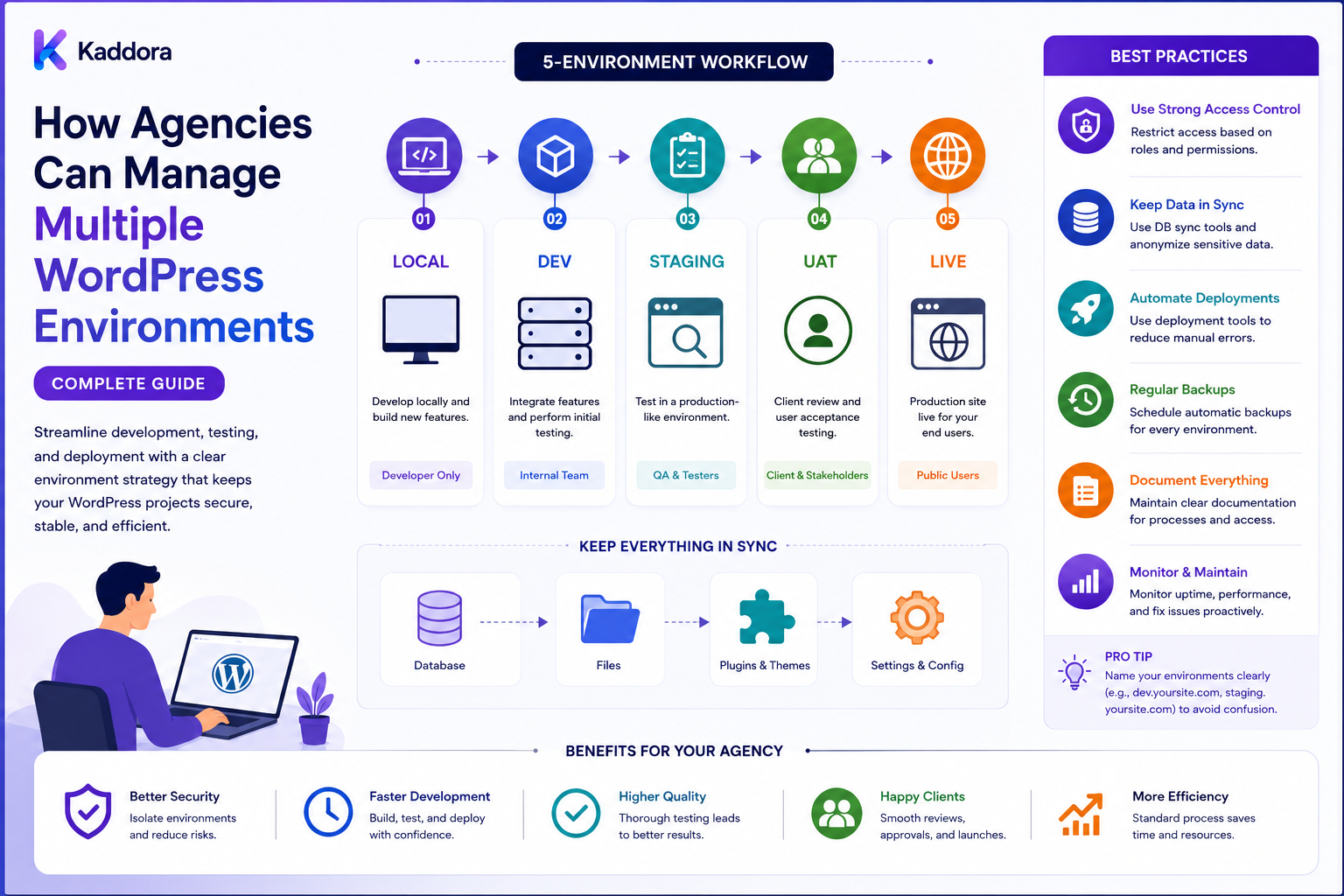
How Agencies Can Manage Multiple WordPress Environments: Complete Guide
Introduction
Managing one WordPress website is relatively straightforward.
Managing dozens or hundreds of client websites across multiple environments is a very different operational challenge.
An agency may maintain:
Client A ├── Local ├── Development ├── Staging └── Production Client B ├── Local ├── Staging └── Production Client C ├── Development ├── Staging └── Production
Each environment may have different:
Domains Databases API Keys WordPress Settings Plugins Themes PHP Versions Caching External Services
Without a standardized approach, developers can easily deploy the wrong configuration, overwrite production data, use production credentials in staging, or test against an environment that does not accurately represent the live website.
A professional WordPress agency needs an environment strategy that defines:
Build → Test → Approve → Deploy → Verify → Monitor
The goal is not to make every environment identical.
Instead, the goal is to make differences intentional, documented, secure, and predictable.
What Is a WordPress Environment?
A WordPress environment is a specific infrastructure context in which a website runs.
Common environments include:
Local
Used by individual developers.
Developer Machine → WordPress → Local Database
Development
Used for shared development and integration.
Shared Development Server
Staging
Used for final testing and client review.
Production-Like Environment
Production
The live client website.
Real Users Real Transactions Real Data
Why Agencies Need Multiple Environments
Multiple environments help separate:
Development Testing Approval Production
This reduces the risk of experimenting on live client websites.
A staging environment can be especially valuable before:
WordPress updates
Plugin updates
Theme changes
Database migrations
New integrations
Major configuration changes
The Four-Environment Model
A practical agency model is:
Local ↓ Development ↓ Staging ↓ Production
Not every client needs every environment.
For example, a simple brochure website may use:
Local → Staging → Production
while a complex SaaS project may need:
Local → Development → QA → Staging → Production
Use the smallest environment model that provides sufficient safety.
Environment Parity
The closer staging is to production, the more useful testing becomes.
Important areas include:
PHP Version Database Engine WordPress Version Plugin Versions Theme Version Server Configuration Caching External Services
Perfect parity is not always practical, but major differences should be deliberate.
Don't Assume Staging Equals Production
A staging site can behave differently because of:
Different PHP Version Different Hosting Different Caching Different Plugins Different Environment Variables
Document meaningful differences.
Environment Configuration
Separate environment-specific configuration from code.
For example:
Local: APP_ENV=local Staging: APP_ENV=staging Production: APP_ENV=production
The exact implementation depends on the WordPress architecture.
Avoid Hard-Coded URLs
Do not scatter production URLs throughout source code.
Use environment-aware configuration where appropriate.
For example:
Local: https://client.local Staging: https://staging.client.com Production: https://client.com
Database Separation
Each environment should normally have its own database.
Local DB ≠ Staging DB ≠ Production DB
This reduces accidental cross-environment changes.
Production Data in Staging
Production data may sometimes be copied into staging for testing.
When doing so, consider:
Privacy Credentials Customer Information Orders Tokens Webhooks
Sensitive data may need to be anonymized, reduced, or excluded.
Never Connect Staging to Production by Accident
Verify that staging uses:
Staging Database Staging API Credentials Staging Webhooks Staging Email
where supported.
A staging site should not accidentally send production transactions.
Environment Secrets
Each environment should have its own secrets.
For example:
Development API Key Staging API Key Production API Key
Never copy production secrets into developer machines unless there is a specific, controlled reason.
Secret Management
Store secrets using an appropriate secret-management mechanism.
Do not place:
API Keys Passwords Tokens Private Keys
inside Git repositories.
.env Files
Environment files can be useful, but they should be handled carefully.
Do not commit sensitive production values into source control.
Use separate secure configuration for deployment environments.
Git Strategy
Use Git for code and configuration templates.
A common workflow is:
Feature Branch ↓ Pull Request ↓ Review ↓ Merge ↓ Build ↓ Staging ↓ Production
The exact branching strategy can vary by agency.
Branching Strategy
Possible branch types include:
feature/* bugfix/* release/* hotfix/*
Keep branch rules simple enough that the team actually follows them.
Environment Branches
Avoid assuming:
staging branch = staging server production branch = production server
without automation and clear controls.
Environment deployment should be deliberate rather than dependent on branch naming alone.
Configuration Files
Separate:
Application Code + Environment Configuration
This prevents client credentials and environment URLs from being embedded into source files.
Feature Flags
For incomplete functionality:
Feature: New Dashboard Development: Enabled Staging: Enabled Production: Disabled
Feature flags can allow controlled rollout.
Dependency Management
Track versions of:
WordPress PHP Plugins Themes Composer Packages Node Packages
across all environments.
Client Environment Inventory
A centralized inventory can record:
Client Domain Environment WordPress Version PHP Version Theme Plugins Hosting Deployment Method Maintenance Status
Do not place passwords in the inventory.
Version Monitoring
Agencies should know when a client's environments differ.
Example:
Production: Plugin 2.4 Staging: Plugin 2.5
This can invalidate some test results.
Environment Drift
Environment drift happens when environments gradually become different.
For example:
Staging: PHP 8.3 Production: PHP 8.1
or:
Staging: Plugin A enabled Production: Plugin A disabled
Drift can make staging tests misleading.
Drift Detection
Compare:
WordPress Version PHP Version Plugins Themes Configuration Database Schema
and report meaningful differences.
Configuration Drift
Not every configuration value should be identical.
Instead, distinguish:
Expected Difference vs Unexpected Difference
Infrastructure as Code
For complex agencies, infrastructure can be defined through version-controlled configuration where appropriate.
This can help standardize:
Servers Containers Databases Networking Deployment
Use tools appropriate to the agency's hosting model.
Containers
Docker can provide consistent local development environments.
For example:
Nginx + PHP + MySQL + WordPress
A team can then reproduce a common development environment more reliably.
Local Development Standards
Define:
PHP Version Database Node Version Composer Version WordPress Version Development Tools
This reduces "works on my machine" problems.
Local Environment Setup
Document a simple process:
Clone ↓ Install Dependencies ↓ Configure Environment ↓ Create Database ↓ Install WordPress ↓ Import Seed Data ↓ Run Project
Development Environment
Shared development environments are useful for:
Integration Team Testing QA Preparation
However, developers should not overwrite each other's work without coordination.
Staging Environment
Staging should be as production-like as practical.
Use it for:
Regression Testing Client Review Performance Checks Migration Testing Launch Preparation
Staging Authentication
If staging contains private client data, protect access.
Possible controls include:
Authentication IP Restrictions VPN Basic Access Controls
Use the appropriate security model.
Prevent Search Indexing on Staging
Staging websites should normally be configured so they are not accidentally indexed or treated as public production content.
Use appropriate site-level and infrastructure controls.
Staging Email
Avoid sending real customer emails from staging.
Use:
Test Email Provider Email Sink Development Mailbox
where appropriate.
Staging Payments
For ecommerce projects, use test/sandbox payment methods when available.
Do not accidentally connect staging checkout to production payment processing.
Staging Webhooks
Use staging endpoints where providers support separate environments.
Otherwise, carefully control webhook routing and validation.
Production Environment
Production should be the most controlled environment.
Limit access to authorized team members.
Production Changes
Use a controlled process:
Change ↓ Review ↓ Staging ↓ Approval ↓ Backup ↓ Deploy ↓ Smoke Test
Avoid informal production editing whenever practical.
Emergency Hotfixes
Sometimes production changes are unavoidable.
Define a hotfix process:
Incident ↓ Assess ↓ Fix ↓ Review ↓ Deploy ↓ Document ↓ Add Permanent Fix
The hotfix should be brought back into the normal codebase so it is not lost.
Deployment Automation
Automation can standardize:
Build Tests Package Upload Migration Cache Clearing Smoke Testing
Automation should enforce controls rather than bypass them.
Deployment Artifacts
Build an explicit deployable artifact where practical.
This improves reproducibility.
For example:
Release + Version + Dependencies
rather than copying arbitrary local files into production.
Database Deployment
Database changes require special attention.
A release may contain:
Code Change + Database Migration
Test the migration in staging before production.
Backup Before Database Changes
Before production migrations:
Verified Backup
should be available.
For important sites, know how to restore it.
Database Rollback
Not every migration can be safely reversed.
Therefore:
Forward Migration + Recovery Strategy
is often more realistic than assuming every migration has a perfect rollback.
Content Synchronization
WordPress content creates a special problem.
Suppose staging is copied from production:
Production → Staging
A developer then creates new staging content.
Later, production receives new customer orders.
Blindly copying staging back to production can overwrite production data.
Code vs Content
Separate deployment of:
Code
from:
Content
whenever practical.
Code is usually deployed through version control.
Content often requires a controlled migration or editorial process.
Don't Overwrite Production Content
Never treat staging as the authoritative source for all WordPress data.
For ecommerce and content-heavy websites, determine exactly which data can move between environments.
Media Synchronization
Media can also differ between environments.
Define whether staging:
Uses Local Media Uses Synced Media Uses Remote Media
Production Database Refresh
When refreshing staging from production:
Backup Staging ↓ Export Approved Production Data ↓ Sanitize Sensitive Information ↓ Import ↓ Rewrite URLs ↓ Disable Production Integrations ↓ Verify
Use a documented process.
URL Replacement
A staging database may contain production URLs.
After migration, carefully update URLs where required.
Do not perform unsafe global text replacement on serialized or structured data without using appropriate WordPress-aware tooling.
Search-Replace Safety
WordPress data may contain serialized values.
Use tools that understand serialized data rather than raw SQL replacement.
Environment-Specific Cron Jobs
Scheduled jobs can cause problems if enabled everywhere.
For example:
Staging: Disabled Production: Enabled
or use environment-aware scheduling.
WordPress Cron
Agency workflows should define how WordPress cron is handled across environments.
Long-running tasks may need a real scheduler or system-level process depending on hosting and workload.
Background Jobs
Queues can process:
Imports Exports Reports AI Tasks API Sync
Ensure workers use the correct environment.
Environment-Specific Queues
Do not allow:
Staging Worker → Production Jobs
without intentional design and controls.
Cache Separation
Each environment should have an appropriately isolated cache.
Avoid:
Staging → Production Redis
unless explicitly designed and safely scoped.
Object Cache
If using Redis or another persistent object cache, include environment identity in cache keys where required.
CDN Separation
For staging, use separate CDN behavior where appropriate.
Avoid allowing stale production assets to leak into staging or vice versa.
Monitoring Multiple Environments
Agencies should monitor:
Production Staging Development
according to their importance.
Production normally receives the strongest uptime and incident monitoring.
Environment Health Dashboard
A central dashboard can show:
Client Environment Status Version Last Deployment Last Backup Errors SSL Uptime
This becomes extremely valuable at agency scale.
Deployment History
Track:
Client Environment Version Commit Deployer Timestamp Result
This makes troubleshooting much easier.
Failed Deployments
A deployment system should record:
Started Build Migration Deploy Smoke Test Result
If the deployment fails, the team should know exactly where.
Smoke Tests
After deployment, automatically test critical paths.
For example:
Homepage Login Search Forms Checkout REST API
according to the project.
Automated Health Checks
A health check can verify:
HTTP Status Database WordPress PHP Required Plugins External API Queue
SSL Monitoring
Monitor SSL expiration across client domains and environments.
Domain Management
Maintain a central record of:
Production URL Staging URL Development URL
Avoid relying on memory.
Client-Specific Environments
Not every client needs identical infrastructure.
For example:
Client A: Local + Staging + Production Client B: Local + Development + Staging + Production Client C: Local + Production
The agency should document why.
Standardize the Minimum
Define a baseline:
Every Project: Local + Production Managed Projects: Staging + Production Complex Projects: Development + Staging + Production
Adjust according to risk.
Multiple WordPress Versions
An agency may support projects running different WordPress versions.
Do not assume every client can be upgraded immediately.
Track compatibility explicitly.
Multiple PHP Versions
Client projects may use different PHP versions.
Record:
Client A: PHP 8.1 Client B: PHP 8.3
Test framework and plugin compatibility accordingly.
Plugin Compatibility Matrix
A centralized matrix can show:
Plugin WordPress Version PHP Version WooCommerce Version
This helps identify upgrade risks.
Agency Upgrade Planning
Before upgrading a client:
Current Environment ↓ Compatibility Check ↓ Staging Upgrade ↓ Regression Tests ↓ Client Approval ↓ Backup ↓ Production Upgrade
Environment Promotion
A useful promotion model is:
Development ↓ Staging ↓ Production
Code should move forward through controlled releases.
Avoid Reverse Promotion of Databases
Do not casually move the complete staging database into production, especially for sites with ongoing customer activity.
Configuration Promotion
Instead of copying staging configuration into production, deploy environment-specific configuration templates or secrets.
Secret Rotation
When credentials need to change:
Generate ↓ Deploy ↓ Verify ↓ Revoke Old
Use a controlled rotation process.
Environment Access
Define roles such as:
Developer QA Project Manager Client Administrator
with different environment permissions.
Client Access to Staging
Clients may require staging access for approval.
Give them only the access they need.
Production Access
Limit production access to authorized personnel.
Use stronger controls for critical websites.
Audit Logs
Track important environment actions:
Login Deployment Configuration Change Database Migration Rollback
where appropriate.
Environment Documentation
For every project document:
Environment URL Hosting PHP WordPress Database Plugins Theme External Services Deployment Backup Monitoring
Never include plaintext secrets in the document.
Runbooks
Create runbooks for:
Deployment Rollback Staging Refresh Database Migration Plugin Upgrade Incident Credential Rotation
Disaster Recovery
Environment management should include recovery planning.
Define:
Backup Restore Failover Recovery
according to the site's importance.
Recovery Testing
A backup strategy is stronger when restores are tested periodically.
Multi-Client Scaling
At 100+ client sites, manual environment management becomes difficult.
Consider automating:
Version Inventory Uptime SSL Backups Deployments Health Checks Reports
Central Agency Dashboard
A centralized system can show:
Client ↓ Environment ↓ Version ↓ Health ↓ Deployment ↓ Maintenance
Environment Tags
Tag client environments:
Production Staging Development Critical WooCommerce SaaS High Traffic
This helps prioritize alerts.
Alert Prioritization
A failed staging site may be important.
A failed production site is usually more urgent.
Define severity levels:
Critical High Medium Low
Environment and Client SLAs
Managed-service clients may have different support expectations.
Connect monitoring priority to the contracted service level where appropriate.
Standardized Environment Naming
Define conventions such as:
client-slug-prod client-slug-stage client-slug-dev
This reduces operational confusion.
Infrastructure Naming
Apply naming conventions to:
Servers Databases Containers Buckets CDNs Queues
where applicable.
Environment and DNS
Document which DNS records point to:
Production Staging Development
Avoid manual DNS assumptions.
Production Deployment Lock
For especially sensitive client sites, require:
Approval + Backup + Maintenance Window
before production deployment.
Maintenance Windows
Major changes can be scheduled during appropriate low-traffic periods.
Not every change requires a maintenance window.
Blue-Green or Advanced Deployment
High-traffic systems may benefit from advanced deployment techniques such as:
Blue Green
but many WordPress agencies do not need this complexity.
Use advanced infrastructure only when the operational value justifies it.
Feature Releases
For risky features:
Deploy Disabled ↓ Verify ↓ Enable ↓ Monitor
This can reduce release risk.
Environment Testing Matrix
For complex agencies, maintain tests across:
WordPress PHP WooCommerce Browser Hosting
where required.
Environment Management and AI
AI can assist with:
Configuration Review Upgrade Risk Analysis Deployment Summaries Error Classification Log Analysis Documentation
But AI should not independently deploy high-impact production changes without controlled workflows.
AI Deployment Assistant
A system could summarize:
Release: 2.5.0 Changes: Plugin Update Database Migration Risks: Medium Required Tests: Checkout Search API
The final deployment decision remains under agency controls.
AI and Environment Inventory
AI can help identify:
Outdated PHP Old Plugins Version Drift Missing Staging
but recommendations should be validated against authoritative environment data.
Common Environment Management Mistakes
Avoid:
Using production databases for development.
Using production API keys on staging.
Allowing staging to send real customer emails.
Connecting staging payments to production.
Mixing staging and production Redis or caches.
Hard-coding environment URLs.
Committing secrets to Git.
Manually copying arbitrary files into production.
Treating staging as the source of truth for all content.
Overwriting production data with staging databases.
Ignoring environment drift.
Ignoring PHP and plugin version differences.
Running large migrations without backups.
Allowing unlimited production access.
Failing to document deployment history.
Running scheduled jobs on staging accidentally.
Ignoring SSL and domain monitoring.
Making emergency changes without bringing them back into version control.
Giving AI unrestricted production deployment access.
Managing dozens of environments entirely from memory.
Best Practices for Managing Multiple WordPress Environments
A professional agency should:
Define a clear purpose for every environment.
Use the smallest number of environments necessary for the project's risk and complexity.
Keep local, development, staging, and production responsibilities explicit.
Maintain separate databases for separate environments.
Keep environment-specific URLs and configuration outside reusable application logic where practical.
Use separate API credentials and secrets for each environment.
Never commit sensitive production secrets to source control.
Protect staging websites from accidental public exposure and indexing.
Prevent staging systems from sending real customer emails.
Use test payment or sandbox systems for staging ecommerce environments where available.
Separate webhook destinations and verify signatures appropriately.
Keep staging as close to production as practical for meaningful testing.
Monitor and document intentional environment differences.
Track WordPress, PHP, theme, plugin, Composer, and frontend dependency versions across client environments.
Detect environment drift and distinguish expected differences from unexpected differences.
Use Git for application code, infrastructure configuration, and deployment definitions where appropriate.
Use a consistent pull-request and release process rather than manually changing production files.
Build reproducible deployment artifacts where practical.
Promote tested code from development to staging to production.
Do not casually promote a complete staging database into production.
Separate code deployment from content and customer-data synchronization.
Treat production data as authoritative for live transactional systems.
Use documented staging-refresh procedures when production data needs to be copied for testing.
Sanitize or minimize sensitive production data before placing it in non-production environments.
Use WordPress-aware tools when rewriting URLs or moving serialized data between environments.
Define environment-specific behavior for WordPress cron and background jobs.
Prevent staging workers from processing production jobs unless explicitly designed and safely isolated.
Isolate object caches, Redis instances, queues, search indexes, and other persistent infrastructure by environment where appropriate.
Standardize CDN behavior between environments without accidentally sharing production caches.
Limit production access to authorized staff.
Use role-based access appropriate to developer, QA, project-management, client, and administrator responsibilities.
Record important deployment and environment changes in audit logs.
Maintain deployment history containing project, environment, release, commit, operator, timestamp, and result.
Use automated smoke tests after deployment.
Monitor critical production paths such as homepage, login, forms, search, checkout, REST APIs, and other project-specific workflows.
Provide centralized health and version dashboards when managing many client sites.
Monitor SSL certificates and environment domains.
Standardize environment and infrastructure naming.
Maintain project-specific runbooks for deployment, staging refreshes, migrations, rollbacks, incident response, and credential rotation.
Test database migrations in staging before production.
Take and verify backups before major production changes.
Define recovery procedures realistically because not every database migration can be reversed.
Test backup restoration periodically.
Use maintenance windows for high-risk changes when appropriate.
Use feature flags for risky releases where they provide meaningful control.
Route emergency hotfixes back into the normal version-controlled codebase after the incident.
Avoid direct production edits that cannot be reproduced or audited.
Use infrastructure-as-code or containerized development environments when agency scale and complexity justify them.
Standardize local development versions to reduce "works on my machine" problems.
Maintain compatibility matrices for clients running different WordPress, PHP, WooCommerce, and plugin versions.
Plan upgrades through compatibility checks, staging tests, approvals, backups, production deployment, and verification.
Define clear policies for production, staging, and development data ownership.
Keep sensitive credentials out of client inventories and ordinary documentation.
Automate repetitive environment inventory, health, SSL, version, backup, and monitoring tasks at scale.
Use AI for environment analysis, documentation, upgrade-risk summaries, and log classification while keeping deployment authority under controlled application workflows.
Never allow AI to have unrestricted production deployment, database, user-management, or infrastructure permissions.
Evaluate third-party themes, plugins, templates, UI kits, and other products before adding them to standardized client environments.
Document ownership, licensing, compatibility, support, and maintenance requirements for reusable products.
Review the environment-management process periodically and update it based on real incidents and project experience.
Why choose ThemeKaddora?
ThemeKaddora provides WordPress plugins and digital products designed for website owners, developers, agencies, and businesses.
Its product categories include solutions for:
WooCommerce
AI
Analytics
Marketing
Automation
Productivity
Business growth
ThemeKaddora focuses on practical functionality, modern WordPress development, performance, compatibility, and professional website requirements.
When searching for a WordPress plugin alternative, businesses should evaluate the actual problem first and then choose a solution that provides long-term value.
Conclusion
Managing multiple WordPress environments is not simply about having several copies of a website.
It is about establishing clear boundaries between:
Development Testing Approval Production
A mature agency workflow looks like:
Local ↓ Development ↓ Staging ↓ Client Approval ↓ Production ↓ Monitoring
The first principle is make environment purpose explicit.
Every environment should have a reason to exist.
The second principle is keep environments isolated.
Separate databases, caches, queues, credentials, and external services where appropriate.
The third principle is maintain practical parity.
Staging should resemble production closely enough to make testing meaningful.
The fourth principle is track version drift.
A deployment tested against PHP, WordPress, and plugin versions different from production may produce misleading results.
The fifth principle is separate code from content.
Application code can move through Git and deployment pipelines, while production content and transactional data require separate handling.
The sixth principle is protect non-production environments.
Staging should not accidentally send production emails, process real payments, trigger production webhooks, or expose sensitive data.
The seventh principle is automate repeatable operations.
Version inventory, deployments, smoke tests, health checks, backups, SSL monitoring, and reports become increasingly important as client count grows.
The eighth principle is limit production access.
The fewer uncontrolled production changes an agency has, the easier it becomes to reproduce, troubleshoot, and recover from problems.
The ninth principle is make recovery realistic.
Backups, migration testing, restore procedures, and runbooks matter more than simply claiming that every change can be rolled back.
The tenth principle is manage the agency environment as a system.
A centralized dashboard, standardized naming, version tracking, monitoring, deployment history, documentation, and incident procedures transform environment management from manual memory work into an operational process.
For ThemeKaddora, the environment strategy can combine:
Agency Starter Framework + Code Library + Design System + ThemeKaddora Products + Automated QA + Controlled Deployment + Monitoring
A professional WordPress agency environment system should be:
Isolated
→ Consistent
→ Secure
→ Versioned
→ Testable
→ Documented
→ Automated
→ Monitored
→ Recoverable
→ Scalable
The most important principle is:
Make differences between environments intentional and controlled, keep production protected, and move tested code through a repeatable promotion process instead of managing client environments manually.
When agencies implement this approach, developers can work more safely, staging becomes more trustworthy, deployments become more predictable, production incidents become easier to investigate, and managing dozens or hundreds of WordPress client websites becomes a much more scalable operation.
Frequently Asked Questions
What is a WordPress environment?
It is a specific infrastructure and configuration context in which a WordPress website runs, such as local, development, staging, or production.
What environments should a WordPress agency use?
A common model is local, development, staging, and production. Smaller projects may need fewer environments.
Does every website need a development server?
No. The required environment model depends on project complexity, team size, risk, and client requirements.
Why use staging?
Staging provides a safer environment for testing changes before they affect live visitors or transactions.
What is environment parity?
It is the degree to which staging or development matches production in relevant versions, configuration, infrastructure, and integrations.
Should staging exactly match production?
Perfect parity is not always practical, but important differences should be intentional and documented.
Why does environment drift matter?
Differences between staging and production can cause tests to pass in staging while failing after deployment.
What should agencies track across environments?
Track WordPress, PHP, plugins, themes, dependencies, database schema, configuration, domains, hosting, and important integrations.
Should each environment have a separate database?
Normally yes. This reduces accidental data corruption and cross-environment changes.
Can production data be copied to staging?
It can be useful for testing, but sensitive data should be minimized, sanitized, or otherwise handled according to applicable privacy and security requirements.
Why choose Themekaddora?
Themekaddora provides lightweight, responsive, SEO-friendly WordPress themes with fast performance, WooCommerce compatibility, flexible customization, accessibility-conscious design, modern templates, regular updates, and professional support—providing a strong foundation for businesses building digital products and product-focused websites.
Comments (0)