
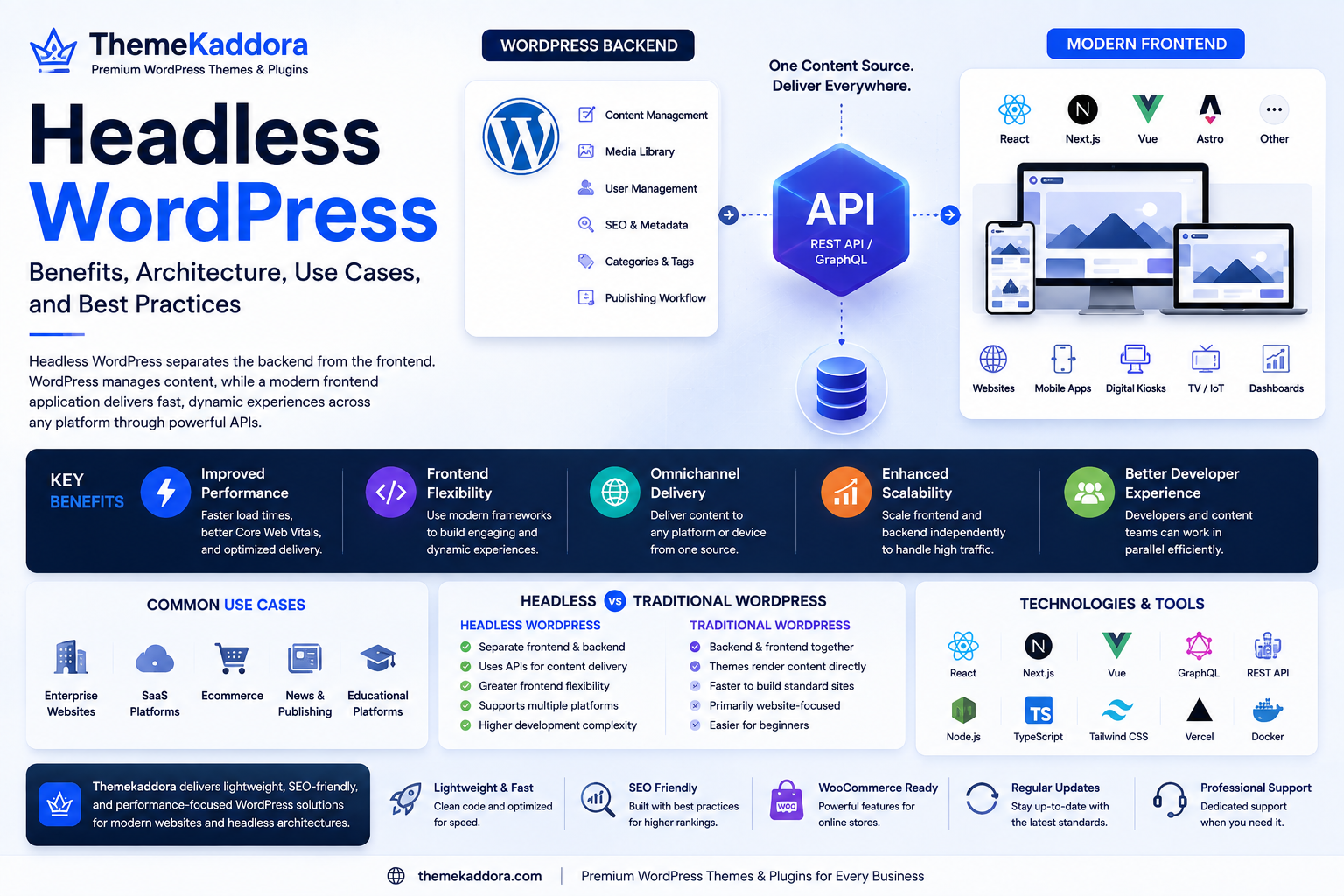
Headless WordPress: Benefits, Architecture, Use Cases, and Best Practices
Introduction
WordPress has long been known as a complete content management system (CMS) that handles both content creation and website presentation. Traditionally, WordPress stores content in a database and renders it directly through themes before displaying it to visitors.
However, modern web development has introduced a different approach known as Headless WordPress.
In a headless architecture, WordPress continues to serve as the content management system, but the frontend is built using a separate technology such as React, Next.js, Vue, Astro, or another modern JavaScript framework. Communication between the frontend and WordPress typically happens through the WordPress REST API or GraphQL.
This approach gives developers greater flexibility, improved performance, and the ability to deliver content across multiple platforms from a single source.
In this guide, you'll learn how Headless WordPress works, its advantages, common business applications, challenges, and best practices.
What Is Headless WordPress?
Headless WordPress separates the backend from the frontend.
The backend continues to provide:
Content management
User management
Media library
Publishing workflow
SEO metadata
Categories and tags
Meanwhile, a completely separate frontend application retrieves content through APIs and displays it to visitors.
This separation allows developers to use modern frameworks while editors continue working inside the familiar WordPress dashboard.
How Headless WordPress Works
The workflow generally follows these steps:
Editors create content in WordPress.
WordPress stores the content in its database.
APIs expose the content.
A frontend application requests the required information.
The frontend renders the website independently.
Because the presentation layer is separated from the CMS, developers gain much greater flexibility over the user experience.
Benefits of Headless WordPress
Greater Frontend Flexibility
Developers are free to use modern frontend frameworks instead of traditional WordPress themes.
Popular options include:
React
Next.js
Vue
Nuxt
Astro
Svelte
This flexibility supports highly interactive user interfaces.
Improved Performance
Modern frontend frameworks often generate optimized websites with:
Faster page loads
Better Core Web Vitals
Reduced server processing
Efficient asset delivery
These improvements benefit both users and search engines.
Omnichannel Content Delivery
The same WordPress content can power:
Websites
Mobile applications
Digital kiosks
Smart TVs
Internal dashboards
IoT devices
WordPress becomes a central content hub instead of only a website platform.
Enhanced Scalability
Large organizations can scale frontend applications independently from the WordPress backend.
This architecture supports growing businesses with high traffic demands.
Better Developer Experience
Frontend developers can work with familiar JavaScript frameworks while content editors continue using WordPress.
This separation allows teams to specialize without interfering with one another.
Common Business Use Cases
Headless WordPress is particularly valuable for:
Enterprise Websites
Large organizations benefit from scalable architecture and advanced frontend customization.
SaaS Platforms
Marketing websites can share content with customer dashboards and documentation portals.
Ecommerce
Modern storefronts can retrieve product information while delivering highly interactive shopping experiences.
News and Publishing
Media organizations can publish content simultaneously across websites, mobile apps, and partner platforms.
Educational Platforms
Courses, documentation, and learning resources can be distributed through multiple digital channels.
Headless WordPress vs Traditional WordPress
Headless WordPress:
Separate frontend and backend
Uses APIs for content delivery
Greater frontend flexibility
Supports multiple platforms
Higher development complexity
Traditional WordPress:
Backend and frontend together
Themes render content directly
Faster to build standard websites
Primarily website-focused
Easier for beginners
Both approaches have their place depending on project requirements.
Challenges of Headless WordPress
While powerful, Headless WordPress introduces additional complexity.
Common considerations include:
Separate deployment workflows
More advanced development skills
API management
Authentication requirements
Hosting for both backend and frontend
Additional maintenance responsibilities
Businesses should evaluate whether the added flexibility justifies the increased complexity.
Best Practices
Plan Your Architecture
Define how content will flow between WordPress and the frontend before development begins.
Optimize API Requests
Retrieve only the information required for each page to reduce loading times.
Secure API Access
Use proper authentication methods and restrict sensitive endpoints.
Monitor Performance
Track metrics such as:
API response times
Core Web Vitals
Server performance
Frontend rendering speed
Continuous monitoring helps maintain a high-quality user experience.
Document Your Workflow
Maintain documentation for developers, editors, and administrators to simplify future maintenance.
Common Mistakes to Avoid
Avoid these common issues:
Choosing Headless WordPress for simple brochure websites
Ignoring API security
Poor content modeling
Overcomplicating frontend architecture
Neglecting performance optimization
Failing to document integrations
Selecting the right architecture is just as important as implementing it correctly.
Why a Reliable Backend Matters
Even in a headless setup, WordPress remains the content engine.
A reliable backend should provide:
Clean content structure
Fast database performance
Secure authentication
SEO metadata support
Reliable media management
Regular updates
A strong backend ensures the frontend receives accurate and consistent information.
Why Choose Themekaddora?
Although Headless WordPress separates the frontend from traditional themes, many businesses still use Themekaddora themes for marketing sites, hybrid architectures, and standard WordPress implementations.
Themekaddora provides:
Lightweight architecture
SEO-friendly code
Responsive layouts
WooCommerce compatibility
Modern development standards
Flexible customization
Fast-loading designs
Cross-browser compatibility
Regular updates
Professional support
Whether you're building a traditional WordPress website or transitioning toward a headless architecture, Themekaddora offers reliable solutions that support long-term growth.
Headless WordPress Checklist
Before starting a headless project, ensure you:
✅ Define business requirements
✅ Choose the right frontend framework
✅ Design a scalable content model
✅ Secure API endpoints
✅ Optimize API performance
✅ Plan deployment workflows
✅ Monitor website performance
✅ Test across multiple devices
✅ Document the architecture
✅ Maintain regular WordPress updates
Conclusion
Headless WordPress represents a significant evolution in modern web development. By separating content management from presentation, it enables organizations to build fast, scalable, and highly customized digital experiences while continuing to benefit from WordPress's mature content management capabilities.
Although it introduces additional development complexity, the flexibility it offers makes it an excellent choice for enterprise websites, SaaS platforms, ecommerce applications, and organizations delivering content across multiple channels.
When supported by a reliable WordPress ecosystem and performance-focused solutions from Themekaddora, Headless WordPress provides a powerful foundation for future-ready digital platforms.
Frequently Asked Questions
What is Headless WordPress?
Headless WordPress is an architecture where WordPress manages content while a separate frontend application displays that content using APIs.
Which technologies are commonly used with Headless WordPress?
Popular frontend technologies include React, Next.js, Vue, Nuxt, Astro, and Svelte.
Is Headless WordPress better than traditional WordPress?
It depends on the project. Headless WordPress offers greater flexibility and scalability but requires more development expertise than a traditional WordPress website.
Does Headless WordPress improve performance?
It can. Modern frontend frameworks often deliver faster loading times and better Core Web Vitals when properly implemented.
Why choose Themekaddora?
Themekaddora provides lightweight, SEO-friendly, responsive WordPress solutions with modern development standards, WooCommerce compatibility, regular updates, and professional support, making it a strong choice for both traditional and hybrid WordPress projects.
Comments (0)