
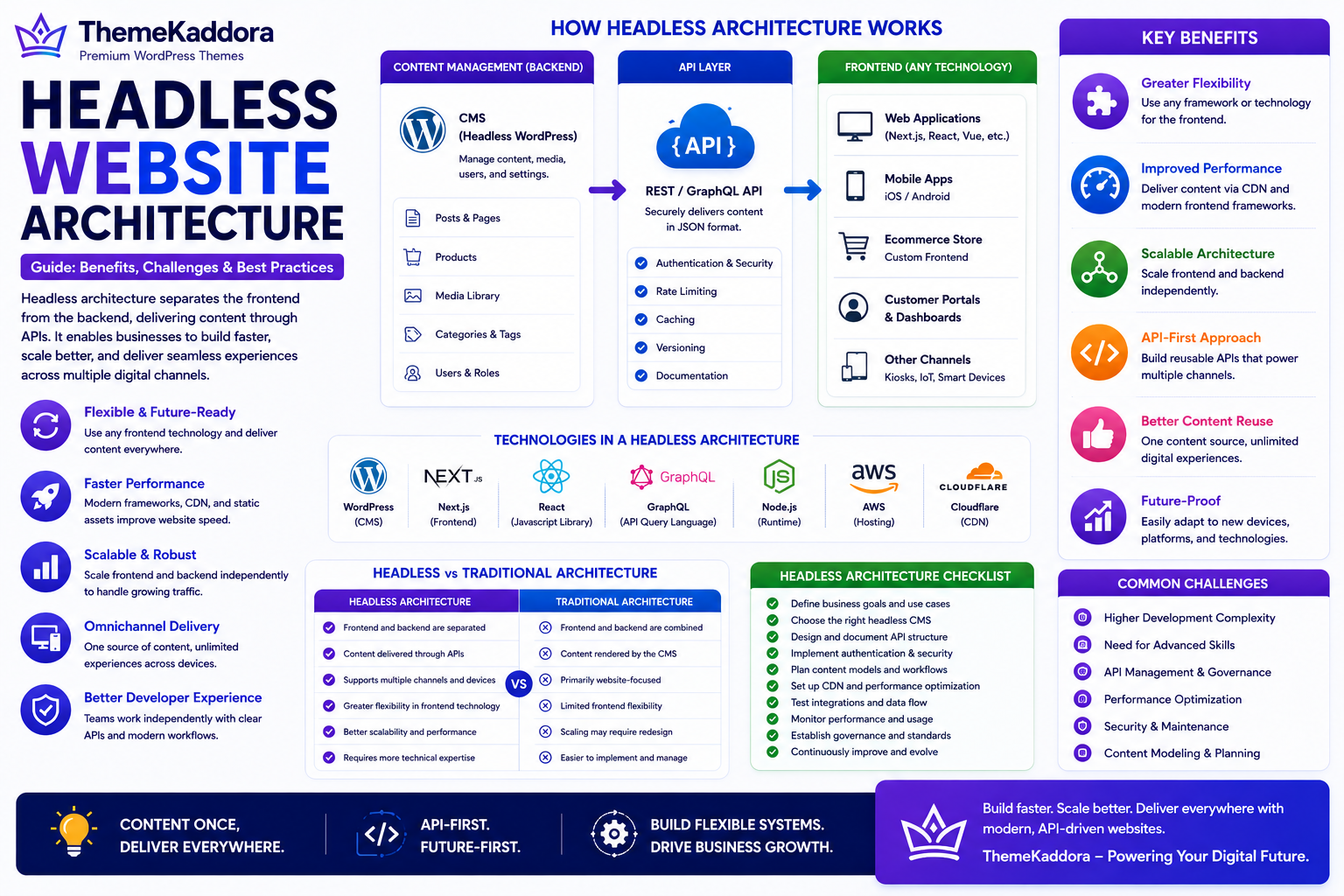
Headless Website Architecture Guide: Benefits, Challenges, and Best Practices
Introduction
Business websites have evolved far beyond simple collections of web pages. Today, organizations deliver content across websites, mobile apps, customer portals, kiosks, smart devices, and other digital channels.
Traditional website architecture often combines the frontend (what users see) and the backend (where content is managed) into a single system. While this approach remains suitable for many businesses, it can become limiting when organizations need greater flexibility or support multiple digital experiences.
Headless Website Architecture separates the frontend presentation layer from the backend content management system. Instead of tightly coupling design and content, the backend delivers information through APIs, allowing multiple frontends to consume the same content.
Whether you're running a WordPress website, an ecommerce platform, or an enterprise digital ecosystem, understanding headless architecture helps you evaluate whether it fits your long-term technology strategy.
What Is Headless Website Architecture?
Headless Website Architecture is an approach where the frontend and backend operate independently.
In a traditional website:
The CMS manages content.
The CMS also controls how content is displayed.
In a headless architecture:
The backend manages content.
APIs deliver that content.
Separate frontend applications display it.
This separation provides greater flexibility for developers and businesses.
How Headless Architecture Works
A typical headless setup includes:
Content Management System (CMS)
API layer
Frontend application
Database
Hosting infrastructure
CDN
Third-party integrations
The CMS stores content while APIs deliver it to websites, mobile apps, and other digital platforms.
Why Businesses Choose Headless Architecture
Organizations adopt headless architecture to:
Deliver content across multiple channels
Improve frontend flexibility
Support modern JavaScript frameworks
Improve scalability
Enable API-first development
Support digital transformation
Create consistent omnichannel experiences
The architecture allows content to be reused across multiple platforms.
Key Components of Headless Architecture
Backend CMS
Stores articles, pages, products, media, and other business content.
APIs
Provide secure communication between the backend and frontend applications.
Frontend
Displays content using technologies chosen by the development team.
Content Repository
Stores structured business information independently of presentation.
Integrations
Connect CRM systems, ecommerce platforms, marketing tools, analytics, and third-party services.
Security
Protect APIs, user authentication, and business data throughout the architecture.
Benefits of Headless Website Architecture
A headless approach helps businesses:
Improve flexibility
Support multiple digital channels
Increase scalability
Accelerate frontend development
Improve content reuse
Enable faster innovation
Support future technologies
Businesses gain more control over how content is delivered.
Potential Challenges
Organizations should also consider:
Higher development complexity
Greater technical expertise requirements
Additional infrastructure management
More complex deployment workflows
Increased API dependency
Headless architecture is not automatically the best choice for every website.
Headless vs Traditional Website Architecture
Headless Architecture
Traditional Architecture
Frontend and backend separated
Frontend and backend combined
Content delivered through APIs
Content rendered by the CMS
Greater frontend flexibility
Easier implementation
Supports multiple channels
Primarily website-focused
Better suited for complex ecosystems
Well-suited for many standard business websites
Requires more technical expertise
Simpler ongoing management
Best Practices
Evaluate business requirements first.
Design APIs carefully.
Prioritize security.
Optimize content models.
Monitor performance.
Document integrations.
Plan long-term scalability.
Headless Architecture Across Different Businesses
Small Businesses
Traditional WordPress websites are often sufficient, but headless architecture may become valuable as digital requirements grow.
Ecommerce Businesses
Deliver consistent product information across websites, mobile apps, marketplaces, kiosks, and customer portals.
SaaS Companies
Use headless architecture to power web applications, customer dashboards, developer portals, and documentation platforms.
Enterprise Organizations
Manage enterprise content across multiple brands, regions, languages, and digital channels using centralized APIs.
WordPress Websites
WordPress can function as a headless CMS by managing content while APIs deliver it to custom frontends, mobile applications, ecommerce experiences, and other digital platforms.
Headless Website Architecture Checklist
Before adopting headless architecture, make sure you:
✅ Define business goals
✅ Evaluate technical requirements
✅ Design secure APIs
✅ Select an appropriate CMS
✅ Plan frontend architecture
✅ Optimize content models
✅ Monitor system performance
✅ Document integrations
✅ Implement governance
✅ Plan for future scalability
Why Choose Themekaddora?
Many businesses continue to benefit from a traditional WordPress architecture, while others gradually adopt API-driven solutions.
Themekaddora WordPress themes provide:
Lightweight architecture
Fast loading performance
SEO-friendly code
Responsive layouts
WooCommerce compatibility
Flexible customization
Clean HTML5 and CSS3 standards
Accessibility-conscious design
Cross-browser compatibility
Regular updates
Professional support
Whether you're building a traditional WordPress website or planning future API integrations, Themekaddora themes provide a reliable foundation for scalable business websites.
Conclusion
Headless Website Architecture offers businesses greater flexibility by separating content management from presentation. This enables organizations to deliver consistent experiences across websites, mobile apps, customer portals, and emerging digital channels.
While headless architecture introduces additional complexity, it can provide significant long-term advantages for businesses with advanced digital requirements. Evaluating your goals, technical resources, and growth plans will help determine whether a headless approach is the right fit.
Frequently Asked Questions (FAQs)
What is Headless Website Architecture?
Headless Website Architecture separates the frontend presentation layer from the backend content management system, with APIs delivering content between them.
What are the benefits of headless architecture?
It improves flexibility, scalability, content reuse, API integration, and support for omnichannel digital experiences.
Is headless architecture suitable for every business?
No. Many businesses can successfully use traditional website architecture. Headless solutions are generally more appropriate for organizations with complex digital ecosystems or multi-channel content delivery needs.
Can WordPress be used as a headless CMS?
Yes. WordPress can manage content while exposing it through APIs, allowing developers to build custom frontend applications.
Why choose Themekaddora?
Themekaddora provides lightweight, SEO-friendly WordPress themes with responsive layouts, WooCommerce compatibility, fast performance, accessibility-conscious design, regular updates, and professional support—helping businesses build professional WordPress websites today while remaining ready for future API-driven growth.
Comments (0)