
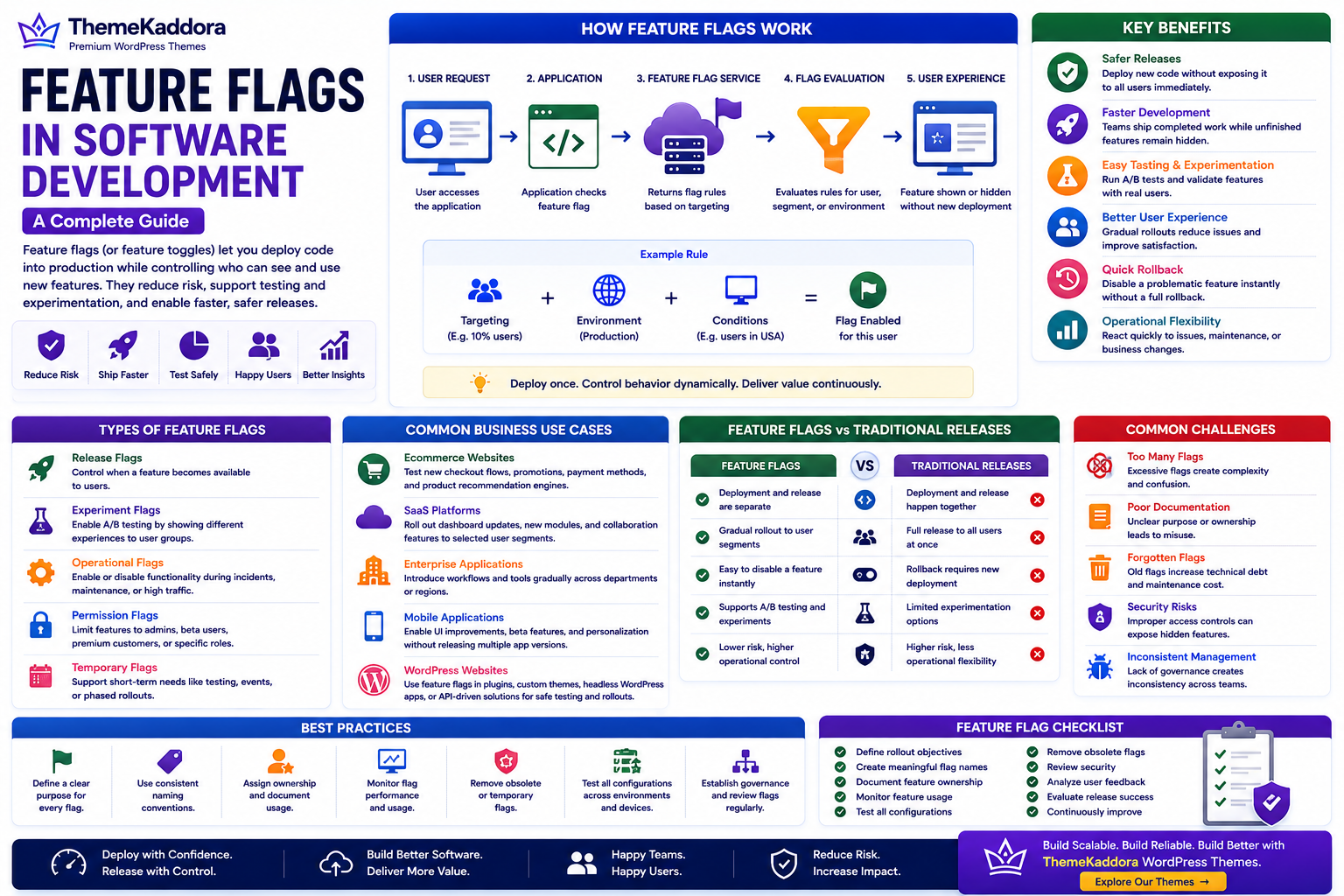
Feature Flags in Software Development: A Complete Guide
Introduction
Launching new software features has traditionally involved a difficult choice: release everything at once or delay deployment until every feature is complete. Both approaches can increase risk, especially for applications with large user bases.
Modern software development teams take a different approach. Instead of tying feature releases directly to deployments, they separate the two using Feature Flags.
Feature flags allow developers to deploy code into production while controlling who can access new functionality. A feature can remain hidden, be enabled for internal testing, released to a small group of users, or gradually rolled out to everyone.
This approach helps businesses reduce release risk, improve testing, and deliver software more confidently.
What Are Feature Flags?
Feature flags (also called feature toggles) are configuration settings that turn application features on or off without changing or redeploying code.
Instead of maintaining separate versions of an application, developers can control feature availability dynamically.
Examples include:
New user interface
Checkout improvements
Search enhancements
Beta features
Payment methods
Personalization tools
Feature flags provide flexibility throughout the software lifecycle.
How Feature Flags Work
A typical feature flag system includes:
Application code
Feature flag service
Configuration rules
User targeting
Monitoring
Analytics
When a user accesses an application, the feature flag determines whether a particular feature should be available.
Why Businesses Use Feature Flags
Organizations use feature flags to:
Reduce deployment risks
Test new functionality safely
Support continuous delivery
Perform gradual rollouts
Enable A/B testing
Improve operational flexibility
Respond quickly to issues
They help separate software deployment from business decisions about feature availability.
Types of Feature Flags
Release Flags
Control when new features become available to users.
Experiment Flags
Support A/B testing by exposing different user groups to different experiences.
Operational Flags
Enable or disable system functionality during incidents or maintenance.
Permission Flags
Restrict features to administrators, internal teams, premium customers, or specific user groups.
Temporary Flags
Support short-term development, testing, or staged releases before permanent rollout.
Benefits of Feature Flags
Safer Releases
Deploy new code without immediately exposing it to every user.
Faster Development
Teams can continue deploying completed work while unfinished features remain hidden.
Easier Testing
Internal teams and selected users can validate new functionality before wider release.
Better User Experience
Gradual rollouts reduce the impact of unexpected issues.
Reduced Downtime
Problematic features can often be disabled without requiring a complete application rollback.
Continuous Delivery
Development teams can release software more frequently with greater confidence.
Common Business Use Cases
SaaS Platforms
Release dashboard improvements, reporting tools, and collaboration features gradually.
Ecommerce Websites
Test checkout experiences, promotional features, product recommendations, and payment options with selected customer groups.
Enterprise Applications
Roll out new workflows, reporting modules, or administrative tools department by department.
Mobile Applications
Introduce interface improvements, beta capabilities, and personalization features without requiring separate application versions.
WordPress Websites
Although traditional WordPress websites rarely require advanced feature flag systems, organizations developing custom plugins, themes, enterprise solutions, or headless WordPress applications may use feature flags to safely test new functionality before broader deployment.
Common Challenges
Organizations should avoid:
Leaving temporary flags active indefinitely
Creating excessive flag complexity
Poor documentation
Weak governance
Inconsistent naming conventions
Forgotten feature cleanup
Proper management prevents feature flags from becoming technical debt.
Best Practices
Define a clear purpose for every flag.
Use consistent naming conventions.
Remove obsolete flags regularly.
Document rollout strategies.
Monitor feature performance.
Test every configuration.
Establish governance policies.
Feature Flags vs Traditional Releases
Feature Flags
Separate deployment from release
Gradual feature rollout
Easier rollback
Supports experimentation
Lower release risk
Better operational flexibility
Traditional Releases
Deployment and release occur together
Full release to all users
Full rollback may be required
Limited experimentation
Higher deployment risk
Less release flexibility
Feature Flag Checklist
Before implementing feature flags, make sure you:
✅ Define rollout objectives
✅ Create meaningful flag names
✅ Document feature ownership
✅ Monitor feature usage
✅ Test all configurations
✅ Remove obsolete flags
✅ Review security
✅ Analyze user feedback
✅ Evaluate release success
✅ Continuously improve deployment processes
Why Choose Themekaddora?
Modern business websites benefit from reliable development practices and scalable architecture.
Themekaddora WordPress themes provide:
Lightweight architecture
Fast loading performance
SEO-friendly code
Responsive layouts
WooCommerce compatibility
Flexible customization
Accessibility-conscious design
Clean HTML5 and CSS3 standards
Cross-browser compatibility
Regular updates
Professional support
These features help businesses build WordPress websites that integrate effectively with modern development workflows, API-driven systems, and scalable digital platforms.
Conclusion
Feature flags have become an essential practice in modern software development by allowing organizations to release features gradually, reduce deployment risks, and improve operational flexibility. They support continuous delivery while giving businesses greater control over how and when new functionality reaches users.
Whether developing SaaS platforms, enterprise software, ecommerce applications, or advanced WordPress solutions, feature flags help create more reliable and adaptable software delivery processes.
Frequently Asked Questions (FAQs)
What are feature flags?
Feature flags are configuration controls that enable or disable software features without requiring new deployments.
Why are feature flags important?
They reduce release risk, support gradual rollouts, improve testing, enable experimentation, and separate deployment from feature release.
Are feature flags only used by large companies?
No. Organizations of all sizes can use feature flags to improve software quality and deployment flexibility.
Can WordPress projects use feature flags?
Yes. Custom WordPress development, enterprise implementations, plugins, headless WordPress applications, and API-driven solutions can all benefit from feature flags during testing and staged releases.
Why choose Themekaddora?
Themekaddora provides lightweight, SEO-friendly WordPress themes with responsive layouts, WooCommerce compatibility, fast performance, accessibility-conscious design, regular updates, and professional support—helping businesses build professional WordPress websites that align with modern software development and digital transformation practices.
Comments (0)