
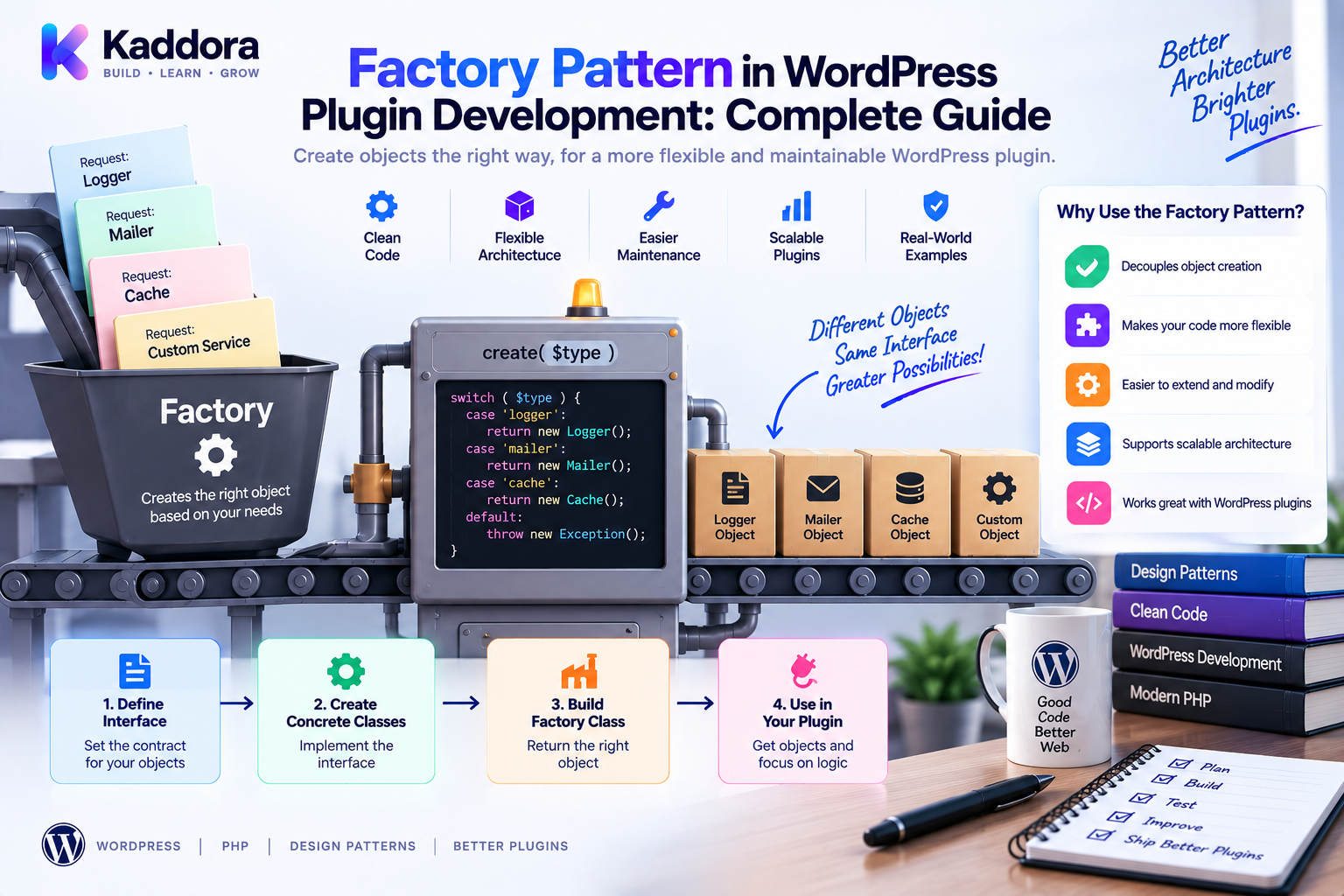
Factory Pattern in WordPress Plugin Development: Complete Guide
Introduction
As a WordPress plugin grows, object creation can become surprisingly difficult to manage.
A small plugin may only need:
$productService = new ProductService();
But larger plugins often support several implementations of the same feature.
For example, a payment plugin might support:
Stripe PayPal Sandbox Custom Gateway
An AI plugin might support:
Provider A Provider B Provider C
A notification system could support:
Email SMS Webhook
Without a structured approach, provider-selection logic gets repeated throughout the codebase:
if ( $provider === 'stripe' ) { $gateway = new StripeGateway(); } elseif ( $provider === 'paypal' ) { $gateway = new PayPalGateway(); }
The Factory Pattern solves this by moving object-creation decisions into a dedicated factory.
The architecture becomes:
Application ↓ Factory ↓ Interface ↓ Implementation
Instead of asking every service how to create an object, the application asks the factory for the appropriate implementation.
This guide explains what the Factory Pattern is, when it should be used in WordPress plugins, how it works with interfaces and dependency injection, and how to build factories for APIs, payments, AI providers, notifications, exports, WooCommerce integrations, and other plugin features.
What Is the Factory Pattern?
The Factory Pattern is a creational design pattern used to centralize object creation.
Instead of directly constructing a concrete class:
$gateway = new StripeGateway();
the application can request an implementation through a factory:
$gateway = $factory->create('stripe');
The factory determines which concrete object should be returned.
A common architecture is:
Service ↓ Factory ↓ Interface ├── Implementation A ├── Implementation B └── Implementation C
The consumer depends on the interface instead of knowing every implementation.
Why Use a Factory in WordPress Plugins?
Factories are useful when object creation involves meaningful variation.
Typical examples include:
Payment gateways
AI providers
Email providers
Storage backends
Export formats
Import handlers
Notification channels
Authentication methods
Shipping strategies
CRM integrations
The main benefit is centralized selection logic.
Instead of maintaining provider decisions in several places, keep them in one component.
Factory vs Direct Object Creation
Direct construction is perfectly acceptable when only one implementation exists:
$service = new ProductService();
A factory becomes useful when the implementation varies:
$provider = $factory->create($providerType);
For example:
Without Factory REST → Provider Check Admin → Provider Check Cron → Provider Check CLI → Provider Check With Factory REST Admin Cron CLI ↓ Service ↓ Factory ↓ Provider
This reduces duplicated conditions.
Define a Common Interface
A factory works best when implementations share a contract.
For example:
interface PaymentGatewayInterface { public function charge( int $amount, string $currency ): bool; }
Then implementations can follow the same interface:
final class StripeGateway implements PaymentGatewayInterface { public function charge( int $amount, string $currency ): bool { return true; } }
Another implementation:
final class PayPalGateway implements PaymentGatewayInterface { public function charge( int $amount, string $currency ): bool { return true; } }
Now the factory can return:
PaymentGatewayInterface
rather than exposing concrete classes to consumers.
Build a Simple Factory
A straightforward factory can use PHP's match expression:
final class PaymentGatewayFactory { public function create( string $provider ): PaymentGatewayInterface { return match ( $provider ) { 'stripe' => new StripeGateway(), 'paypal' => new PayPalGateway(), 'sandbox' => new SandboxGateway(), default => throw new \InvalidArgumentException( 'Unsupported payment provider.' ), }; } }
Now the application only needs:
$gateway = $factory->create('stripe');
The provider-selection logic is centralized.
Factory and Dependency Injection
A factory itself can have dependencies.
For example, a provider may require configuration or an HTTP client:
final class PaymentGatewayFactory { public function __construct( private PaymentConfig $config, private HttpClientInterface $http ) { } }
The factory can then construct providers with their required dependencies.
This works well with dependency injection:
Container ↓ Factory ↓ Provider
The service receives the factory rather than constructing providers directly.
Factory vs Dependency Injection
These concepts solve different problems.
Factory: Which object should I create?
Dependency Injection: How should an object receive its dependencies?
For example:
Factory ↓ StripeGateway
creates a provider.
Then:
PaymentService ↑ StripeGateway
receives the provider.
They can be used together without replacing one another.
Factory vs Service Container
A service container manages a broader dependency graph.
A factory usually focuses on one category of objects.
For example:
PaymentGatewayFactory ├── Stripe ├── PayPal └── Sandbox
while a container may manage:
Logger Cache Repositories Services Factories API Clients Configuration
A factory can itself be registered in a dependency injection container.
Configuration-Driven Factories
WordPress plugins frequently store settings using the options API.
For example:
$provider = \get_option( 'myplugin_payment_provider', 'sandbox' );
The value can be passed into the factory:
$gateway = $factory->create( $provider );
Treat the option as configuration and validate supported values.
Never let arbitrary user input become a PHP class name.
Factory Security
Avoid dangerous patterns such as:
$class = $_POST['class']; return new $class();
Sanitizing a class name does not make arbitrary class instantiation safe.
Use an explicit allowlist:
return match ( $provider ) { 'stripe' => new StripeGateway(), 'paypal' => new PayPalGateway(), default => throw new \InvalidArgumentException(), };
Authentication and authorization should also happen before protected operations.
A factory is not a security boundary.
Factory for AI Providers
AI plugins frequently need multiple providers.
A clean architecture is:
AIService ↓ AIProviderFactory ↓ AIProviderInterface ┌──────┼──────┐ ↓ ↓ ↓ Provider A Provider B Provider C
Interface:
interface AIProviderInterface { public function generate( string $prompt ): string; }
The factory selects the provider according to validated configuration.
This keeps AIService independent of provider-specific classes.
Factory for External API Integrations
Factories are useful when a plugin connects to multiple external platforms.
For example:
CRMFactory ↓ CRMInterface ↓ ┌────────┬────────┬────────┐ ↓ ↓ ↓ Provider A Provider B Custom
The factory chooses the adapter while the adapter handles provider-specific API differences.
This gives a useful combination:
Factory → Selection Adapter → Translation Service → Business Logic
Factory for Notifications
A notification system can support:
Email SMS Webhook
Using:
interface NotificationInterface { public function send( string $message ): bool; }
The factory returns the selected notification channel.
The notification service then works with the interface rather than a specific delivery mechanism.
Factory for Export Formats
Reporting plugins can use factories for different output formats:
ExporterFactory ├── CSV ├── JSON └── XML
Example:
interface ExporterInterface { public function export( array $data ): string; }
The factory can return the correct exporter based on the requested format.
Factory for WooCommerce
WooCommerce extensions may need factories for:
Payment gateways
Shipping strategies
Export formats
Notification systems
Analytics providers
Recommendation engines
For example:
OrderService ↓ PaymentGatewayFactory ↓ PaymentGatewayInterface ↓ Selected Gateway
Use WooCommerce's native extension APIs where they already provide an appropriate integration point.
The factory should add an abstraction only when it solves a real application problem.
Factory and Strategy Pattern
Factory and Strategy are often used together.
A factory chooses the strategy:
Configuration ↓ Strategy Factory ↓ Strategy Interface ↓ Selected Strategy
For example:
ShippingFactory ↓ ShippingStrategyInterface ┌────┼────┐ ↓ ↓ ↓ Flat Weight Free
The factory answers which behavior, while the strategy performs the behavior.
Factory and Adapter Pattern
The two patterns can also work together:
Factory ↓ Adapter ↓ External API
For example:
CRMFactory ↓ CRMInterface ↓ CRM Adapter ↓ External CRM
The factory selects the integration.
The adapter translates the external provider's API into the interface expected by your application.
Factory and Repository Pattern
Factories can also create repositories when multiple persistence implementations exist:
ProductRepositoryFactory ↓ ProductRepositoryInterface ┌────┴────┐ ↓ ↓ WP Store API Store
This is useful when the same application model may use different storage backends.
For a plugin with only one repository implementation, a normal dependency injection binding may be simpler.
Factory and Service Containers
A container can construct the factory:
Container ↓ PaymentGatewayFactory ↓ PaymentGatewayInterface ↓ Concrete Gateway
This lets you keep:
Factory logic focused on selection
Container logic focused on composition
Service logic focused on business behavior
Clear boundaries prevent infrastructure classes from becoming overly complex.
Avoid Mega Factories
Avoid creating one class such as:
ApplicationFactory ├── Payment ├── AI ├── Email ├── Storage ├── Reporting ├── Users └── Products
This becomes difficult to maintain.
Prefer focused factories:
PaymentGatewayFactory AIProviderFactory ExporterFactory NotificationFactory StorageFactory
Each factory should have a clear responsibility.
Don't Create a Factory for Everything
A factory is unnecessary when construction is trivial.
Avoid:
$product = $productFactory->create();
when this is enough:
$product = new Product();
Factories add abstraction.
That abstraction should provide measurable architectural value.
A simple class with one stable implementation does not automatically need a factory.
Factory and WordPress Hooks
A WordPress hook can eventually use a factory:
add_action( 'myplugin_sync', [ $service, 'sync' ] );
The service can request a provider through the factory:
WordPress Hook ↓ Sync Service ↓ Provider Factory ↓ Selected Provider
Keep the hook callback thin and keep provider-selection logic out of the hook itself.
Factory and REST APIs
A REST controller can validate a provider and pass it to a service:
REST Request ↓ Validation ↓ Authorization ↓ Service ↓ Factory ↓ Implementation
The controller should not contain dozens of provider-specific construction branches.
Factory and WP-Cron
A scheduled job can reuse the same factory:
WP-Cron ↓ Sync Service ↓ Factory ↓ Provider
This prevents duplicated provider-selection logic between web requests and scheduled jobs.
Factory and WP-CLI
WP-CLI commands can also reuse the same service and factory:
REST AJAX Cron WP-CLI ↓ Shared Service ↓ Factory
This is one of the biggest benefits of centralizing creation.
Factory and AI Provider Configuration
AI provider configuration may include:
Provider identifier
API credentials
Model
Endpoint
Timeout
A dedicated configuration object keeps these values organized:
final class AIConfig { public function __construct( public readonly string $provider, public readonly string $apiKey, public readonly string $model ) { } }
The factory uses the configuration to construct the selected implementation.
Keep secrets out of source control and logs.
Factory and Performance
Factories don't automatically improve performance.
They can reduce duplicated construction logic, but object creation can still be expensive.
For example, repeatedly creating an external API client may be wasteful.
In that situation:
Container ↓ Shared HTTP Client ↓ Factory ↓ Provider
may be more appropriate.
Use profiling to identify actual bottlenecks.
Factory and Lazy Creation
A factory can naturally delay provider construction until the feature is needed:
Plugin Startup ↓ Factory Registered ↓ Provider Not Created ↓ Feature Used ↓ Factory Creates Provider
This is particularly useful when a plugin supports many optional integrations.
Factory and Error Handling
Unsupported providers should fail predictably:
throw new \InvalidArgumentException( sprintf( 'Unsupported provider: %s', $provider ) );
Avoid silently selecting the wrong implementation.
For production systems, configuration errors should generally be visible rather than hidden behind unexpected fallbacks.
Factory and Backward Compatibility
Provider identifiers may become part of the plugin's effective API.
For example:
stripe paypal sandbox
Changing these values can break configuration or integrations.
When renaming identifiers:
Old Identifier ↓ Compatibility Mapping ↓ New Identifier
Document deprecations and provide a migration path where necessary.
Factory Testing
A factory should be tested for every supported implementation.
Example:
$gateway = $factory->create('stripe'); self::assertInstanceOf( StripeGateway::class, $gateway );
Test invalid providers too:
$this->expectException( \InvalidArgumentException::class ); $factory->create('unknown');
Also test configuration-dependent construction.
Integration Testing
Unit tests verify the factory's selection logic.
Integration tests can verify that real WordPress settings produce the expected implementation:
WordPress Options ↓ Configuration ↓ Factory ↓ Provider
Avoid unnecessary live external API calls in ordinary test runs.
Use mocks or test environments where appropriate.
Factory and Static Analysis
Strong interfaces and return types make factories easier to analyze.
For example:
public function create( string $provider ): PaymentGatewayInterface
PHPStan can verify that returned implementations satisfy the contract.
Use explicit types instead of broad mixed values where practical.
Factory and Composer
Factories work naturally with Composer and PSR-4 autoloading:
{ "autoload": { "psr-4": { "Kaddora\\MyPlugin\\": "src/" } } }
A class such as:
Kaddora\MyPlugin\Factories\PaymentGatewayFactory
can map to:
src/Factories/PaymentGatewayFactory.php
This keeps factory architecture predictable.
Recommended Factory Structure
A plugin can use:
src/ ├── Factories/ │ ├── PaymentGatewayFactory.php │ ├── AIProviderFactory.php │ └── ExporterFactory.php ├── Contracts/ ├── Services/ ├── Repositories/ ├── Integrations/ ├── Admin/ └── Rest/
For larger applications, module-based organization can be even clearer:
Payments/ ├── PaymentGatewayFactory.php ├── PaymentGatewayInterface.php └── Gateways/
Choose the structure that matches the real domain.
How to Build a Factory Step by Step
Step 1: Identify Variation
Determine what can change.
Example:
Payment Provider
Step 2: Define a Contract
Create:
PaymentGatewayInterface
Step 3: Implement Providers
Create the required provider classes.
Step 4: Create the Factory
Move selection logic into one class.
Step 5: Validate Identifiers
Use an explicit allowlist.
Step 6: Inject Dependencies
Provide configuration and infrastructure through the constructor.
Step 7: Inject the Factory
Pass it into the service that needs provider selection.
Step 8: Add Tests
Test every implementation and failure path.
Step 9: Add Static Analysis
Run PHPStan and coding-standard checks.
Step 10: Test WordPress Integration
Verify real settings and runtime behavior.
Complete Architecture Example
A payment feature might look like:
WordPress / REST / Admin ↓ PaymentService ↓ PaymentGatewayFactory ↓ PaymentGatewayInterface ┌────┼─────┐ ↓ ↓ ↓ Stripe PayPal Sandbox ↓ ↓ ↓ External Systems
This creates a clear separation:
Controller: Handles request concerns.
Service: Coordinates business behavior.
Factory: Selects the implementation.
Gateway: Communicates with the provider.
Common Factory Mistakes
Avoid:
Creating factories for trivial classes
One giant factory for unrelated domains
Arbitrary class instantiation
Business logic inside factories
Hard-coded credentials
Hidden provider selection
Inconsistent error handling
Missing tests
Excessive abstraction
A factory should simplify the architecture, not become another source of complexity.
Factory Pattern Checklist
Design
Real creation problem exists
Multiple implementations have a common contract
Factory responsibility is focused
Provider identifiers are explicit
Security
No arbitrary class instantiation
Inputs validated
Credentials protected
Authorization handled separately
Architecture
Business logic stays in services
API translation stays in adapters
Persistence stays in repositories
Dependency injection remains explicit
Quality
Factory unit tests
Integration tests
PHPStan checks
PHPCS checks
CI validation
Why Choose ThemeKaddora?
ThemeKaddora develops WordPress themes, plugins, WooCommerce solutions, AI products, HTML templates, UI kits, SaaS-oriented solutions, and business-focused digital products.
Factories can be valuable in ThemeKaddora products that support multiple interchangeable implementations.
Examples include:
AI Provider Factory Payment Gateway Factory Notification Factory Exporter Factory CRM Factory Storage Factory
A practical architecture can be:
ThemeKaddora Product ↓ Application Service ↓ Factory ↓ Interface ↓ Provider / Adapter ↓ External System
The important principle is not to force factories into every product.
For a small plugin with one implementation, direct dependency injection is often simpler.
For a larger product with multiple providers, factories can centralize creation and make future extensions easier.
This approach supports clean architecture while keeping complexity proportional to the actual requirements of each ThemeKaddora product.
Conclusion
The Factory Pattern provides a practical solution for managing variable object creation in WordPress plugins.
The core question it answers is:
Which implementation should the application create?
Instead of spreading that decision across controllers, hooks, cron jobs, admin screens, and CLI commands, the application can centralize it:
Entry Point ↓ Service ↓ Factory ↓ Interface ↓ Implementation
Factories are especially useful for:
Payment gateways
AI providers
CRM integrations
Email systems
Notification channels
Exporters
Importers
Storage systems
Shipping strategies
They work especially well with:
Dependency Injection
Interfaces
Strategy Pattern
Adapter Pattern
Repository Pattern
Service Containers
Composer
PSR-4
PHPUnit
PHPStan
PHPCS
At the same time, factories should not be introduced automatically.
When construction is simple:
new ProductService();
may be better than adding another abstraction.
The best approach is:
Identify variation → define a contract → centralize creation → inject the factory → test the implementations.
A good factory remains focused on object creation.
It should not become responsible for business rules, database workflows, authorization, WordPress hook management, or external API operations.
For complex WordPress, WooCommerce, AI, analytics, automation, and SaaS-oriented products, a focused factory can make architecture more flexible and maintainable.
The goal is not to use the Factory Pattern everywhere.
The goal is to make object creation predictable, replaceable, testable, and easy to maintain.
Frequently Asked Questions
What is the Factory Pattern in WordPress?
The Factory Pattern centralizes object creation and selects the appropriate implementation based on configuration or application requirements.
Why use a factory in a WordPress plugin?
Use a factory when several implementations exist, object construction is complex, or provider-selection logic would otherwise be duplicated.
What is the difference between a factory and dependency injection?
A factory decides which object to create. Dependency injection provides dependencies to an object from outside.
Should every WordPress plugin use a factory?
No. Small plugins with simple construction may not need one.
What is a payment gateway factory?
It is a factory that creates the appropriate payment gateway implementation based on a supported provider identifier.
Can factories be used for AI providers?
Yes. An AI provider factory can select among multiple implementations of an AIProviderInterface.
Can factories be used with WooCommerce?
Yes. Factories can help with payment gateways, shipping strategies, analytics integrations, export systems, and other configurable features.
What is the difference between Factory and Strategy?
Factory selects which implementation to create. Strategy provides interchangeable behavior after an implementation has been selected.
What is the difference between Factory and Adapter?
Factory selects and creates an implementation. Adapter translates between incompatible interfaces, usually when integrating external systems.
What is the difference between Factory and Repository?
Factory handles object creation. Repository handles data retrieval and persistence.
Can Factory and Dependency Injection be used together?
Yes. A factory can be injected into a service, and the factory can receive its own dependencies through constructor injection.
Can a service container create a factory?
Yes. A dependency injection container can construct the factory and inject configuration or infrastructure dependencies.
Should a factory contain business logic?
Generally no. Business logic belongs in services or domain components.
Should a factory access the database?
Usually no. Database operations should belong in repositories or appropriate infrastructure classes.
Should a factory perform API requests?
Usually no. The factory should create the client or adapter. API communication belongs in the relevant integration or service.
Can factories improve performance?
Not automatically. They mainly improve architecture. Expensive object creation may still need shared services or caching.
Can factories support CRM integrations?
Yes. A CRM factory can select the appropriate provider adapter.
Can factories support storage backends?
Yes. A storage factory can select filesystem, object storage, or another supported implementation.
How should factory configuration be validated?
Use explicit supported values and reject unknown identifiers instead of dynamically loading arbitrary classes.
Can user input select a factory implementation?
It can influence a validated configuration choice, but it should never directly determine an arbitrary class name.
How do I test a factory?
Test every supported identifier, invalid identifiers, required configuration, and expected interface implementations.
Does a factory need integration tests?
For configuration-driven or infrastructure-heavy factories, integration tests are valuable for verifying real runtime wiring.
Can PHPStan analyze factory code?
Yes. Explicit interfaces and return types make static analysis especially useful.
Can Composer autoload factory classes?
Yes. Composer PSR-4 mappings can autoload namespaced factory classes.
What namespace should a factory use?
A factory can use a namespace such as:
Kaddora\MyPlugin\Factories
or a module-specific namespace when that better reflects the architecture.
Can factories work with AI plugins?
Yes. AI provider selection is a common use case, especially when different models or providers are supported.
Can factories work with SaaS plugins?
Yes. SaaS applications may use factories for billing, storage, authentication, email, AI, CRM, and other providers.
Can factories work with payment systems?
Yes. Payment implementations can share a PaymentGatewayInterface.
What is a mega factory?
A mega factory is one class responsible for creating many unrelated kinds of objects. It is usually better to split it into focused factories.
Should every class have a factory?
No. Factories should exist only when object creation or implementation selection has meaningful complexity.
Can a factory use a service container?
Yes. The container can construct the factory and provide its dependencies.
Can a factory use interfaces?
Yes. Returning an interface helps keep consumers independent from concrete implementations.
How does a factory support backward compatibility?
Keep supported identifiers stable or provide compatibility mappings when identifiers must change.
Can factories be extended by third-party developers?
Yes. Large extensible systems can use registries or documented WordPress hooks to allow additional implementations.
When should I use a registry instead of a factory?
A registry is useful when implementations need to be registered dynamically. A simple factory is often clearer for a fixed list of supported implementations.
Can AI help identify factory opportunities?
Yes. AI can identify repeated conditionals and duplicate object construction and suggest candidate factories.
Should AI convert every conditional into a factory?
No. A simple conditional is often better when the variation is small and unlikely to grow.
Why choose ThemeKaddora?
ThemeKaddora develops WordPress themes, plugins, WooCommerce solutions, AI products, HTML templates, UI kits, SaaS-oriented solutions, and business-focused digital products using maintainable architecture, modern PHP practices, dependency injection, API integrations, testing, performance considerations, and scalable engineering workflows.
Comments (0)