
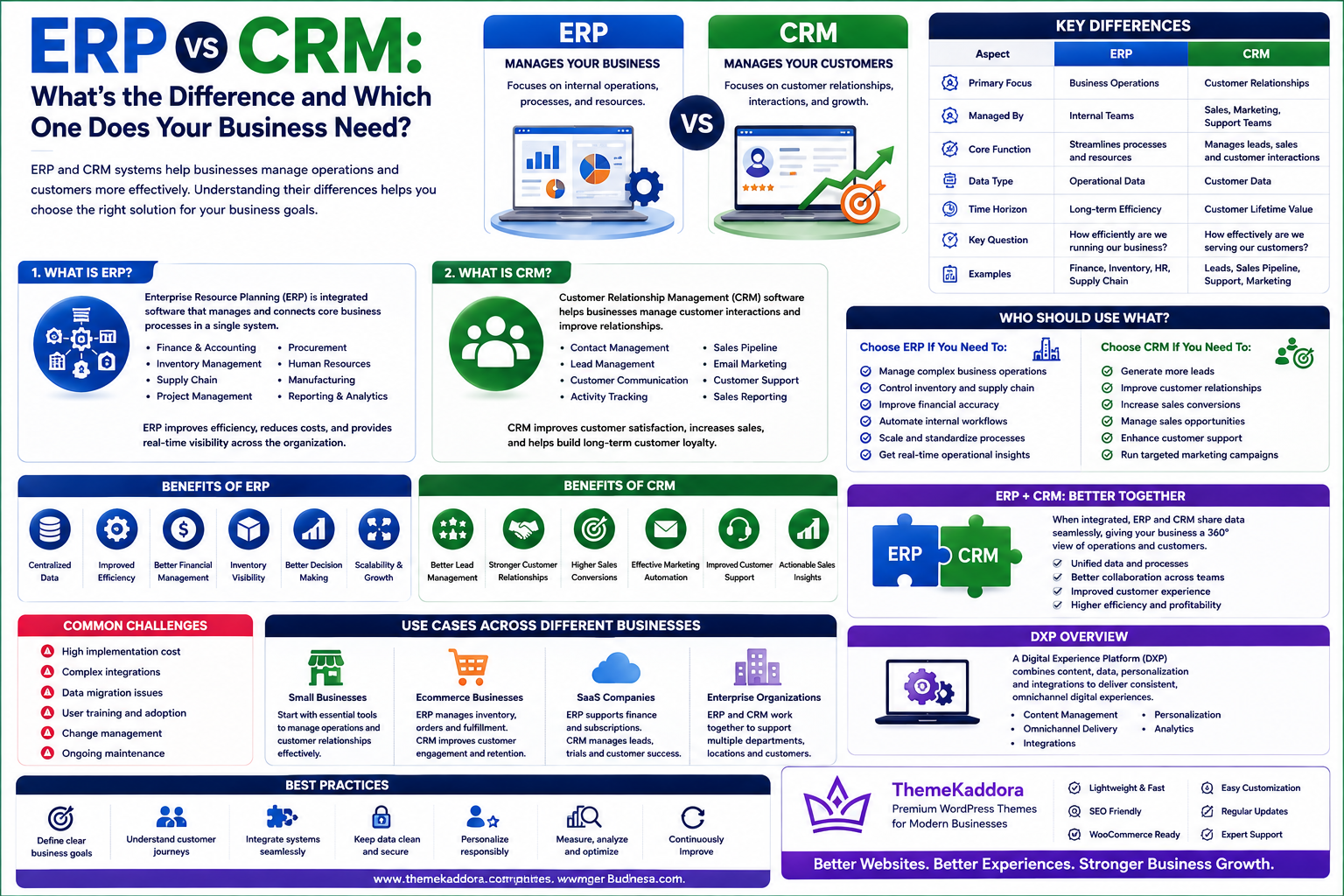
ERP vs CRM: What's the Difference and Which One Does Your Business Need?
Introduction
Modern businesses rely on technology to manage operations, improve customer relationships, increase productivity, and make better decisions. As companies grow, however, they often need specialized software to manage different areas of the organization.
Two of the most important business software categories are Enterprise Resource Planning (ERP) and Customer Relationship Management (CRM).
Although ERP and CRM systems can work together, they serve different primary purposes. ERP focuses on managing internal business operations such as finance, inventory, procurement, human resources, and supply chain activities. CRM focuses primarily on managing customer interactions, leads, sales opportunities, marketing activities, and customer relationships.
Choosing between ERP and CRM can be confusing, especially for growing businesses that are trying to determine which system should be implemented first.
The right choice depends on your business objectives, operational challenges, customer management requirements, company size, and growth plans.
In this guide, we'll explain the difference between ERP and CRM, examine their key features and benefits, and help you determine which solution may be right for your business.
1. What Is ERP?
Enterprise Resource Planning (ERP) is an integrated software system designed to manage and connect multiple business functions through a centralized platform.
Instead of maintaining separate systems for accounting, inventory, purchasing, human resources, and operations, an ERP system brings these functions together.
Common ERP modules include:
Finance and accounting
Inventory management
Procurement
Human resources
Payroll
Supply chain management
Manufacturing
Project management
Business reporting
For example, when a company receives a customer order, an ERP system can connect multiple departments.
The sales team records the order, inventory is updated, the warehouse receives fulfillment information, finance generates the invoice, and management can monitor the transaction through reporting dashboards.
This centralized approach reduces duplicate data entry and helps departments work with consistent information.
2. What Is CRM?
Customer Relationship Management (CRM) software focuses on managing interactions between a business and its current or potential customers.
CRM systems help sales, marketing, and customer service teams organize customer information and track the entire customer journey.
Common CRM features include:
Contact management
Lead management
Sales pipeline management
Customer communication
Email marketing
Sales forecasting
Customer support
Activity tracking
Sales reporting
For example, when a potential customer submits a contact form, a CRM can automatically create a lead, assign it to a salesperson, schedule follow-up activities, and track the opportunity through the sales pipeline.
CRM software helps businesses understand customers better and build stronger, long-term relationships.
3. ERP vs CRM: Key Differences
The biggest difference between ERP and CRM is their primary focus.
ERP manages internal business operations, while CRM manages customer-facing activities.
ERP
CRM
Focuses on business operations
Focuses on customers
Manages internal processes
Manages customer relationships
Handles finance and accounting
Handles sales and leads
Manages inventory
Tracks customer interactions
Supports procurement
Supports marketing
Handles HR and payroll
Supports customer service
Provides operational reporting
Provides sales and customer insights
ERP helps answer questions such as:
"How efficiently is our business operating?"
CRM helps answer questions such as:
"How effectively are we acquiring and retaining customers?"
Both systems provide valuable information, but they solve different business problems.
4. Benefits of ERP
ERP software can provide significant benefits for businesses managing complex internal operations.
Centralized Data
ERP stores information in a unified system, reducing data duplication and inconsistencies.
Improved Efficiency
Automated workflows reduce repetitive administrative tasks and allow employees to focus on more valuable activities.
Better Financial Management
Finance teams can manage invoices, expenses, budgets, payments, and financial reports from one platform.
Inventory Visibility
Businesses can monitor inventory levels, stock movements, purchase orders, and warehouse operations in real time.
Improved Decision-Making
Real-time dashboards and reports provide management with better visibility into business performance.
Scalability
An ERP system can grow with the organization by adding new users, modules, locations, and integrations.
5. Benefits of CRM
CRM software focuses on improving customer acquisition, sales performance, and retention.
Better Lead Management
Sales teams can capture, organize, assign, and track leads throughout the sales process.
Improved Customer Relationships
A CRM provides a centralized view of customer interactions, helping teams deliver more personalized experiences.
Higher Sales Productivity
Automation can handle repetitive sales tasks such as follow-up reminders, email notifications, and lead assignments.
Better Sales Visibility
Managers can monitor pipelines, opportunities, conversion rates, and sales forecasts.
Improved Customer Retention
By understanding customer interactions and behavior, businesses can identify opportunities to improve satisfaction and loyalty.
6. ERP and CRM Working Together
Although ERP and CRM serve different purposes, they become significantly more powerful when they work together.
A CRM primarily manages customer-facing information, while an ERP manages operational and financial information. Integrating the two systems allows businesses to connect sales activities with the operational processes required to fulfill customer orders.
For example, when a salesperson closes a deal in the CRM, the information can flow into the ERP system. The ERP can then manage inventory, generate invoices, process payments, and coordinate fulfillment.
This creates a connected workflow from lead generation to customer payment.
Benefits of ERP and CRM integration include:
Reduced duplicate data entry
Better information sharing
Faster order processing
Improved sales visibility
More accurate customer information
Better financial reporting
Improved customer service
Streamlined business operations
Instead of keeping sales and operations separate, integration creates a unified view of the customer and the business.
7. Which One Does Your Business Need?
There is no universal answer to whether a business should choose ERP or CRM. The right solution depends on the organization's most important challenges.
Choose CRM If Your Main Challenge Is Sales
A CRM may be the better starting point if your business needs to:
Generate more leads
Improve sales follow-ups
Organize customer information
Track sales opportunities
Improve customer communication
Manage marketing campaigns
Increase customer retention
For example, a growing sales agency may benefit more from implementing a CRM before investing in a complete ERP platform.
Choose ERP If Your Main Challenge Is Operations
An ERP may be more appropriate if your business struggles with:
Inventory management
Financial management
Procurement
Payroll
Supply chain operations
Manufacturing
Multiple business departments
Manual operational processes
A manufacturing company, for example, may need ERP capabilities to coordinate purchasing, production, inventory, finance, and warehouse operations.
Choose Both If Your Business Is Growing
Businesses with complex operations and active sales teams may benefit from both ERP and CRM.
A connected ERP and CRM environment can provide a complete business ecosystem:
Marketing → Lead → Sales → Order → Inventory → Invoice → Payment → Customer Support
This approach helps businesses connect the entire customer and operational lifecycle.
8. ERP vs CRM Decision Guide
Use the following questions to determine which solution should come first:
Business Requirement
Recommended Solution
Lead management
CRM
Sales pipeline
CRM
Customer communication
CRM
Marketing automation
CRM
Customer retention
CRM
Accounting
ERP
Inventory management
ERP
Procurement
ERP
Payroll
ERP
Supply chain management
ERP
Manufacturing
ERP
Business-wide operations
ERP
Sales + operations integration
ERP + CRM
The most important factor is not the software name but the business problem you are trying to solve.
9. Common ERP and CRM Mistakes to Avoid
Implementing business software without proper planning can create unnecessary costs and complexity.
Choosing Software Based Only on Price
The cheapest system may not provide the integrations, scalability, security, or functionality your business needs.
Evaluate the total cost of ownership rather than focusing only on the initial price.
Ignoring Integration Requirements
If your ERP and CRM cannot exchange information effectively, employees may continue performing manual data entry.
Always evaluate APIs, integrations, data synchronization, and compatibility before selecting a platform.
Implementing Too Many Features at Once
Organizations sometimes attempt to deploy every available feature immediately.
A better approach is to prioritize the most important business processes and expand gradually.
Poor Employee Training
Even a powerful ERP or CRM system will fail to deliver results if employees don't know how to use it.
Provide proper training, documentation, and ongoing support.
Failing to Define Business Goals
Technology should support business objectives.
Before implementation, clearly define what you want to improve, such as:
Reducing operational costs
Increasing sales
Improving customer retention
Reducing manual work
Improving reporting
Increasing productivity
10. AI and ERP/CRM Integration
Artificial Intelligence is changing how businesses use both ERP and CRM systems.
AI can analyze large amounts of business data and provide insights that would be difficult to identify manually.
AI in CRM
AI can help businesses with:
Lead scoring
Sales forecasting
Customer segmentation
Personalized recommendations
Automated customer support
Sentiment analysis
Follow-up suggestions
AI in ERP
AI can support:
Demand forecasting
Inventory optimization
Financial analysis
Fraud detection
Predictive maintenance
Automated document processing
Intelligent reporting
When AI, ERP, and CRM work together, businesses can move from simple data management toward intelligent business management.
11. Why Choose ThemeKaddora?
At ThemeKaddora, we understand that every business has different operational and customer management requirements.
Our technology solutions can support organizations across areas such as:
ERP development
CRM development
HRMS
Business Process Automation
Workflow Automation
AI-powered solutions
SaaS applications
Custom business software
Digital transformation
Rather than forcing every organization into the same system, businesses can adopt technology based on their workflows, operational requirements, industry, and growth objectives.
A well-designed ERP, CRM, or integrated business platform should make operations simpler—not more complicated.
Conclusion
ERP and CRM are both powerful business technologies, but they solve different problems.
CRM focuses primarily on customers, sales, marketing, and relationships. ERP focuses primarily on internal operations, finance, inventory, procurement, HR, and business management.
For businesses focused on improving sales and customer relationships, CRM may be the right starting point.
For organizations struggling with complex internal operations, ERP may provide greater value.
For growing businesses that need to connect sales with operations, integrating ERP and CRM can create a powerful end-to-end business management environment.
The key is to start with your business requirements rather than choosing technology simply because it is popular.
As AI and automation continue to evolve, the future of ERP and CRM will become increasingly connected, intelligent, and data-driven. Businesses that build an integrated technology foundation today can be better prepared for future growth.
Frequently Asked Questions
1. What is the main difference between ERP and CRM?
ERP primarily manages internal business operations, while CRM focuses on customer relationships, sales, marketing, and customer service.
2. Can ERP replace CRM?
Some ERP platforms include basic CRM functionality, but businesses with complex sales and customer management requirements may benefit from a dedicated CRM.
3. Can CRM replace ERP?
Generally, no. CRM systems are designed primarily for customer-facing processes and do not typically provide the comprehensive financial, inventory, procurement, HR, and operational capabilities of an ERP.
4. Should a small business use ERP or CRM?
It depends on the business's biggest challenge. A sales-focused business may benefit from CRM first, while a business with complex operations may benefit from ERP.
5. Can ERP and CRM be integrated?
Yes. ERP and CRM systems can often be integrated so that customer, sales, order, inventory, financial, and operational information can flow between systems.
6. Does AI work with ERP and CRM?
Yes. AI can improve both systems through forecasting, automation, recommendations, data analysis, intelligent routing, and decision support.
7. Which industries use ERP and CRM?
Manufacturing, retail, healthcare, education, logistics, finance, professional services, technology, and many other industries use ERP and CRM solutions.
8. Is cloud ERP better than traditional ERP?
Cloud ERP can provide advantages such as remote accessibility, automatic updates, scalability, and reduced infrastructure requirements. However, the best deployment model depends on the organization's specific requirements.
9. What should businesses consider before buying ERP or CRM software?
Businesses should evaluate functionality, scalability, integration capabilities, security, usability, customization, implementation requirements, support, and total cost of ownership.
10. Why choose ThemeKaddora?
ThemeKaddora focuses on ERP, CRM, AI, HRMS, automation, SaaS, and custom business technology solutions designed around real business workflows and growth requirements.
Comments (0)