
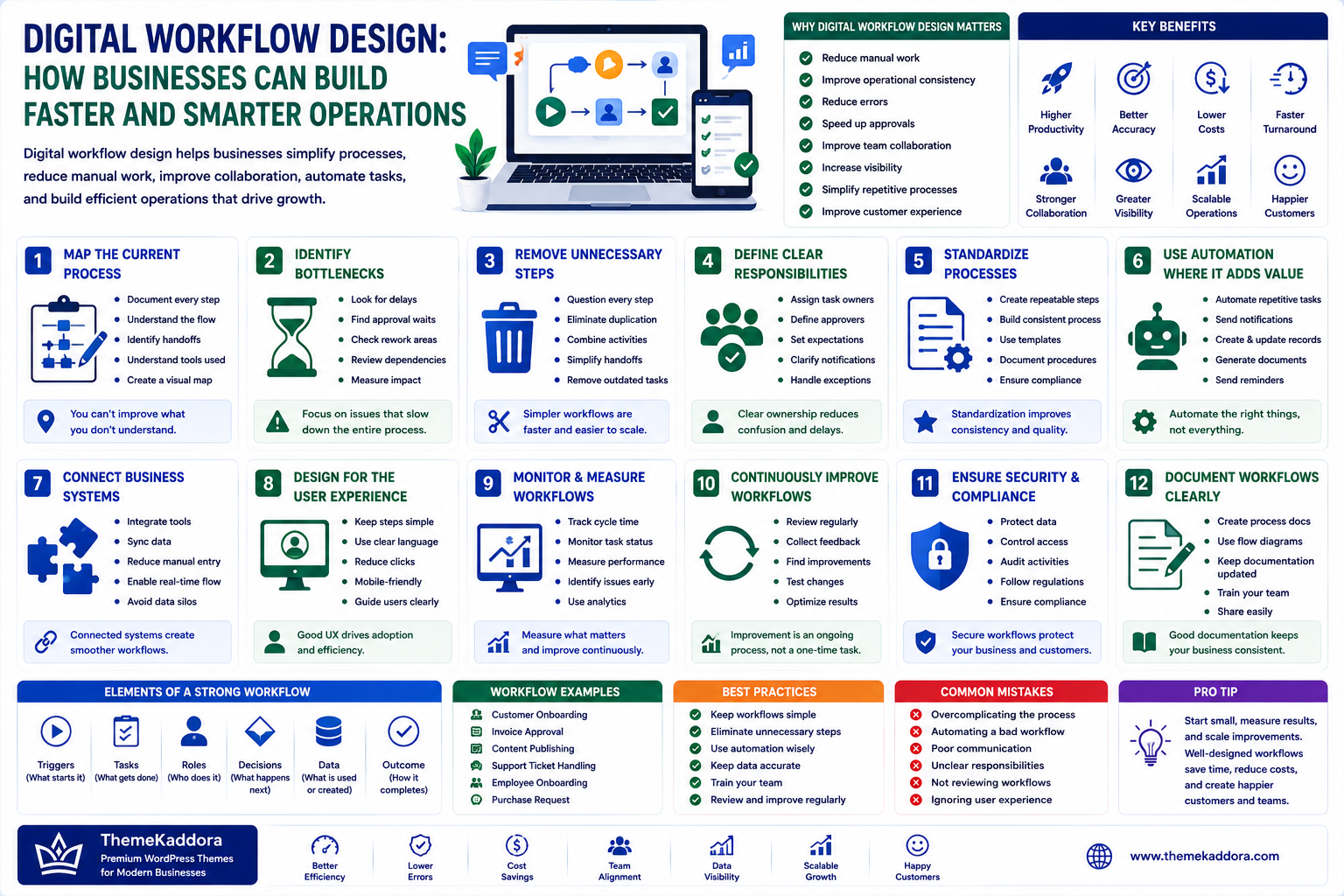
Digital Workflow Design: How Businesses Can Build Faster and Smarter Operations
Introduction
Every business has workflows.
A customer submits a request. A sales team follows up. A manager approves a proposal. A document moves between departments. A payment is processed. A support ticket is assigned and resolved.
These activities may appear simple individually, but inefficient workflows can create significant delays when repeated hundreds or thousands of times.
Manual data entry, unnecessary approvals, duplicated tasks, unclear responsibilities, and disconnected software can make everyday operations slower than they need to be.
Digital workflow design provides a structured way to examine how work moves through an organization and identify opportunities to make those processes simpler, faster, and more reliable.
The objective is not to automate everything.
The objective is to design workflows that help people and technology work together effectively.
What Is Digital Workflow Design?
Digital workflow design is the process of mapping, structuring, improving, and managing how tasks move through a digital business process.
A workflow can define:
Starting conditions
Tasks
Responsibilities
Decisions
Approvals
Data movement
Automation
Completion criteria
A well-designed workflow makes it clear what happens, who does it, when it happens, and what happens next.
Why Digital Workflow Design Matters
Effective workflows can help businesses:
Reduce unnecessary manual work
Improve operational consistency
Reduce errors
Speed up approvals
Improve team collaboration
Increase visibility
Simplify repetitive processes
Improve customer experiences
Small improvements can become significant when a process is repeated frequently.
Start by Mapping the Current Process
Before improving a workflow, document how it works today.
For example:
Customer inquiry
→ Sales receives request
→ Information is reviewed
→ Employee contacts customer
→ Proposal is prepared
→ Manager approves
→ Proposal is sent
→ Customer responds
This simple map may reveal unnecessary steps or delays.
Identify Workflow Bottlenecks
Look for points where work frequently stops.
Common bottlenecks include:
Waiting for approval
Manual data entry
Repeated communication
Missing information
Unclear ownership
Switching between multiple systems
Tasks being completed in the wrong order
Focus first on bottlenecks that have a measurable business impact.
Remove Unnecessary Steps
Not every existing task is necessary.
Ask:
Why does this step exist?
Is the information still required?
Can two steps be combined?
Can the customer complete this task directly?
Can software perform this activity?
Removing unnecessary work is often more effective than simply automating it.
Define Clear Responsibilities
Every workflow should have clear ownership.
Define:
Who starts the process
Who performs each task
Who approves decisions
Who receives notifications
Who handles exceptions
Ambiguous ownership often causes delays.
Standardize Repetitive Processes
If employees repeatedly perform the same task, create a consistent process.
Examples include:
Employee onboarding
Customer onboarding
Invoice approval
Content publishing
Sales follow-ups
Support escalation
Purchase requests
Standardization makes performance easier to measure and improve.
Use Automation Where It Adds Value
Automation can handle repetitive and predictable tasks.
Examples include:
Sending notifications
Creating records
Assigning tasks
Updating statuses
Generating documents
Sending reminders
Moving information between systems
Automation should support a well-designed process.
Automating a bad workflow simply makes the bad workflow faster.
Connect Business Systems
Modern businesses often use multiple digital tools.
For example:
Website → CRM → Email → Billing → Support
When these systems operate independently, employees may need to copy information manually.
Integrations can reduce duplicated work and improve data consistency.
Design for Exceptions
Real businesses rarely operate perfectly.
A workflow should account for situations such as:
Missing information
Failed payments
Unusual customer requests
Approval rejection
System errors
Urgent requests
Define what happens when the normal process cannot continue.
A workflow without exception handling can become a source of operational problems.
Create Approval Workflows
Approvals are common in businesses.
Examples include:
Marketing campaigns
Purchase requests
Contracts
Expenses
Website content
Discounts
Use appropriate approval levels.
Not every decision needs multiple layers of management.
Excessive approvals can slow the business without meaningfully reducing risk.
Improve Workflow Visibility
Employees should be able to understand the current state of important work.
Useful statuses might include:
New → In Progress → Waiting → Review → Approved → Completed
Visibility helps teams identify:
Delays
Workloads
Pending approvals
Failed processes
Outstanding tasks
Measure Workflow Performance
A workflow should be measurable.
Useful metrics include:
Completion time
Processing volume
Error rate
Approval time
Abandoned tasks
Manual effort
Customer response time
Measurement helps businesses determine whether workflow changes actually improve performance.
Digital Workflow Design and Customer Experience
Internal workflows can directly affect customers.
For example:
A slow internal approval process may delay a customer quote.
A poorly designed support workflow may increase response times.
A disconnected billing workflow may create payment problems.
Improving internal processes can therefore improve external customer experiences.
Digital Workflow Design for WordPress Businesses
WordPress websites often sit at the beginning of important business workflows.
A website form might trigger:
Form submission → Lead record → Sales notification → Follow-up → CRM update
Other WordPress workflows may involve:
Ecommerce orders
Membership registrations
Content approvals
Customer support
Newsletter subscriptions
Appointment requests
A WordPress website becomes more valuable when it connects effectively with the broader business operation.
Common Digital Workflow Mistakes
Avoid:
Automating before understanding the process
Adding unnecessary approval stages
Creating workflows nobody owns
Ignoring exceptions
Using disconnected systems
Tracking too many unnecessary metrics
Designing workflows only around internal departments
Failing to document processes
Good workflow design should make work easier to understand and execute.
How to Design a Digital Workflow
Step 1: Choose One Process
Start with a process that is repetitive or inefficient.
Step 2: Map the Current Workflow
Document every major step.
Step 3: Identify Problems
Find bottlenecks, duplication, delays, and unnecessary work.
Step 4: Simplify
Remove or combine steps where appropriate.
Step 5: Assign Responsibilities
Define clear ownership.
Step 6: Identify Automation Opportunities
Automate predictable tasks that create real value.
Step 7: Connect Systems
Reduce unnecessary manual data transfers.
Step 8: Test the Workflow
Run realistic scenarios, including exceptions.
Step 9: Measure Results
Compare performance before and after implementation.
Step 10: Improve Continuously
Workflows should evolve as business requirements change.
Digital Workflow Design Checklist
Before implementing a workflow, confirm:
✅ The business objective is clear
✅ The current process is documented
✅ Bottlenecks have been identified
✅ Unnecessary steps have been removed
✅ Responsibilities are defined
✅ Approval stages are appropriate
✅ Automation opportunities are identified
✅ Exceptions are supported
✅ Systems are connected where useful
✅ Performance can be measured
Why Choose Themekaddora?
A business workflow often begins with the website.
Themekaddora WordPress themes provide:
Lightweight architecture
Fast loading performance
Responsive layouts
SEO-friendly code
WooCommerce compatibility
Flexible customization
Modern page templates
Accessibility-conscious design
Clean HTML5 and CSS3 standards
Regular updates
Professional support
A reliable WordPress foundation can help businesses create websites that connect effectively with lead generation, ecommerce, customer communication, content, and other digital workflows.
Conclusion
Digital workflow design is about making work easier, clearer, and more efficient.
Businesses do not always need more software.
Often, they need better processes.
By mapping existing workflows, removing unnecessary steps, defining responsibilities, automating repetitive tasks, connecting systems, and measuring results, organizations can create operations that are easier to manage and scale.
The best workflows combine people, processes, and technology rather than relying on any one of them.
For modern businesses, thoughtful workflow design can turn everyday activities into structured systems that support productivity, customer experience, and long-term growth.
Frequently Asked Questions (FAQs)
What is digital workflow design?
Digital workflow design is the process of mapping and improving how tasks, information, decisions, and approvals move through a digital business process.
What is an example of a digital workflow?
A simple example is a website lead workflow: a customer submits a form, the lead is recorded, the sales team is notified, a follow-up task is created, and the customer receives a response.
Should every workflow be automated?
No. Automation is most useful for repetitive, predictable tasks where it creates measurable value. Some decisions still require human judgment.
How can workflow design improve customer experience?
Better internal workflows can reduce delays, improve response times, reduce errors, and make customer interactions more consistent.
Can WordPress be part of a digital workflow?
Yes. WordPress can trigger workflows through forms, ecommerce transactions, memberships, registrations, content publishing, appointments, and integrations with other business systems.
Why choose Themekaddora?
Themekaddora provides lightweight, SEO-friendly WordPress themes with responsive layouts, fast performance, WooCommerce compatibility, flexible customization, accessibility-conscious design, modern templates, regular updates, and professional support—providing a strong foundation for websites that connect with modern business workflows.
Comments (0)