
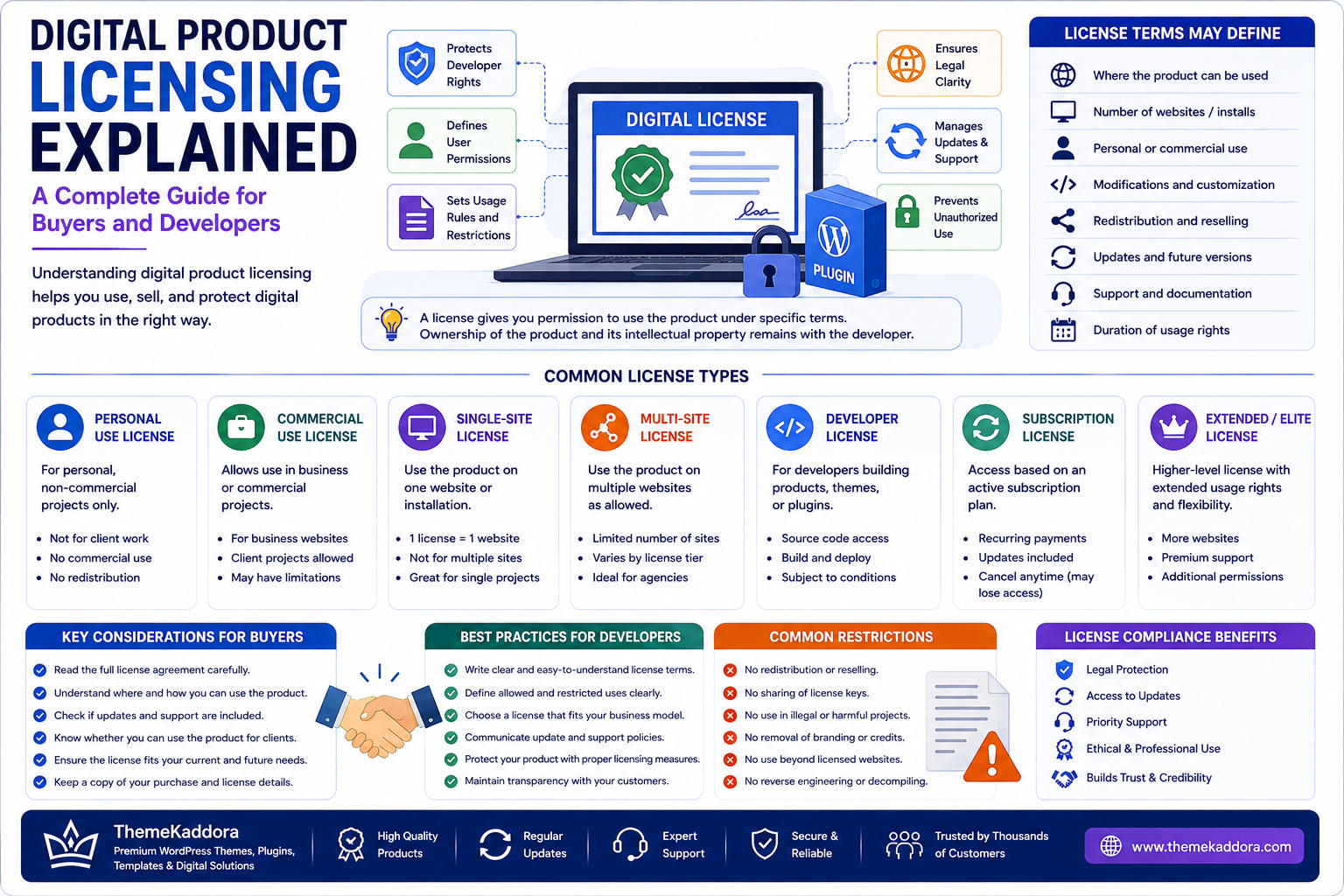
Digital Product Licensing Explained: A Complete Guide for Buyers and Developers
Introduction
Digital products have become an important part of the modern online economy.
Businesses, developers, agencies, freelancers, and entrepreneurs regularly use digital products such as WordPress plugins, website themes, templates, SaaS applications, graphics, scripts, software, and other digital resources.
However, purchasing or downloading a digital product does not necessarily mean you own all rights to use, modify, distribute, or resell it.
Those rights are generally determined by the license.
Understanding digital product licensing helps buyers avoid unexpected restrictions while helping developers protect their intellectual property and clearly communicate how their products can be used.
A license can define:
Where a product can be used
How many websites can use it
Whether commercial use is permitted
Whether modifications are allowed
Whether redistribution is allowed
Whether updates are included
Whether support is included
How long usage rights remain valid
In this guide, we'll explain the fundamentals of digital product licensing and what buyers and developers should consider before purchasing, selling, or distributing digital products.
What Is Digital Product Licensing?
A digital product license is a set of terms that defines how a buyer is permitted to use a digital product.
The product may be software, a plugin, theme, template, graphic, document, audio file, video, or another digital asset.
The license does not necessarily transfer intellectual property ownership.
Instead, it generally grants specific usage rights under defined conditions.
For example, a license might allow a buyer to use a WordPress plugin on one website while prohibiting redistribution of the plugin's original files.
Why Licensing Matters
Without clear licensing terms, users may misunderstand what they are allowed to do with a product.
Licensing helps establish expectations around:
Usage
Ownership
Modification
Distribution
Commercial activity
Updates
Support
Restrictions
For marketplaces, clear licensing information also improves transparency and helps customers make better purchasing decisions.
License vs Ownership
One of the most important concepts to understand is the difference between buying a product and owning the intellectual property behind that product.
When you purchase a digital product, you may receive a license to use it.
You may not receive ownership of:
Source code
Copyright
Brand identity
Original artwork
Product name
Intellectual property
The exact rights depend on the applicable license agreement.
1. Personal Use License
A personal-use license generally allows an individual to use a digital product for personal projects.
For example, a person might purchase a website template for their personal portfolio.
Restrictions may apply to:
Commercial projects
Client websites
Redistribution
Reselling
Always review the specific license because definitions of "personal use" vary between products.
2. Commercial Use License
A commercial license generally permits use of a digital product in connection with business activities.
Examples might include:
Business websites
Client projects
Marketing campaigns
Commercial applications
However, commercial use does not automatically mean unlimited use.
The license may still restrict:
Number of projects
Number of websites
Redistribution
Reselling
SaaS usage
Read the exact terms before using the product commercially.
3. Single-Site License
A single-site license generally permits the product to be used on one website or installation.
For example:
1 license = 1 website
If an agency wants to use the same plugin on ten separate client websites, a single-site license may not be sufficient unless the license explicitly permits that use.
4. Multi-Site License
A multi-site license permits usage across multiple websites, subject to the stated limits.
For example, a license might permit:
5 websites
10 websites
25 websites
Unlimited websites
The exact definition of "site" can vary, particularly for staging environments, multisite networks, and development installations.
5. Unlimited License
An unlimited license may allow usage across an unrestricted number of websites or projects.
However, "unlimited" does not necessarily mean unlimited rights.
Other restrictions may still apply to:
Redistribution
Reselling
White-labeling
SaaS usage
Source-code distribution
Always read the complete license.
6. Subscription Licenses
Many modern digital products use subscription-based licensing.
A subscription may provide:
Product access
Updates
Technical support
Premium features
Cloud services
The product may continue functioning after a subscription expires, or certain features may become unavailable.
This depends entirely on the provider's licensing model.
7. Lifetime Licenses
A lifetime license generally provides usage rights for the lifetime defined by the seller's terms.
However, buyers should verify what "lifetime" actually means.
It could refer to:
Lifetime product usage
Lifetime updates
Lifetime support
Lifetime access to a particular version
These are not necessarily the same thing.
8. Open Source Licensing
Open-source software uses licenses that define how the software can be used, modified, and distributed.
Common open-source licenses include:
MIT
GPL
Apache License
BSD licenses
Each license has different requirements.
For example, some licenses require certain notices or require derivative distributions to preserve particular licensing conditions.
Developers should understand the obligations associated with third-party open-source components included in their products.
9. WordPress Plugin and Theme Licensing
WordPress products have additional considerations because WordPress itself is open-source software and many plugins and themes interact with the WordPress ecosystem.
Before using a WordPress plugin or theme, check:
License type
Usage restrictions
Website limits
Update policy
Support terms
Third-party dependencies
External services
For commercial WordPress products, buyers should understand whether the purchase covers the product itself, updates, support, or additional services separately.
10. Modification Rights
Some licenses allow users to modify a digital product.
For example, a developer may customize:
CSS
Templates
PHP code
JavaScript
Images
Layouts
However, permission to modify a product does not automatically grant permission to redistribute the modified version.
Modification and redistribution are separate rights.
11. Redistribution Rights
Redistribution means providing the original or modified product to another person or organization.
Examples include:
Uploading a plugin to another marketplace
Giving source files to customers
Sharing premium themes publicly
Including software in another downloadable package
Many commercial licenses prohibit redistribution.
This is one of the most important restrictions buyers should understand.
12. Reselling Digital Products
Reselling is different from simply using a product.
If you purchase a website template and use it to build a website for a client, that may be permitted under the applicable license.
If you purchase the template and sell the original template files to another person, that may be prohibited.
The license determines the difference.
13. White-Label Rights
White-label licensing may allow a buyer to rebrand a product under their own business identity.
Possible permissions may include:
Removing original branding
Adding your own branding
Modifying the interface
Selling the solution under another name
White-label rights should never be assumed.
They must be explicitly provided by the license.
14. SaaS Usage Rights
Using a digital product as part of a SaaS service can involve additional licensing considerations.
For example, a business might purchase software and use it to provide services to thousands of customers.
A standard single-site license may not automatically permit this type of deployment.
Before using a digital product in a SaaS environment, verify:
Number of end users
Server usage
Redistribution rights
API usage
Multi-tenant deployment
Commercial service restrictions
15. Client Work and Agency Use
Agencies frequently purchase digital products for client projects.
Before doing so, verify whether the license allows:
Client websites
Multiple client projects
Development environments
Staging environments
Transfer to clients
Some licenses permit agency use while others require separate licenses for each client project.
16. Updates and Support
Updates and support are often treated as part of the purchase, but they may have separate terms.
A license might provide:
Product usage: Permanent
Updates: 12 months
Support: 12 months
After the support period expires, the buyer may continue using the product but may need to renew to receive future updates or support.
17. License Expiration
Licenses can work differently.
Some grant perpetual usage rights.
Others expire after:
One year
A subscription period
A defined contract period
Understand what happens when the license expires.
Questions to ask include:
Does the software stop working?
Are updates disabled?
Is support discontinued?
Can the existing installation continue operating?
18. License Transfer
Some licenses can be transferred from one website or user to another.
Others cannot.
Before transferring a license, check whether the agreement permits:
Website migration
Ownership changes
Domain changes
Client transfers
Account transfers
This is particularly important when selling a business or transferring a website to a client.
19. Developer Responsibilities
Developers and marketplace sellers should provide clear licensing information.
A product listing should ideally explain:
License type
Number of permitted installations
Commercial usage
Update period
Support period
Redistribution restrictions
Modification rights
Third-party dependencies
Clear information reduces confusion and support requests.
20. Buyer Responsibilities
Buyers should:
Read the license
Keep purchase records
Understand usage limits
Avoid unauthorized redistribution
Monitor license renewals
Review third-party requirements
If the license is unclear, ask the seller for clarification before using the product in a commercial project.
21. Common Licensing Mistakes
Assuming Purchase Means Ownership
Buying a product usually provides usage rights rather than complete intellectual property ownership.
Sharing Premium Products
Giving licensed product files to unauthorized users may violate the license.
Ignoring Client Restrictions
Agency use may require additional licenses.
Assuming Unlimited Means Everything Is Allowed
Unlimited installation does not necessarily mean unlimited redistribution or resale.
Ignoring Renewal Terms
Updates and support may require periodic renewal.
Using Products in SaaS Without Checking
A standard license may not permit multi-user or hosted-service deployment.
Digital Product License Checklist
Before purchasing a digital product, check:
Usage
Personal or commercial?
Single site or multiple sites?
Client use allowed?
SaaS use allowed?
Rights
Modification allowed?
Redistribution allowed?
Reselling allowed?
White-labeling allowed?
Support
How long is support provided?
Are updates included?
Is renewal required?
Technical
Third-party services?
External APIs?
Dependencies?
Hosting requirements?
Business
License cost
Renewal cost
Transfer policy
Cancellation terms
ThemeKaddora and Digital Product Transparency
For a digital marketplace such as ThemeKaddora, clear product information is an important part of creating a trustworthy buying experience.
Customers should be able to understand what they are purchasing before completing a transaction.
Product listings can provide information such as:
Product features
Compatibility
Licensing
Documentation
Support
Updates
Requirements
Usage limitations
Transparent product information helps buyers choose solutions that match their projects and reduces confusion after purchase.
Why Clear Licensing Benefits Developers
Licensing is not only about protecting restrictions.
It also helps developers communicate the value of their products.
A clear license can explain:
What customers receive
What customers can do
What customers cannot do
What support is included
What updates are included
Which commercial uses are permitted
This can create greater confidence for potential customers.
Conclusion
Digital product licensing can seem complicated, but the basic principle is simple:
A license defines how you are allowed to use a digital product.
Before purchasing a plugin, theme, template, SaaS product, software package, or other digital asset, understand the rights and restrictions that apply.
Pay particular attention to:
Commercial use
Website limits
Modification
Redistribution
Reselling
Client projects
SaaS usage
Updates
Support
License expiration
For developers and digital marketplaces, clear licensing information creates transparency and helps customers make informed decisions.
Whether you're buying a digital product for your own business or developing products for others, understanding licensing can prevent costly misunderstandings and create a more professional digital-product ecosystem.
Frequently Asked Questions
1. What is a digital product license?
A digital product license defines how a buyer is permitted to use a digital product and what restrictions apply.
2. Does buying software mean I own it?
Usually, purchasing software grants usage rights rather than transferring the underlying intellectual property ownership.
3. Can I modify a purchased digital product?
That depends on the license. Some licenses allow modification while others impose restrictions.
4. Can I use one license for multiple websites?
Only if the license permits multiple installations or websites.
5. Can I resell a digital product?
Not unless the applicable license specifically grants resale or redistribution rights.
6. What is a commercial license?
A commercial license generally permits use in business or revenue-generating activities, subject to its specific restrictions.
7. What is a lifetime license?
A lifetime license generally provides rights for the period defined by the seller, but the exact meaning of "lifetime" varies by product.
8. What happens when a subscription license expires?
Depending on the product, access, updates, support, or certain functionality may change after expiration.
9. Can agencies use one license for all clients?
Not necessarily. The license may limit use to a specific number of websites or projects.
10. Why is licensing important for digital marketplaces?
Clear licensing helps buyers understand their rights, reduces misunderstandings, and creates greater transparency between sellers and customers.
Comments (0)