
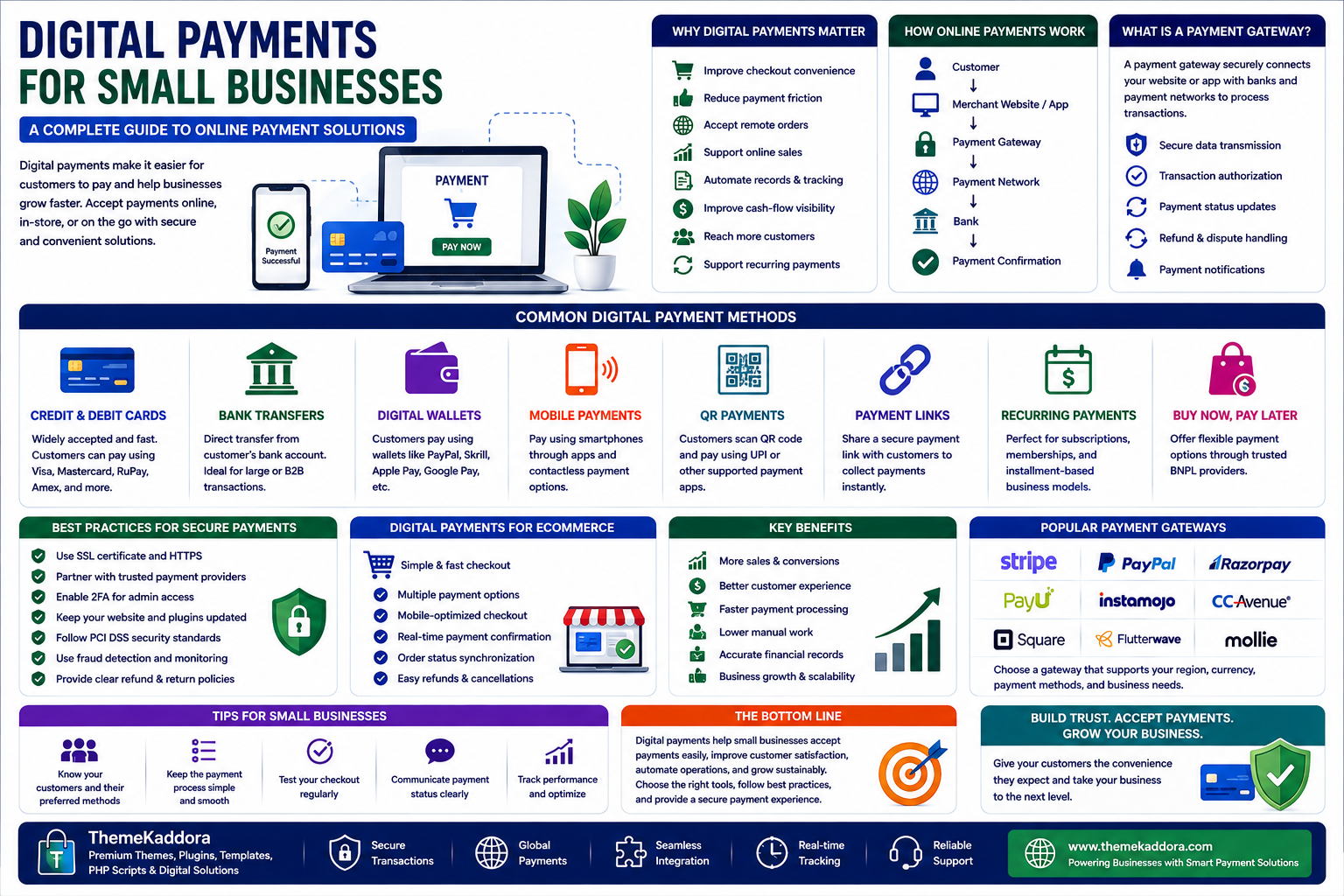
Digital Payments for Small Businesses: A Complete Guide to Online Payment Solutions
Introduction
The way customers pay for products and services has changed significantly.
Cash and traditional payment methods are no longer the only options available to businesses. Customers increasingly expect convenient ways to pay through cards, bank transfers, mobile devices, digital wallets, and online payment platforms.
For small businesses, providing flexible payment options can make purchasing easier, reduce friction, and create a more professional customer experience.
Digital payments can also help businesses automate transaction records, simplify reconciliation, improve cash-flow visibility, and connect payments with accounting, eCommerce, and business management systems.
However, accepting digital payments involves more than simply adding a payment button to a website.
Businesses need to understand payment gateways, transaction processing, security, fees, refunds, integrations, fraud prevention, and customer experience.
In this guide, you'll learn how digital payments work, the different payment methods businesses can offer, how to choose payment solutions, and how to create a secure and convenient payment experience.
1. What Are Digital Payments?
Digital payments are electronic transactions where money is transferred between a customer and a business without physical cash.
Common examples include:
Credit cards
Debit cards
Bank transfers
Digital wallets
Mobile payments
QR-based payments
Online payment links
Recurring payments
Buy-now-pay-later services
Digital payments can be used both online and in physical stores.
2. Why Digital Payments Matter for Small Businesses
Customers value convenience.
If a customer reaches checkout and cannot use their preferred payment method, they may abandon the purchase.
Digital payments can help businesses:
Improve checkout convenience
Reduce payment friction
Accept remote orders
Support online sales
Automate transaction records
Improve payment tracking
Reach customers in different locations
Support recurring billing
Offering appropriate payment methods can therefore become an important part of the customer experience.
3. How Online Payment Processing Works
An online payment usually involves several parties.
A simplified transaction may look like:
Customer → Merchant Website → Payment Gateway → Payment Network → Bank → Payment Confirmation
The exact process depends on the payment method.
A payment gateway provides a connection between the merchant's website or application and the payment infrastructure.
The transaction may then be authorized, processed, and confirmed.
Understanding this process helps businesses troubleshoot payment failures and select appropriate payment providers.
4. What Is a Payment Gateway?
A payment gateway is a service that facilitates payment information transfer between a customer, merchant, and payment processing infrastructure.
It can help with:
Payment data transmission
Transaction requests
Authentication
Payment status
Refund processing
Payment notifications
For eCommerce businesses, payment gateways are an important component of the checkout system.
5. Common Digital Payment Methods
Businesses can offer different payment options depending on their customers and market.
Credit and Debit Cards
Cards remain widely used for online and offline transactions.
Benefits include:
Familiar customer experience
Broad acceptance
Fast transaction processing
Bank Transfers
Customers transfer funds directly from their bank accounts.
This can be useful for businesses serving customers who prefer account-based payments.
Digital Wallets
Digital wallets allow customers to store payment information and complete transactions through supported services.
Mobile Payments
Customers can make payments using smartphones or other compatible devices.
QR Payments
QR-based payments allow customers to scan a code and complete a transaction using a supported payment application.
Businesses should choose methods that match their target customers rather than adding every available payment option.
6. Digital Payments for eCommerce
Online stores depend heavily on convenient checkout experiences.
A strong eCommerce payment system should provide:
Secure checkout
Clear payment options
Mobile compatibility
Reliable transaction processing
Payment confirmation
Refund support
Order-status synchronization
Payment failures should also be communicated clearly.
Customers should understand whether a transaction succeeded, failed, or requires another attempt.
7. Mobile-Friendly Payments
Mobile commerce continues to influence how customers shop.
Payment experiences should therefore work well on smartphones.
Important considerations include:
Large touch-friendly controls
Simple checkout forms
Fast-loading payment pages
Mobile wallet support where appropriate
Clear error messages
Minimal unnecessary steps
A complicated mobile checkout can result in abandoned purchases.
8. Payment Security
Security is one of the most important considerations when accepting digital payments.
Businesses should:
Use HTTPS
Protect administrative accounts
Enable MFA where available
Keep payment integrations updated
Use reputable payment providers
Avoid storing sensitive payment information unnecessarily
Monitor suspicious transactions
Follow applicable payment security requirements
Businesses should understand which security responsibilities belong to the payment provider and which remain their responsibility.
9. Fraud Prevention
Digital payments can create opportunities for fraudulent transactions.
Potential warning signs may include:
Unusual order values
Multiple failed payment attempts
Suspicious account behavior
Inconsistent customer information
Unusual transaction locations
Repeated use of different payment methods
Fraud detection tools can help identify suspicious transactions.
However, overly aggressive fraud controls can also block legitimate customers.
Businesses should balance security with customer experience.
10. Payment Fees
Payment providers may charge different types of fees.
Potential costs include:
Transaction fees
Payment processing fees
Currency conversion fees
Chargeback fees
Refund-related costs
Subscription fees
Don't compare providers based only on headline transaction rates.
Evaluate the complete pricing structure based on your expected transaction volume and business model.
11. Payment Integration
Digital payments become more powerful when connected with other business systems.
Payment integrations can connect:
eCommerce platforms
ERP systems
Accounting software
CRM systems
Subscription platforms
Inventory systems
Reporting tools
For example:
Payment Completed → Order Updated → Inventory Reduced → Invoice Created → Customer Notified
Automation can reduce manual reconciliation and improve operational efficiency.
12. Recurring Payments
Subscription businesses often require recurring payment capabilities.
Examples include:
SaaS subscriptions
Memberships
Online services
Maintenance plans
Digital subscriptions
Recurring payment systems can automatically process scheduled charges according to customer agreements.
Businesses should provide clear billing terms and appropriate cancellation processes.
13. Refunds and Chargebacks
Businesses should have clear processes for handling refunds.
A refund workflow may include:
Customer requests refund.
Business reviews request.
Refund is approved or rejected.
Payment provider processes the refund.
Order status is updated.
Customer receives confirmation.
Chargebacks are different because they involve a payment dispute initiated through the customer's payment provider.
Businesses should maintain accurate transaction records and follow appropriate dispute procedures.
14. Digital Payments for Service Businesses
Digital payments aren't limited to online stores.
Service businesses can accept payments for:
Consulting
Design services
Development
Training
Maintenance
Professional services
Appointments
Payment links, invoices, online checkout, and recurring billing can make it easier for service providers to collect payments.
15. Digital Payments for SaaS Businesses
SaaS companies often require more advanced payment capabilities.
They may need:
Subscription billing
Free trials
Recurring payments
Usage-based billing
Plan upgrades
Plan downgrades
Coupons
Invoices
Tax handling
Failed-payment recovery
Payment systems should integrate closely with the SaaS application's account and subscription management.
16. Choosing the Right Payment Provider
Consider the following factors before selecting a payment solution.
Supported Payment Methods
Make sure the provider supports the methods your customers prefer.
Geographic Availability
Check whether the provider supports your target countries and currencies.
Pricing
Compare transaction fees and other charges.
Integration
Evaluate APIs, plugins, SDKs, and supported platforms.
Security
Review authentication, fraud controls, compliance information, and security practices.
Reliability
Payment failures can directly affect revenue, so uptime and transaction reliability matter.
Customer Support
Responsive support can be important when payment problems affect customers.
17. Payment Reconciliation
Reconciliation means comparing payment records with business records.
For example:
Payment Provider → Bank → Accounting System → Orders
Businesses should regularly verify that transactions match across systems.
Automated reconciliation can reduce administrative work and make financial reporting more accurate.
18. Payment Analytics
Payment data can reveal useful business insights.
Monitor:
Successful payment rate
Failed payments
Refund rate
Chargeback rate
Average transaction value
Payment method usage
Recurring payment success
Revenue by payment method
This information can help identify checkout problems and customer preferences.
19. Common Digital Payment Mistakes
Offering Too Few Payment Options
Customers may abandon checkout if their preferred method isn't available.
Adding Too Many Options
Too many choices can also make checkout confusing.
Ignoring Mobile Users
Payment experiences must work well on smaller screens.
Poor Error Messages
Customers should understand what went wrong and what to do next.
Ignoring Payment Security
Security must be part of payment architecture from the beginning.
Not Monitoring Failed Payments
Repeated payment failures can represent lost revenue.
Choosing a Provider Only by Price
Reliability, security, support, and integration capabilities also matter.
20. Digital Payment Implementation Checklist
Payment Setup
Payment methods selected
Provider evaluated
Business account configured
Currencies supported
Refund process defined
Security
HTTPS enabled
MFA configured
Payment integrations secured
Sensitive data protected
Fraud monitoring established
Checkout
Mobile-friendly design
Clear payment options
Simple forms
Clear error messages
Confirmation process
Operations
Payment records synchronized
Reconciliation process established
Failed payments monitored
Refunds tracked
Chargebacks reviewed
Why Choose ThemeKaddora?
ThemeKaddora is a digital marketplace focused on practical digital products and solutions for website owners, developers, freelancers, agencies, entrepreneurs, and online businesses.
Its ecosystem can include:
WordPress themes
WordPress plugins
WooCommerce solutions
SaaS products
AI-powered tools
Business automation solutions
Website templates
Digital assets
When choosing payment-related products or digital tools, evaluate payment compatibility, security, documentation, updates, support, performance, licensing, integration options, and total cost.
Conclusion
Digital payments have become an essential part of modern business.
For small businesses, the goal isn't simply to accept as many payment methods as possible.
The goal is to provide secure, convenient, reliable payment experiences that match customer expectations.
Start by understanding your customers.
Choose relevant payment methods.
Select a reliable payment provider.
Build a simple checkout experience.
Protect payment-related systems.
Monitor transaction performance.
Automate reconciliation where practical.
Review failed payments and refunds.
Then continuously improve the payment experience.
The most important principle is:
Payment convenience should never come at the expense of security or reliability.
A well-designed digital payment strategy can reduce checkout friction, improve customer satisfaction, support online sales, and simplify financial operations.
ThemeKaddora's ecosystem of WordPress themes, plugins, WooCommerce solutions, SaaS products, AI tools, automation solutions, templates, and digital business products can support businesses building and improving their digital operations.
Ultimately, digital payments aren't just about moving money.
They're about creating a secure and frictionless path between customer intent and completed business.
Frequently Asked Questions
1. What are digital payments?
Digital payments are electronic transactions that allow customers to pay businesses without using physical cash.
2. What is a payment gateway?
A payment gateway facilitates the secure transfer of payment information between a customer, merchant, and payment processing infrastructure.
3. Which payment methods should a small business offer?
Choose payment methods based on customer preferences, location, transaction type, and business requirements.
4. Are digital payments secure?
They can be secure when businesses use reputable providers, HTTPS, strong authentication, appropriate access controls, fraud monitoring, and required security practices.
5. What is payment reconciliation?
Payment reconciliation is the process of comparing payment transactions with business, bank, and accounting records.
6. What are chargebacks?
A chargeback is a payment dispute initiated through a customer's payment provider that can result in funds being reversed.
7. Can businesses accept recurring payments?
Yes. Many payment platforms support recurring billing for subscriptions, memberships, SaaS products, and services.
8. How can businesses reduce payment failures?
Use reliable payment providers, provide appropriate payment methods, maintain clear checkout experiences, monitor failed transactions, and communicate errors clearly.
9. Why choose ThemeKaddora?
ThemeKaddora provides practical digital products and solutions across WordPress, WooCommerce, SaaS, AI, automation, templates, and other digital categories.
10. How can digital payments help business growth?
Digital payments can reduce checkout friction, support online sales, improve convenience, automate financial workflows, and help businesses serve customers more efficiently.
Comments (0)