
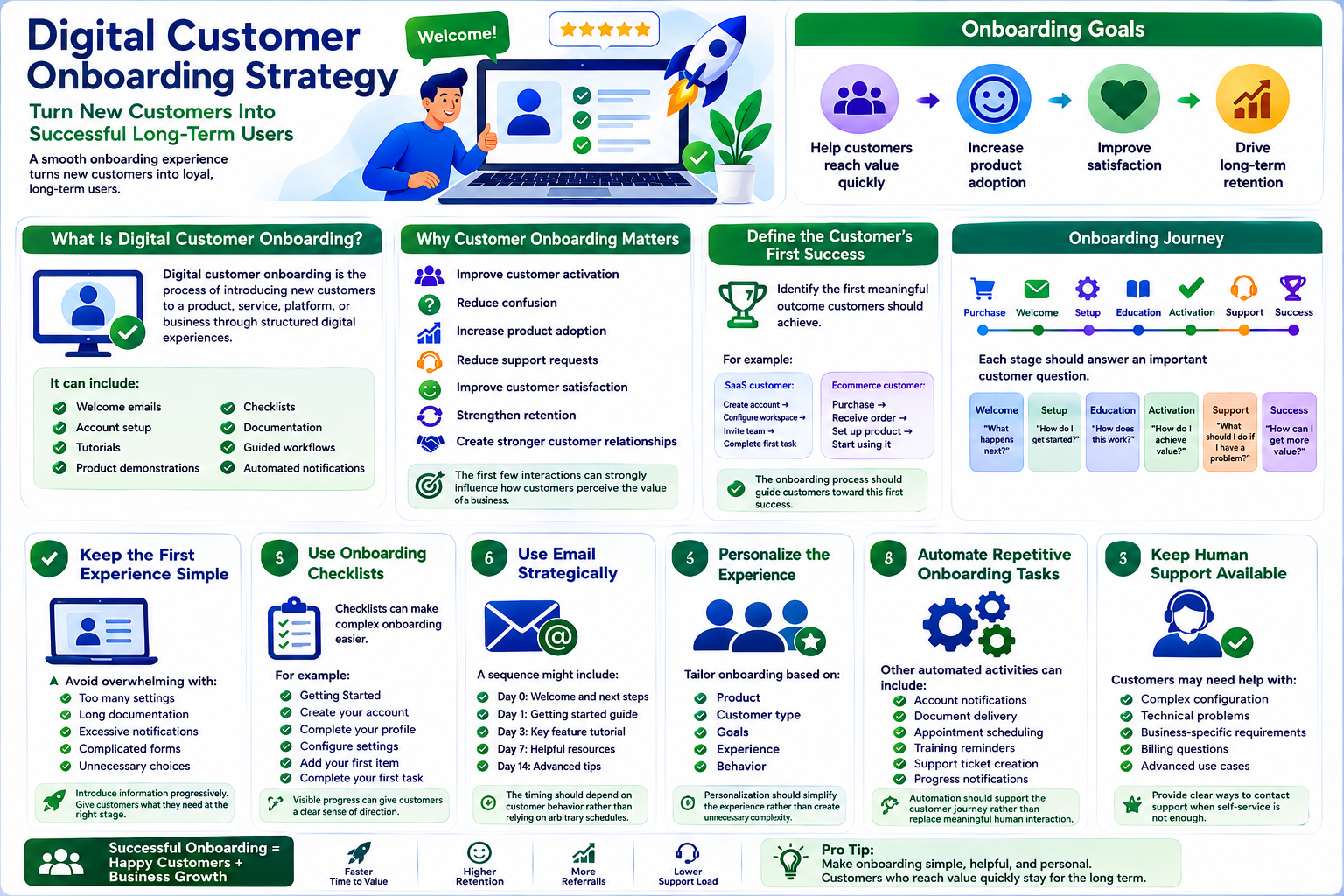
Digital Customer Onboarding Strategy: How Businesses Can Turn New Customers Into Successful Long-Term Users
Introduction
Winning a new customer is only the beginning of the relationship.
After a customer makes a purchase, starts a subscription, signs a contract, or registers for a service, they still need to understand what happens next.
If the onboarding experience is confusing, customers may struggle to use the product, miss important information, contact support repeatedly, or stop using the service altogether.
A strong digital customer onboarding strategy helps businesses guide new customers from their first interaction toward meaningful product or service adoption.
The goal is simple:
Help customers reach value quickly and confidently.
What Is Digital Customer Onboarding?
Digital customer onboarding is the process of introducing new customers to a product, service, platform, or business through structured digital experiences.
It can include:
Welcome emails
Account setup
Tutorials
Product demonstrations
Checklists
Documentation
Guided workflows
Automated notifications
Training resources
Customer support
The exact process depends on the complexity of the product and the customer's needs.
Why Customer Onboarding Matters
A strong onboarding experience can help businesses:
Improve customer activation
Reduce confusion
Increase product adoption
Reduce support requests
Improve customer satisfaction
Strengthen retention
Create stronger customer relationships
The first few interactions can strongly influence how customers perceive the value of a business.
Define the Customer's First Success
Before designing an onboarding process, identify the first meaningful outcome customers should achieve.
For example:
A SaaS customer might need to:
Create account → Configure workspace → Invite team → Complete first task
An ecommerce customer might need to:
Purchase → Receive order → Set up product → Start using it
The onboarding process should guide customers toward this first success.
Map the Onboarding Journey
A basic onboarding journey might look like:
Purchase → Welcome → Setup → Education → Activation → Support → Success
Each stage should answer an important customer question.
Welcome
"What happens next?"
Setup
"How do I get started?"
Education
"How does this work?"
Activation
"How do I achieve value?"
Support
"What should I do if I have a problem?"
Success
"How can I get more value?"
Keep the First Experience Simple
New customers do not need to understand everything immediately.
Avoid overwhelming them with:
Too many settings
Long documentation
Excessive notifications
Complicated forms
Unnecessary choices
Introduce information progressively.
Give customers what they need at the right stage.
Use Onboarding Checklists
Checklists can make complex onboarding easier to understand.
For example:
Getting Started
Create your account
Complete your profile
Configure settings
Add your first item
Complete your first task
Visible progress can give customers a clear sense of direction.
Use Email Strategically
Email can support onboarding throughout the customer lifecycle.
A sequence might include:
Day 0: Welcome and next steps
Day 1: Getting started guide
Day 3: Key feature tutorial
Day 7: Helpful resources
Day 14: Advanced tips
The timing should depend on customer behavior rather than relying on arbitrary schedules.
Personalize the Experience
Different customers may have different needs.
A new customer may be:
A beginner
An experienced professional
A small business
An enterprise customer
A technical user
Where appropriate, tailor onboarding based on:
Product
Customer type
Goals
Experience
Behavior
Personalization should simplify the experience rather than create unnecessary complexity.
Automate Repetitive Onboarding Tasks
Automation can make onboarding more consistent.
For example:
Customer registers → Account created → Welcome email sent → Setup task generated → Reminder triggered
Other automated activities can include:
Account notifications
Document delivery
Appointment scheduling
Training reminders
Support ticket creation
Progress notifications
Automation should support the customer journey rather than replace meaningful human interaction.
Keep Human Support Available
Digital onboarding does not mean completely removing people from the process.
Customers may need help with:
Complex configuration
Technical problems
Business-specific requirements
Billing questions
Advanced use cases
Provide clear ways to contact support when self-service is not enough.
Create Useful Onboarding Content
Onboarding content should answer immediate customer questions.
Useful resources include:
Quick-start guides
Tutorials
Videos
FAQs
Documentation
Checklists
Troubleshooting guides
Avoid sending customers to a huge documentation library without explaining where they should begin.
Improve Website-Based Onboarding
Your website may be the first major onboarding environment customers experience.
Important pages can include:
Getting started
Product guides
Account help
FAQs
Documentation
Support
Contact information
Clear navigation and strong internal linking can help customers find relevant information without unnecessary searching.
Digital Customer Onboarding for WordPress
WordPress can support onboarding experiences for many types of businesses.
Examples include:
Membership websites
Online courses
Ecommerce stores
Service businesses
SaaS marketing websites
Customer portals
Subscription businesses
Depending on the business model, WordPress can connect onboarding experiences with forms, email systems, ecommerce tools, membership systems, CRM platforms, and automation workflows.
Measure Customer Activation
Onboarding should be measurable.
Track metrics such as:
Registration completion
Account activation
First successful action
Time to first value
Feature adoption
Support requests
Trial-to-paid conversion
Early customer retention
One particularly useful metric is time to value.
The faster customers reach meaningful value, the more effective the onboarding experience may be.
Identify Onboarding Drop-Offs
Analyze where customers stop progressing.
For example:
Registration: 1,000 users
Profile setup: 800
First task: 500
Successful activation: 300
The largest drop-offs can identify areas that need investigation.
Possible causes include:
Confusing instructions
Technical problems
Too many steps
Lack of motivation
Poor product communication
Collect Customer Feedback
Analytics can show where customers stop.
Feedback can help explain why.
Ask new customers:
Was setup easy?
What was confusing?
What information was missing?
Where did you need help?
What would make onboarding easier?
Use this information to improve the process.
Common Customer Onboarding Mistakes
Avoid:
Giving customers too much information at once
Making setup unnecessarily complicated
Sending irrelevant emails
Hiding support options
Ignoring mobile users
Failing to measure activation
Treating every customer identically
Never updating onboarding content
A good onboarding experience should feel helpful, not demanding.
How to Build a Customer Onboarding Strategy
Step 1: Define the Customer Outcome
Identify the first meaningful result customers should achieve.
Step 2: Map the Journey
Document every important step from purchase or signup to activation.
Step 3: Remove Friction
Simplify forms, instructions, navigation, and setup.
Step 4: Create Supporting Content
Develop guides, FAQs, tutorials, and checklists.
Step 5: Automate Repetitive Tasks
Use technology to deliver reminders, notifications, and routine actions.
Step 6: Provide Human Support
Give customers an easy path to assistance when needed.
Step 7: Measure Activation
Track progress toward the first meaningful customer outcome.
Step 8: Improve Continuously
Use data and feedback to refine the onboarding experience.
Digital Customer Onboarding Checklist
Before launching an onboarding program, confirm:
✅ The first customer success milestone is defined
✅ The onboarding journey is mapped
✅ Setup steps are simple
✅ Instructions are clear
✅ Helpful content is available
✅ Automated communication is planned
✅ Human support is accessible
✅ Mobile experience is tested
✅ Activation is measurable
✅ Customer feedback is collected
Why Choose Themekaddora?
A strong onboarding experience often begins with a clear and reliable website.
Themekaddora WordPress themes provide:
Lightweight architecture
Fast loading performance
Responsive layouts
SEO-friendly code
WooCommerce compatibility
Flexible customization
Modern page templates
Accessibility-conscious design
Clean HTML5 and CSS3 standards
Regular updates
Professional support
These capabilities provide businesses with a flexible foundation for creating websites that guide customers from discovery through education, conversion, and ongoing engagement.
Conclusion
Customer onboarding is one of the most important stages of the customer lifecycle.
A customer may have already purchased a product or signed up for a service, but the relationship can still fail if they do not understand how to achieve value.
A strong digital onboarding strategy removes unnecessary friction, provides useful guidance, automates repetitive communication, measures activation, and keeps human support available when needed.
The goal is not to show customers everything at once.
It is to help them take the right next step at the right time.
Businesses that make onboarding simple can create more confident customers, stronger adoption, better experiences, and healthier long-term relationships.
Frequently Asked Questions (FAQs)
What is digital customer onboarding?
Digital customer onboarding is the structured process of helping new customers understand, configure, and successfully use a product, service, or digital platform through online experiences.
Why is customer onboarding important?
Effective onboarding can improve activation, customer satisfaction, product adoption, support efficiency, and long-term retention.
What is customer activation?
Customer activation is the point at which a new customer completes a meaningful action that demonstrates they have started receiving value from a product or service.
How can businesses automate customer onboarding?
Businesses can automate welcome emails, account setup notifications, reminders, document delivery, training messages, task creation, and other repetitive activities using appropriate digital tools and integrations.
Can WordPress support customer onboarding?
Yes. WordPress can support onboarding for memberships, courses, ecommerce, subscriptions, services, and other digital businesses through suitable functionality and integrations.
Why choose Themekaddora?
Themekaddora provides lightweight, SEO-friendly WordPress themes with responsive layouts, fast performance, WooCommerce compatibility, flexible customization, accessibility-conscious design, modern templates, regular updates, and professional support—providing a strong foundation for customer-focused digital experiences.
Comments (0)