
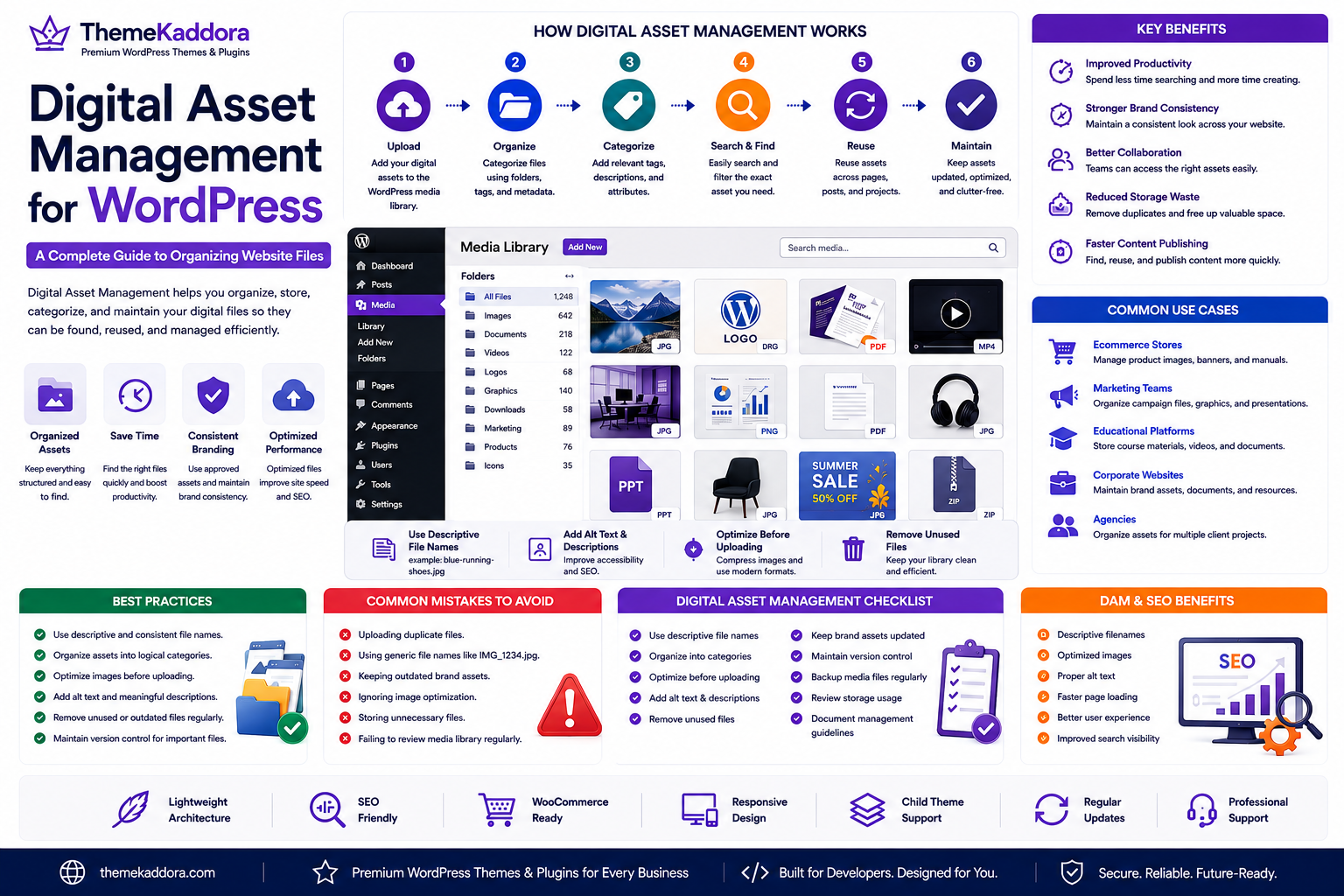
Digital Asset Management for WordPress: A Complete Guide to Organizing Website Files
Introduction
As a WordPress website grows, so does its collection of images, videos, PDFs, logos, presentations, downloadable resources, and marketing materials. Without a structured approach, finding the right file becomes increasingly difficult, leading to duplicated uploads, inconsistent branding, and wasted storage.
This is where Digital Asset Management (DAM) becomes valuable.
Digital Asset Management is the practice of organizing, storing, categorizing, and maintaining digital files so they can be found and reused efficiently. For businesses using WordPress, a well-managed asset library improves productivity, strengthens brand consistency, and simplifies collaboration between content creators, designers, developers, and marketing teams.
Whether you manage a company website, an ecommerce store, or a content-rich publication, implementing DAM principles helps create a more organized and scalable website.
What Is Digital Asset Management?
Digital Asset Management is a structured system for managing digital files throughout their lifecycle.
Digital assets include:
Images
Videos
Audio files
PDF documents
Logos
Brand guidelines
Product photos
Infographics
Marketing materials
Downloadable resources
A DAM strategy focuses on keeping these assets organized, searchable, and up to date.
Why DAM Matters for WordPress
Without proper organization, websites often experience:
Duplicate media uploads
Broken file references
Outdated branding
Inconsistent file names
Difficulty locating assets
Increased storage usage
Slower content production
A well-planned DAM process addresses these challenges and improves day-to-day website management.
Key Benefits of Digital Asset Management
Improved Productivity
Teams spend less time searching for files and more time creating content.
Stronger Brand Consistency
Using approved logos, images, and design resources helps maintain a consistent brand identity across the website.
Better Collaboration
Content writers, designers, and developers can access the same organized asset library.
Reduced Storage Waste
Eliminating duplicate files saves storage space and simplifies maintenance.
Faster Content Publishing
Well-organized media speeds up the publishing process for blogs, landing pages, and product updates.
Best Practices for Managing WordPress Assets
Use Descriptive File Names
Choose names that clearly describe the content instead of generic filenames.
Organize Assets into Logical Categories
Group files by project, department, campaign, or content type to make navigation easier.
Optimize Media Before Uploading
Compress images and use modern file formats where appropriate to improve loading speed.
Remove Unused Assets
Periodically review the media library and delete obsolete or unused files after confirming they are no longer required.
Establish Version Control
Maintain updated versions of logos, brochures, and other frequently revised resources to avoid confusion.
Common Business Use Cases
Digital Asset Management benefits:
Ecommerce Stores
Organize product images, promotional banners, and downloadable manuals.
Marketing Teams
Manage campaign graphics, social media visuals, and advertising materials.
Educational Platforms
Store course documents, presentations, and learning resources.
Corporate Websites
Maintain logos, press kits, policy documents, and employee resources.
Agencies
Manage media assets across multiple client websites while maintaining consistent organization.
Common Mistakes to Avoid
Avoid these common issues:
Uploading duplicate files
Using inconsistent naming conventions
Keeping outdated brand assets
Ignoring image optimization
Storing unnecessary files
Failing to review media regularly
These practices can lead to clutter, confusion, and slower website performance.
DAM and SEO
A well-organized media library also supports technical SEO.
Benefits include:
Descriptive filenames
Improved image optimization
Better accessibility through accurate alt text
Faster page loading
Easier content updates
Together, these improvements contribute to a stronger user experience and search visibility.
Why Choose Themekaddora?
Themekaddora creates WordPress themes that are designed for businesses focused on long-term growth and efficient content management.
Our themes provide:
Lightweight architecture
SEO-friendly code
Responsive layouts
WooCommerce compatibility
Accessibility-ready design
Clean coding standards
Flexible customization
Cross-browser compatibility
Regular updates
Professional support
When combined with effective Digital Asset Management, Themekaddora themes help organizations build fast, organized, and scalable WordPress websites.
Digital Asset Management Checklist
Before publishing new content, make sure you:
✅ Use descriptive file names
✅ Organize assets into categories
✅ Optimize images before uploading
✅ Remove unused files
✅ Keep brand assets updated
✅ Maintain version control
✅ Add descriptive alt text
✅ Back up media files regularly
✅ Review storage usage
✅ Document media management guidelines
Conclusion
Digital Asset Management is an essential part of running a successful WordPress website. By organizing media, reducing duplication, maintaining brand consistency, and improving collaboration, businesses can streamline content creation while supporting long-term website performance.
Whether you're managing a small business website or a large enterprise platform, adopting DAM best practices helps your team work more efficiently and keeps your digital resources organized.
Paired with lightweight, SEO-friendly WordPress themes from Themekaddora, a strong Digital Asset Management strategy creates a foundation for scalable, professional, and future-ready websites.
Frequently Asked Questions
What is Digital Asset Management?
Digital Asset Management (DAM) is the process of organizing, storing, managing, and maintaining digital files such as images, videos, documents, and brand resources.
Why is DAM important for WordPress?
It improves media organization, reduces duplicate files, supports consistent branding, and makes content creation more efficient.
What types of files should be managed?
Common digital assets include images, videos, PDFs, logos, icons, presentations, product photos, and downloadable resources.
Does Digital Asset Management improve SEO?
Indirectly, yes. Better-organized media, optimized images, descriptive filenames, and improved accessibility contribute to better technical SEO and user experience.
Why choose Themekaddora?
Themekaddora themes combine lightweight architecture, responsive design, SEO-friendly code, WooCommerce compatibility, clean coding standards, accessibility support, regular updates, and professional support—providing the perfect foundation for well-organized, high-performing WordPress websites.
Comments (0)