
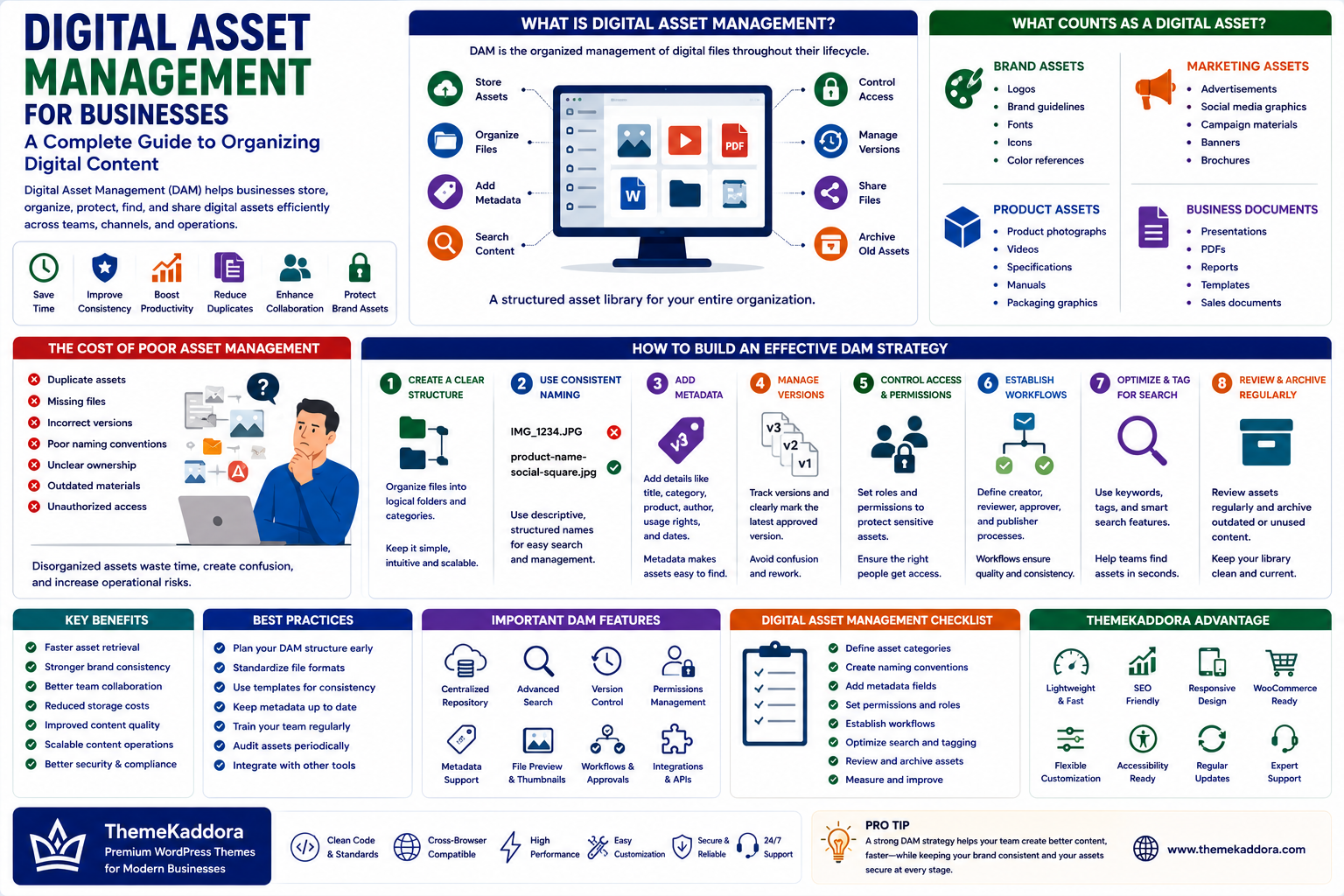
Digital Asset Management for Businesses: A Complete Guide to Organizing Digital Content
Introduction
Modern businesses create and collect enormous amounts of digital content.
Images, videos, logos, documents, presentations, product photos, marketing materials, PDFs, graphics, and brand assets are used across websites, social media, advertising, sales, and customer communication.
As the business grows, finding the right file can become surprisingly difficult.
A logo may exist in several versions. A product image may have multiple resolutions. An old brochure may still be used by a sales team. Important files may be scattered across cloud storage, computers, email conversations, and messaging platforms.
Digital Asset Management (DAM) provides a structured way to organize, manage, protect, find, and distribute digital assets.
For growing businesses, effective asset management can improve productivity, consistency, collaboration, and content operations.
What Is Digital Asset Management?
Digital Asset Management is the organized management of digital files throughout their lifecycle.
A DAM system can help businesses:
Store assets
Organize files
Add metadata
Search content
Control access
Manage versions
Share files
Archive outdated assets
Instead of treating digital files as disconnected documents, DAM creates a structured asset library.
What Counts as a Digital Asset?
Digital assets can include:
Brand Assets
Logos
Brand guidelines
Fonts
Icons
Color references
Marketing Assets
Advertisements
Social media graphics
Campaign materials
Banners
Brochures
Product Assets
Product photographs
Videos
Specifications
Manuals
Packaging graphics
Business Documents
Presentations
PDFs
Reports
Templates
Sales documents
The exact asset library depends on the organization.
Why Digital Asset Management Matters
A well-organized asset library can help businesses:
Save employee time
Reduce duplicate files
Improve brand consistency
Simplify collaboration
Reduce accidental use of outdated assets
Improve content production
Make files easier to find
The value becomes greater as the volume of digital content increases.
The Cost of Poor Asset Management
Without a structured system, employees may spend significant time searching for files.
Common problems include:
Duplicate assets
Missing files
Incorrect versions
Poor naming conventions
Unclear ownership
Outdated marketing materials
Unauthorized access
These problems create unnecessary operational friction.
Create a Clear Folder and Category Structure
Organization should reflect how employees actually use information.
For example:
Brand
→ Logos
→ Guidelines
→ Templates
Marketing
→ Campaigns
→ Social Media
→ Advertising
Products
→ Product A
→ Product B
→ Product C
Avoid creating an overly complicated structure.
Users should be able to understand where an asset belongs without extensive training.
Use Consistent File Naming
File names should provide useful information.
Instead of:
final-image-new2.jpg
Use a structured approach such as:
product-name-social-square.jpg
Depending on the organization, naming conventions may include:
Product
Campaign
Location
Content type
Version
Date
Consistency makes files easier to search and manage.
Add Metadata
Metadata provides additional information about an asset.
Useful metadata can include:
Title
Description
Category
Product
Campaign
Author
Usage rights
Creation date
Expiration date
Metadata becomes particularly valuable when businesses manage thousands of assets.
Manage Versions Carefully
Businesses often create multiple versions of the same asset.
A DAM strategy should make it clear:
Which version is current
Which version is archived
Who approved it
When it was updated
This reduces the risk of employees using outdated files.
Control Access
Not every employee needs access to every asset.
Access controls can help protect:
Confidential documents
Unreleased campaigns
Licensed content
Internal materials
Sensitive business information
Use permissions based on roles and responsibilities.
Manage Digital Rights
Some assets have usage restrictions.
For example:
Stock photographs
Licensed fonts
Music
Video footage
Third-party illustrations
Track relevant licensing information and expiration dates.
This can help businesses avoid accidentally using assets beyond their permitted rights.
Improve Collaboration
A centralized asset library creates a shared source of truth.
Marketing, sales, design, product, and content teams can work from the same approved resources.
This reduces the need to repeatedly send files through email or messaging applications.
Digital Asset Management and WordPress
WordPress websites depend heavily on digital assets.
The media library may contain:
Images
PDFs
Videos
Graphics
Product media
Downloadable resources
Businesses should maintain organized media practices as their WordPress websites grow.
This can include:
Descriptive file names
Optimized images
Appropriate metadata
Organized content
Regular asset reviews
Removal of unnecessary files
For larger organizations, WordPress can also be connected to broader digital asset workflows where appropriate.
Optimize Assets for Website Performance
Asset management is not only about organization.
Digital assets also affect website performance.
Large images and unnecessary media can increase:
Page weight
Loading time
Bandwidth usage
Storage requirements
Before publishing assets, consider:
Correct dimensions
Appropriate formats
Compression
Responsive delivery
Actual user requirements
Good asset management therefore supports both productivity and website performance.
Build an Asset Lifecycle
Digital assets should have a lifecycle:
Create → Review → Approve → Publish → Use → Update → Archive
This helps prevent old content from remaining in active circulation indefinitely.
Regular reviews can identify assets that should be:
Updated
Replaced
Archived
Removed
Common Digital Asset Management Mistakes
Avoid:
Storing everything without organization
Using inconsistent file names
Keeping multiple unofficial versions
Ignoring usage rights
Giving everyone unrestricted access
Uploading oversized website images
Never reviewing old assets
Creating complicated folder structures
The best system balances structure with simplicity.
Digital Asset Management Checklist
Before creating a DAM process, confirm:
✅ Assets are categorized
✅ File naming rules are defined
✅ Metadata standards are established
✅ Access permissions are clear
✅ Version control is available
✅ Usage rights are documented
✅ Outdated assets can be archived
✅ Website images are optimized
✅ Teams know where approved assets are stored
✅ Asset ownership is assigned
Why Choose Themekaddora?
A modern business website depends on well-managed digital assets.
Themekaddora WordPress themes provide:
Lightweight architecture
Fast loading performance
Responsive layouts
SEO-friendly code
WooCommerce compatibility
Flexible customization
Modern content layouts
Accessibility-conscious design
Clean HTML5 and CSS3 standards
Regular updates
Professional support
A performance-focused WordPress foundation helps businesses present digital assets efficiently while maintaining a professional online experience.
Conclusion
Digital assets are valuable business resources.
Without a clear management system, files become difficult to find, outdated versions remain in circulation, and teams waste time searching for information.
Digital Asset Management creates a structured approach to organizing, protecting, sharing, and maintaining these resources.
The goal is not simply to store more files.
It is to make the right digital asset easy to find, easy to use, and easy to manage.
As businesses continue producing more digital content, effective asset management becomes an important part of efficient digital operations.
Frequently Asked Questions (FAQs)
What is Digital Asset Management?
Digital Asset Management is the organized process of storing, categorizing, searching, managing, protecting, distributing, and archiving digital files.
What are examples of digital assets?
Images, videos, logos, documents, presentations, PDFs, product photographs, marketing materials, templates, and brand resources are common digital assets.
Why is Digital Asset Management important?
It can reduce time spent searching for files, improve collaboration, prevent outdated assets from being used, and create greater consistency across digital channels.
Can WordPress be used for digital asset management?
WordPress includes a media library for managing website assets. Larger businesses may also use additional systems or integrations when their asset management requirements become more complex.
How does asset management affect website performance?
Properly managed assets can be optimized for dimensions, formats, and file size, helping reduce unnecessary page weight and improve website performance.
Why choose Themekaddora?
Themekaddora provides lightweight, SEO-friendly WordPress themes with responsive layouts, fast performance, WooCommerce compatibility, flexible customization, accessibility-conscious design, regular updates, and professional support—providing a strong foundation for businesses managing content-rich websites.
Comments (0)