
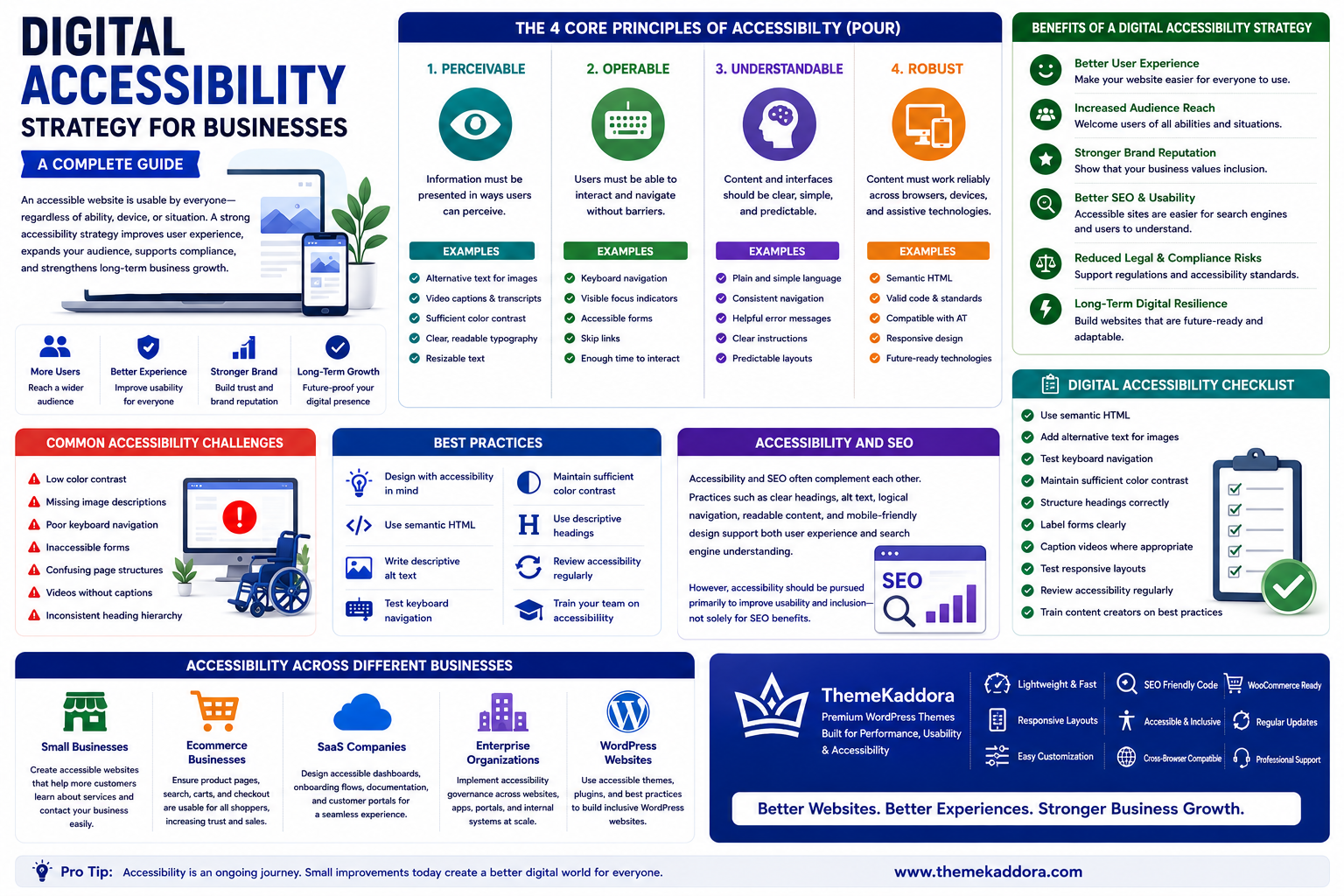
Digital Accessibility Strategy for Businesses: A Complete Guide
Introduction
A successful website should be usable by everyone—not just the average visitor.
People access websites using different devices, internet speeds, assistive technologies, and interaction methods. Some rely on screen readers, keyboard navigation, voice control, captions, or text resizing to browse the web effectively.
A Digital Accessibility Strategy helps businesses design and maintain websites, applications, and digital services that are accessible to the widest possible audience.
Accessibility is not simply a legal or technical consideration. It improves usability, strengthens customer trust, expands audience reach, and creates better digital experiences for everyone.
Whether you're managing a WordPress website, an ecommerce platform, or an enterprise digital ecosystem, accessibility should be part of your long-term digital strategy.
What Is Digital Accessibility?
Digital accessibility is the practice of designing websites, applications, and digital content so people with diverse abilities can access, understand, navigate, and interact with them.
Accessibility considers users who may experience:
Visual impairments
Hearing impairments
Motor impairments
Cognitive differences
Temporary disabilities
Age-related limitations
Accessible design benefits a much broader audience than many businesses realize.
Why Accessibility Matters
Businesses invest in accessibility because it helps:
Improve user experience
Reach more customers
Strengthen brand reputation
Support inclusive design
Improve website usability
Reduce usability barriers
Support long-term digital sustainability
Accessibility is a business advantage as well as a user benefit.
Core Principles of Accessibility
Many accessibility practices are based on four key principles.
Perceivable
Content should be presented in ways users can perceive.
Examples include:
Alternative text for images
Video captions
Sufficient color contrast
Clear typography
Operable
Users should be able to navigate without unnecessary barriers.
Examples include:
Keyboard navigation
Visible focus indicators
Accessible forms
Logical navigation
Understandable
Interfaces and content should be clear and predictable.
Examples include:
Plain language
Consistent layouts
Helpful error messages
Clear instructions
Robust
Websites should work reliably across browsers, devices, and assistive technologies.
Using semantic HTML and following web standards supports long-term compatibility.
Benefits of a Digital Accessibility Strategy
Organizations benefit from:
Better customer experiences
Improved usability
Increased audience reach
Stronger customer trust
Better mobile experiences
Easier website maintenance
Long-term digital resilience
Accessibility improvements often enhance the experience for all visitors.
Common Accessibility Challenges
Businesses often encounter:
Low color contrast
Missing image descriptions
Poor keyboard navigation
Inaccessible forms
Confusing page structures
Videos without captions
Inconsistent heading hierarchy
Many issues can be prevented by considering accessibility from the beginning of a project.
Best Practices
Design with accessibility in mind.
Use semantic HTML.
Write descriptive alternative text.
Test keyboard navigation.
Maintain sufficient color contrast.
Use descriptive headings.
Review accessibility regularly.
Accessibility is an ongoing process rather than a one-time task.
Accessibility Across Different Businesses
Small Businesses
Create accessible websites that make it easier for all customers to learn about services, contact the business, and complete key actions.
Ecommerce Businesses
Ensure product pages, search, shopping carts, and checkout processes are usable for everyone.
SaaS Companies
Design accessible dashboards, onboarding flows, documentation, and customer portals.
Enterprise Organizations
Implement accessibility governance across websites, portals, applications, and internal digital systems.
WordPress Websites
WordPress websites can improve accessibility by using well-coded themes, accessible plugins, proper heading structures, descriptive image alt text, keyboard-friendly navigation, readable typography, and responsive layouts.
Digital Accessibility Checklist
Before publishing your website, make sure you:
✅ Use semantic HTML
✅ Add alternative text for images
✅ Test keyboard navigation
✅ Maintain sufficient color contrast
✅ Structure headings correctly
✅ Label forms clearly
✅ Caption videos where appropriate
✅ Test responsive layouts
✅ Review accessibility regularly
✅ Train content creators on accessibility best practices
Accessibility and SEO
Accessibility and SEO often complement each other.
Practices such as:
Clear heading structures
Descriptive alternative text
Logical navigation
Readable content
Mobile-friendly design
can improve both user experience and search engine understanding. However, accessibility should be pursued primarily to improve usability and inclusion—not solely for SEO benefits.
Why Choose Themekaddora?
Accessibility starts with a well-built website foundation.
Themekaddora WordPress themes provide:
Lightweight architecture
Responsive layouts
SEO-friendly code
Fast loading performance
WooCommerce compatibility
Flexible customization
Semantic HTML5 structure
Cross-browser compatibility
Regular updates
Professional support
These features help businesses create WordPress websites that are easier to maintain, accessible to a broader audience, and prepared for long-term digital growth.
Conclusion
A Digital Accessibility Strategy helps businesses create websites that are more inclusive, usable, and resilient. By considering accessibility throughout design, development, content creation, and ongoing maintenance, organizations improve customer experiences while supporting broader business goals.
Accessibility is not simply about compliance—it is about ensuring every visitor has the opportunity to engage with your digital services effectively.
Frequently Asked Questions (FAQs)
What is a digital accessibility strategy?
A digital accessibility strategy is a long-term approach to designing, developing, and maintaining websites and digital services that are usable by people with diverse abilities.
Why is digital accessibility important?
Accessibility improves user experience, expands audience reach, strengthens brand trust, and creates more inclusive digital experiences.
What are the core principles of accessibility?
The four core principles are Perceivable, Operable, Understandable, and Robust, often referred to by the acronym POUR.
Can WordPress websites be accessible?
Yes. WordPress websites can improve accessibility by using accessible themes, semantic HTML, descriptive alternative text, proper heading structures, keyboard-friendly navigation, and responsive design.
Why choose Themekaddora?
Themekaddora provides lightweight, SEO-friendly WordPress themes with responsive layouts, semantic HTML5 structure, WooCommerce compatibility, fast performance, flexible customization, regular updates, and professional support—helping businesses build accessible, scalable, and future-ready WordPress websites.
Comments (0)