
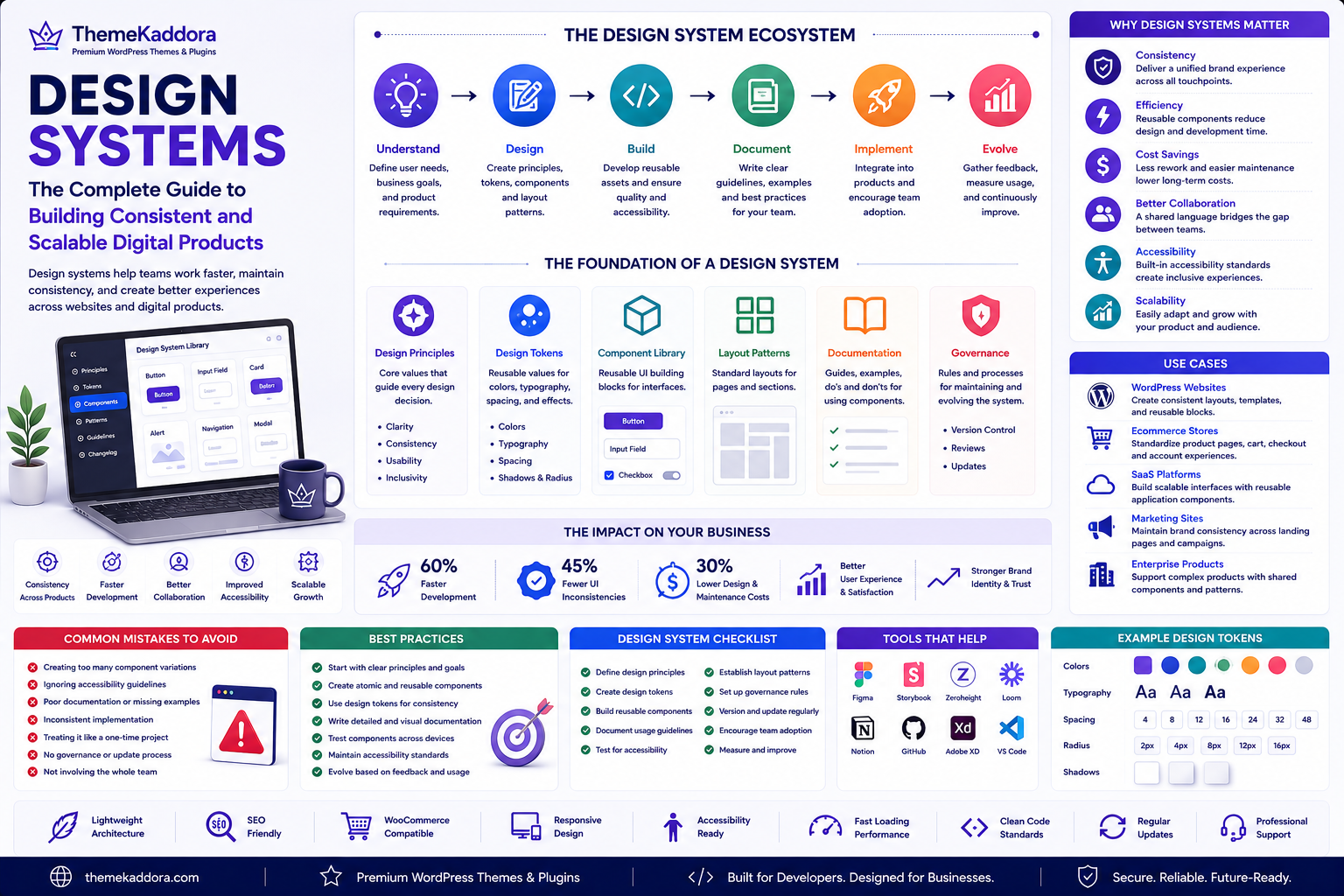
Design Systems: The Complete Guide to Building Consistent and Scalable Digital Products
Introduction
As websites and digital products grow, maintaining consistency becomes increasingly difficult. Different designers may use different colors, developers may build similar components in different ways, and content creators may apply inconsistent layouts across pages.
Over time, these inconsistencies can affect usability, slow development, increase maintenance costs, and weaken brand identity.
A Design System provides a structured framework for creating consistent digital experiences. It combines reusable components, design standards, documentation, and governance into a shared system that guides how products are designed and built.
Whether you're managing a WordPress website, an ecommerce platform, a SaaS application, or an enterprise product, a well-designed system helps teams work faster while delivering a more consistent experience.
What Is a Design System?
A Design System is a collection of reusable design assets, development standards, documentation, and governance practices that help teams build digital products consistently.
A design system typically includes:
Color palettes
Typography
Spacing rules
Icons
Buttons
Forms
Navigation components
Layout patterns
Design tokens
Documentation
Accessibility guidelines
Rather than designing each page from scratch, teams reuse proven building blocks.
Why Design Systems Matter
Organizations adopt design systems to:
Maintain brand consistency
Improve collaboration between designers and developers
Speed up product development
Reduce duplicate work
Improve accessibility
Simplify maintenance
Support scalable product growth
A shared system creates predictable and high-quality user experiences.
Core Elements of a Design System
Design Principles
High-level guidelines that define how products should look and behave.
Design Tokens
Reusable values for colors, spacing, typography, borders, shadows, and other visual properties.
Component Library
Reusable interface elements such as buttons, cards, forms, alerts, navigation menus, and modals.
Layout Patterns
Standard page structures and responsive layout rules.
Documentation
Clear guidance explaining how and when to use components correctly.
Governance
Processes for reviewing, updating, and maintaining the design system over time.
Benefits of Design Systems
Better Consistency
Reusable components create a unified experience across websites and applications.
Faster Development
Teams spend less time recreating common interface elements.
Easier Maintenance
Updating a shared component improves every page where it is used.
Improved Collaboration
Designers, developers, marketers, and content teams work from the same standards.
Better Accessibility
Accessibility improvements made to shared components benefit the entire product.
Design Systems for Different Organizations
Startups
Create reusable UI foundations that support rapid product growth.
Marketing Agencies
Standardize website projects while maintaining consistent client experiences.
Ecommerce Businesses
Develop reusable product cards, checkout flows, forms, and navigation components.
SaaS Companies
Build scalable interfaces using reusable application components.
WordPress Websites
Use reusable templates, blocks, navigation patterns, typography systems, and design standards to maintain consistency across pages.
Best Practices
Start With Design Principles
Define the values that guide every design decision.
Build Reusable Components
Design flexible components that solve multiple use cases.
Document Everything
Provide examples, usage guidelines, and accessibility recommendations.
Encourage Collaboration
Include designers, developers, content creators, and stakeholders in the design system process.
Review Regularly
Update the design system as products, technologies, and user needs evolve.
Common Mistakes to Avoid
Avoid these common challenges:
Creating too many component variations
Ignoring accessibility
Failing to document components
Treating the design system as a one-time project
Allowing inconsistent implementation
Neglecting governance
Design Systems Checklist
Before building your design system, make sure you:
✅ Define design principles
✅ Create design tokens
✅ Build reusable components
✅ Establish typography standards
✅ Standardize spacing and layouts
✅ Document usage guidelines
✅ Test accessibility
✅ Review components regularly
✅ Maintain version control
✅ Encourage cross-team adoption
Why Choose Themekaddora?
Themekaddora develops WordPress themes with a focus on consistency, performance, and long-term maintainability.
Our themes include:
Lightweight architecture
SEO-friendly code
Responsive layouts
WooCommerce compatibility
Accessibility-conscious design
Flexible customization
Clean HTML5 and CSS3 standards
Fast loading performance
Cross-browser compatibility
Regular updates
Professional support
These features provide a strong foundation for implementing design system principles across WordPress websites and digital products.
Conclusion
A design system is more than a collection of reusable components—it is a shared language that helps teams create consistent, scalable, and user-friendly digital experiences. By combining design principles, reusable components, documentation, accessibility, and governance, organizations can improve collaboration while reducing maintenance and development costs.
Whether you're building a WordPress website, an ecommerce platform, or a SaaS application, adopting a design system helps create products that are easier to manage and more enjoyable to use. Combined with Themekaddora's lightweight WordPress themes, a design system supports long-term growth, consistency, and exceptional user experiences.
Frequently Asked Questions
What is a design system?
A design system is a collection of reusable components, design standards, documentation, and governance practices used to create consistent digital products.
What is the difference between a design system and a style guide?
A style guide focuses mainly on visual branding, while a design system includes reusable UI components, documentation, accessibility guidance, development standards, and governance.
Why are design systems important?
They improve consistency, speed up development, simplify maintenance, enhance accessibility, and strengthen collaboration between designers and developers.
Can WordPress websites benefit from a design system?
Yes. WordPress websites can use reusable blocks, templates, typography rules, spacing systems, and component libraries to maintain a consistent experience across pages.
Why choose Themekaddora?
Themekaddora provides lightweight, SEO-friendly WordPress themes with responsive layouts, accessibility-conscious design, WooCommerce compatibility, fast performance, clean coding standards, regular updates, and professional support—helping businesses build scalable, consistent, and high-performing websites.
Comments (0)