
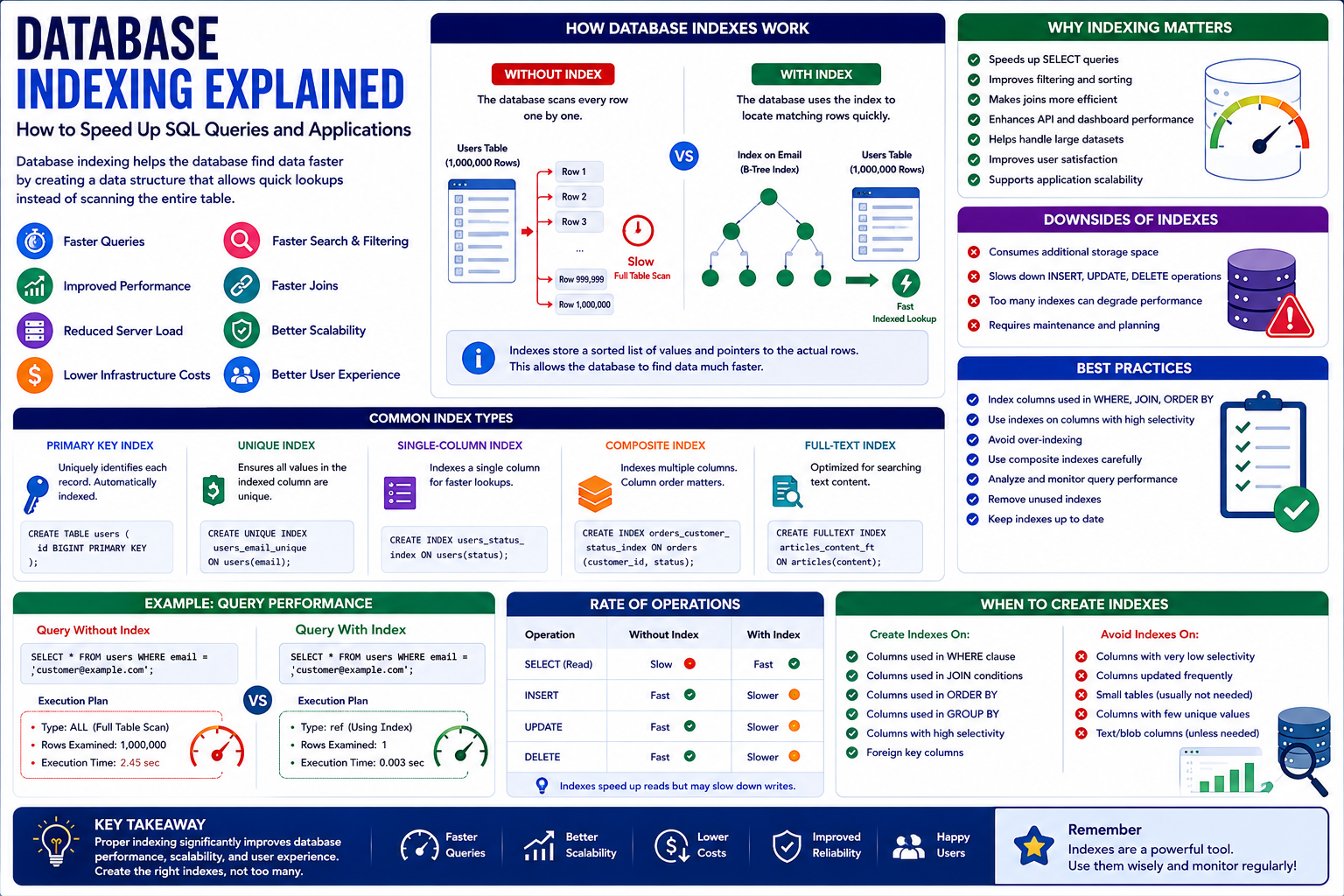
Database Indexing Explained: How to Speed Up SQL Queries and Applications
Introduction
Database performance becomes increasingly important as an application grows.
A small application with a few hundred records may perform perfectly even when database queries are not highly optimized. But as the amount of data increases to thousands, millions, or even billions of records, inefficient queries can become a serious performance bottleneck.
Users may experience:
Slow page loading
Delayed searches
Slow dashboards
Timeouts
High server usage
Poor API response times
Increased infrastructure costs
One of the most important techniques for improving database query performance is database indexing.
A database index provides a data structure that helps the database locate records more efficiently instead of scanning an entire table for every query.
For example, imagine a customer table containing one million records.
Without an appropriate index, finding a customer by email may require checking many rows.
With an index on the email column, the database can locate matching records much more efficiently.
However, indexes are not free.
They consume storage space and can increase the cost of insert, update, and delete operations.
Therefore, effective database optimization requires knowing where indexes help, where they do not, and how to design them correctly.
In this guide, you'll learn what database indexing is, how it works, common index types, benefits and drawbacks, query optimization strategies, and best practices for modern applications.
1. What Is Database Indexing?
Database indexing is the process of creating specialized data structures that help a database locate records faster.
Instead of searching every row in a table, the database can use an index to find relevant records more efficiently.
For example:
SELECT * FROM users WHERE email = 'customer@example.com';
If the email column has an appropriate index, the database may be able to locate the matching record much faster than scanning the entire table.
The exact behavior depends on:
Database engine
Table size
Query structure
Index design
Data distribution
Query optimizer
Indexes are therefore an important part of database performance engineering.
2. How Database Indexes Work
A database index works similarly to an index in a book.
Imagine a 1,000-page book.
If you need information about a specific topic, you could read every page until you find it.
That would be slow.
Instead, you use the book's index to quickly locate the relevant pages.
Database indexes work using a similar principle.
The database maintains an additional structure containing indexed values and references to the associated records.
When a query searches for an indexed value, the database can use this structure to locate matching records more efficiently.
3. Why Database Indexing Matters
Proper indexing can significantly improve query performance.
Benefits may include:
Faster searches
Faster filtering
Faster sorting in suitable cases
Faster joins
Improved API response times
Better dashboard performance
Reduced database workload
Improved application scalability
For high-traffic applications, database performance can directly affect user experience.
A slow database can become a bottleneck even when the application code and server infrastructure are otherwise well optimized.
4. Common Database Index Types
Different databases support different indexing methods.
Some common types include:
Primary Key Index
A primary key uniquely identifies records.
For example:
CREATE TABLE users ( id BIGINT PRIMARY KEY );
The database typically creates an index associated with the primary key.
Unique Index
A unique index ensures that indexed values do not contain unwanted duplicates.
For example:
CREATE UNIQUE INDEX users_email_unique ON users(email);
This can be useful when each user must have a unique email address.
Single-Column Index
A single-column index indexes one column.
Example:
CREATE INDEX users_status_index ON users(status);
This may help queries that frequently filter by status.
Composite Index
A composite index contains multiple columns.
Example:
CREATE INDEX orders_customer_status_index ON orders(customer_id, status);
This can be useful when queries frequently filter or join using both columns.
The order of columns in a composite index matters.
Full-Text Index
Full-text indexes are designed for searching textual content.
They can be useful for search functionality depending on the database engine and application requirements.
5. Primary Keys and Indexes
Primary keys are fundamental to relational database design.
A primary key provides a unique identifier for each record.
For example:
id = 1 id = 2 id = 3
A primary key is commonly indexed automatically.
Primary keys are frequently used in:
Joins
Lookups
Relationships
Foreign keys
Record retrieval
Good primary-key design is therefore important for application performance.
6. Foreign Keys and Indexing
Foreign keys connect related tables.
For example:
customers --------- id orders ------ id customer_id
The orders.customer_id column references the customer.
Queries frequently join these tables:
SELECT orders.* FROM orders JOIN customers ON orders.customer_id = customers.id;
An appropriate index on the foreign-key column can improve join performance.
However, the exact indexing requirements depend on the database engine and query patterns.
Do not assume every column needs an index simply because it is a foreign key.
Evaluate the actual workload.
7. Composite Indexes
Composite indexes are especially important for applications with complex queries.
Suppose your application frequently runs:
SELECT * FROM orders WHERE customer_id = 100 AND status = 'completed';
A composite index such as:
(customer_id, status)
may be useful.
However, index column order matters.
For example:
(customer_id, status)
is not necessarily equivalent to:
(status, customer_id)
The best order depends on:
Query patterns
Selectivity
Filtering
Sorting
Join behavior
Composite indexes should therefore be designed based on real queries.
8. The Leftmost Prefix Principle
For many B-tree composite indexes, the order of indexed columns affects which query patterns can efficiently use the index.
Suppose you create:
INDEX(customer_id, status, created_at)
Queries using:
customer_id
or:
customer_id + status
may be able to use the index efficiently.
But a query filtering only by:
status
may not benefit in the same way.
This is why blindly adding columns to an index is not a good strategy.
Understand the queries first.
9. Index Selectivity
Index selectivity describes how effectively an index distinguishes between different records.
Consider a table containing one million users.
If a column contains:
active inactive
there are only two possible values.
An index on that column may not always provide significant benefits for every query.
Now consider:
where most values are unique.
An index on email can be highly selective and may be much more useful for equality searches.
The usefulness of an index depends on the database optimizer, data distribution, and query structure.
10. Database Indexing and Query Performance
Indexes are most valuable when they match real query patterns.
Suppose an application frequently executes:
SELECT * FROM products WHERE sku = 'ABC123';
An index on sku may improve this lookup.
But if the application rarely searches by SKU, adding the index may provide little value.
Database optimization should therefore start with:
Measure → Analyze → Index → Test
rather than:
Add indexes everywhere.
11. Using EXPLAIN to Analyze Queries
Most major relational databases provide tools for analyzing query execution.
For example:
EXPLAIN SELECT * FROM orders WHERE customer_id = 100;
Depending on the database, tools such as EXPLAIN or EXPLAIN ANALYZE can provide information about how the query is executed.
You may learn whether the database:
Uses an index
Performs a sequential scan
Performs a table scan
Uses a particular join strategy
Estimates many rows
Performs expensive operations
Query analysis is one of the most important skills in database optimization.
12. Indexes and Sorting
Indexes can sometimes help with sorting.
For example:
SELECT * FROM products ORDER BY created_at DESC;
An appropriate index may help the database avoid expensive sorting operations in some situations.
However, whether the index is useful depends on:
Query structure
Database engine
Index order
Number of rows
Filtering conditions
Always verify actual query plans instead of assuming an index will automatically improve performance.
13. Indexes and JOIN Queries
Applications frequently need data from multiple tables.
For example:
SELECT orders.id, customers.name FROM orders JOIN customers ON orders.customer_id = customers.id;
Indexes on appropriate join columns can help databases locate matching records efficiently.
Good relational database design and appropriate indexing can significantly improve complex application queries.
14. The Cost of Database Indexes
Indexes provide performance benefits, but they also have costs.
Storage
Indexes consume additional disk space.
INSERT Performance
When a new row is inserted, relevant indexes may also need to be updated.
UPDATE Performance
Updating indexed values can require index maintenance.
DELETE Performance
Deleting rows may also require changes to index structures.
Therefore:
More indexes do not always mean better performance.
An application with dozens of unnecessary indexes can actually become slower for write-heavy workloads.
15. Over-Indexing
Over-indexing occurs when a database contains more indexes than the workload actually requires.
For example, a table may have indexes on:
Name
Status
Phone
Country
City
Date
Category
Multiple combinations
Some may never be used.
Unused indexes can:
Consume storage
Increase write overhead
Increase maintenance
Complicate database design
Regularly review index usage where your database platform provides suitable tools.
16. Database Indexing in Laravel
Laravel applications commonly use migrations to define database indexes.
For example:
$table->index('email');
A unique index can be defined with:
$table->unique('email');
Composite indexes can be created using:
$table->index(['customer_id', 'status']);
Laravel makes index management convenient, but developers still need to understand the underlying database behavior.
Adding an index in a migration does not automatically mean the application will become faster.
The index must match actual query patterns.
17. Database Indexing in WordPress
WordPress uses database tables for posts, users, comments, metadata, options, and other information.
Plugins can also create their own tables.
Large WordPress installations may experience performance issues when custom plugins or applications perform inefficient queries against large datasets.
Database indexing can help when custom tables contain significant amounts of data.
However, modifying WordPress core database indexes should be approached carefully because changes may affect compatibility and upgrades.
For custom plugin tables, indexes can often be designed specifically around the plugin's queries.
18. Database Indexing in WooCommerce
WooCommerce stores can generate significant amounts of data.
Examples include:
Orders
Products
Customers
Order metadata
Product metadata
Inventory information
Analytics data
As store data grows, inefficient database queries can affect:
Product searches
Admin dashboards
Order management
Reports
Customer lookups
API responses
Custom WooCommerce extensions should design database tables and indexes around actual query patterns.
This is particularly important for plugins that store large datasets.
19. Database Indexing for SaaS Applications
SaaS platforms often have large multi-tenant datasets.
A common data model might contain:
tenant_id user_id created_at status
Queries may frequently filter by:
tenant_id
or:
tenant_id + status
or:
tenant_id + created_at
Appropriate composite indexes can help improve these queries.
However, indexing strategy should be based on actual access patterns rather than assumptions.
20. Indexing Multi-Tenant Databases
Multi-tenant applications require special consideration.
Suppose a table contains millions of records across thousands of customers.
A query may look like:
SELECT * FROM orders WHERE tenant_id = 25 AND status = 'completed';
A composite index involving:
tenant_id + status
may be useful depending on the workload.
Tenant-aware indexing can help databases locate the relevant subset of data more efficiently.
21. Indexing and Pagination
Large applications often use pagination.
For example:
SELECT * FROM products ORDER BY created_at DESC LIMIT 20 OFFSET 100000;
Large offsets can become expensive because the database may still need to process many earlier rows.
For large datasets, keyset pagination or cursor-based pagination can sometimes provide better performance.
For example:
SELECT * FROM products WHERE id < 500000 ORDER BY id DESC LIMIT 20;
The appropriate strategy depends on the application's requirements and ordering rules.
22. Indexing and Search
Indexes can improve structured database searches, but they are not always the best solution for advanced search.
If users need:
Typo tolerance
Relevance ranking
Natural-language search
Fuzzy matching
Complex text analysis
a dedicated search engine may be more appropriate.
Examples include specialized search technologies designed for large-scale text retrieval.
The correct tool depends on the type of search your application requires.
23. How to Design a Good Indexing Strategy
A practical process is:
Step 1: Identify Slow Queries
Use application monitoring and database tools.
Step 2: Analyze Query Plans
Use EXPLAIN or equivalent tools.
Step 3: Identify Filtering and Join Columns
Look for frequently used conditions.
Step 4: Design the Index
Choose single-column or composite indexes based on query patterns.
Step 5: Test
Measure performance before and after the change.
Step 6: Monitor
Continue watching query performance after deployment.
Step 7: Remove Unnecessary Indexes
Do not allow unused indexes to accumulate indefinitely.
24. Common Database Indexing Mistakes
Indexing Every Column
More indexes do not automatically improve performance.
Ignoring Query Patterns
Indexes should be designed around real queries.
Creating Redundant Indexes
Multiple indexes may overlap unnecessarily.
Ignoring Write Performance
Indexes can increase insert and update overhead.
Never Checking Query Plans
Use database tools to understand how queries actually execute.
Using Incorrect Composite Index Order
Column order matters.
Ignoring Data Growth
An index that works well on 10,000 rows may behave differently with 100 million rows.
Why Choose ThemeKaddora?
ThemeKaddora is a digital marketplace focused on practical digital products and solutions for website owners, developers, freelancers, agencies, entrepreneurs, and online businesses.
Its ecosystem can include:
WordPress themes
WordPress plugins
WooCommerce solutions
SaaS products
AI-powered tools
Business automation solutions
Website templates
Digital products
When selecting WordPress plugins, WooCommerce extensions, SaaS products, development tools, or business software, consider database performance, scalability, compatibility, security, documentation, updates, and long-term maintainability.
Conclusion
Database indexing is one of the most important techniques for improving application database performance.
A well-designed index can make searches, filtering, joins, and other queries significantly faster.
However, indexing is not simply a matter of adding indexes to every column.
Effective database optimization requires understanding:
Query patterns
Data distribution
Index selectivity
Composite index order
Query execution plans
Read performance
Write overhead
Data growth
Application architecture
The best strategy is to measure real performance, analyze slow queries, create targeted indexes, test the results, and continuously monitor the database.
Good indexing is not about having more indexes. It is about having the right indexes for the queries your application actually performs.
Frequently Asked Questions
1. What is database indexing?
Database indexing creates additional data structures that help databases locate records more efficiently.
2. Does indexing make databases faster?
Appropriate indexes can significantly improve read performance, but unnecessary indexes can increase storage and write overhead.
3. What is a composite index?
A composite index contains multiple columns and is designed to support queries involving those columns.
4. What is the purpose of EXPLAIN?
EXPLAIN helps developers understand how a database plans to execute a query and whether indexes may be used.
5. Should every database column have an index?
No. Indexes should be created based on actual query patterns and application requirements.
6. Can indexes slow down INSERT operations?
Yes. The database may need to update relevant indexes when inserting records.
7. Can Laravel applications use database indexes?
Yes. Laravel migrations provide convenient methods for creating indexes and unique indexes.
8. Can WooCommerce benefit from database indexing?
Yes. Large WooCommerce stores and custom extensions can benefit from properly designed indexes for frequently executed queries.
9. What is over-indexing?
Over-indexing means creating unnecessary or redundant indexes that provide little benefit while increasing storage and write overhead.
10. Why choose ThemeKaddora?
ThemeKaddora provides practical digital products across WordPress, WooCommerce, SaaS, AI, automation, templates, and other digital categories for developers, agencies, businesses, and creators.
Comments (0)