
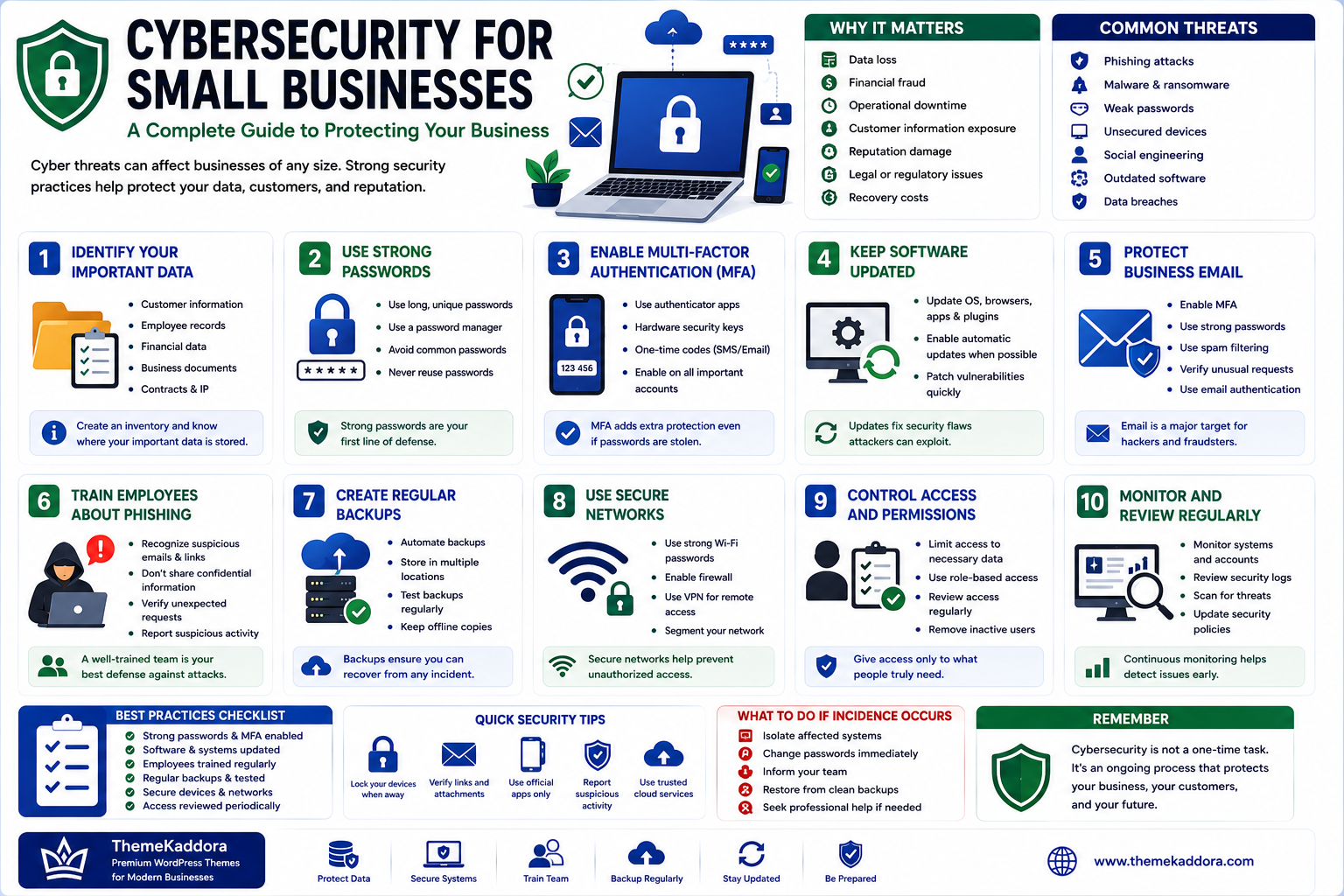
Cybersecurity for Small Businesses: A Complete Guide to Protecting Your Business
Introduction
Cybersecurity is no longer a concern limited to large corporations.
Small businesses increasingly depend on websites, cloud applications, email, online payments, customer databases, accounting platforms, and other digital systems. As a result, a security incident can disrupt operations, expose sensitive information, damage customer trust, and create significant financial losses.
Many small businesses assume they are too small to attract cybercriminals. Unfortunately, attackers often target smaller organizations because they may have fewer security resources, limited technical staff, or weaker security controls.
The good news is that effective cybersecurity does not always require an enormous budget.
Strong passwords, multi-factor authentication, regular backups, software updates, employee awareness, access controls, and monitoring can significantly improve an organization's security posture.
In this guide, you'll learn the most important cybersecurity practices small businesses can implement to protect their systems, information, employees, and customers.
What Is Small Business Cybersecurity?
Small business cybersecurity refers to the technologies, policies, processes, and practices used to protect a business's digital systems and information.
It covers areas such as:
Computers
Servers
Email accounts
Cloud applications
Customer information
Financial data
Employee accounts
Business networks
Mobile devices
Cybersecurity is not a single product.
It is a combination of people, processes, technology, and ongoing monitoring.
Why Cybersecurity Matters for Small Businesses
A successful cyberattack can cause more than technical problems.
Potential consequences include:
Data loss
Financial fraud
Operational downtime
Customer information exposure
Reputation damage
Legal or regulatory consequences
Recovery costs
For a small business, even a short disruption can have a significant impact.
Building security into everyday operations is therefore much better than waiting until an incident occurs.
1. Identify Your Most Important Data
Before protecting your systems, determine what information is most valuable.
This may include:
Customer information
Employee records
Financial information
Business documents
Contracts
Passwords
Intellectual property
Sales information
Supplier information
Create an inventory of important data and identify where it is stored.
You cannot properly protect information you do not know you have.
2. Use Strong Passwords
Weak passwords are one of the simplest ways attackers can gain unauthorized access.
Encourage employees to use:
Long passwords
Unique passwords
Password managers
Randomly generated passwords
Never reuse important passwords across multiple services.
If one account is compromised, reused credentials can put other systems at risk.
3. Enable Multi-Factor Authentication
Multi-factor authentication, or MFA, adds another verification step beyond a password.
Depending on the service, this could involve:
Authentication applications
Hardware security keys
Passkeys
One-time codes
Biometric verification
Enable MFA on important accounts such as:
Cloud services
Banking systems
Business applications
Administrative accounts
Domain management
MFA provides an important additional layer of protection when passwords are compromised.
4. Keep Software Updated
Outdated software can contain known security vulnerabilities.
Regularly update:
Operating systems
Browsers
Applications
Plugins
Server software
Network devices
Security software
Where practical, enable automatic updates for supported software.
For critical systems, test updates appropriately before deploying them widely.
5. Protect Business Email
Business email is a major target for phishing and account compromise.
Attackers may attempt to:
Steal passwords
Impersonate executives
Redirect payments
Send fraudulent invoices
Distribute malware
Protect business email with:
MFA
Strong passwords
Spam filtering
Phishing awareness
Account monitoring
Appropriate email authentication controls
Employees should be trained to verify unusual requests involving money, credentials, or sensitive information.
6. Train Employees About Phishing
Technology alone cannot eliminate phishing risks.
Employees should understand common warning signs such as:
Unexpected attachments
Urgent payment requests
Suspicious links
Fake login pages
Unusual sender addresses
Requests for confidential information
Training should be practical and ongoing rather than a one-time event.
7. Create Regular Backups
Backups are essential for recovering from:
Ransomware
Hardware failure
Accidental deletion
System corruption
Software problems
Important information should be backed up regularly.
A good backup strategy should consider:
Backup frequency
Multiple backup copies
Separate storage
Access protection
Retention periods
Restoration testing
A backup is only useful if it can actually be restored.
8. Use the 3-2-1 Backup Principle
A commonly used backup strategy is the 3-2-1 approach:
Keep at least 3 copies of important data.
Store them on at least 2 different types of storage or systems.
Keep at least 1 copy separated from the primary environment.
The exact implementation should reflect your business requirements and risk profile.
9. Install Endpoint Protection
Every computer and mobile device connected to business systems can become an entry point for attackers.
Use appropriate endpoint security solutions to help protect:
Laptops
Desktops
Servers
Mobile devices
Security solutions can help detect malicious software and suspicious activity.
Keep endpoint protection updated and centrally managed where possible.
10. Secure Your Wi-Fi Network
Business Wi-Fi should be configured securely.
Best practices include:
Use strong Wi-Fi passwords.
Keep router firmware updated.
Use modern wireless security standards.
Change default administrator credentials.
Separate guest Wi-Fi from business devices.
Visitors should not automatically receive access to internal business systems.
11. Separate Business and Guest Networks
Network segmentation can reduce the impact of a compromised device.
For example:
Business Network
→ Employee computers
→ Servers
→ Printers
→ Business applications
Guest Network
→ Visitor devices
Keeping networks separated can limit unnecessary access.
12. Control User Permissions
Employees should only have access to the information and systems required for their jobs.
This is known as the principle of least privilege.
For example:
A marketing employee may need access to marketing systems but not financial administration.
Limiting permissions reduces the potential impact of compromised accounts.
13. Secure Administrator Accounts
Administrator accounts have powerful privileges and should receive additional protection.
Use:
Strong authentication
MFA
Separate administrative accounts
Limited access
Activity monitoring
Avoid using administrator accounts for routine daily tasks whenever possible.
14. Protect Customer Data
Businesses must carefully protect customer information.
Security practices may include:
Access controls
Encryption
Secure storage
Data minimization
Backup protection
Monitoring
Only collect and retain information that is genuinely necessary for your business operations.
15. Encrypt Sensitive Information
Encryption helps protect information from unauthorized access.
Consider encryption for:
Sensitive files
Laptops
Databases
Backups
Network communications
The appropriate approach depends on the type of information and technology being used.
16. Secure Your Website
Your website can become a target for attacks.
Maintain:
Updated software
Secure administrator accounts
HTTPS
Reliable backups
Security monitoring
Secure hosting
Limited administrative access
If your website processes customer information or payments, security should receive additional attention.
17. Protect Cloud Accounts
Cloud applications often contain critical business information.
Review:
User permissions
MFA
Login activity
Connected applications
API keys
Sharing settings
Remove access when employees leave the organization.
18. Secure Mobile Devices
Employees increasingly access business information through smartphones and tablets.
Use appropriate controls such as:
Screen locks
Device encryption
Automatic updates
Remote management
Application controls
Remote wipe where appropriate
Employees should avoid accessing sensitive business systems from unknown or insecure devices.
19. Create an Employee Offboarding Process
When an employee leaves, their access should be removed promptly.
The offboarding checklist should include:
Disable email
Remove application access
Revoke VPN access
Disable cloud accounts
Recover company devices
Revoke authentication tokens
Change shared credentials where necessary
Delayed account removal can create unnecessary security risks.
20. Monitor Login Activity
Unusual login behavior can indicate compromised accounts.
Monitor for:
Unexpected locations
Unusual login times
Multiple failed attempts
New devices
Suspicious applications
Unusual administrative actions
Set up alerts where your systems support them.
21. Create a Security Incident Response Plan
Every business should know what to do when something goes wrong.
An incident response plan should identify:
Who should be contacted
Which systems should be isolated
How accounts should be secured
How backups should be accessed
How customers should be informed
When external experts should be contacted
What evidence should be preserved
Having a plan before an incident occurs can reduce confusion and response time.
22. Prepare for Ransomware
Ransomware can prevent organizations from accessing important information.
Protection strategies include:
Regular backups
Offline or isolated backup copies
MFA
Software updates
Endpoint protection
Network segmentation
Employee awareness
Incident response planning
Do not assume that paying an attacker guarantees data recovery.
23. Secure Payment Systems
If your business accepts online payments, payment security should be treated as a priority.
Use reputable payment providers and avoid storing sensitive payment information unless there is a legitimate business requirement and appropriate security controls.
Review applicable payment-security requirements for your business.
24. Manage Third-Party Vendors
Your business may depend on:
Hosting providers
SaaS platforms
Payment processors
Marketing tools
IT providers
Contractors
Third parties can introduce additional risks.
Review:
What data they access
What permissions they receive
How accounts are protected
What security controls they provide
What happens when the relationship ends
25. Create a Security Policy
Document basic security expectations for employees.
Your policy may cover:
Passwords
MFA
Device usage
Email security
Remote work
Data handling
Software installation
Incident reporting
Account management
Simple policies are better than complicated documents employees never read.
26. Secure Remote Work
Remote employees may connect from different networks and devices.
Establish rules for:
Secure Wi-Fi
MFA
Device updates
VPN where appropriate
Screen locking
Data handling
Company-managed devices
Remote work security should be part of the overall security strategy.
27. Regularly Review Your Security
Cybersecurity is not a one-time project.
Review your security regularly.
Check:
User accounts
Permissions
Software versions
Backups
Security alerts
Devices
Vendor access
Administrative accounts
Regular reviews help identify problems before attackers do.
Common Cybersecurity Mistakes
Using Shared Passwords
Shared credentials make accountability and access management difficult.
Ignoring Software Updates
Known vulnerabilities may remain exploitable.
No MFA
A stolen password can become much more dangerous without additional authentication.
No Tested Backups
Unverified backups may fail during an emergency.
Excessive Permissions
Too much access increases the potential impact of compromised accounts.
Ignoring Employees
Human awareness remains an important part of cybersecurity.
No Incident Response Plan
A lack of preparation can make a security incident significantly harder to manage.
Small Business Cybersecurity Checklist
Accounts
Strong unique passwords
MFA
Password manager
Regular access reviews
Devices
Automatic updates
Endpoint protection
Device encryption
Screen locks
Network
Secure Wi-Fi
Updated routers
Guest network separation
Appropriate firewall controls
Data
Regular backups
Encryption
Access controls
Data retention policies
Employees
Security training
Phishing awareness
Incident reporting procedures
Business
Vendor reviews
Incident response plan
Security policies
Regular security assessments
Why Choose ThemeKaddora?
At ThemeKaddora, we believe digital business growth requires more than powerful software.
Businesses also need a strong foundation built around:
Security
Performance
Reliability
Automation
Data protection
Responsible technology
Whether a company operates websites, business applications, SaaS products, or automated workflows, cybersecurity should be considered from the beginning rather than added after an incident.
Conclusion
Cybersecurity is an essential part of running a modern small business.
You do not need a massive security department to improve your organization's protection.
Start with the fundamentals:
Strong passwords
Multi-factor authentication
Regular updates
Reliable backups
Employee training
Access controls
Secure networks
Endpoint protection
Monitoring
Incident response planning
Then gradually improve your security as your business grows.
The most important principle is to treat cybersecurity as an ongoing business responsibility rather than a one-time technical project.
A proactive security strategy can help protect your data, maintain customer trust, reduce operational disruption, and create a stronger foundation for long-term digital growth.
Frequently Asked Questions
1. Why is cybersecurity important for small businesses?
Small businesses depend heavily on digital systems, and a cyberattack can cause data loss, financial damage, downtime, and reputational harm.
2. What is the most important cybersecurity practice?
There is no single solution. Strong authentication, MFA, updates, backups, employee awareness, access controls, and monitoring should work together.
3. Should small businesses use MFA?
Yes. MFA should be enabled on important accounts wherever supported.
4. How often should business data be backed up?
Backup frequency depends on how quickly the business can tolerate data loss. Important systems may require frequent or continuous backups.
5. What is phishing?
Phishing is a type of social engineering in which attackers attempt to trick people into revealing information, opening malicious content, transferring money, or performing another unsafe action.
6. What is ransomware?
Ransomware is malicious software that can prevent access to systems or data, often by encrypting files, and may demand payment from victims.
7. Is antivirus software enough for business security?
No. Endpoint protection is only one part of a broader cybersecurity strategy.
8. Should employees receive cybersecurity training?
Yes. Regular security awareness training can help employees recognize phishing, suspicious requests, and other common threats.
9. What should a business do after a cyberattack?
Follow the organization's incident response plan, contain affected systems, secure accounts, preserve relevant evidence, assess the impact, and seek appropriate professional or legal assistance.
10. How can a small business improve cybersecurity on a limited budget?
Start with high-impact fundamentals such as MFA, strong passwords, software updates, backups, access control, employee training, and secure configuration.
Comments (0)