
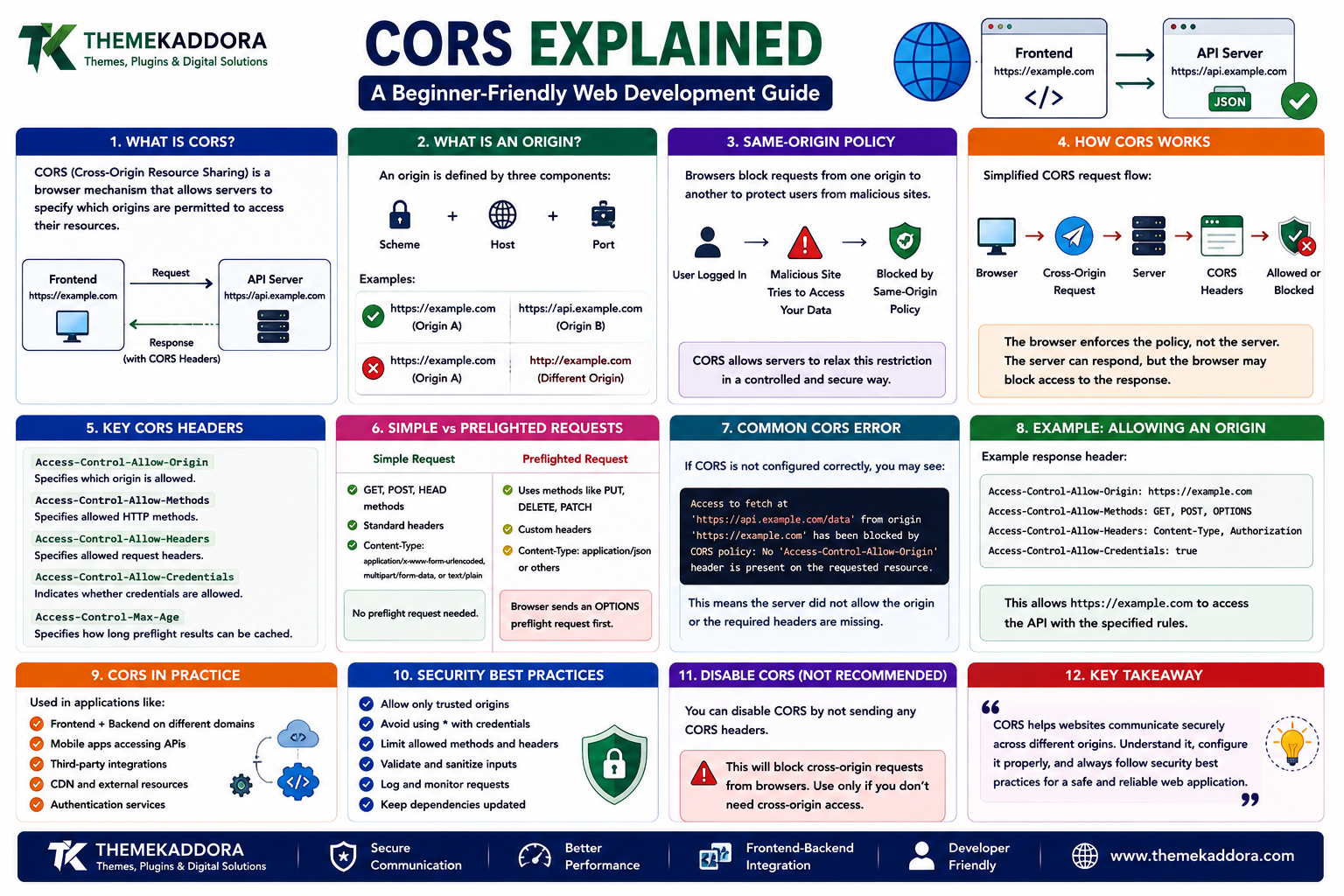
Cross-Origin Resource Sharing (CORS) Explained: A Beginner-Friendly Web Development Guide
Introduction
Modern web applications rarely operate as a single system.
A frontend may be hosted on one domain.
An API may run on another domain.
Images may come from a CDN.
Authentication may use a separate service.
Third-party APIs may provide additional functionality.
This creates an important question:
How can a website safely communicate with resources hosted on another origin?
This is where Cross-Origin Resource Sharing, commonly called CORS, becomes important.
CORS is a browser security mechanism that controls whether a web page can request resources from a different origin.
It is an essential concept for frontend developers, backend developers, API developers, and anyone building modern web applications.
For WordPress developers, CORS can become especially relevant when connecting WordPress with external APIs, headless frontends, JavaScript applications, mobile applications, analytics systems, or third-party services.
What Is CORS?
CORS stands for Cross-Origin Resource Sharing.
It is a browser mechanism that allows servers to specify which other origins are permitted to access their resources.
A simplified example is:
Frontend
https://example.com
↓
API Request
↓
https://api.example.com
The browser recognizes that these are different origins and applies its cross-origin security rules.
The API server can respond with specific headers that tell the browser whether the request is allowed.
What Is an Origin?
To understand CORS, you first need to understand the concept of an origin.
An origin is generally defined by three components:
Scheme
Host
Port
For example:
https://example.com
has:
Scheme: HTTPS
Host: example.com
Port: 443 by default for HTTPS
If any of these components differ, the origin can be different.
For example:
https://example.com
and:
https://api.example.com
are different origins because the host is different.
Similarly:
http://example.com
and:
https://example.com
have different origins because the scheme is different.
Same-Origin Policy
CORS exists because of an important browser security principle called the Same-Origin Policy.
The same-origin policy limits how documents and scripts from one origin can interact with resources from another origin.
Without browser restrictions, a malicious website could potentially make requests to other websites using a user's existing browser session.
For example, imagine a user is logged into an online service.
A malicious website should not automatically be able to read private information from that service simply because the user opened the malicious page.
The same-origin policy helps prevent this type of unauthorized access.
CORS provides a controlled mechanism for servers to allow legitimate cross-origin access.
Why Do Browsers Enforce CORS?
Browsers enforce cross-origin restrictions to protect users.
Imagine:
User Logs Into Website
↓
Authentication Cookie Stored
↓
User Visits Malicious Website
↓
Malicious Website Sends Request
Without appropriate browser protections, sensitive information could potentially be exposed.
CORS helps servers explicitly declare which origins are permitted to access responses through browser-based cross-origin requests.
It is therefore an important part of web security.
How CORS Works
A simplified CORS request looks like:
Browser
↓
Cross-Origin Request
↓
Server
↓
CORS Response Headers
↓
Browser Checks Permission
↓
Response Allowed or Blocked
The important point is that the browser is responsible for enforcing the policy.
A server can return data, but the browser may prevent frontend JavaScript from reading that response if the CORS policy does not allow the requesting origin.
The Access-Control-Allow-Origin Header
One of the most important CORS headers is:
Access-Control-Allow-Origin
It tells the browser which origin is allowed to access the resource.
For example:
Access-Control-Allow-Origin: https://example.com
This means the server allows requests from that origin under the applicable CORS rules.
A server can also use:
Access-Control-Allow-Origin: *
This allows requests from any origin for scenarios where wildcard access is appropriate.
However, wildcard access should not automatically be used for private or credentialed resources.
What Is a CORS Error?
A common CORS problem occurs when the browser sends a cross-origin request but the server does not provide the required permission.
A developer may see an error similar to:
Blocked by CORS policy
This usually means the browser determined that the response did not satisfy the required cross-origin policy.
The problem may be caused by:
Missing CORS headers
Incorrect allowed origin
Incorrect HTTP methods
Missing allowed headers
Failed preflight request
Credential configuration problems
Server configuration issues
The exact error message depends on the request and browser.
CORS Is Not Usually a Frontend Problem
One common misunderstanding is that developers can simply "disable CORS" in frontend JavaScript.
That is generally not how CORS works.
The server needs to provide appropriate response headers.
For example:
Frontend
↓
Request
↓
API Server
↓
CORS Headers
↓
Browser
The frontend can control how it sends a request, but it cannot simply grant itself permission to read a protected cross-origin response.
Simple Requests
Some cross-origin requests can be classified as simple requests under the CORS rules.
These requests generally use permitted methods and headers and meet specific content-type requirements.
For example, a basic request might be:
Browser
↓
GET Request
↓
API
↓
Response
The server still needs to provide appropriate CORS permissions when browser access to the response is required.
What Is a Preflight Request?
Some cross-origin requests require the browser to check with the server before sending the actual request.
This is called a preflight request.
The browser typically sends an OPTIONS request first.
A simplified process looks like:
Browser
↓
OPTIONS Request
↓
Server
↓
Permission Response
↓
Browser Sends Actual Request
The preflight allows the browser to determine whether the server permits the requested method and headers.
Why Do Preflight Requests Happen?
Preflight requests can occur when a request does not qualify as a simple request.
For example, an application may send:
A custom HTTP method
Custom request headers
Certain content types
The browser can ask the server:
"Are these types of requests allowed?"
The server responds with appropriate CORS headers.
If the response is acceptable, the browser proceeds.
Important CORS Headers
Several HTTP headers can be involved in CORS configuration.
Access-Control-Allow-Origin
Specifies permitted origins.
Access-Control-Allow-Methods
Specifies permitted HTTP methods.
Access-Control-Allow-Headers
Specifies permitted request headers.
Access-Control-Allow-Credentials
Controls whether credentials can be included in cross-origin requests under the relevant browser rules.
Access-Control-Expose-Headers
Specifies response headers that browser JavaScript is allowed to access.
Understanding these headers makes CORS errors much easier to diagnose.
CORS and HTTP Methods
APIs commonly use methods such as:
GET
POST
PUT
PATCH
DELETE
A server may need to specify which methods are allowed for cross-origin requests.
For example:
Access-Control-Allow-Methods: GET, POST, PUT, DELETE
The correct configuration depends on the API.
A server should not allow unnecessary methods simply because they are available.
CORS and Custom Headers
Modern applications may send headers such as:
Authorization
Content-Type
Custom application headers
When a request triggers a preflight, the server needs to indicate which request headers are permitted.
For example:
Access-Control-Allow-Headers: Authorization, Content-Type
The allowed list should match the actual application requirements.
CORS and Credentials
Credentials can include things such as cookies or other authentication information depending on the request configuration.
Credentialed cross-origin requests require additional configuration.
For example, the client may indicate that credentials should be included.
The server must then explicitly allow credentials through the appropriate CORS response header.
A common mistake is assuming that:
Access-Control-Allow-Origin: *
can be freely combined with credentialed requests.
That combination is restricted by browser CORS rules.
CORS and Cookies
Cookies are often used for authentication.
Suppose:
Frontend
https://app.example.com
needs to communicate with:
API
https://api.example.com
If authentication relies on cookies, the application must correctly configure:
Browser request behavior
Server CORS headers
Cookie attributes
HTTPS
Authentication rules
CORS configuration alone does not automatically make cross-origin authentication secure.
CORS vs CSRF
CORS and CSRF are related to browser security but solve different problems.
CORS
Controls whether browser-based JavaScript can access cross-origin resources.
CSRF
Protects against unauthorized actions performed using a user's authenticated session.
A website may need protections against both.
For example:
CORS
→ Controls cross-origin access.
CSRF Protection
→ Helps protect state-changing requests.
Understanding the difference is important when designing secure web applications.
CORS vs Same-Origin Policy
The same-origin policy is the broader browser security principle.
CORS provides a standardized mechanism for servers to relax certain cross-origin restrictions in controlled situations.
A simplified relationship is:
Same-Origin Policy
↓
Restricts Cross-Origin Access
↓
CORS
↓
Allows Specific Cross-Origin Access
This makes CORS an important part of modern browser-based application architecture.
CORS in Frontend and Backend Applications
Modern applications frequently separate the frontend and backend.
For example:
Frontend
app.example.com
↓
API
api.example.com
↓
**Database`
The frontend may use JavaScript to communicate with the API.
If the origins differ, the API needs appropriate CORS configuration.
This architecture is common in:
React applications
Vue applications
Angular applications
Mobile-backed web systems
Headless CMS projects
SaaS applications
CORS and WordPress
WordPress can also be involved in cross-origin applications.
For example:
WordPress
↓
REST API
↓
External Frontend
A separate frontend application may request WordPress data.
Depending on the deployment architecture, CORS configuration may be required.
This can be useful for:
Headless WordPress
JavaScript applications
Mobile applications
External dashboards
Custom frontend experiences
WordPress developers should configure cross-origin access according to the actual application requirements.
CORS and the WordPress REST API
The WordPress REST API allows applications to interact with WordPress data programmatically.
A custom frontend might request:
Frontend
↓
WordPress REST API
↓
Posts / Pages / Custom Data
↓
Frontend
If the frontend and WordPress installation are hosted on different origins, cross-origin policies may become relevant.
The correct solution depends on the hosting architecture and authentication requirements.
CORS and Third-Party APIs
Websites frequently connect to external APIs.
Examples include:
Payment services
Maps
Analytics
AI services
Search services
Shipping systems
Social platforms
A browser application may attempt to communicate directly with these services.
Whether that works depends partly on the API's CORS configuration.
Some APIs are designed for server-to-server communication rather than direct browser requests.
In such cases, a backend service may be more appropriate.
Browser Request vs Server Request
CORS is primarily a browser security mechanism.
This distinction is important.
A server-side application can often make an HTTP request to another server without being subject to the browser's same-origin restrictions in the same way.
For example:
Browser
→ API
may encounter CORS restrictions.
But:
Backend Server
→ API
does not operate under the browser's same-origin policy.
This is one reason backend proxy patterns are sometimes used.
Using a Backend Proxy
Suppose:
Browser
cannot directly access:
Third-Party API
because of CORS restrictions.
The application may use:
Browser
↓
Your Backend
↓
Third-Party API
↓
Your Backend
↓
Browser
The backend retrieves the information and returns an appropriate response to the frontend.
This can also help protect private API credentials.
However, a proxy should not be used simply to bypass security without understanding the API's intended access model.
CORS and Security
Incorrect CORS configuration can create security problems.
For example, overly broad origin policies may expose information to websites that should not have access.
Developers should avoid blindly allowing every origin.
Instead, define:
Trusted origins
Required methods
Required headers
Credential behavior
Authentication requirements
Security should be part of CORS design from the beginning.
Avoid Allowing Every Origin Unnecessarily
A configuration such as:
Access-Control-Allow-Origin: *
may be acceptable for certain public resources.
For example:
Public API Data
→ Broad access may be appropriate.
But private application data may require:
Specific Trusted Origin
→ Restricted access.
The correct configuration depends on the data and use case.
CORS and Development Environments
Developers often run frontend and backend applications on different local ports.
For example:
Frontend
http://localhost:3000
Backend
http://localhost:8000
Even though both use localhost, different ports mean different origins.
This can cause CORS errors during development.
Developers should configure their local API server appropriately rather than assuming the browser will treat the applications as the same origin.
CORS in Production
Development and production environments may use different origins.
For example:
Development
http://localhost:3000
Production
https://app.example.com
The CORS configuration should therefore be environment-aware.
Production systems should avoid accidentally allowing development origins unless they are genuinely required.
Common CORS Mistakes
1. Allowing Every Origin
Broad access can create unnecessary security exposure.
2. Forgetting Preflight Requests
The API may support GET requests but fail when the browser sends an OPTIONS request.
3. Missing Required Headers
The server may reject a request because a required header is not allowed.
4. Incorrect Credential Configuration
Cookies and authentication require additional configuration.
5. Configuring Only the Frontend
CORS permission is primarily determined by server responses.
6. Ignoring HTTPS
Secure applications should use encrypted connections.
7. Using a Proxy Without Understanding the Security Model
A backend proxy should be designed carefully.
8. Copying CORS Configurations Blindly
Different applications require different policies.
How to Fix Common CORS Errors
A practical troubleshooting process can follow these steps.
Step 1: Identify the Two Origins
Write down the frontend and backend URLs.
Step 2: Check the Browser Error
Determine which CORS rule is failing.
Step 3: Inspect the Network Request
Look at:
Request method
Request headers
Response headers
Status code
Step 4: Check the OPTIONS Request
If a preflight occurs, verify that the server handles it correctly.
Step 5: Review Allowed Origins
Make sure the actual frontend origin is permitted.
Step 6: Review Methods
Check whether the requested method is allowed.
Step 7: Review Headers
Confirm required request headers are permitted.
Step 8: Check Credentials
If cookies or authentication are involved, verify credential configuration.
Step 9: Test Again
Use browser developer tools to confirm the response now satisfies the policy.
CORS and API Design
CORS should be considered when designing an API.
Developers should decide:
Who needs access?
Which origins are trusted?
Which methods are required?
Which headers are needed?
Is authentication required?
Is the API public or private?
Good API architecture considers browser access as part of the overall system design.
CORS and Performance
CORS itself is not usually a major performance bottleneck.
However, preflight requests can introduce additional network communication for certain requests.
For high-frequency applications, developers should consider:
Request design
Caching behavior
Preflight behavior
API architecture
Network latency
The goal is to create a secure configuration without unnecessary network overhead.
CORS and CDN Configuration
CDNs and reverse proxies can sometimes participate in CORS behavior.
Developers should ensure that:
CORS headers are preserved
Cached responses are handled correctly
Different origins receive appropriate responses
Cache keys account for relevant headers when necessary
Incorrect caching configuration can create confusing CORS behavior.
Testing CORS
CORS problems can be tested using:
Browser developer tools
Network panels
API testing tools
Server logs
Command-line HTTP tools
The browser network panel is particularly useful because it shows the actual request and response headers involved in the problem.
A Simple CORS Architecture
A basic application may look like:
Browser
↓
Frontend
↓
Cross-Origin Request
↓
API Server
↓
CORS Validation
↓
Application Logic
↓
Response
For a larger system:
Browser
↓
Frontend
↓
API Gateway
↓
Authentication
↓
Application Services
↓
Database / External APIs
↓
Response
CORS should be designed as one part of this broader architecture.
When Do You Need CORS?
You generally need to think about CORS when browser-based code communicates across different origins.
Examples include:
Separate frontend and backend domains
Headless WordPress
External APIs
JavaScript applications
SaaS applications
Third-party integrations
If everything is served from the same origin, CORS may not be a major concern.
Why Choose Themekaddora?
ThemeKaddora provides WordPress plugins and digital products designed for website owners, developers, agencies, and businesses.
Its product categories include solutions for:
WooCommerce
AI
Analytics
Marketing
Automation
Productivity
Business growth
ThemeKaddora focuses on practical functionality, modern WordPress development, performance, compatibility, and professional website requirements.
When searching for a WordPress plugin alternative, businesses should evaluate the actual problem first and then choose a solution that provides long-term value.
The Future of Cross-Origin Web Applications
Modern web applications are increasingly distributed.
A single product may use:
Frontend
Backend APIs
Cloud Services
AI APIs
CDNs
Third-Party Services
Cross-origin communication will therefore remain an important part of web development.
As applications become more connected, developers will need to balance:
Accessibility
Security
Performance
Privacy
A well-designed CORS policy can help applications communicate across trusted origins without unnecessarily weakening browser security.
Conclusion
CORS is an essential concept for modern web development.
It controls how browsers handle requests between different origins and allows servers to specify which origins can access their resources.
Understanding CORS helps developers build and troubleshoot:
Frontend applications
Backend APIs
Headless WordPress websites
SaaS platforms
Third-party integrations
JavaScript applications
The most important lesson is that CORS is not simply an error to "remove."
It is a browser security mechanism.
The correct solution is to configure the server and application architecture so that legitimate cross-origin requests are allowed while unnecessary access remains restricted.
For Themekaddora, CORS is another important part of understanding how modern websites communicate.
As WordPress, APIs, cloud services, AI, and frontend applications become increasingly connected, developers need a clear understanding of browser security and cross-origin communication.
The future of web development depends not only on connecting systems.
It depends on connecting them securely and intelligently.
Frequently Asked Questions
1. What does CORS stand for?
CORS stands for Cross-Origin Resource Sharing. It is a browser mechanism that controls access to resources across different origins.
2. Why do I get a CORS error?
A CORS error usually occurs when a browser request crosses origins and the server response does not provide the required CORS permissions.
3. Is CORS a frontend or backend issue?
CORS is enforced by the browser, but the server generally needs to provide the appropriate CORS response headers.
4. What is Access-Control-Allow-Origin?
It is an HTTP response header that tells the browser which origin is allowed to access a resource under CORS rules.
5. What is a CORS preflight request?
A preflight is an OPTIONS request that the browser sends before certain cross-origin requests to determine whether the server permits the requested method and headers.
6. Can WordPress use CORS?
Yes. CORS can be relevant when WordPress data is accessed by external frontends, JavaScript applications, APIs, or other systems hosted on different origins.
7. Can I simply allow all origins?
Technically, some public resources can use wildcard access, but allowing every origin is not appropriate for every application. Private or credentialed resources generally require more restrictive policies.
8. Does CORS protect an API from all unauthorized access?
No. CORS is primarily a browser security mechanism. APIs still need proper authentication, authorization, validation, and server-side security controls.
9. Can CORS affect API performance?
Certain requests may require preflight requests, which can introduce additional network communication. API design and caching can help reduce unnecessary overhead.
10. Why Choose Themekaddora?
Themekaddora provides educational resources covering WordPress, web development, APIs, security, AI, performance, eCommerce, themes, plugins, and modern web technologies.
Comments (0)