
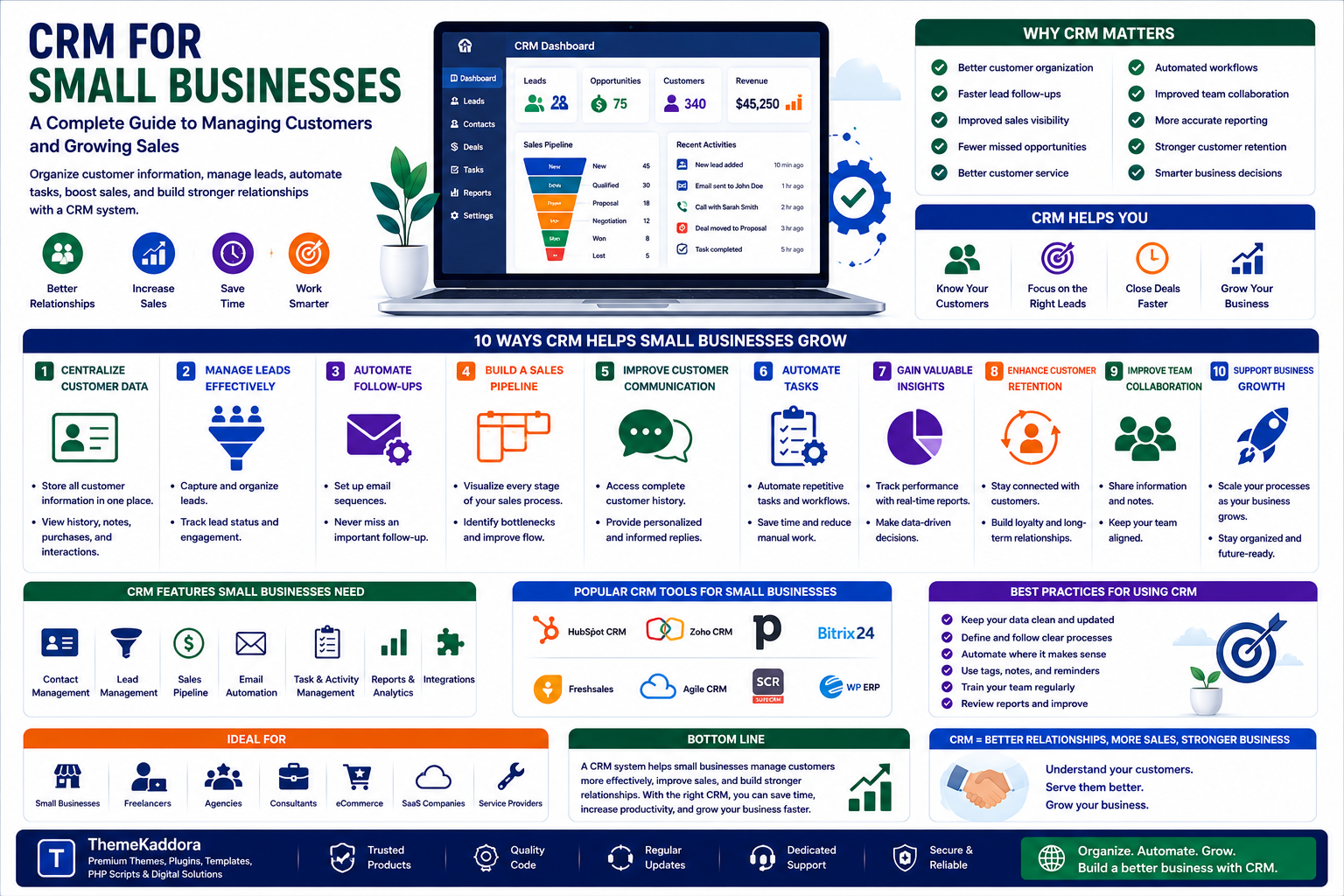
CRM for Small Businesses: A Complete Guide to Managing Customers and Growing Sales
Introduction
Managing customer relationships becomes increasingly difficult as a business grows.
A small business may begin with a simple spreadsheet containing customer names and contact details. As the number of leads, customers, conversations, sales opportunities, and follow-ups increases, spreadsheets and scattered notes can quickly become difficult to manage.
Important information may end up across:
Emails
Spreadsheets
Phone calls
Messaging apps
Sales notes
Support systems
Accounting software
This fragmentation makes it harder to understand the complete customer journey.
A Customer Relationship Management (CRM) system helps businesses organize customer information, manage leads, track sales opportunities, automate repetitive tasks, and build stronger relationships.
CRM isn't only for large corporations.
Small businesses, freelancers, agencies, SaaS companies, consultants, eCommerce businesses, and service providers can all benefit from structured customer management.
In this guide, you'll learn what CRM is, why it matters, how CRM systems work, and how small businesses can use CRM to improve sales, customer service, retention, and long-term growth.
1. What Is CRM?
CRM stands for Customer Relationship Management.
A CRM system is software that helps businesses organize and manage interactions with current and potential customers.
Depending on the platform, a CRM can store:
Customer names
Contact information
Company details
Communication history
Sales opportunities
Notes
Tasks
Meetings
Support interactions
Purchase history
Instead of keeping customer information in separate systems, businesses can manage important relationship data from a centralized platform.
2. Why CRM Matters for Small Businesses
Small businesses often have limited time and resources.
A CRM helps teams organize customer information and reduce the amount of manual administrative work.
Key benefits include:
Better customer organization
Faster lead follow-ups
Improved sales visibility
Fewer missed opportunities
Better customer service
Automated workflows
Improved team collaboration
More accurate reporting
Stronger customer retention
A CRM can also help business owners understand which opportunities deserve attention.
3. Centralize Customer Information
One of the biggest benefits of CRM software is centralized customer data.
Instead of searching through multiple systems, employees can view important information from one customer record.
A customer profile might contain:
Contact information
Previous conversations
Purchase history
Open sales opportunities
Support requests
Follow-up tasks
Notes
This creates a more complete picture of the customer relationship.
4. Manage Leads More Effectively
Not every person who contacts your business is ready to purchase immediately.
A CRM helps businesses organize leads based on their current stage.
For example:
New Lead → Contacted → Qualified → Proposal → Negotiation → Won/Lost
This sales pipeline helps teams understand where each opportunity currently stands.
Without a structured pipeline, leads can easily be forgotten.
5. Automate Lead Follow-Ups
Following up consistently is essential for sales.
However, manually remembering every follow-up can become difficult.
CRM automation can help trigger:
Follow-up reminders
Emails
Task assignments
Notifications
Lead status updates
Sales alerts
Automation doesn't eliminate human interaction.
Instead, it helps ensure important actions aren't forgotten.
6. Build a Sales Pipeline
A sales pipeline provides a visual representation of potential business opportunities.
A simple pipeline might include:
New
A potential customer has entered the system.
Qualified
The lead appears to match your target customer profile.
Proposal
A quote or proposal has been provided.
Negotiation
The customer is discussing terms or pricing.
Won
The opportunity has become a customer.
Lost
The opportunity did not convert.
Tracking these stages helps businesses understand their sales process and identify bottlenecks.
7. Improve Customer Communication
Customers don't want to repeat the same information every time they contact a business.
CRM systems can provide employees with access to relevant customer history.
For example, before responding to a customer, an employee may see:
Previous purchases
Earlier conversations
Open support issues
Sales history
Previous requests
This allows businesses to provide more informed and personalized service.
8. Automate Repetitive CRM Tasks
Many CRM tasks can be automated.
Examples include:
Creating customer records
Assigning leads
Sending follow-up emails
Scheduling reminders
Updating lead stages
Creating tasks
Sending notifications
Generating reports
Automation reduces repetitive administrative work and allows teams to focus on customers and revenue-generating activities.
9. Improve Customer Retention
CRM isn't only about acquiring new customers.
It can also help businesses retain existing customers.
Use CRM data to identify:
Customers who haven't purchased recently
High-value customers
Customers approaching renewal
Customers who need support
Customers interested in specific products
Businesses can then create targeted retention campaigns.
10. Use CRM for Customer Segmentation
Not every customer should receive the same message.
CRM systems can divide customers into meaningful groups.
Examples include:
New customers
Returning customers
High-value customers
Inactive customers
Leads
Enterprise customers
Customers interested in specific products
Segmentation enables more relevant communication.
11. Improve Sales Forecasting
CRM data can help businesses estimate future sales.
Managers can analyze:
Open opportunities
Pipeline value
Conversion rates
Average sales cycle
Historical performance
Expected closing dates
Forecasts are estimates rather than guarantees, but they can support better planning.
12. Track Customer Interactions
Every customer interaction can provide valuable context.
Depending on your systems and privacy practices, CRM records may include:
Emails
Calls
Meetings
Support tickets
Sales conversations
Website inquiries
Purchases
A complete interaction history helps teams understand the relationship over time.
13. Connect CRM With Other Business Tools
CRM becomes more powerful when connected to other systems.
Common integrations include:
Email marketing
Accounting
eCommerce
Customer support
Marketing automation
Calendars
Payment systems
Analytics
Business intelligence
Integrations can reduce duplicate data entry and create smoother workflows between departments.
14. Use CRM Analytics
CRM analytics can help answer important business questions.
Track metrics such as:
Number of leads
Lead conversion rate
Sales pipeline value
Average deal size
Sales cycle length
Customer retention
Customer lifetime value
Revenue by customer segment
Analytics helps businesses identify patterns and improve their sales strategy.
15. Improve Customer Support
CRM systems can support customer service teams by providing customer history in one place.
Support staff can quickly understand:
Who the customer is
What they purchased
Previous problems
Existing requests
Communication history
This can reduce response time and improve service consistency.
16. Protect Customer Data
CRM systems contain sensitive business and customer information.
Security should include:
Strong passwords
Multi-factor authentication
Role-based access
Secure backups
Encryption where appropriate
Access monitoring
Regular security reviews
Employees should only have access to information necessary for their roles.
Businesses should also follow applicable privacy and data-protection requirements.
17. Choose the Right CRM
There is no single CRM that is perfect for every business.
Consider:
Business Size
Choose software that matches your current team and expected growth.
Features
Identify the features you actually need.
Ease of Use
A powerful CRM is not useful if employees refuse to use it.
Integrations
Make sure it works with your existing business systems.
Automation
Look for workflows that can reduce repetitive work.
Reporting
Ensure the CRM provides the reports needed to measure performance.
Pricing
Consider both current costs and future scaling costs.
18. Train Your Team
CRM implementation isn't only a technology project.
Employees need to understand:
Why the CRM is being introduced
What information they should enter
How sales stages work
How follow-ups should be recorded
How customer information should be protected
Create simple processes and documentation.
The goal is to make CRM usage part of everyday work.
19. Keep CRM Data Clean
Poor data quality can make CRM systems unreliable.
Regularly check for:
Duplicate contacts
Incorrect email addresses
Outdated information
Missing fields
Incorrect lead stages
Duplicate opportunities
Create rules for maintaining data quality.
Clean data leads to better reports and more reliable customer communication.
20. Continuously Improve Your CRM Strategy
CRM implementation should not end when the software is installed.
Regularly review:
Sales pipeline performance
Lead conversion
Follow-up effectiveness
Customer retention
Automation workflows
Data quality
Employee adoption
Reporting accuracy
Use a continuous improvement cycle:
Track → Analyze → Improve → Automate → Measure
Over time, this can turn CRM from a simple database into an important business growth system.
Common CRM Mistakes
Choosing Too Many Features
More features don't necessarily mean better results.
Ignoring User Adoption
If employees don't use the CRM consistently, data becomes incomplete.
Poor Data Management
Incorrect or outdated records reduce CRM value.
Over-Automating Communication
Automation should support relationships, not make communication feel robotic.
Ignoring Existing Customers
CRM should support retention as well as acquisition.
Not Integrating Systems
Disconnected tools can recreate the same data-management problems CRM is supposed to solve.
CRM Implementation Checklist
Planning
Business goals defined
Customer journey mapped
CRM requirements identified
Users and responsibilities defined
Setup
Customer fields configured
Sales pipeline created
User permissions established
Integrations connected
Automation
Follow-up reminders
Lead assignment
Notifications
Email workflows
Reporting automation
Management
Data regularly cleaned
Team trained
Performance monitored
Workflows improved
Why Choose ThemeKaddora?
ThemeKaddora is a digital marketplace focused on practical digital products and solutions for website owners, developers, freelancers, agencies, entrepreneurs, and online businesses.
Its ecosystem can include:
WordPress themes
WordPress plugins
WooCommerce solutions
SaaS products
AI-powered tools
Business automation solutions
Website templates
Digital assets
Why Choose ThemeKaddora?
Practical digital solutions for businesses managing online operations.
Multiple technology categories covering websites, eCommerce, SaaS, AI, automation, and templates.
Developer-friendly products suitable for developers, agencies, freelancers, and businesses.
Business-focused ecosystem supporting productivity, automation, customer management, and digital growth.
Growing marketplace bringing different digital solutions together.
Solutions for different business needs from website development to business management.
When choosing a CRM or related digital solution, evaluate security, integrations, scalability, documentation, support, performance, pricing, and ease of use.
Conclusion
Customer relationships are among the most valuable assets of any business.
But managing those relationships becomes increasingly difficult as the number of customers, leads, conversations, and opportunities grows.
A CRM system provides the structure businesses need to organize customer information, manage sales pipelines, automate follow-ups, improve customer service, and build stronger long-term relationships.
Start with a clear business objective.
Choose a CRM that your team can actually use.
Centralize customer information.
Create a clear sales pipeline.
Automate repetitive tasks.
Protect customer data.
Keep records clean.
Measure results.
Then continuously improve your processes.
The most important principle is:
A CRM should help your team build better customer relationships, not simply store more customer data.
ThemeKaddora's ecosystem of WordPress themes, plugins, WooCommerce solutions, SaaS products, AI tools, automation solutions, templates, and digital business products can support businesses building and improving their digital operations.
Ultimately, successful CRM isn't about collecting the most information.
It's about using the right information to deliver better experiences and build stronger customer relationships.
Frequently Asked Questions
1. What is CRM?
CRM stands for Customer Relationship Management. It refers to the systems and processes businesses use to manage customer relationships, leads, sales, and interactions.
2. Does a small business need CRM software?
A CRM can be particularly useful when customer information, leads, follow-ups, and sales opportunities become difficult to manage manually.
3. What are the main benefits of CRM?
CRM can improve customer organization, lead management, follow-ups, sales visibility, customer service, automation, and retention.
4. What information should be stored in a CRM?
Depending on the business, CRM records may include contact information, communication history, purchases, opportunities, notes, tasks, and support interactions.
5. Can CRM automate follow-ups?
Yes. Many CRM systems can automate reminders, emails, notifications, task assignments, and other follow-up activities.
6. How does CRM improve sales?
CRM helps sales teams organize leads, manage pipelines, track opportunities, automate follow-ups, and analyze sales performance.
7. Is CRM useful for customer support?
Yes. CRM provides customer history and context that can help support teams deliver faster and more personalized assistance.
8. How should businesses protect CRM data?
Use strong authentication, role-based access, secure backups, appropriate encryption, access monitoring, and applicable privacy practices.
9. Why choose ThemeKaddora?
ThemeKaddora provides practical digital products and solutions across WordPress, WooCommerce, SaaS, AI, templates, automation, customer management, and other digital categories.
10. How can CRM support business growth?
CRM can help businesses manage more customers efficiently, improve sales processes, increase retention, automate repetitive tasks, and make better customer-related decisions.
Comments (0)