
Conversion Rate Optimization (CRO): A Complete Guide for Business Websites
Introduction
Attracting website traffic is only part of the equation. A website that receives thousands of visitors each month but generates very few inquiries, sales, or sign-ups is missing valuable business opportunities.
Instead of focusing solely on increasing traffic, successful businesses also work to improve how many visitors complete meaningful actions. This process is known as Conversion Rate Optimization (CRO).
CRO is the practice of improving a website so that a higher percentage of visitors become customers, leads, subscribers, or users. Small improvements to navigation, page design, messaging, or forms can significantly improve business results without increasing advertising costs.
Whether you manage a WordPress website, an ecommerce store, or a SaaS platform, CRO helps maximize the value of your existing traffic.
What Is Conversion Rate Optimization?
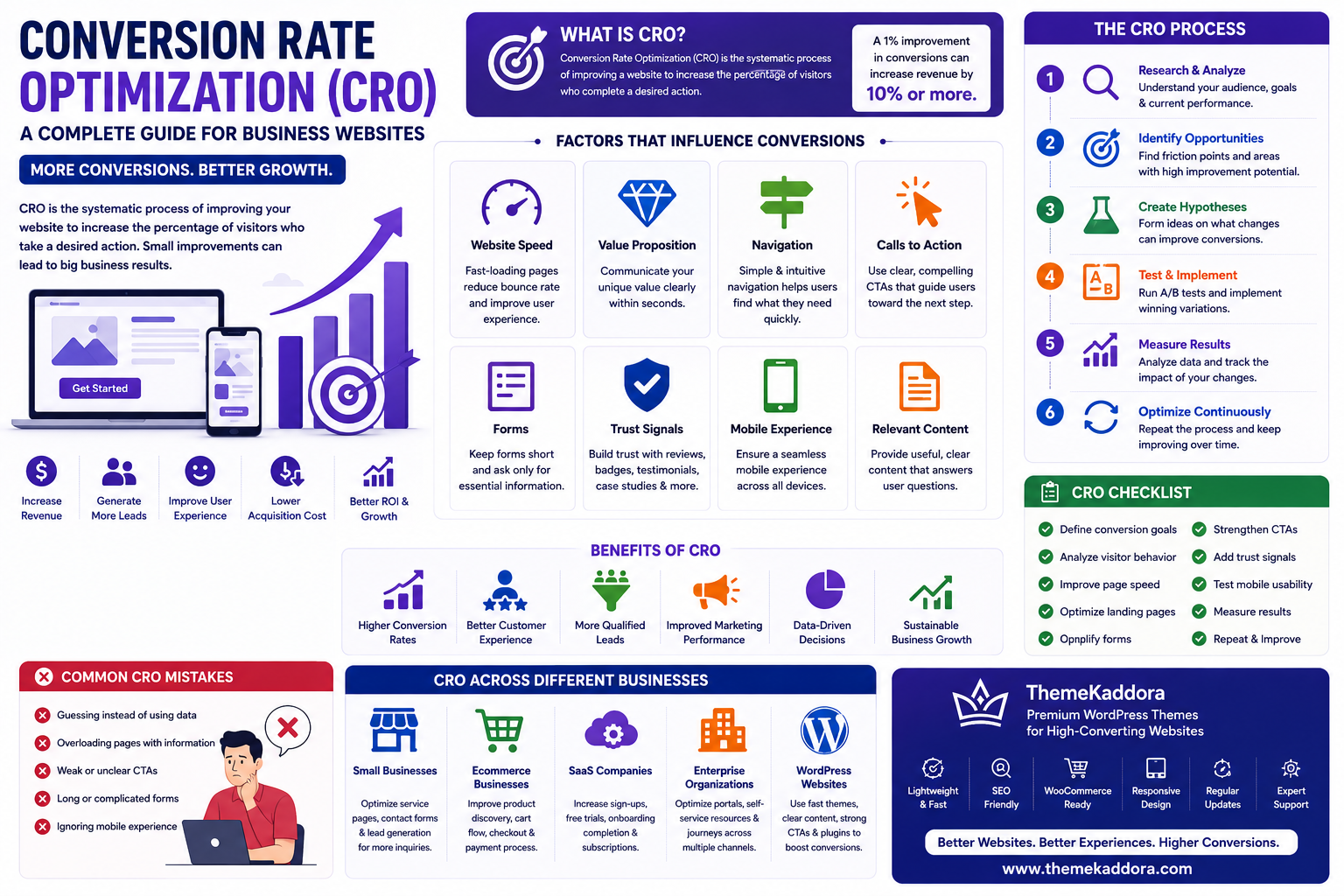
Conversion Rate Optimization is the systematic process of improving a website to increase the percentage of visitors who complete a desired action.
Common conversions include:
Purchasing a product
Requesting a quote
Booking an appointment
Submitting a contact form
Downloading a resource
Creating an account
Subscribing to a newsletter
The goal is to remove obstacles that prevent visitors from taking action.
Why CRO Matters
Businesses invest in CRO because it helps:
Increase revenue
Generate more leads
Improve marketing efficiency
Enhance user experience
Lower customer acquisition costs
Improve return on investment (ROI)
Support sustainable growth
Better conversions often deliver greater business impact than simply increasing traffic.
Factors That Influence Conversions
Website Speed
Fast-loading pages reduce visitor frustration and improve engagement.
Clear Value Proposition
Visitors should immediately understand what your business offers and why it is valuable.
Navigation
Simple, intuitive navigation helps users find information quickly.
Calls to Action (CTAs)
Buttons and links should clearly communicate the next step.
Examples include:
Contact Us
Request a Demo
Start Free Trial
Get a Quote
Buy Now
Forms
Keep forms simple by requesting only the information necessary to complete the action.
Trust Signals
Build credibility through:
Customer testimonials
Reviews
Certifications
Security badges
Case studies
Clear contact information
Mobile Experience
Ensure pages, forms, and checkout processes work smoothly on smartphones and tablets.
Benefits of CRO
Organizations benefit from:
Higher conversion rates
Better customer experiences
Improved marketing performance
Increased sales opportunities
Better use of existing traffic
Stronger business growth
Data-driven decision-making
CRO aligns website improvements with measurable business goals.
Common CRO Mistakes
Avoid:
Guessing instead of using data
Overloading pages with information
Weak or unclear CTAs
Long forms
Ignoring mobile users
Poor page performance
Making multiple major changes without testing
Continuous testing is more effective than relying on assumptions.
Best Practices
Define measurable conversion goals.
Simplify user journeys.
Improve page speed.
Write clear calls to action.
Test landing pages regularly.
Review analytics frequently.
Optimize continuously based on data.
CRO Across Different Businesses
Small Businesses
Improve service pages, contact forms, and quote requests to generate more qualified leads.
Ecommerce Businesses
Optimize product pages, shopping carts, checkout flows, payment options, and post-purchase experiences.
SaaS Companies
Increase free trial sign-ups, product demo requests, onboarding completion, and subscription conversions.
Enterprise Organizations
Optimize customer portals, lead generation, self-service resources, and digital experiences across multiple business units.
WordPress Websites
WordPress websites can improve conversions through faster performance, optimized landing pages, accessible forms, responsive design, compelling content, effective CTAs, and seamless plugin integrations.
CRO Checklist
Before optimizing your website, make sure you:
✅ Define conversion goals
✅ Analyze visitor behavior
✅ Improve page speed
✅ Optimize landing pages
✅ Simplify forms
✅ Strengthen calls to action
✅ Add trust signals
✅ Test mobile usability
✅ Measure results
✅ Repeat the optimization process
Why Choose Themekaddora?
High-converting websites begin with a fast and reliable foundation.
Themekaddora WordPress themes provide:
Lightweight architecture
Fast loading performance
SEO-friendly code
Responsive layouts
WooCommerce compatibility
Flexible customization
Accessibility-conscious design
Clean HTML5 and CSS3 standards
Cross-browser compatibility
Regular updates
Professional support
These features help businesses create WordPress websites that support better user experiences, stronger engagement, and higher conversion rates.
Conclusion
Conversion Rate Optimization is an ongoing process of improving how visitors interact with your website. By focusing on user experience, page performance, content clarity, trust, and continuous testing, businesses can increase leads, sales, and customer engagement without relying solely on additional traffic.
Whether you operate a business website, ecommerce store, or SaaS platform, CRO should be a core part of your long-term digital growth strategy.
Frequently Asked Questions (FAQs)
What is Conversion Rate Optimization (CRO)?
Conversion Rate Optimization (CRO) is the process of improving a website so that more visitors complete desired actions such as purchases, sign-ups, or inquiries.
Why is CRO important?
CRO helps businesses generate more value from existing website traffic by increasing conversions, improving user experience, and reducing customer acquisition costs.
What affects website conversions?
Website speed, navigation, content quality, calls to action, forms, trust signals, and mobile usability all influence conversion rates.
Can WordPress websites improve conversion rates?
Yes. WordPress websites can improve conversions through better themes, faster performance, optimized landing pages, effective CTAs, accessible forms, and ongoing testing.
Why choose Themekaddora?
Themekaddora provides lightweight, SEO-friendly WordPress themes with responsive layouts, WooCommerce compatibility, fast performance, accessibility-conscious design, regular updates, and professional support—helping businesses build WordPress websites that convert more visitors into customers while supporting long-term digital growth.
Comments (0)