
Content Modeling: The Complete Guide to Creating Structured and Scalable Digital Content
Introduction
Many websites begin with a simple collection of pages and blog posts. As content grows, however, businesses often face inconsistent page layouts, duplicate information, difficult updates, and content that cannot be easily reused across different channels.
The solution is not simply creating more content—it is creating better structured content.
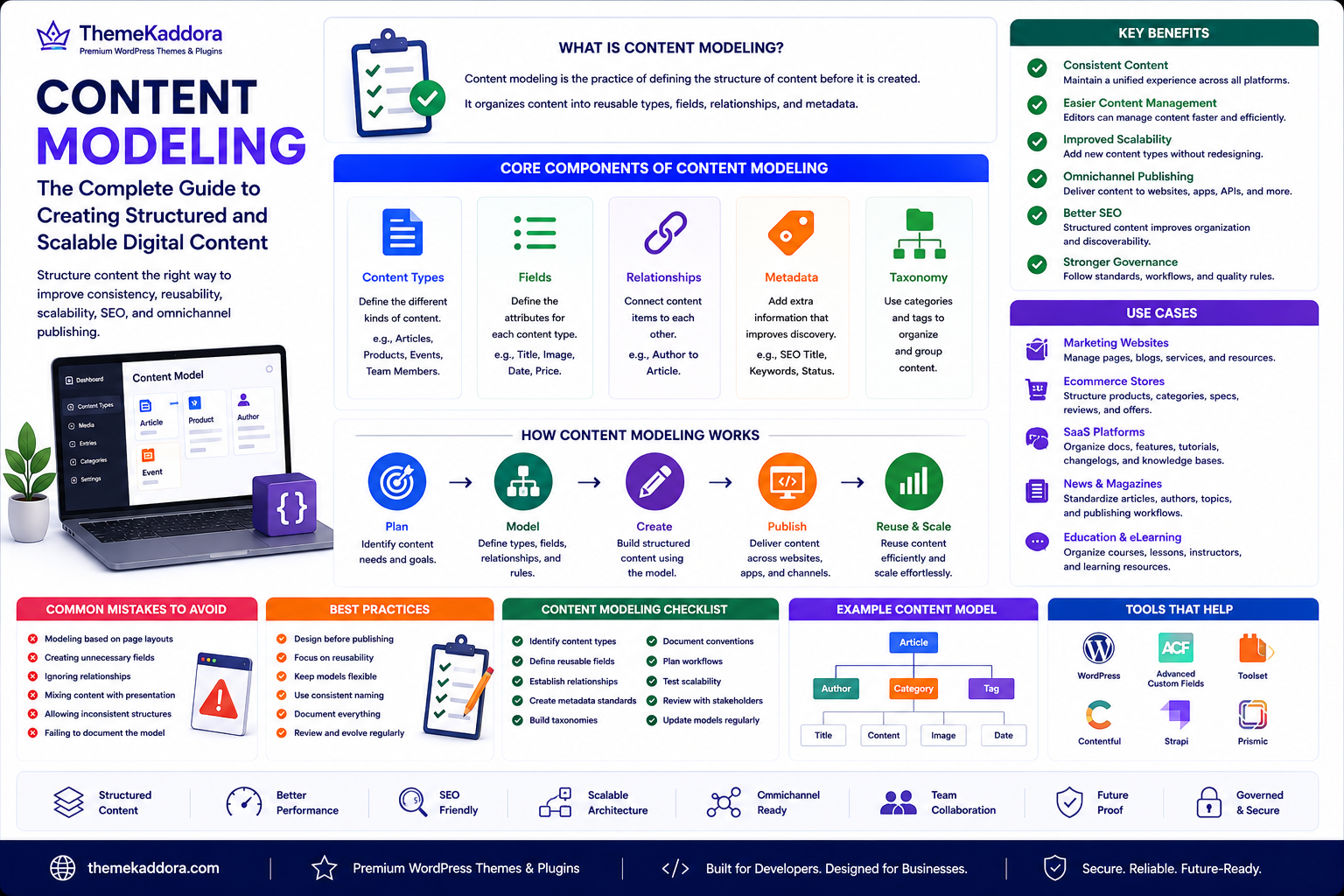
Content Modeling is the practice of defining how content should be organized before it is created. Instead of thinking only about webpages, content modeling focuses on reusable content types, relationships, attributes, and metadata that support long-term scalability.
Whether you're managing a WordPress website, an ecommerce catalog, a documentation portal, or a headless CMS, content modeling provides a framework that keeps information organized, reusable, and easier to manage.
What Is Content Modeling?
Content modeling is the process of designing the structure of content before it is published.
Rather than creating isolated pages, organizations define reusable content components that can be displayed in different ways across websites, mobile apps, APIs, and other digital channels.
A content model typically defines:
Content types
Fields and attributes
Relationships
Metadata
Categories
Taxonomies
Validation rules
Publishing workflows
The result is structured content that is easier to manage and reuse.
Why Content Modeling Matters
A structured content model helps organizations:
Improve content consistency
Reduce duplicate information
Simplify website maintenance
Support omnichannel publishing
Improve content governance
Enhance scalability
Create better user experiences
Instead of redesigning content repeatedly, teams build reusable information that adapts to different contexts.
Core Components of Content Modeling
Content Types
Examples include:
Articles
Products
Services
Team members
Testimonials
Events
FAQs
Case studies
Each content type has its own structure.
Fields
Fields define the information stored within a content type.
Examples include:
Title
Summary
Featured image
Author
Price
Publication date
Categories
Relationships
Content items often connect with one another.
Examples include:
Articles linked to authors
Products linked to categories
Events linked to locations
Tutorials linked to related guides
Metadata
Metadata improves organization and discoverability.
Examples include:
SEO titles
Meta descriptions
Tags
Keywords
Content status
Taxonomy
Categories and tags help organize related content and improve navigation.
Benefits of Content Modeling
Better Content Consistency
Every content type follows the same structure.
Easier Content Management
Editors spend less time formatting pages and more time creating valuable information.
Improved Scalability
New content types can be added without redesigning the entire website.
Omnichannel Publishing
Structured content can be reused across websites, mobile applications, digital signage, and APIs.
Better SEO
Well-structured content improves internal organization and helps search engines understand relationships between information.
Content Modeling for Different Organizations
Startups
Create scalable content structures before rapid growth.
Marketing Agencies
Standardize landing pages, case studies, services, and campaign resources.
Ecommerce Businesses
Structure products, categories, specifications, reviews, and promotional content.
SaaS Companies
Model documentation, feature pages, pricing information, tutorials, and knowledge bases.
WordPress Websites
Structure blog posts, services, portfolios, FAQs, products, testimonials, documentation, and reusable content blocks.
Best Practices
Design Before Publishing
Create the content model before writing large volumes of content.
Focus on Reusability
Build content that can appear in multiple contexts without duplication.
Keep Models Flexible
Allow room for future content requirements without unnecessary complexity.
Use Consistent Naming
Apply standardized field names and content types throughout the system.
Review Regularly
Update content models as business requirements evolve.
Common Mistakes to Avoid
Avoid these common issues:
Modeling based only on current page layouts
Creating unnecessary fields
Ignoring relationships between content
Mixing content with presentation
Allowing inconsistent structures
Failing to document the model
Content Modeling Checklist
Before creating your content model, make sure you:
✅ Identify content types
✅ Define reusable fields
✅ Establish relationships
✅ Create metadata standards
✅ Build taxonomies
✅ Document naming conventions
✅ Plan publishing workflows
✅ Test scalability
✅ Review with stakeholders
✅ Update models regularly
Why Choose Themekaddora?
Themekaddora develops WordPress themes that support organized, scalable, and high-performing websites.
Our themes provide:
Lightweight architecture
SEO-friendly code
Responsive layouts
WooCommerce compatibility
Accessibility-conscious design
Flexible customization
Fast loading performance
Clean HTML5 and CSS3 standards
Cross-browser compatibility
Regular updates
Professional support
Combined with effective content modeling, Themekaddora themes help businesses build websites that remain organized, scalable, and easy to manage as content grows.
Conclusion
Content Modeling provides the blueprint for creating structured digital content that can scale with your business. By defining content types, relationships, metadata, and reusable fields before publishing, organizations reduce duplication, improve consistency, and simplify long-term content management.
Whether you're managing a WordPress website, an ecommerce catalog, or a documentation portal, content modeling creates a stronger foundation for future growth. Together with Themekaddora's lightweight WordPress themes, it supports websites that are flexible, efficient, and prepared for evolving digital experiences.
Frequently Asked Questions
What is content modeling?
Content modeling is the process of defining how digital content should be structured, organized, and related before it is created and published.
How is content modeling different from content strategy?
Content strategy focuses on planning, governance, and lifecycle management, while content modeling defines the structure and relationships of the content itself.
Can WordPress websites benefit from content modeling?
Yes. WordPress sites can use structured content types, custom fields, taxonomies, reusable blocks, and consistent templates to improve scalability and content management.
Is content modeling only for headless CMS platforms?
No. While it is common in headless CMS solutions, content modeling also provides significant benefits for traditional CMS platforms such as WordPress.
Why choose Themekaddora?
Themekaddora provides lightweight, SEO-friendly WordPress themes with responsive layouts, accessibility-conscious design, WooCommerce compatibility, fast performance, clean coding standards, regular updates, and professional support—helping businesses build scalable websites with well-structured content and excellent user experiences.
Comments (0)