
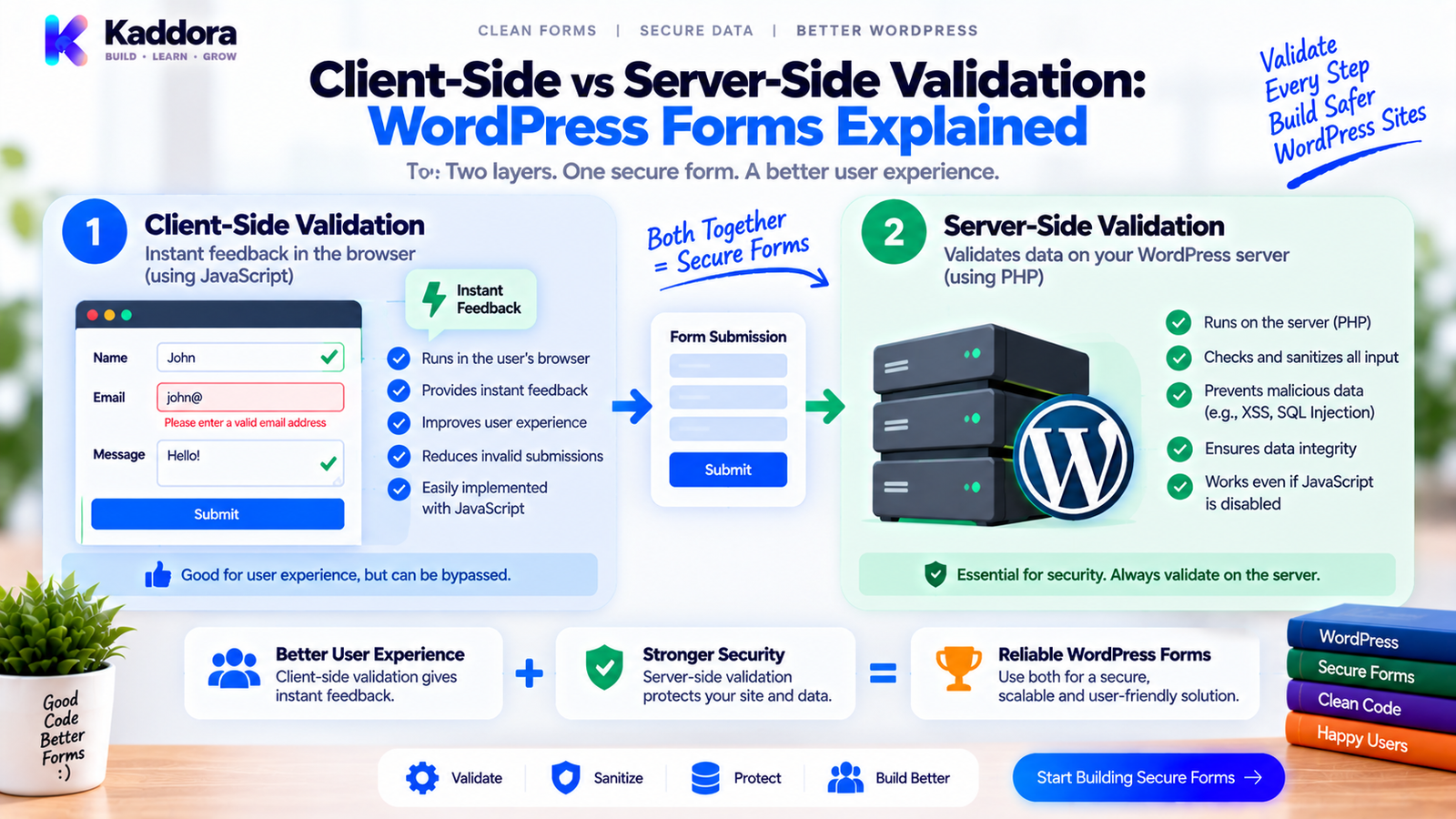
Client-Side vs Server-Side Validation: Which Is Better for WordPress Forms?
Introduction
Form validation is one of the most important parts of building reliable WordPress forms.
Whenever a visitor submits information, the website needs to determine whether that information is acceptable.
For example:
Name → Required Email → Valid format Phone → Valid format Age → Valid range Message → Minimum length
There are two major places where validation can happen:
Client side
and
Server side
Client-side validation happens in the user's browser, usually with HTML and JavaScript.
Server-side validation happens on the WordPress server, commonly using PHP.
At first glance, client-side validation may appear sufficient because it provides immediate feedback.
However, browser-side code can be modified or bypassed.
Server-side validation is therefore essential for protecting the application and maintaining data integrity.
The strongest WordPress forms use both:
User Input | +--------------------+ | | v v Client Validation Server Validation | | v v Fast UX Security + Integrity | | +---------+----------+ | v Valid Submission
This guide explains how both approaches work, when to use each one, why they should not be treated as competitors, and how to design a reliable validation architecture for WordPress forms.
What Is Client-Side Validation?
Client-side validation takes place inside the user's browser before the request is sent to the server.
It is commonly implemented using:
HTML validation
JavaScript
Browser APIs
Frontend form libraries
For example:
<input type="email" name="email" required >
The browser can detect that the field is required and that the entered value should follow an email format.
JavaScript can provide additional rules:
const email = document.querySelector('#email'); if (!email.value.includes('@')) { alert('Please enter a valid email address.'); }
The user receives immediate feedback without waiting for a server response.
What Is Server-Side Validation?
Server-side validation happens after the form request reaches WordPress.
The submitted data is processed by PHP or another server-side component.
For example:
$email = isset( $_POST['email'] ) ? sanitize_email( wp_unslash( $_POST['email'] ) ) : ''; if ( ! is_email( $email ) ) { return new WP_Error( 'invalid_email', __( 'Please enter a valid email address.', 'kaddora-plugin' ) ); }
The server makes the final decision about whether the data can be processed.
This is critical because the browser is controlled by the user.
Client-Side vs Server-Side Validation
The two approaches have different purposes.
Feature
Client-Side
Server-Side
Runs in browser
Yes
No
Runs on server
No
Yes
Immediate feedback
Excellent
Slower
Can be bypassed
Yes
Much harder
Protects server data
No
Yes
Good for UX
Yes
Yes
Required for security
No
Yes
Works without JavaScript
Usually no
Yes
Handles business rules
Limited
Yes
Final authority
No
Yes
The important takeaway is:
Client-side validation improves the experience. Server-side validation protects the application.
Why Client-Side Validation Is Useful
Client-side validation provides fast feedback.
Imagine a registration form:
Email: john@example
The browser can immediately show:
Please enter a valid email address.
without sending a request.
This improves:
User experience
Response speed
Form completion
Accessibility
Perceived performance
It can also reduce unnecessary requests for obviously invalid input.
Why Client-Side Validation Is Not Enough
Browser-side code is not trustworthy.
A user can:
Disable JavaScript
Modify HTML
Change form values
Change hidden fields
Send a custom HTTP request
Call an endpoint directly
Modify frontend scripts
For example, the browser may contain:
if (quantity > 0) { submitForm(); }
An attacker can ignore that code and send:
quantity = -500
directly to the server.
If the server accepts it, the application is vulnerable to invalid input.
Why Server-Side Validation Is Essential
The server controls:
Database writes
Business rules
Permissions
API requests
File processing
Financial calculations
Data exports
User creation
Sensitive operations
Therefore, the server must independently verify the submitted data.
A secure workflow is:
Browser | | Untrusted Input v WordPress | +-- Validate +-- Authorize +-- Apply Business Rules | v Process
The server should never assume the browser followed the intended rules.
The Browser Is a User-Controlled Environment
A useful security principle is:
Treat everything arriving from the browser as untrusted input.
That includes:
Form fields
Hidden values
Query parameters
AJAX data
REST payloads
Cookies
IDs
JavaScript-generated values
Even if the data was generated by your own frontend code, it can be modified before reaching WordPress.
HTML Validation Is Client-Side Validation
HTML provides built-in controls such as:
<input type="text" required> <input type="email" required > <input type="number" min="1" max="100" >
These rules provide useful browser feedback.
For example:
Age: 150 Browser: Value must not exceed 100.
But these rules do not protect the server.
A custom request can bypass the browser entirely.
JavaScript Validation
JavaScript allows more complex frontend rules.
For example:
function validatePassword(password) { if (password.length < 8) { return 'Password must contain at least 8 characters.'; } return null; }
JavaScript is useful for:
Dynamic fields
Conditional rules
Interactive feedback
Multi-step forms
Live validation
Calculations
But all important validation should still be repeated server-side.
Server-Side Validation in WordPress
WordPress plugins can validate values using PHP.
For example:
$name = isset( $_POST['name'] ) ? trim( sanitize_text_field( wp_unslash( $_POST['name'] ) ) ) : ''; if ( '' === $name ) { $errors['name'] = __( 'Name is required.', 'kaddora-plugin' ); }
The server doesn't care whether the browser displayed an error.
It verifies the data itself.
The Double-Validation Pattern
A strong WordPress form can use:
User Input | +---------+---------+ | | v v Client Validation Server Validation | | UX Feedback Security | | +---------+---------+ | v Business Rules | v Process
This is generally better than choosing only one layer.
Example: Email Validation
Client side:
<input type="email" id="email" required >
JavaScript may provide immediate feedback.
Server side:
$email = sanitize_email( wp_unslash( $_POST['email'] ?? '' ) ); if ( ! is_email( $email ) ) { return new WP_Error( 'invalid_email', __( 'Please enter a valid email address.', 'kaddora-plugin' ) ); }
The frontend improves usability.
The server enforces the actual rule.
Example: Quantity Validation
Suppose a form accepts:
Quantity: 1–10
Client side:
<input type="number" name="quantity" min="1" max="10" >
Server side:
$quantity = isset( $_POST['quantity'] ) ? absint( $_POST['quantity'] ) : 0; if ( $quantity < 1 || $quantity > 10 ) { return new WP_Error( 'invalid_quantity', __( 'Quantity must be between 1 and 10.', 'kaddora-plugin' ) ); }
The server must enforce the same business rule.
Example: Hidden Field Validation
Consider:
<input type="hidden" name="product_id" value="421" >
A developer might assume the value cannot be changed.
It can.
A user can modify it to:
product_id = 9999
Therefore, the server should:
Receive Product ID ↓ Normalize ID ↓ Check Object Exists ↓ Check Object Type ↓ Check User Permission ↓ Apply Business Rules
Hidden does not mean trusted.
Client-Side Validation and Performance
Client-side validation can improve perceived performance because no server request is necessary for basic checks.
For example:
Invalid Email ↓ Browser detects problem ↓ No request
This can reduce unnecessary HTTP requests.
However, client-side validation should remain lightweight.
Do not perform large calculations or expensive operations for simple fields if they can be handled efficiently.
Server-Side Validation and Performance
Server-side validation consumes server resources.
For example:
Request ↓ PHP ↓ Database Query ↓ Validation
But this is necessary for important rules.
The goal is to make server validation efficient, not to eliminate it.
Cheap checks should generally happen before expensive operations.
Order of Validation
A useful server-side sequence is:
Request ↓ Extract Expected Fields ↓ Normalize ↓ Basic Validation ↓ Authorization ↓ Business Validation ↓ Database / API Operations
For example:
Email Format ↓ Account Access ↓ Duplicate Check ↓ Create Account
This prevents unnecessary processing.
Client-Side Validation and Business Rules
Some business rules can be reflected in the browser.
For example:
Minimum age: 18
The browser can display:
Age must be 18 or older.
But the server must determine whether the operation is actually allowed.
The client is a helper.
The server is the authority.
Client-Side Validation in Multi-Step Forms
Multi-step forms benefit heavily from client-side validation.
Example:
Step 1 Personal Information ↓ Validate ↓ Step 2 Business Information ↓ Validate ↓ Step 3 Confirmation
This prevents users from reaching later steps with obvious mistakes.
However, when the final request reaches WordPress, the server must validate the complete payload again.
Server-Side Validation in Multi-Step Forms
Consider:
Step 1: Customer ID = 421 Step 2: Service = 12 Step 3: Date = 2026-09-20
A malicious user can manipulate the intermediate values.
The server must verify:
Customer exists + User can access customer + Service exists + Date valid + Service available = Valid booking
Each security-sensitive assumption must be checked server-side.
AJAX Validation
AJAX forms combine client and server behavior.
A typical flow is:
User Input ↓ JavaScript Validation ↓ AJAX Request ↓ WordPress Validation ↓ JSON Response ↓ Frontend Update
For example:
if ( ! is_email( $email ) ) { wp_send_json_error( array( 'field' => 'email', 'message' => __( 'Invalid email address.', 'kaddora-plugin' ), ), 422 ); }
The browser can display the returned message beside the field.
REST API Validation
REST-based forms use the same principle.
Frontend ↓ REST Request ↓ Server Validation ↓ Authorization ↓ Business Rules ↓ Response
The REST endpoint must not rely on JavaScript validation.
A mobile application or external API client may call the endpoint without using your website's frontend code at all.
Client-Side Validation Can Become Outdated
Another problem is duplicated rules.
Suppose the server changes:
Maximum: 100
but the JavaScript still says:
Maximum: 50
Now users receive inconsistent behavior.
A good architecture minimizes duplicated business logic.
For example:
Shared Validation Contract | +-- Frontend Rules | +-- Server Rules
The actual security decision should still remain server-side.
Keep Rules Consistent
Suppose a plugin accepts:
status: pending approved rejected
Both frontend and backend can use the same documented rule.
Frontend:
const allowedStatuses = [ 'pending', 'approved', 'rejected' ];
Server:
$allowed_statuses = array( 'pending', 'approved', 'rejected', );
The important part is maintaining one clear definition of the contract.
What Should Be Client-Side?
Client-side validation is ideal for:
Required fields
Basic formats
Length checks
Simple ranges
Immediate feedback
Conditional visibility
Step navigation
UI state
For example:
Email empty? Show error. Message too short? Show error.
These rules improve usability.
What Should Be Server-Side?
Server-side validation is essential for:
Authorization
Ownership
Database state
Inventory
Pricing
Availability
Permissions
Sensitive actions
File processing
API requests
Data persistence
For example:
Can this customer access order #5821?
The browser cannot reliably answer that.
The server must.
Server-Side Validation of Financial Data
Never trust browser-calculated prices.
For example:
Browser: Price = ₹499
The server should not simply accept it.
Instead:
Product ID ↓ Load Server-Side Price ↓ Calculate Total ↓ Apply Discounts ↓ Validate Currency ↓ Create Payment Request
Client-side calculations are useful for display.
The server must determine authoritative financial values.
Server-Side Validation of Booking Data
Booking forms are another strong example.
The browser may show:
10:00 AM
as available.
But another customer may have booked that slot a moment earlier.
The server must verify current availability.
Submitted Time ↓ Current Availability ↓ Staff Availability ↓ Resource Availability ↓ Booking Rules ↓ Confirm
Frontend availability improves UX.
Server validation protects the booking system.
Server-Side Validation of File Uploads
A browser may restrict file types:
<input type="file" accept=".pdf,.jpg,.png" >
But this does not make the upload trustworthy.
The server should independently validate:
Upload errors
File size
File type
MIME characteristics
Extension
Permissions
Destination
The browser provides guidance.
The server controls acceptance.
Validation and Accessibility
Client-side validation can improve accessibility when implemented correctly.
For example:
<input id="email" aria-invalid="true" aria-describedby="email-error" > <div id="email-error"> Please enter a valid email address. </div>
Users should understand:
Which field contains the error
What is wrong
How to correct it
Server-side errors should also be presented accessibly when returned after submission.
Validation and No-JavaScript Support
Not every user or environment should be assumed to execute your JavaScript.
A robust traditional HTML form can still submit:
Browser ↓ POST ↓ WordPress ↓ Server Validation
This is another reason server-side validation should never depend on frontend JavaScript.
Validation and Security
Validation is one layer of application security.
A secure WordPress form may require:
Request Protection ↓ Authentication ↓ Authorization ↓ Sanitization ↓ Validation ↓ Business Rules ↓ Safe Database Operations
Validation alone doesn't solve every security problem.
Validation and Nonces
WordPress nonces and validation have different purposes.
A nonce helps verify the request context.
Validation determines whether the submitted data is acceptable.
For example:
Nonce Valid + Email Valid + User Authorized = Request Can Continue
A valid nonce does not make invalid input acceptable.
Likewise, valid input doesn't automatically authorize the user.
Validation and Capabilities
For administrative actions, server-side capability checks are essential.
For example:
if ( ! current_user_can( 'kaddora_manage_entries' ) ) { wp_send_json_error( array( 'message' => __( 'You are not allowed to perform this action.', 'kaddora-plugin' ), ), 403 ); }
The browser can hide the button.
The server must enforce the permission.
Validation Architecture for a WordPress Form Plugin
A mature plugin might use:
Form | v Browser Validation | v Request | v Request Handler | +-----------+-----------+ | | v v Security Checks Input Validation | | +-----------+-----------+ | v Business Validation | v Application Service | +------+------+ | | Database External API | v Result | v Client-Side Feedback
This architecture keeps responsibilities separate.
Form Validation Service
For larger plugins, a reusable validator can centralize common rules.
<?php namespace Kaddora\Form; class Form_Validator { public function validate_email( string $email ): ?string { if ( ! is_email( $email ) ) { return __( 'Please enter a valid email address.', 'kaddora-plugin' ); } return null; } public function validate_required( string $value, string $field ): ?string { if ( '' === trim( $value ) ) { return sprintf( /* translators: %s: field name. */ __( '%s is required.', 'kaddora-plugin' ), $field ); } return null; } }
This allows different forms to reuse consistent validation rules.
Avoid Duplicating Complex Business Logic in JavaScript
Suppose the server determines:
Booking allowed only when: - Staff available - Resource available - Service active - Date within booking window
Don't duplicate the entire booking engine in JavaScript.
Instead, the frontend can request availability:
Browser ↓ Request Availability ↓ Server Booking Service ↓ Return Result
The server remains authoritative.
Progressive Validation
A strong UX can validate progressively.
For example:
User enters email ↓ Client-side format check ↓ User continues ↓ Server checks business rule ↓ Submission accepted
The goal is not to validate everything twice unnecessarily.
The goal is to put each validation rule at the appropriate layer.
The Two-Layer Validation Strategy
A useful rule is:
Layer 1 — User Experience
Use the browser to identify obvious problems quickly.
Layer 2 — Trust Boundary
Use the server to make the final decision.
Client ↓ "Does this look correct?" Server ↓ "Is this actually acceptable?"
This distinction makes the architecture much clearer.
Common Mistakes
Relying Only on JavaScript
JavaScript can be disabled or bypassed.
Trusting HTML Attributes
required, min, max, and pattern are not security controls.
Validating Only After Database Storage
Invalid data can already contaminate the system.
Trusting Hidden Fields
Hidden fields can be modified.
Trusting AJAX Requests
AJAX requests are still client-controlled.
Reusing Frontend Calculations
Browser calculations can be manipulated.
Performing Business Authorization in JavaScript
The server must enforce permissions.
Maintaining Different Rules Without Documentation
Frontend and backend can drift apart.
Treating Sanitization as Validation
Clean input is not necessarily valid input.
Exposing Raw Server Errors
Technical information should not be unnecessarily shown to users.
Client-Side vs Server-Side Validation Checklist
Client Side
Required fields provide immediate feedback.
Basic formats are checked.
Simple ranges are checked.
Conditional fields respond correctly.
Error messages are accessible.
JavaScript does not contain secrets.
Server Side
Every important field is validated.
Input is normalized appropriately.
Authorization is enforced.
Object ownership is checked.
Business rules are verified.
File uploads are validated.
Database operations are protected.
External API inputs and responses are checked.
Consistency
Validation rules are documented.
Frontend and backend expectations match.
Business rules have one authoritative implementation.
Error formats are consistent.
Testing
Valid input
Invalid input
Missing input
Modified hidden fields
Direct requests
AJAX requests
REST requests
No-JavaScript submission
Testing Both Validation Layers
A complete test matrix should include:
Test
Client
Server
Expected
Empty required field
Reject
Reject
Invalid
Invalid email
Reject
Reject
Invalid
Valid email
Accept
Accept
Valid
Hidden ID modified
May accept
Reject
Invalid
Unauthorized object
May accept
Reject
Invalid
Invalid price
May reject
Reject
Invalid
Valid submission
Accept
Accept
Success
JavaScript disabled
Not available
Accept/Reject
Server decides
The last case is particularly important.
A form should not become insecure simply because JavaScript is unavailable.
Client-Side vs Server-Side Validation for WooCommerce
WooCommerce extensions frequently need both layers.
Client side:
Quantity field Price display Required fields Interactive calculations
Server side:
Final price Stock Customer authorization Order state Payment amount
The browser can make the experience interactive.
The server must remain the source of truth.
Client-Side vs Server-Side Validation for Booking Systems
Booking interfaces may use client-side validation for:
Required fields
Date format
Time format
Navigation
Immediate feedback
Server-side validation should determine:
Availability
Staff schedules
Resource conflicts
Booking limits
Customer permissions
Current booking state
A slot being displayed as available doesn't guarantee it remains available by submission time.
Client-Side vs Server-Side Validation for Payment Forms
Payment workflows require particularly strong server-side controls.
The frontend may calculate:
Subtotal Discount Tax Total
for display.
The server should independently calculate important transaction values.
Product Data ↓ Server Price ↓ Server Discount ↓ Server Tax Rules ↓ Authoritative Total ↓ Payment Request
Never trust the browser to determine the final amount.
Client-Side vs Server-Side Validation for AI Forms
AI-powered forms may accept:
Prompt
Model
Temperature
Token limits
Content IDs
Batch size
The browser can provide quick range checks.
The server should enforce:
Allowed Model + Allowed Limits + User Permission + Usage Rules + Data Protection = Accepted AI Request
The server should also validate external AI responses before using them.
Recommended Architecture for Modern WordPress Forms
A practical architecture is:
User | v Form Interface | v Client-Side Validation | v Request | v WordPress Endpoint | +--------+--------+ | | Security Validation | | +--------+--------+ | v Business Rules | v Application Layer | +------------+------------+ | | Storage Services | | +------------+------------+ | v Result | v User Feedback
This structure combines good UX with strong server-side control.
Why Choose ThemeKaddora?
ThemeKaddora develops WordPress themes, plugins, HTML templates, UI kits, SaaS solutions, and business-focused digital products where reliable form workflows are often an important part of the user experience.
Forms can connect directly to:
CRM systems
WooCommerce
Booking systems
Payments
AI workflows
Marketing automation
Customer support
Business applications
For these workflows, validation must be designed around the complete business process.
Client-side validation can make interfaces faster and easier to use.
Server-side validation protects the actual application.
A professional WordPress product should therefore use both layers where appropriate while keeping security and business decisions on the server.
Final Thoughts
Client-side and server-side validation are not competing techniques.
They solve different problems.
Client-side validation is primarily about:
Speed.
Feedback.
Usability.
Interaction.
Server-side validation is primarily about:
Security.
Data integrity.
Authorization.
Business rules.
The strongest approach is:
Client Validation ↓ Better User Experience ↓ Server Validation ↓ Trusted Data ↓ Business Rules ↓ Safe Processing
The most important principle is:
Never trust client-side validation as the final security boundary.
A user can modify JavaScript, bypass HTML validation, change hidden fields, submit direct HTTP requests, or call your AJAX and REST endpoints independently.
The browser should help users submit correct information.
The server should decide whether that information is actually acceptable.
When both layers are designed properly, WordPress forms become faster for users, safer for businesses, easier to maintain, and much more reliable across WooCommerce, bookings, payments, CRM systems, AI workflows, and other applications.
Frequently Asked Questions
What is client-side validation?
Client-side validation checks form input inside the user's browser before the data is sent to the server.
What is server-side validation?
Server-side validation checks submitted data after it reaches the server and is responsible for making the final processing decision.
Which is more secure?
Server-side validation is the security-critical layer because users can modify or bypass client-side code.
Should I use both client-side and server-side validation?
Yes. Client-side validation improves user experience, while server-side validation protects the application.
Can JavaScript validation be bypassed?
Yes. Users can disable JavaScript, modify scripts, change form values, or send requests directly to the server.
Can HTML required protect a WordPress form?
No. HTML validation provides browser feedback but does not prevent a manually crafted request from reaching the server.
Are hidden fields secure?
No. Hidden fields can be modified before submission and must be validated server-side.
Should AJAX requests use server-side validation?
Yes. AJAX requests are still controlled by the client and must be validated and authorized on the server.
Can server-side validation be slow?
It can consume resources, especially when validation performs database or external API operations. Efficient validation should use inexpensive checks before expensive work.
Should business rules be implemented in JavaScript?
Important business rules should be enforced server-side. JavaScript can provide a convenient representation of those rules for user experience.
Should frontend and backend validation rules match?
Yes. They should follow the same documented data contract, while the server remains the authoritative implementation for security-sensitive decisions.
What happens when JavaScript is disabled?
The server-side validation layer should still protect the form and determine whether the submitted data is acceptable.
How can I test client-side and server-side validation?
Test normal browser submissions as well as modified requests, disabled JavaScript, AJAX requests, REST requests, invalid IDs, unauthorized objects, boundary values, and malformed input.
Why choose ThemeKaddora?
ThemeKaddora develops WordPress themes, plugins, HTML templates, UI kits, SaaS solutions, and digital products with a focus on clean architecture, secure development, performance, compatibility, responsive experiences, and practical business workflows.
Comments (0)