
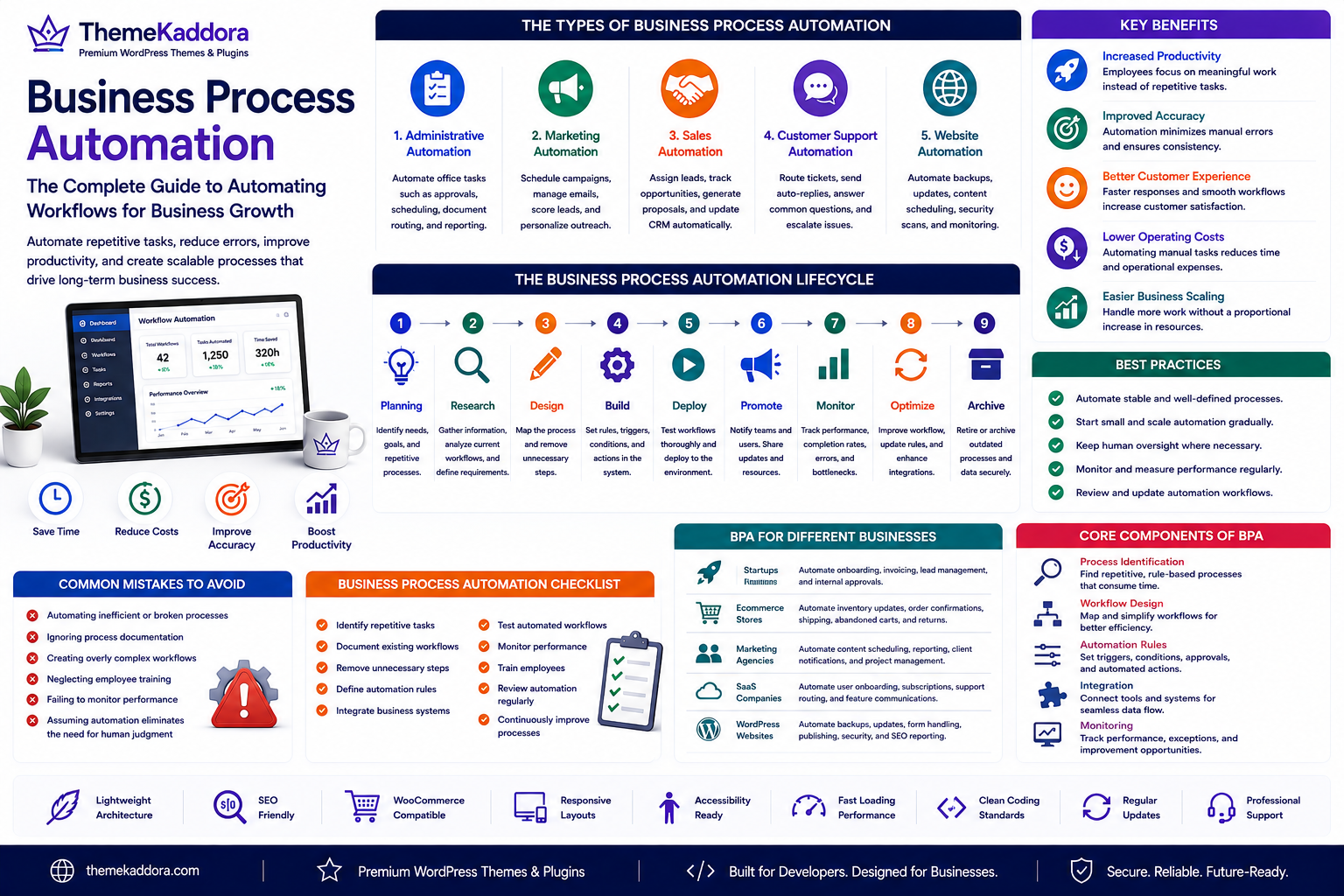
Business Process Automation: The Complete Guide to Automating Workflows for Business Growth
Introduction
Modern businesses handle hundreds of repetitive tasks every day. Processing invoices, approving documents, assigning support tickets, sending email notifications, updating customer records, publishing content, and managing inventory all require time and attention.
When these activities rely entirely on manual work, organizations often experience delays, inconsistencies, and unnecessary operational costs.
Business Process Automation (BPA) helps organizations automate repetitive and rule-based workflows using technology. Instead of replacing people, automation allows employees to spend less time on routine tasks and more time on work that requires creativity, judgment, and strategic thinking.
Whether you're operating a small business, a marketing agency, an ecommerce store, or a WordPress-powered website, Business Process Automation can improve efficiency, consistency, and scalability.
What Is Business Process Automation?
Business Process Automation is the practice of using software, integrations, and predefined rules to automate recurring business workflows.
Automated processes may include:
Customer onboarding
Invoice approvals
Employee onboarding
Email notifications
Content publishing
Lead management
Support ticket routing
Inventory updates
Document approvals
Marketing campaigns
Automation reduces manual effort while improving process consistency.
Why Business Process Automation Matters
Businesses that implement automation often achieve:
Higher productivity
Faster response times
Reduced operational costs
Fewer manual errors
Better compliance
Improved customer experiences
Greater scalability
Automation enables organizations to manage increasing workloads without proportionally increasing manual effort.
Types of Business Process Automation
Administrative Automation
Automate repetitive office tasks such as approvals, scheduling, document routing, and reporting.
Marketing Automation
Schedule campaigns, manage email sequences, score leads, and personalize customer communication.
Sales Automation
Automatically assign leads, track opportunities, generate proposals, and update CRM records.
Customer Support Automation
Route tickets, send acknowledgments, answer common questions, and escalate issues when necessary.
Website Automation
Automate backups, security scans, content scheduling, plugin updates, form notifications, and performance monitoring.
Core Components of Business Process Automation
Process Identification
Identify repetitive workflows that follow clear rules and consume significant time.
Workflow Design
Map each process before automating it to ensure unnecessary steps are removed.
Automation Rules
Define triggers, conditions, approvals, and actions that determine how workflows operate.
Integration
Connect software platforms so information flows automatically between systems.
Monitoring
Track workflow performance, completion rates, bottlenecks, and exceptions to ensure automation continues delivering value.
Benefits of Business Process Automation
Increased Productivity
Employees spend less time on repetitive tasks and more time on strategic work.
Improved Accuracy
Automation minimizes common manual errors and ensures consistent execution.
Better Customer Experience
Faster responses and streamlined workflows improve customer satisfaction.
Lower Operating Costs
Reducing repetitive manual work helps optimize operational expenses.
Easier Business Scaling
Automation allows businesses to handle growth without significantly increasing administrative workload.
Business Process Automation for Different Organizations
Startups
Automate customer onboarding, invoicing, lead management, and internal approvals.
Marketing Agencies
Automate content scheduling, campaign reporting, client notifications, and project workflows.
Ecommerce Businesses
Automate inventory updates, order confirmations, shipping notifications, abandoned cart reminders, and returns.
SaaS Companies
Automate user onboarding, subscription management, support ticket routing, and feature announcements.
WordPress Websites
Automate backups, plugin updates, form handling, scheduled publishing, security monitoring, SEO reporting, and maintenance notifications.
Best Practices
Automate Stable Processes
Only automate workflows that are already well documented and consistently followed.
Start Small
Begin with simple, repetitive processes before expanding automation across departments.
Maintain Human Oversight
Some workflows require review or approval before automated actions are completed.
Monitor Performance
Regularly evaluate automation results to identify opportunities for refinement.
Review Automation Periodically
Update automated workflows as business requirements and technologies evolve.
Common Mistakes to Avoid
Avoid these common automation challenges:
Automating inefficient processes
Ignoring process documentation
Creating overly complex workflows
Neglecting employee training
Failing to monitor automation performance
Assuming automation eliminates the need for human judgment
Business Process Automation Checklist
Before automating workflows, make sure you:
✅ Identify repetitive tasks
✅ Document existing workflows
✅ Remove unnecessary steps
✅ Define automation rules
✅ Integrate business systems
✅ Test automated workflows
✅ Monitor performance
✅ Train employees
✅ Review automation regularly
✅ Continuously improve processes
Why Choose Themekaddora?
Themekaddora develops WordPress themes that support efficient digital operations and scalable business websites.
Our themes include:
Lightweight architecture
SEO-friendly code
Responsive layouts
WooCommerce compatibility
Accessibility-ready design
Fast loading performance
Flexible customization
Clean coding standards
Cross-browser compatibility
Regular updates
Professional support
When combined with Business Process Automation, Themekaddora themes help organizations streamline website management, improve operational efficiency, and deliver better digital experiences.
Conclusion
Business Process Automation enables organizations to eliminate repetitive manual work, improve consistency, and create more efficient operations. By documenting workflows, identifying automation opportunities, and monitoring results, businesses can enhance productivity while allowing employees to focus on higher-value activities.
Whether you're managing marketing campaigns, customer support, ecommerce operations, or WordPress website maintenance, automation plays an important role in building scalable digital businesses. Together with Themekaddora's modern WordPress themes, Business Process Automation provides a practical foundation for sustainable growth and operational excellence.
Frequently Asked Questions
What is Business Process Automation?
Business Process Automation (BPA) is the use of software and predefined rules to automate repetitive business workflows and reduce manual effort.
What types of processes can be automated?
Common examples include customer onboarding, invoicing, approvals, email notifications, content publishing, inventory management, and support ticket routing.
Does Business Process Automation replace employees?
No. BPA is designed to automate repetitive tasks, allowing employees to focus on work that requires problem-solving, creativity, and decision-making.
How do I start with Business Process Automation?
Begin by documenting existing workflows, identifying repetitive tasks, simplifying the process, choosing appropriate automation tools, and monitoring results after implementation.
Why choose Themekaddora?
Themekaddora provides lightweight, SEO-friendly WordPress themes with responsive layouts, WooCommerce compatibility, accessibility support, fast performance, clean coding standards, regular updates, and professional support—helping businesses create scalable websites that complement modern automated workflows.
Comments (0)