
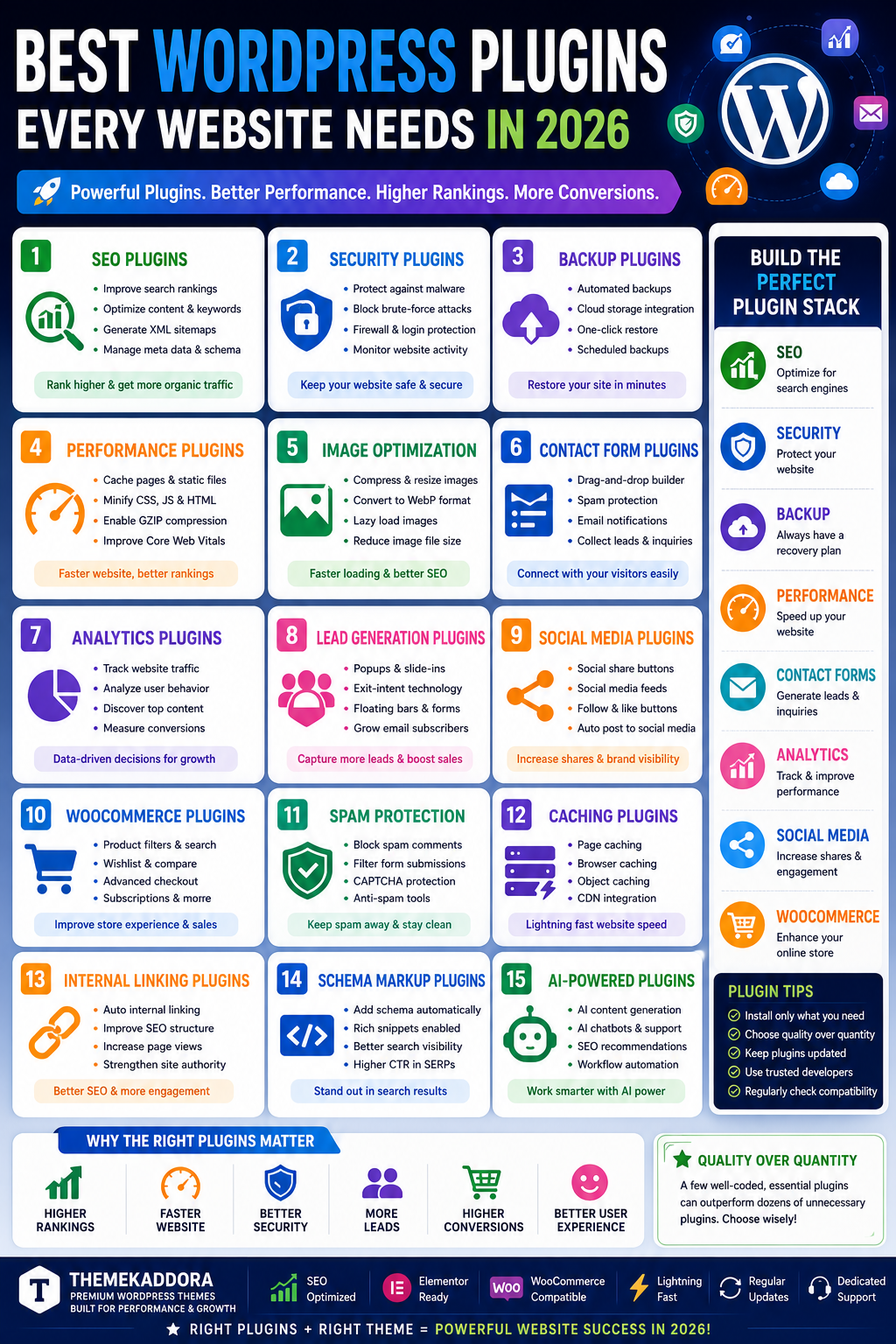
Best WordPress Plugins Every Website Needs in 2026
Introduction
WordPress powers more than 40% of websites worldwide, making it the most popular content management system available today. One of the biggest reasons for WordPress's success is its extensive plugin ecosystem.
Plugins allow website owners to add powerful features without writing code. Whether you want to improve SEO, increase website speed, enhance security, generate leads, or create an online store, there's a plugin designed for the job.
However, with over 60,000 plugins available, choosing the right ones can be overwhelming.
In this guide, we'll explore the best WordPress plugins every website needs in 2026 and explain how they can improve performance, security, user experience, and search rankings.
Why WordPress Plugins Matter
Plugins extend the functionality of your website and help you:
Improve SEO rankings
Increase website speed
Enhance security
Generate leads
Improve user experience
Increase conversions
Automate business processes
The right plugin stack can transform an average website into a high-performing digital asset.
1. SEO Plugins
Search engine optimization is essential for generating organic traffic.
Benefits
Improve search visibility
Optimize content
Generate XML sitemaps
Manage metadata
Features
Keyword optimization
Schema markup
Technical SEO tools
SEO analysis
SEO plugins help websites rank higher in Google and attract more visitors.
2. Security Plugins
Cyber threats continue to increase every year.
Security plugins help protect websites from:
Malware
Brute-force attacks
Spam
Unauthorized access
Essential Features
Firewall protection
Login security
Malware scanning
Activity monitoring
Website security should always be a top priority.
3. Backup Plugins
Backups protect your website from:
Server failures
Hacking incidents
Human errors
Plugin conflicts
A good backup plugin allows you to restore your website quickly if problems occur.
Key Features
Automated backups
Cloud storage integration
One-click restoration
Scheduled backups
4. Performance Optimization Plugins
Website speed directly impacts:
SEO rankings
User experience
Conversion rates
Performance plugins help:
Cache pages
Compress files
Minify code
Improve loading speed
Fast websites consistently outperform slow competitors.
5. Image Optimization Plugins
Large images often slow websites significantly.
Image optimization plugins help by:
Compressing images
Converting files to modern formats
Implementing lazy loading
Benefits include:
Faster page speed
Better Core Web Vitals
Improved SEO
6. Contact Form Plugins
Every professional website needs a reliable way for visitors to get in touch.
Contact form plugins help businesses:
Collect leads
Receive inquiries
Improve customer communication
Popular features include:
Drag-and-drop builders
Spam protection
Email notifications
7. Analytics Plugins
Understanding visitor behavior is essential for growth.
Analytics plugins provide insights into:
Traffic sources
User behavior
Popular content
Conversion rates
This data helps improve marketing strategies and website performance.
8. Lead Generation Plugins
Lead generation plugins help businesses capture potential customers.
Features include:
Popups
Slide-ins
Floating bars
Exit-intent forms
Benefits include:
More subscribers
More leads
Higher conversions
9. Social Media Plugins
Social media integration helps increase:
Content sharing
Brand awareness
Website traffic
Features may include:
Share buttons
Social feeds
Follow buttons
Auto-posting
10. WooCommerce Plugins
For eCommerce websites, WooCommerce plugins provide additional functionality.
Common features include:
Product filtering
Wishlist functionality
Advanced checkout
Subscription management
These enhancements improve shopping experiences and increase sales.
11. Spam Protection Plugins
Spam can negatively affect:
User experience
Website performance
Security
Spam protection plugins help filter unwanted submissions and comments.
12. Caching Plugins
Caching significantly improves loading speed.
Benefits include:
Reduced server load
Faster page delivery
Improved SEO
Caching is one of the easiest ways to improve website performance.
13. Internal Linking Plugins
Internal links help:
Improve SEO
Increase page views
Guide visitors through content
Proper internal linking strengthens website structure and authority.
14. Schema Markup Plugins
Schema helps search engines understand website content.
Benefits include:
Rich snippets
Better visibility
Higher click-through rates
Schema implementation is increasingly important for SEO success.
15. AI-Powered WordPress Plugins
AI is transforming website management.
AI plugins can help with:
Content generation
Customer support
SEO recommendations
Automation
Businesses are increasingly using AI to improve productivity and user experiences.
Building the Perfect Plugin Stack
A typical business website should include:
SEO
SEO optimization plugin
Security
Firewall and malware protection
Backup
Automated backup solution
Performance
Caching and optimization plugin
Contact Forms
Lead generation forms
Analytics
Visitor tracking
Social Media
Content sharing tools
This combination provides a solid foundation for most websites.
Common Plugin Mistakes
Installing Too Many Plugins
More plugins do not always mean better functionality.
Too many plugins can:
Slow websites
Create conflicts
Increase security risks
Ignoring Updates
Always update plugins regularly.
Using Poorly Maintained Plugins
Choose plugins from reputable developers with active support.
Why Themekaddora Themes Work Well with Essential Plugins
Themekaddora themes are designed to integrate seamlessly with:
SEO plugins
WooCommerce plugins
Performance tools
Security solutions
Elementor add-ons
Benefits include:
Better compatibility
Faster performance
Improved user experience
Enhanced SEO
Whether you're running a blog, business website, agency, or online store, Themekaddora themes provide a strong foundation for plugin-powered functionality.
Future of WordPress Plugins in 2026
Key trends include:
AI Integration
More plugins will incorporate AI-powered features.
Performance Optimization
Developers continue focusing on speed and Core Web Vitals.
Automation
Workflow automation is becoming increasingly important.
Security Enhancements
Advanced security measures are becoming standard.
Conclusion
Plugins are one of WordPress's greatest strengths. By selecting the right plugins, website owners can improve SEO, security, performance, lead generation, and overall user experience.
The best strategy is to focus on quality rather than quantity and build a streamlined plugin stack that supports your business goals.
Combined with a high-quality theme from Themekaddora, the right plugins can help create a powerful, fast, secure, and profitable website.
Frequently Asked Questions
How many plugins should a WordPress website use?
There is no fixed limit, but only install plugins that provide real value.
Do plugins affect website speed?
Yes. Poorly optimized plugins can slow websites.
What are the most important WordPress plugins?
SEO, security, backup, performance, analytics, and contact form plugins.
Are free plugins safe?
Many free plugins are safe if downloaded from trusted sources.
Should I update plugins regularly?
Yes. Updates improve security and compatibility.
Can plugins improve SEO?
Absolutely. SEO plugins help optimize content and technical SEO.
Are premium plugins worth it?
Premium plugins often offer advanced features and support.
Why choose Themekaddora themes?
Themekaddora themes are optimized for compatibility, speed, SEO, and plugin integration.
Comments (0)