
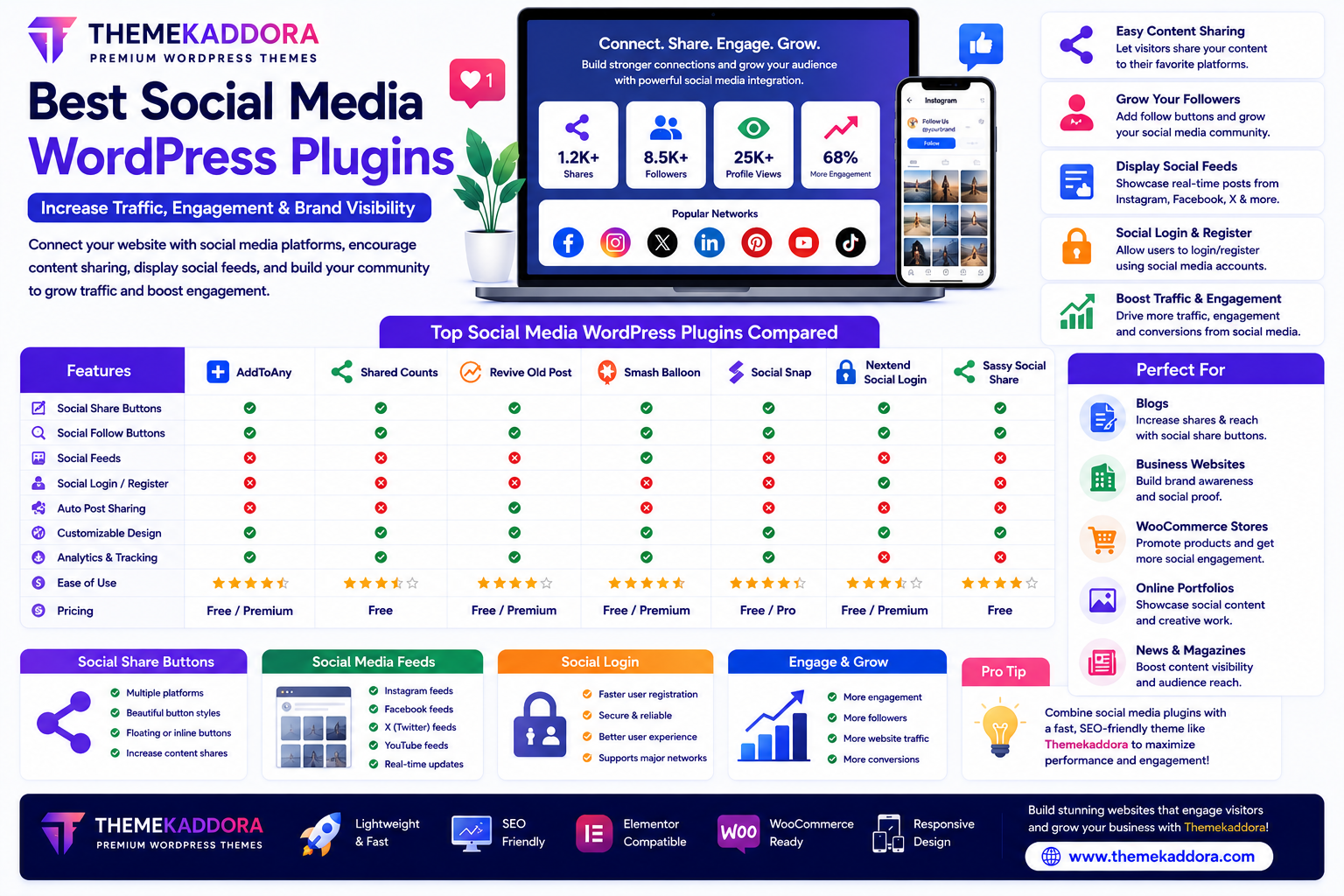
Best Social Media WordPress Plugins to Increase Traffic and Engagement
Introduction
Social media has become an essential marketing channel for businesses, bloggers, online stores, and content creators. Platforms like Facebook, Instagram, X (formerly Twitter), LinkedIn, Pinterest, and YouTube help drive traffic, increase brand awareness, and build stronger relationships with audiences.
Integrating social media with your WordPress website allows visitors to easily share content, follow your profiles, view live social feeds, and engage with your brand across multiple platforms.
WordPress social media plugins simplify these integrations without requiring coding skills.
In this guide, you'll learn what social media plugins do, their essential features, and how to choose the best solution for your website.
Why Social Media Integration Matters
Connecting your website with social media can help you:
Increase website traffic
Grow your audience
Improve brand visibility
Encourage content sharing
Build customer trust
Increase engagement
Generate more leads
Strengthen online communities
A strong social media strategy complements your website and content marketing efforts.
What Does a Social Media Plugin Do?
Social media plugins add features such as:
Social share buttons
Social follow buttons
Social login
Social media feeds
Click-to-share quotes
Auto-sharing tools
Social icons
Content promotion
These tools help visitors interact with your content and brand more easily.
Essential Features to Look For
Social Share Buttons
Allow visitors to share your content with one click on popular platforms.
Common sharing options include:
Instagram (profile links)
X (formerly Twitter)
Telegram
Easy sharing can help expand your content's reach.
Social Follow Buttons
Encourage visitors to follow your social media profiles directly from your website.
This helps grow your audience across different platforms.
Social Media Feeds
Display your latest social media posts directly on your website.
Popular feed integrations include:
Instagram galleries
Facebook posts
X timelines
YouTube videos
Fresh social content keeps your website active and engaging.
Social Login
Allow users to register or log in using their existing social media accounts.
Benefits include:
Faster registration
Improved user experience
Reduced password management
Click-to-Share Quotes
Enable readers to instantly share interesting quotes from your blog posts on social media.
This is particularly useful for blogs and educational websites.
Auto Sharing
Some plugins can automatically share newly published posts to your connected social media accounts, helping maintain a consistent publishing workflow.
Social Media Plugins for Different Websites
Blogs
Improve visibility by adding:
Share buttons
Click-to-share quotes
Author social profiles
Business Websites
Promote:
Company updates
Services
Customer testimonials
Social proof
WooCommerce Stores
Encourage customers to:
Share products
Review purchases
Follow promotions
Discover new arrivals
Portfolio Websites
Showcase creative work by embedding Instagram feeds, YouTube videos, or other social content.
Educational Websites
Share:
Tutorials
Webinars
Student achievements
Learning resources
Best Practices for Social Media Integration
Place Share Buttons Strategically
Position sharing buttons where they are visible without interrupting the reading experience.
Focus on Relevant Platforms
Use the social networks that best match your audience instead of adding every available platform.
Keep Branding Consistent
Use consistent logos, colors, and messaging across your website and social profiles.
Optimize for Mobile Users
Ensure buttons and feeds work well on smartphones and tablets.
Monitor Engagement
Track which platforms drive the most traffic and interactions to improve your strategy.
Common Mistakes to Avoid
Avoid:
Displaying too many social buttons
Embedding slow-loading feeds
Using outdated social icons
Ignoring mobile responsiveness
Automatically playing social videos
Focusing on follower counts instead of engagement
A clean and focused integration often performs better than an overloaded website.
Why Pair Social Media Plugins with Themekaddora WordPress Themes?
Social media performs best on a fast and visually appealing website.
Themekaddora WordPress themes provide:
Lightweight code
Fast loading speed
Responsive layouts
SEO-friendly structure
WooCommerce compatibility
Elementor support
Modern design
Conversion-focused pages
These features create an excellent foundation for social media marketing and audience growth.
Social Media Optimization Checklist
Before publishing your website, ensure you:
✅ Add social share buttons
✅ Display social follow icons
✅ Link to active social profiles
✅ Optimize social images
✅ Test mobile responsiveness
✅ Monitor engagement metrics
✅ Keep branding consistent
✅ Update social feeds regularly
Conclusion
Social media plugins make it easier to connect your WordPress website with your audience, encourage content sharing, and grow your online presence.
Whether you're running a blog, business website, WooCommerce store, or portfolio, the right social media plugin can help increase traffic, improve engagement, and strengthen your brand.
When paired with a fast, responsive, and SEO-friendly WordPress theme like Themekaddora, social media integration becomes an effective tool for long-term digital growth.
Frequently Asked Questions (FAQs)
Why should I use a social media plugin?
A social media plugin helps visitors share your content, follow your profiles, and engage with your brand more easily.
Can social media plugins increase website traffic?
Yes. Social sharing and profile integration can help expose your content to a wider audience and encourage more visitors to your website.
Are social media plugins useful for WooCommerce?
Absolutely. Customers can share products, promotions, and reviews, helping increase product visibility and brand awareness.
Will social media plugins slow down my website?
Well-coded plugins have minimal impact, but using too many feeds or unnecessary features can affect performance. Choose lightweight plugins and optimize embedded content.
Why choose Themekaddora WordPress themes?
Themekaddora themes are lightweight, responsive, SEO-friendly, WooCommerce-ready, Elementor-compatible, and built for speed and performance, making them an excellent choice for websites using social media plugins.
Comments (0)