
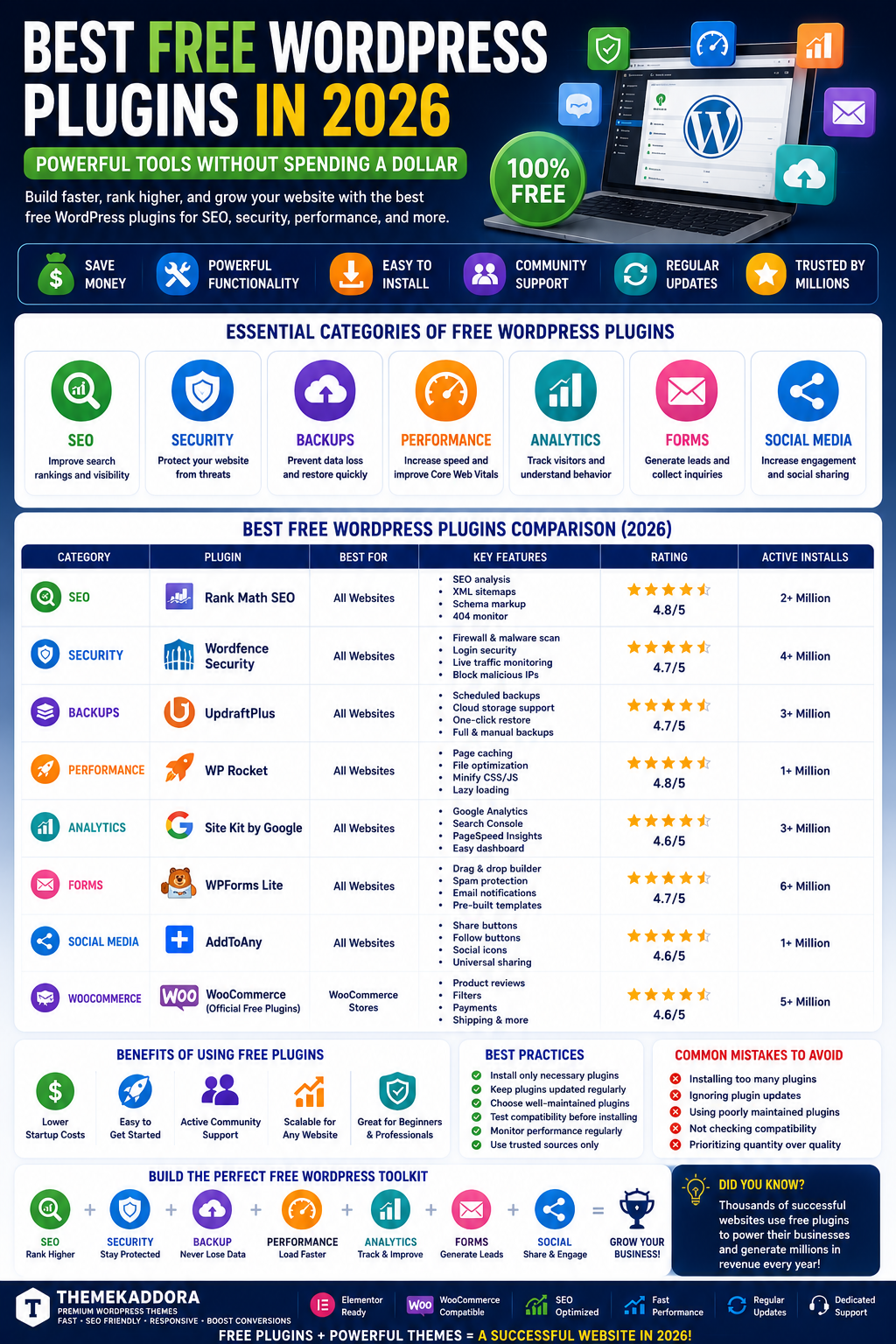
Best Free WordPress Plugins in 2026: Powerful Tools Without Spending a Dollar
Introduction
One of the biggest advantages of WordPress is its massive ecosystem of free plugins. Whether you're launching a personal blog, business website, online portfolio, startup landing page, or WooCommerce store, free plugins can provide powerful functionality without increasing your budget.
Many website owners mistakenly believe they must purchase premium plugins immediately. In reality, thousands of successful websites operate using carefully selected free WordPress plugins.
In this guide, we'll explore the best free WordPress plugins, the categories every website should consider, and how these tools can help improve SEO, performance, security, and user experience in 2026.
Why Free WordPress Plugins Are So Popular
Free plugins allow website owners to:
Save money
Add advanced functionality
Improve performance
Enhance security
Grow websites faster
Benefits include:
No upfront cost
Easy installation
Community support
Large developer ecosystem
For beginners and startups, free plugins often provide everything needed to launch successfully.
Essential Categories of Free WordPress Plugins
Every website should consider plugins in the following categories:
SEO
Improve search visibility.
Security
Protect against threats.
Backups
Prevent data loss.
Performance
Increase loading speed.
Analytics
Track visitor behavior.
Forms
Generate leads and inquiries.
Social Media
Increase engagement and sharing.
Free SEO Plugins
SEO plugins help optimize websites for search engines.
Common features include:
Meta title management
Meta descriptions
XML sitemaps
Schema markup
Technical SEO improvements
Benefits include:
Better rankings
Increased organic traffic
Improved search visibility
SEO remains one of the most important investments for long-term growth.
Free Security Plugins
Security should never be overlooked.
Free security tools can help:
Block attacks
Prevent spam
Monitor suspicious activity
Protect login pages
Benefits include:
Improved trust
Better website stability
Reduced risk of hacking incidents
Free Backup Plugins
Backups protect websites from:
Server failures
Human errors
Malware infections
Plugin conflicts
Key features include:
Automated backups
Scheduled backups
Cloud storage integration
Quick restoration
Every website should maintain a reliable backup strategy.
Free Performance Plugins
Website speed directly impacts:
SEO rankings
User experience
Conversion rates
Performance plugins help:
Enable caching
Minify code
Optimize resources
Improve Core Web Vitals
Fast websites consistently outperform slower competitors.
Free Image Optimization Plugins
Images often account for the majority of webpage size.
Image optimization plugins help:
Compress files
Improve loading speed
Reduce bandwidth usage
Improve mobile performance
Benefits include:
Better SEO
Faster websites
Improved user experience
Free Contact Form Plugins
Every professional website needs communication tools.
Form plugins help businesses:
Collect leads
Receive inquiries
Support customers
Gather feedback
Benefits include:
Improved communication
Better lead generation
Increased conversions
Free Analytics Plugins
Understanding visitor behaviour is essential.
Analytics plugins provide data about:
Traffic sources
Popular pages
User engagement
Conversion performance
These insights help businesses make better decisions.
Free Social Media Plugins
Social media integration helps increase:
Website traffic
Content sharing
Brand awareness
Audience growth
Popular features include:
Share buttons
Social feeds
Follow widgets
Auto-publishing tools
Free WooCommerce Plugins
WooCommerce store owners can improve functionality through free extensions.
Common features include:
Product Filters
Improve shopping experiences.
Wishlists
Encourage return visits.
Product Reviews
Increase customer trust.
Marketing Features
Boost sales and conversions.
These enhancements help online stores compete effectively.
Benefits of Using Free Plugins
Lower Startup Costs
Perfect for beginners and small businesses.
Easy Experimentation
Test features before investing in premium solutions.
Scalability
Many free plugins offer upgrade paths.
Community Support
Popular plugins often have active user communities.
Limitations of Free Plugins
While free plugins are powerful, they may include:
Limited Features
Premium versions often unlock advanced functionality.
Basic Support
Support may rely on forums rather than dedicated teams.
Usage Restrictions
Some features may require paid upgrades.
However, many free plugins still provide excellent value.
Common Plugin Mistakes
Installing Too Many Plugins
Excessive plugins can:
Slow websites
Create conflicts
Increase maintenance requirements
Ignoring Updates
Outdated plugins create security risks.
Using Poorly Maintained Plugins
Choose plugins with active development and positive reviews.
Prioritizing Quantity Over Quality
A smaller, optimized plugin stack often performs better.
Building the Perfect Free WordPress Toolkit
A complete free website toolkit should include:
SEO Plugin
Improve rankings.
Security Plugin
Protect against attacks.
Backup Plugin
Safeguard data.
Performance Plugin
Increase speed.
Analytics Plugin
Measure growth.
Contact Form Plugin
Generate leads.
This combination provides a strong foundation for most websites.
Why Themekaddora Themes Work Perfectly with Free Plugins
Themekaddora themes are built to integrate seamlessly with modern WordPress plugins.
Benefits include:
Fast loading performance
Mobile responsiveness
SEO optimization
Elementor compatibility
WooCommerce support
Flexible customization
Whether you're using free or premium plugins, Themekaddora themes provide a stable foundation for website growth.
Future of Free WordPress Plugins
The plugin ecosystem continues evolving through:
AI-Powered Features
Content generation and automation tools are growing rapidly.
Better Performance Standards
Developers increasingly prioritize speed.
Advanced Security
Security features continue improving.
Automation
More tasks are becoming automated through plugins.
Conclusion
Free WordPress plugins remain one of the most valuable resources available to website owners.
By carefully selecting plugins for SEO, security, backups, performance, analytics, and marketing, businesses can build powerful websites without significant upfront costs.
Combined with a professional WordPress theme from Themekaddora, free plugins can help create fast, secure, and highly functional websites capable of competing with much larger competitors.
Frequently Asked Questions
Are free WordPress plugins safe?
Most plugins from trusted developers and the WordPress repository are safe when kept updated.
Can free plugins improve SEO?
Yes. Many free SEO plugins provide excellent optimization tools.
Do free plugins affect website speed?
Poorly optimized plugins can impact performance, so choose carefully.
Are premium plugins always better?
Not necessarily. Many free plugins provide outstanding functionality.
How many plugins should I install?
Only install plugins that add genuine value to your website.
Can free plugins work for WooCommerce stores?
Yes. Many free WooCommerce extensions offer powerful features.
Should I upgrade to premium plugins later?
As websites grow, premium features may become valuable.
Why choose Themekaddora themes?
Themekaddora themes are optimized for speed, SEO, WooCommerce, Elementor, and plugin compatibility.
Comments (0)