
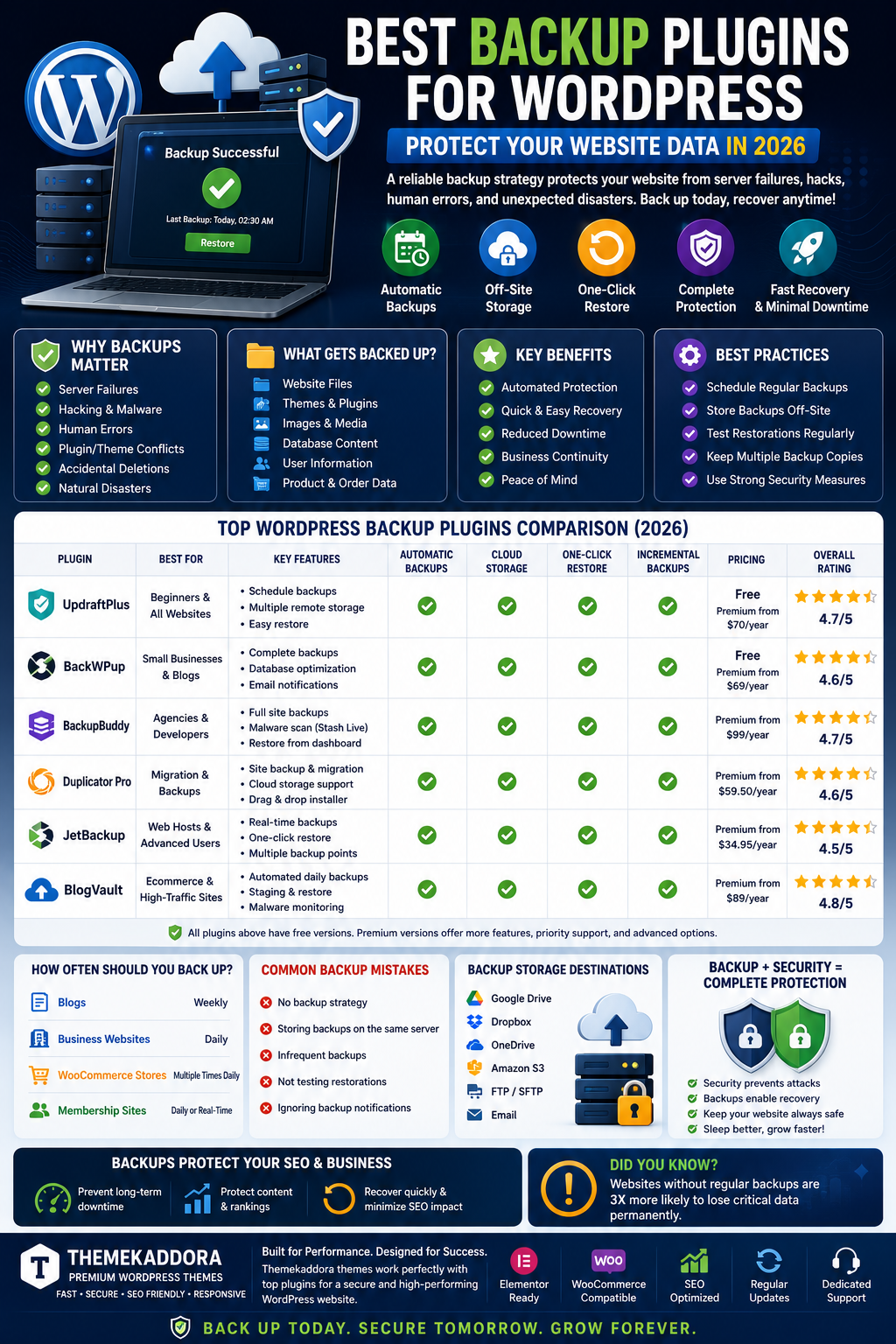
Best Backup Plugins for WordPress: Protect Your Website Data in 2026
Introduction
Imagine spending months or years building your website only to lose everything in a matter of minutes due to a server crash, hacking attempt, plugin conflict, or accidental deletion.
Unfortunately, website data loss happens more often than many website owners realize.
A reliable backup strategy is one of the most important parts of managing a WordPress website. Whether you operate a blog, business website, WooCommerce store, membership platform, or agency website, backups ensure you can quickly recover your data when unexpected problems occur.
In this guide, we'll explore why backups are critical, what features to look for in backup plugins, and how WordPress backup solutions help protect your website in 2026.
What Is a WordPress Backup?
A backup is a complete copy of your website data.
This typically includes:
Website files
Themes
Images
Database content
User information
Product information
If something goes wrong, a backup allows you to restore your website to a previous working version.
Why Website Backups Matter
Many website owners assume disasters won't happen to them.
Common causes of data loss include:
Server Failures
Hosting servers can fail unexpectedly.
Hacking Incidents
Cyber attacks can damage or delete website files.
Human Error
Accidental deletions happen frequently.
Plugin Conflicts
Updates sometimes break websites.
Malware Infections
Malicious code can corrupt website data.
Backups provide protection against all these risks.
Benefits of Backup Plugins
Automated Protection
Backups occur automatically without manual intervention.
Quick Recovery
Restore websites within minutes.
Reduced Downtime
Minimize disruptions to visitors and customers.
Business Continuity
Protect critical website operations.
Essential Features of Backup Plugins
Automatic Scheduling
Set daily, weekly, or monthly backups.
One-Click Restoration
Quickly restore websites when needed.
Cloud Storage Integration
Store backups securely off-site.
Popular destinations include:
Google Drive
Dropbox
OneDrive
Amazon S3
Incremental Backups
Only save changed files to reduce storage requirements.
Why Backups Are Critical for Business Websites
Business websites often contain:
Customer inquiries
Lead information
Service pages
Marketing assets
Data loss can result in:
Lost revenue
Damaged reputation
Customer frustration
Regular backups help ensure business continuity.
Backup Requirements for WooCommerce Stores
WooCommerce websites contain:
Product Data
Products, descriptions, and inventory.
Customer Accounts
User information and purchase history.
Order Information
Sales records and transaction details.
Payment Data
Critical business information.
Frequent backups are essential for online stores.
Common Backup Mistakes
No Backup Strategy
Many website owners never create backups until disaster strikes.
Storing Backups on the Same Server
Server failures can destroy both websites and backups.
Infrequent Backups
Websites change constantly.
Daily backups are often recommended.
Not Testing Restorations
A backup is useless if it cannot be restored successfully.
How Often Should You Back Up Your Website?
Blogs
Weekly backups may be sufficient.
Business Websites
Daily backups are recommended.
WooCommerce Stores
Multiple daily backups may be necessary.
Membership Sites
Frequent automated backups are essential.
Backup and Security Work Together
Security plugins help prevent attacks.
Backup plugins help recover from attacks.
Together they provide:
Better protection
Faster recovery
Reduced downtime
Improved peace of mind
Every WordPress website should have both.
Backup and SEO
Many website owners overlook the relationship between backups and SEO.
Backups help:
Prevent Long-Term Downtime
Downtime can negatively affect rankings.
Protect Content Assets
Years of content creation remain safe.
Recover Quickly
Fast restoration minimizes SEO impact.
Preserve Website Authority
Protect backlinks, pages, and indexed content.
Backup Strategies for Agencies
Agencies often manage multiple client websites.
Backup plugins help agencies:
Protect client projects
Simplify maintenance
Reduce risk
Improve reliability
Reliable backup systems are essential for professional website management.
Future of WordPress Backup Solutions
AI-Powered Monitoring
Backup systems increasingly use AI to identify risks.
Cloud-First Storage
Off-site backups continue growing in popularity.
Automated Disaster Recovery
Recovery processes become faster and more intelligent.
Enhanced Security
Encrypted backups provide additional protection.
Why Themekaddora Themes Support Reliable Website Management
Themekaddora themes are built for long-term stability and performance.
Benefits include:
Clean code structure
WooCommerce compatibility
Elementor integration
SEO optimization
Fast performance
Regular updates
Combined with reliable backup plugins, Themekaddora themes help create secure and resilient websites.
Building a Complete WordPress Protection Stack
Every website should include:
Security Plugin
Protect against attacks.
Backup Plugin
Recover from disasters.
Caching Plugin
Improve performance.
SEO Plugin
Increase search visibility.
Monitoring Tools
Track website health.
Together these tools create a strong website foundation.
Conclusion
Backups are one of the most important investments any website owner can make.
Without backups, a single mistake or security incident can result in catastrophic data loss.
By implementing a reliable backup solution and combining it with high-performance WordPress themes from Themekaddora, website owners can protect their businesses, content, and revenue while ensuring long-term success.
Frequently Asked Questions
Why do I need a backup plugin?
Backup plugins protect your website from data loss caused by hacks, server failures, and human errors.
How often should I back up my website?
Business websites should generally be backed up daily, while WooCommerce stores may require more frequent backups.
Can backups protect against hackers?
Backups allow you to restore your website after an attack.
Where should backups be stored?
Off-site cloud storage is recommended.
Are backup plugins necessary if my host provides backups?
Yes. Independent backups provide additional protection.
How quickly can a website be restored?
Many backup solutions offer one-click restoration.
Do backup plugins affect performance?
Most modern backup plugins have minimal impact when configured correctly.
Why use Themekaddora themes?
Themekaddora themes are optimized for performance, SEO, security, and compatibility with essential WordPress plugins.
Comments (0)