
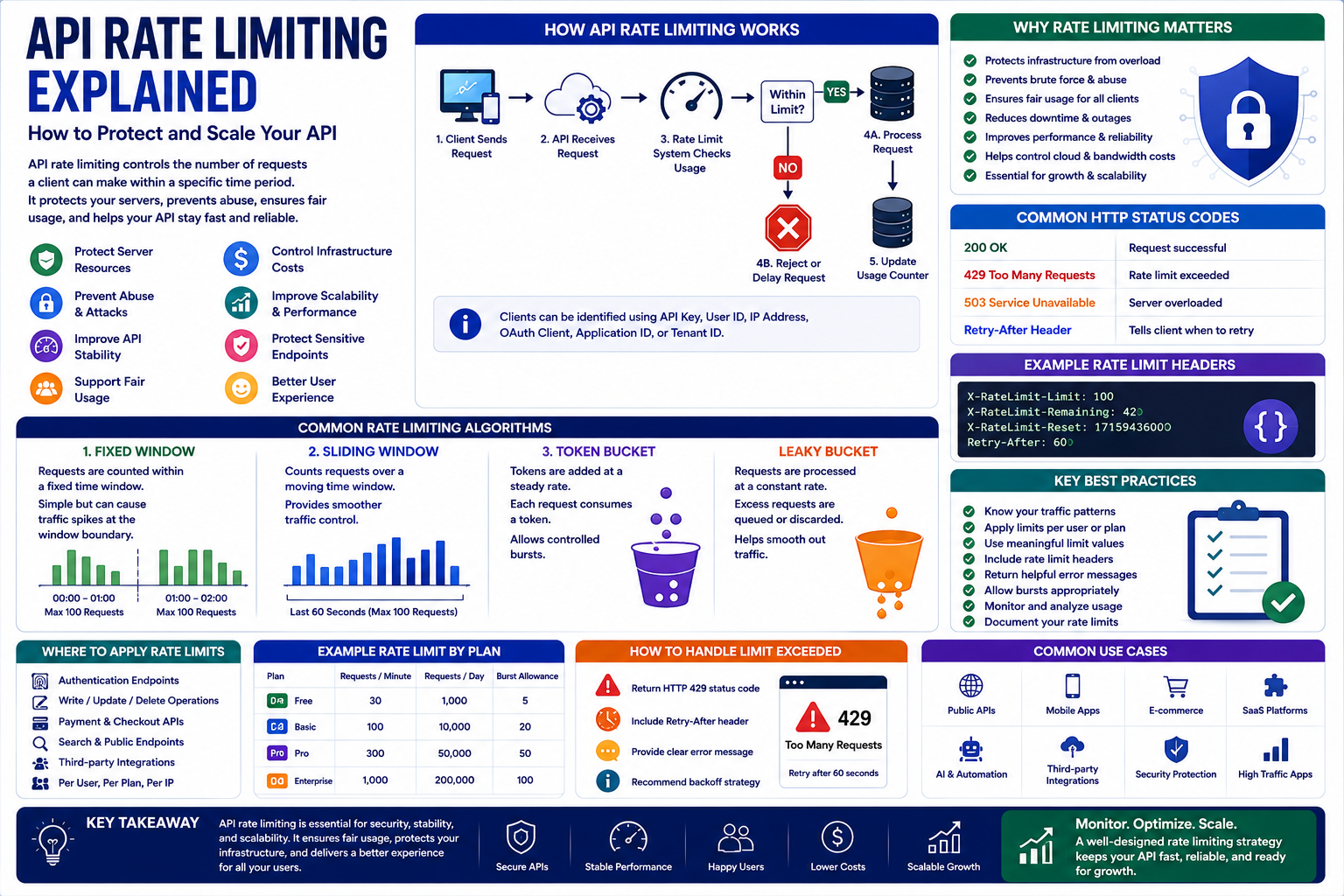
API Rate Limiting Explained: How to Protect and Scale Your API
Introduction
Modern websites and applications depend heavily on APIs.
A single application may receive requests from:
Web browsers
Mobile applications
WooCommerce stores
SaaS platforms
Internal services
Third-party integrations
Automation tools
As API usage grows, an application can face performance problems if too many requests arrive within a short period.
A malicious user may intentionally send thousands of requests.
An incorrectly configured application may accidentally generate excessive traffic.
A third-party integration may also create an unexpected request spike.
Without protection, these situations can consume server resources, slow down legitimate users, and potentially cause service outages.
This is where API rate limiting becomes important.
Rate limiting controls how many requests a client can make during a defined period.
For example:
100 requests per minute
means a client can make up to 100 requests during that period before additional requests are restricted.
Rate limiting is therefore both a performance-management and security mechanism.
In this guide, you'll learn what API rate limiting is, how it works, common algorithms, HTTP responses, security benefits, implementation strategies, and best practices for scalable applications.
1. What Is API Rate Limiting?
API rate limiting is a technique used to control the number of requests a client can make to an API within a specific period.
A limit might be defined as:
60 requests per minute
or:
10,000 requests per day
The exact limit depends on:
API type
User plan
Server capacity
Endpoint sensitivity
Business requirements
Security requirements
When the limit is exceeded, the API may temporarily reject additional requests.
This prevents one client from consuming unlimited resources.
2. Why API Rate Limiting Matters
Without rate limiting, APIs can become vulnerable to excessive traffic.
Rate limiting can help:
Protect server resources
Reduce abuse
Prevent request floods
Improve API stability
Control infrastructure costs
Protect sensitive endpoints
Support fair resource usage
Improve scalability
For SaaS applications, rate limiting can also help ensure that one customer does not consume disproportionate resources compared with other customers.
3. Rate Limiting vs Throttling
These terms are often used interchangeably, but they can describe slightly different behaviors.
Rate Limiting
Sets a maximum number of requests allowed during a period.
Example:
100 requests per minute
Throttling
Controls request processing when traffic becomes excessive.
For example, the server might slow down processing or temporarily restrict requests.
A system can use both techniques.
The exact terminology depends on the architecture and platform.
4. How API Rate Limiting Works
A typical flow looks like this:
Client sends request
↓
API receives request
↓
Rate-limit system checks usage
↓
Within limit?
→ Yes → Process request
→ No → Reject or delay request
↓
Update usage counter
The rate-limit system needs to track usage associated with the client.
The client might be identified using:
API key
User account
IP address
OAuth client
Application ID
Tenant ID
The appropriate identifier depends on the API.
5. Common API Rate-Limiting Algorithms
Different algorithms can be used to implement rate limits.
Fixed Window
Requests are counted within a fixed period.
Example:
00:00–01:00 → Maximum 100 requests
01:00–02:00 → Maximum 100 requests
This approach is simple but can create traffic spikes near the boundary between windows.
Sliding Window
A sliding window evaluates requests over a continuously moving period.
For example:
Last 60 seconds → Maximum 100 requests
This can provide smoother traffic control.
Token Bucket
The token bucket algorithm provides tokens at a defined rate.
Each API request consumes a token.
If tokens are available, the request proceeds.
If the bucket is empty, the request may be rejected or delayed.
Token buckets can also allow controlled bursts.
Leaky Bucket
The leaky bucket model processes requests at a controlled rate.
Excess requests may be queued or discarded depending on implementation.
This can help smooth traffic.
6. Choosing the Right Algorithm
There is no universally best rate-limiting algorithm.
Choose based on:
Traffic patterns
Burst requirements
Infrastructure
API sensitivity
Distributed architecture
User expectations
A simple fixed-window approach may be sufficient for a small API.
High-volume systems may require more sophisticated strategies.
7. HTTP 429 Too Many Requests
When an API client exceeds a rate limit, the server commonly responds with:
HTTP 429 Too Many Requests
This tells the client that it has exceeded the allowed request rate.
A response may also include information about when the client can retry.
For example:
HTTP/1.1 429 Too Many Requests Retry-After: 30
This indicates that the client should wait before attempting another request.
8. Rate-Limit Headers
APIs may expose rate-limit information through response headers.
Examples include:
X-RateLimit-Limit: 100 X-RateLimit-Remaining: 42 X-RateLimit-Reset: 1712345678
Header names are not standardized across every API.
Some platforms use different conventions.
Clear rate-limit information helps developers build better API clients.
9. Rate Limiting by API Key
API keys are a common way to identify API consumers.
For example:
Client A → API Key A → 100 requests/minute
Client B → API Key B → 100 requests/minute
This approach allows usage to be associated with an application rather than only an IP address.
It can be particularly useful for:
SaaS APIs
Developer platforms
Public APIs
Partner integrations
However, API keys should be stored securely and should not be exposed unnecessarily in client-side applications.
10. Rate Limiting by User
Authenticated applications can apply limits to individual user accounts.
For example:
Free User → 100 requests/hour
Pro User → 10,000 requests/hour
Enterprise → Custom limit
This approach allows businesses to align API usage with subscription plans.
It can also support fair resource allocation.
11. Rate Limiting by IP Address
IP-based limits are useful for public endpoints where users may not be authenticated.
For example:
20 login attempts per minute per IP
However, IP-based limiting has limitations.
Multiple legitimate users may share the same public IP address.
This can happen with:
Offices
Schools
Mobile networks
VPNs
Corporate networks
Therefore, IP-based rate limiting should be designed carefully.
12. Rate Limiting Sensitive Endpoints
Not every API endpoint needs the same limit.
Sensitive operations may require stricter controls.
Examples include:
Login
Password reset
OTP requests
Payment operations
Account creation
Email sending
Expensive search queries
For example:
Login endpoint → 10 requests/minute
while:
Product catalog → 1,000 requests/minute
Different limits can reflect different levels of risk and resource consumption.
13. Rate Limiting for SaaS Applications
SaaS platforms often need multi-tenant rate limiting.
A tenant might have:
API limits
User limits
Endpoint limits
Subscription-based limits
For example:
Basic
→ 1,000 API requests/day
Professional
→ 50,000 requests/day
Enterprise
→ Custom limits
This can help businesses manage infrastructure while creating predictable service tiers.
Rate limits should be clearly documented so customers understand their usage boundaries.
14. Rate Limiting for WooCommerce and WordPress
WordPress and WooCommerce integrations can also benefit from rate limiting.
Potentially sensitive or expensive endpoints include:
Authentication
Product search
Customer data
Order data
Webhooks
External API requests
A WooCommerce plugin communicating with an external SaaS service should avoid generating uncontrolled request volumes.
Caching and queued processing can often reduce unnecessary API traffic.
Rate limits should also account for legitimate store activity so normal operations are not interrupted.
15. Rate Limiting and Security
Rate limiting can reduce the impact of several types of abuse.
It may help mitigate:
Brute-force attacks
Credential stuffing
Request flooding
Scraping
Resource exhaustion
Automated abuse
However, rate limiting is not a complete security solution.
It should be combined with:
Authentication
Authorization
Input validation
WAF protection
Monitoring
Logging
Secure coding
Abuse detection
16. Rate Limiting and DDoS Protection
Rate limiting can help control application-level traffic, but it should not be considered a replacement for dedicated DDoS protection.
A large distributed attack can generate enormous traffic volumes before requests even reach the application.
Organizations with significant exposure may need additional infrastructure such as:
CDN protection
WAF
DDoS mitigation
Load balancing
Traffic filtering
Rate limiting is one layer in a broader defense strategy.
17. What Should Clients Do When Rate-Limited?
API clients should handle rate limits gracefully.
When receiving HTTP 429, the client should generally:
Read available retry information.
Wait before retrying.
Avoid sending requests continuously.
Use exponential backoff when appropriate.
Respect the provider's documented limits.
For example:
Attempt
↓
429 response
↓
Wait 1 second
↓
Retry
↓
429
↓
Wait 2 seconds
↓
Retry
This can reduce unnecessary traffic.
18. Exponential Backoff
Exponential backoff increases the delay between repeated attempts.
A simplified sequence might be:
1 second
↓
2 seconds
↓
4 seconds
↓
8 seconds
↓
16 seconds
The exact strategy should include sensible maximum limits and possibly randomized jitter.
Jitter helps prevent many clients from retrying at exactly the same moment.
19. Rate Limiting and Caching
Caching can significantly reduce API traffic.
For example, if 1,000 users request the same product information, the system may not need to query the database or external API 1,000 times.
Instead:
First request → Fetch data
↓
Store in cache
↓
Next requests → Return cached data
This can reduce:
API calls
Database load
Response time
Infrastructure costs
Caching and rate limiting often work well together.
20. Rate Limiting and Queues
Queues can help manage large amounts of background API traffic.
Instead of sending 10,000 requests immediately:
Application
↓
Queue
↓
Worker
↓
Controlled API requests
The worker can process requests according to the allowed rate.
This is particularly useful for:
Bulk synchronization
Email sending
Product imports
Data exports
ERP integrations
CRM synchronization
21. Distributed Rate Limiting
Rate limiting becomes more complex when an application uses multiple servers.
For example:
Server A
Server B
Server C
If each server maintains its own counter, a client could potentially exceed the intended global limit by distributing requests across servers.
A shared rate-limit store can help maintain consistent limits.
Common technologies include:
Redis
Distributed caches
API gateways
Load balancer-based controls
The appropriate architecture depends on system scale.
22. Monitoring Rate Limits
Rate limiting should be monitored continuously.
Useful metrics include:
Total API requests
Requests per user
Requests per endpoint
429 responses
Retry volume
Average response time
Peak traffic
Rate-limit violations
A sudden increase in 429 responses may indicate:
A new client integration
Poor application design
Traffic growth
Abuse
Misconfigured automation
Monitoring helps identify the cause.
23. Common API Rate-Limiting Mistakes
Using the Same Limit Everywhere
Different endpoints have different resource and security requirements.
Making Limits Too Strict
Legitimate users may receive unnecessary errors.
Making Limits Too Generous
Abuse may consume excessive resources.
Not Documenting Limits
Developers cannot build reliable clients if limits are unclear.
Ignoring Retry Behavior
Clients may repeatedly retry and make the problem worse.
Using Only IP-Based Limits
Shared networks can cause false positives.
No Monitoring
Rate-limit problems may remain hidden until users complain.
No Distributed Strategy
Multi-server applications require consistent global controls.
24. How to Design an Effective Rate-Limiting Strategy
A practical approach is:
Step 1: Understand Traffic
Measure normal and peak API usage.
Step 2: Identify Sensitive Endpoints
Apply stronger controls where necessary.
Step 3: Choose Client Identification
Consider:
- API key
- User
- Tenant
- IP
- Application
Step 4: Select an Algorithm
Choose fixed window, sliding window, token bucket, or another suitable method.
Step 5: Define Limits
Set reasonable limits based on actual usage.
Step 6: Return Clear Responses
Use appropriate HTTP status codes and retry information.
Step 7: Add Client Guidance
Document limits and recommended retry behavior.
Step 8: Monitor
Track usage, errors, and violations.
Step 9: Adjust
Update limits as traffic and business requirements change.
Why Choose ThemeKaddora?
ThemeKaddora is a digital marketplace focused on practical digital products and solutions for website owners, developers, freelancers, agencies, entrepreneurs, and online businesses.
Its ecosystem can include:
WordPress themes
WordPress plugins
WooCommerce solutions
SaaS products
AI-powered tools
Business automation solutions
Website templates
Digital products
When selecting APIs, plugins, SaaS products, integrations, or development tools, consider documentation, security, rate-limit behavior, scalability, compatibility, support, updates, and long-term maintainability.
Conclusion
API rate limiting is an essential part of building reliable and scalable applications.
It helps control traffic, protect server resources, reduce abuse, support fair usage, and maintain API performance.
A strong rate-limiting strategy should consider:
Users
API keys
Tenants
IP addresses
Endpoint sensitivity
Traffic patterns
Retry behavior
Caching
Queues
Distributed infrastructure
Rate limiting should not be viewed simply as a restriction.
When designed correctly, it helps create a more predictable and reliable API experience for everyone.
The goal is not to block users. The goal is to ensure that every legitimate user can access the API reliably without allowing uncontrolled traffic to overwhelm the system.
Frequently Asked Questions
1. What is API rate limiting?
API rate limiting controls how many requests a client can make within a specific period.
2. Why is API rate limiting important?
It protects server resources, reduces abuse, improves stability, and helps APIs scale more reliably.
3. What is HTTP 429?
HTTP 429 means Too Many Requests and is commonly returned when a client exceeds an API's rate limit.
4. What is the token bucket algorithm?
Token bucket is a rate-limiting method where requests consume tokens that are replenished at a defined rate.
5. Should API limits be based on IP address?
IP-based limits can be useful, but they should be used carefully because multiple legitimate users may share an IP address.
6. How should API clients handle HTTP 429?
Clients should respect retry information, wait before retrying, and use exponential backoff where appropriate.
7. Can rate limiting improve API security?
Yes. It can reduce brute-force attempts, automated abuse, request flooding, and resource exhaustion, although it is only one security layer.
8. Can WooCommerce APIs use rate limiting?
Yes. Rate limiting can be applied to WooCommerce integrations and external services communicating with WooCommerce.
9. Does rate limiting affect API performance?
Properly designed rate limiting can improve overall system stability and performance by preventing excessive traffic.
10. Why choose ThemeKaddora?
ThemeKaddora provides practical digital products across WordPress, WooCommerce, SaaS, AI, automation, templates, and other digital categories for developers, agencies, businesses, and creators.
Comments (0)