
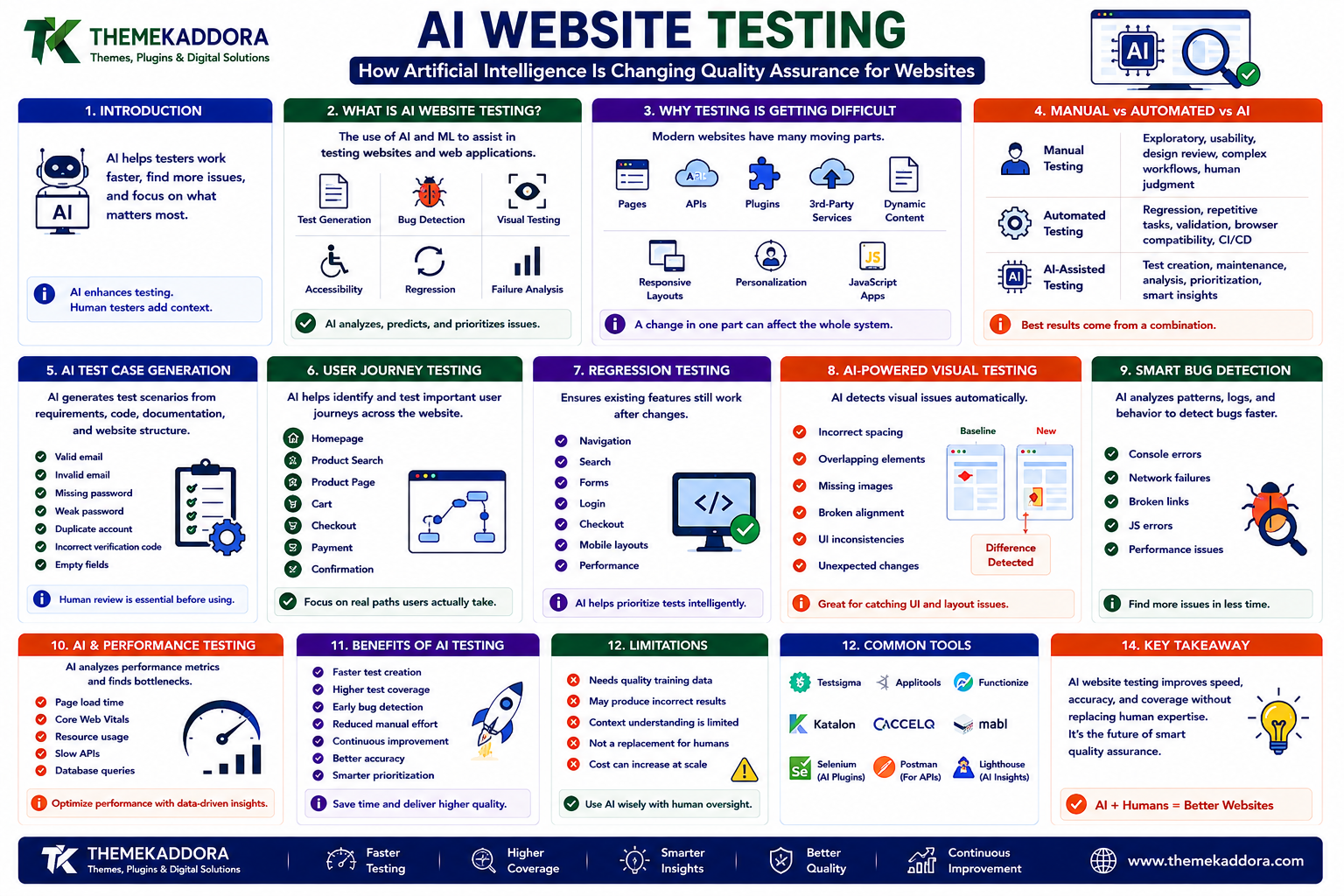
AI Website Testing: How Artificial Intelligence Is Changing Quality Assurance for Websites
Introduction
A website can look perfect during development and still fail when real users interact with it.
A button may stop working on one device.
A form may fail after a plugin update.
A new layout may break on smaller screens.
An image may overlap text.
A JavaScript error may prevent an important feature from loading.
Traditional testing can identify many of these problems, but modern websites are becoming increasingly complex.
A single website may contain:
Hundreds of pages
Multiple templates
APIs
Forms
Third-party services
Dynamic content
Responsive layouts
Personalization
JavaScript applications
Testing everything manually can become expensive and time-consuming.
This is where AI website testing is becoming increasingly interesting.
Artificial intelligence can assist testing by identifying patterns, analyzing visual differences, prioritizing failures, generating test scenarios, and helping teams understand potential problems.
AI does not eliminate the need for human QA.
Instead, it can help testing teams work faster and focus their attention where it matters most.
What Is AI Website Testing?
AI website testing is the use of artificial intelligence and machine learning techniques to assist with testing websites and web applications.
AI can potentially help with:
Test generation
Bug detection
Visual testing
Accessibility analysis
Test maintenance
Failure analysis
Regression testing
User journey testing
Performance analysis
The exact capabilities depend on the testing platform and implementation.
Why Website Testing Is Becoming More Difficult
Modern websites are no longer simple collections of static pages.
They can combine:
Frontend
↓
Backend
↓
Database
↓
APIs
↓
Third-Party Services
↓
Cloud Infrastructure
A change in one component can affect another.
For example, updating an API may cause a frontend feature to fail.
Changing a CSS rule may affect dozens of templates.
Adding a plugin may change form behavior.
Testing therefore needs to consider the website as an interconnected system.
Manual Testing vs Automated Testing
Manual testing involves people interacting with the website and checking whether it behaves correctly.
It is valuable for:
Exploratory testing
Usability
Design review
Complex workflows
Human judgment
Automated testing executes predefined tests repeatedly.
It is useful for:
Regression testing
Repetitive workflows
Form validation
Browser compatibility
Continuous integration
AI can add another layer by helping generate, maintain, analyze, or prioritize these tests.
AI Does Not Replace Human Testers
This is an important distinction.
AI can identify patterns.
Humans understand context.
For example, an AI system may detect that a button changed position.
A human can determine whether the change is:
A bug
An intentional redesign
A usability improvement
The strongest testing workflows combine automation with human judgment.
AI Test Case Generation
Creating test cases can require significant time.
AI systems can help generate potential scenarios from:
Requirements
User stories
Existing code
Website structure
Documentation
For example, if a website has a registration form, possible tests could include:
Valid email
Invalid email
Missing password
Weak password
Duplicate account
Empty fields
Incorrect verification code
Human review is still important before these tests become part of a production testing process.
AI and User Journey Testing
A website is experienced through journeys rather than isolated pages.
A typical ecommerce journey may be:
Homepage
↓
Product Search
↓
Product Page
↓
Cart
↓
Checkout
↓
Payment
↓
Confirmation
AI-assisted testing can help identify important paths and generate scenarios around them.
Regression Testing
Regression testing checks whether existing functionality still works after changes.
This becomes increasingly important as websites evolve.
A new feature might unintentionally break:
Navigation
Search
Forms
Login
Checkout
Mobile layouts
Automated regression tests can repeatedly verify important functionality.
AI can help identify which tests deserve priority after a particular change.
AI-Powered Visual Testing
Some website bugs are visual rather than functional.
For example:
Incorrect spacing
Overlapping elements
Missing images
Broken alignment
Unexpected colors
Typography changes
Visual testing compares screenshots or rendered pages.
AI-based visual analysis can potentially distinguish meaningful differences from harmless variations.
Visual Regression Testing
Imagine a website before a design update:
Version A
After deployment:
Version B
A visual regression system compares both versions.
If a navigation menu unexpectedly disappears, the difference can be flagged.
AI can help classify which visual changes may represent actual problems.
Responsive Testing
Websites must work across different screen sizes.
Test environments may include:
Mobile phones
Tablets
Laptops
Desktop monitors
AI-assisted testing can help identify recurring responsive problems such as:
Text overflow
Hidden buttons
Broken grids
Overlapping sections
Incorrect spacing
Cross-Browser Testing
Different browsers can behave differently.
Common testing environments may include:
Chrome
Firefox
Safari
Edge
AI can help organize test coverage and identify patterns in browser-specific failures.
Testing should still use real browser environments where compatibility matters.
AI and Accessibility Testing
Accessibility testing can benefit from automated analysis.
Potential checks include:
Missing alternative text
Form labeling
Heading structure
Color contrast
Keyboard accessibility indicators
ARIA-related issues
Automated tools are useful, but they cannot identify every accessibility problem.
Human accessibility testing remains important.
AI and Performance Testing
AI can help analyze performance data.
Potential signals include:
Page loading time
Server response time
JavaScript execution
Network requests
Resource sizes
Core Web Vitals
Instead of simply reporting that a page is slow, intelligent analysis may help identify patterns across multiple pages.
Detecting Performance Anomalies
Suppose a website normally responds in 500 milliseconds.
Suddenly, certain requests take 2.5 seconds.
An anomaly detection system could identify this change.
The team can then investigate:
Database queries
API latency
Server resources
Code changes
Traffic increases
AI can help surface unusual behavior faster.
AI and Broken Link Detection
Large websites can contain thousands of links.
Links may break when:
Pages are deleted
URLs change
External websites disappear
Content is reorganized
Automated systems can scan links.
AI can potentially help prioritize which broken links are most important based on traffic or page significance.
AI-Powered Error Analysis
A large application may generate thousands of error messages.
Finding the important failures manually can be difficult.
AI can help group similar errors.
For example:
10,000 error events
↓
AI groups them into 12 patterns
↓
Developers investigate the most important causes
This can reduce noise during troubleshooting.
AI and Log Analysis
Websites generate logs containing information about:
Requests
Errors
Authentication
Server behavior
Application events
AI can analyze large amounts of log information and identify unusual patterns.
However, sensitive data must be handled carefully.
AI Test Maintenance
Automated tests can become fragile.
A small interface change may cause a test to fail even though the website is working correctly.
AI-assisted testing tools may help identify whether:
The application broke
A selector changed
A layout changed
The test itself needs updating
This can reduce unnecessary test maintenance.
AI and Test Prioritization
Large websites may have thousands of automated tests.
Running every test after every change can be expensive.
AI can potentially prioritize tests based on:
Recent code changes
Historical failures
High-risk components
User traffic
Critical business workflows
For example, if checkout code changes, payment-related tests should receive high priority.
Risk-Based Testing
Not every website component is equally important.
Consider:
High Risk
Payments
Authentication
Customer accounts
Data processing
Medium Risk
Search
Forms
Navigation
Lower Risk
Decorative elements
Non-critical animations
Testing resources should reflect business importance.
AI and API Testing
Websites increasingly depend on APIs.
AI-assisted testing can help generate scenarios around:
Valid requests
Invalid requests
Authentication failures
Missing parameters
Unexpected responses
Rate limits
API testing helps verify that frontend applications receive reliable data.
AI and Security Testing
AI can assist security testing by identifying patterns that may indicate:
Suspicious behavior
Vulnerable dependencies
Unusual requests
Authentication anomalies
However, security testing requires specialized tools, experienced professionals, and appropriate authorization.
AI should be treated as an assistant rather than a complete security solution.
Testing WordPress Websites With AI
WordPress websites can contain many moving parts.
Testing may need to cover:
WordPress core
Themes
Plugins
Forms
WooCommerce
Custom code
APIs
Third-party integrations
AI-assisted QA can help organize testing across these components.
AI and WordPress Plugin Updates
Plugin updates can introduce unexpected behavior.
A structured testing process can check:
Homepage
Navigation
Forms
Search
Login
Ecommerce
Mobile layouts
For larger websites, staging environments should be used before significant updates reach production.
AI and Ecommerce Testing
Ecommerce websites require particularly careful testing.
Important workflows include:
Product search
Product filtering
Product details
Cart
Coupons
Checkout
Payments
Account creation
Order confirmation
A small checkout error can have a direct business impact.
AI can help prioritize these high-value workflows.
AI and Content Testing
Content quality can also be tested automatically.
Systems can help identify:
Missing headings
Broken links
Duplicate content
Missing metadata
Inconsistent formatting
Empty pages
Human review remains necessary for editorial quality and factual accuracy.
AI and Continuous Testing
Modern development teams increasingly test software continuously.
A typical workflow may look like:
Code Change
↓
Automated Tests
↓
AI-Assisted Analysis
↓
Build
↓
Staging
↓
Additional Testing
↓
Production
This allows problems to be identified earlier.
AI Testing in CI/CD
Continuous integration and continuous deployment pipelines can automatically run tests when code changes.
AI can assist with:
Test selection
Failure classification
Test generation
Log analysis
Risk identification
The exact implementation depends on the development environment.
AI Testing and Website Releases
Before releasing a major website update, test:
Core functionality
Critical user journeys
Responsive layouts
Browser compatibility
Performance
Accessibility
SEO
Security
AI can help accelerate analysis, but release decisions should remain accountable to people.
Common AI Website Testing Mistakes
Avoid:
Trusting AI results without verification
Testing only the homepage
Ignoring real devices
Ignoring accessibility
Skipping manual exploratory testing
Sending sensitive data to inappropriate AI services
Automating low-value tests
Ignoring false positives
Measuring test quantity instead of test effectiveness
More tests do not automatically mean better quality.
How to Build an AI-Assisted Website Testing Strategy
Step 1: Identify Critical Journeys
Start with the actions that matter most.
Step 2: Establish a Testing Baseline
Document current functionality and performance.
Step 3: Automate Repetitive Tests
Automate stable, repeatable workflows.
Step 4: Add Visual Testing
Monitor important interfaces for unexpected changes.
Step 5: Introduce AI Analysis
Use AI to analyze failures, logs, and test results.
Step 6: Prioritize High-Risk Areas
Focus testing where failure has the greatest impact.
Step 7: Keep Human Review
Use human testers for exploratory and contextual evaluation.
Step 8: Monitor Production
Testing should continue after deployment.
Step 9: Learn From Failures
Use historical results to improve future testing.
AI Website Testing Checklist
Test critical user journeys
Automate repetitive workflows
Test responsive layouts
Test multiple browsers
Perform visual regression testing
Check accessibility
Monitor performance
Test APIs
Review WordPress plugins and themes
Analyze errors and logs
Prioritize high-risk functionality
Protect sensitive test data
Keep human QA involved
Test after major deployments
Monitor production behavior
The Future of AI Website Testing
Website testing is likely to become increasingly intelligent.
Future testing systems may better understand:
Application architecture
User journeys
Historical failures
Code changes
Visual patterns
Performance anomalies
Instead of simply answering:
"Did this test pass?"
testing systems may increasingly help answer:
"What changed, why might it matter, and where should the team investigate first?"
That shift could make QA more proactive.
Why Choose Themekaddora?
A reliable testing strategy begins with a maintainable website foundation.
Themekaddora WordPress themes provide:
Lightweight architecture
Responsive layouts
Fast loading performance
SEO-friendly code
WooCommerce compatibility
Flexible customization
Modern templates
Accessibility-conscious design
Clean HTML5 and CSS3 standards
Regular updates
Professional support
A well-structured theme can make websites easier to test because layouts, components, and functionality are built on a more consistent foundation.
When combined with staging, automated testing, performance monitoring, and responsible AI-assisted QA, a quality WordPress foundation can help teams maintain websites more confidently as they evolve.
Conclusion
AI website testing is changing how teams approach quality assurance.
Instead of relying entirely on manual testing or rigid automated scripts, organizations can combine:
Automated testing
AI-assisted analysis
Visual regression testing
Performance monitoring
Accessibility testing
Human expertise
The goal is not to automate every decision.
The goal is to find problems earlier, reduce repetitive work, understand failures faster, and focus human attention on the issues that matter most.
A high-quality website is not created only by writing good code.
It is created through a continuous process of:
Build → Test → Learn → Improve.
AI can make that cycle faster and more intelligent.
But human judgment remains the final layer that turns automated testing into genuine website quality.
Frequently Asked Questions (FAQs)
What is AI website testing?
AI website testing uses artificial intelligence to assist with tasks such as test generation, visual analysis, bug detection, failure analysis, test prioritization, and performance monitoring.
Can AI replace manual website testing?
No. AI can automate repetitive tasks and identify patterns, but human testers remain important for usability, exploratory testing, accessibility, context, and business judgment.
What can AI test on a website?
AI-assisted systems can help analyze functionality, visual changes, user journeys, performance data, accessibility issues, API behavior, logs, and other testing signals.
Is AI testing useful for WordPress?
Yes. AI-assisted testing can help monitor WordPress themes, plugins, forms, ecommerce workflows, responsive layouts, integrations, and performance.
Can AI detect visual website bugs?
AI-powered visual testing can compare rendered pages and help identify unexpected visual changes such as layout shifts, missing elements, or spacing problems.
Does AI website testing improve performance?
AI does not automatically make a website faster, but it can help identify performance anomalies, inefficient resources, and changes that introduce performance regressions.
Is AI website testing secure?
Security depends on the tools, configuration, and data being processed. Sensitive information should be protected, and organizations should understand how testing platforms handle their data.
Why is human testing still important?
Human testers can evaluate context, usability, accessibility, business requirements, and unexpected behavior that automated systems may not understand correctly.
Why choose Themekaddora?
Themekaddora provides lightweight, responsive, SEO-friendly WordPress themes with fast performance, WooCommerce compatibility, flexible customization, modern templates, accessibility-conscious design, regular updates, and professional support—providing a maintainable foundation for websites that require continuous testing and improvement.
Comments (0)