
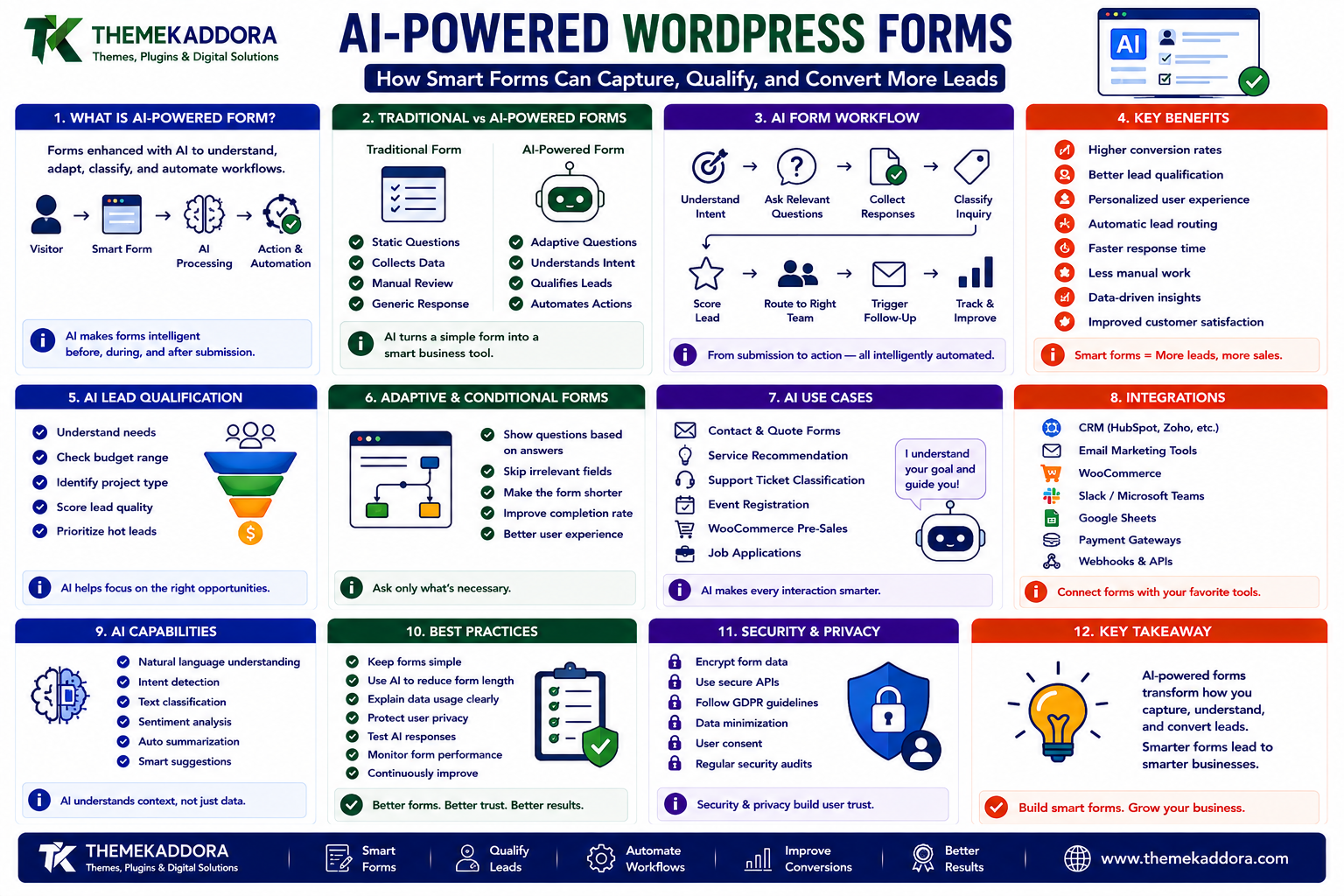
AI-Powered WordPress Forms: How Smart Forms Can Capture, Qualify, and Convert More Leads
Introduction
Forms are one of the most important conversion elements on a business website.
They can be used for:
Contact requests
Quote requests
Consultation bookings
Job applications
Customer support
Lead generation
Product inquiries
Newsletter subscriptions
Survey collection
WooCommerce pre-sales questions
Traditional forms usually work like this:
Visitor ↓ Fill Form ↓ Submit ↓ Email Notification
This is useful, but the workflow often stops there.
Someone on the team still has to:
Read the submission
Understand the customer's intent
Determine whether the lead is valuable
Enter information into a CRM
Assign the lead
Write a response
Decide what should happen next
AI can transform this process.
A smarter workflow could look like:
Visitor ↓ AI-Powered Form ↓ Understand Request ↓ Collect Relevant Information ↓ Classify Lead ↓ Score Opportunity ↓ Update CRM ↓ Trigger Follow-Up
The form becomes more than a data-collection interface.
It becomes the beginning of an automated business workflow.
AI can potentially help forms:
Adapt questions
Understand natural-language responses
Qualify leads
Detect intent
Categorize submissions
Summarize inquiries
Recommend next actions
Route leads
Trigger automation
However, AI should not be added simply because it is fashionable.
A good form should still be:
Fast
Clear
Accessible
Mobile-friendly
Privacy-conscious
Easy to complete
AI should improve the customer journey rather than make the form more complicated.
In this guide, you'll learn how AI-powered WordPress forms work, how they differ from traditional forms, how adaptive questions can improve lead qualification, how AI can connect forms with CRM and WooCommerce workflows, how to design smart form templates, how to protect submitted data, and how to build a practical AI form system.
1. What Is an AI-Powered WordPress Form?
An AI-powered WordPress form is a form system that uses artificial intelligence to understand submissions, adapt interactions, classify information, or trigger intelligent workflows.
A traditional form may contain:
Name Email Phone Message [Submit]
An AI-powered form can add intelligence around the interaction:
Visitor Goal ↓ AI Understands Intent ↓ Relevant Questions ↓ Submission ↓ AI Classification ↓ Business Workflow
The AI layer can operate before, during, or after form submission.
2. Traditional Forms vs AI-Powered Forms
The difference is not necessarily the visual design.
It is the intelligence behind the workflow.
Traditional Form
User Input ↓ Store Data ↓ Notify Team
AI-Powered Form
User Input ↓ Understand Intent ↓ Collect Relevant Data ↓ Classify ↓ Score ↓ Route ↓ Automate
The second approach can reduce manual processing.
3. Why Smart Forms Matter for Businesses
Website visitors have different intentions.
One person may want:
"I need a simple website."
Another may want:
"We need a 100-page multilingual eCommerce platform with CRM integration."
Sending both submissions to the same generic workflow is inefficient.
AI can help distinguish between them.
For example:
Inquiry ↓ AI Classification Basic Website → Standard Sales Flow Enterprise eCommerce → Senior Sales Team Support Issue → Support Team
This can improve response speed and lead handling.
4. AI Lead Qualification
Lead qualification is one of the strongest use cases for AI forms.
A form can ask initial questions such as:
What service do you need?
What is your budget range?
How quickly do you need it?
What is the size of your business?
AI can then help classify the submission.
For example:
Lead Information ↓ AI Analysis ↓ High Intent Medium Intent Low Intent
The sales team can prioritize high-value opportunities.
5. AI Lead Scoring
Lead scoring assigns a value or category to a lead based on defined signals.
For example:
Budget + Business Size + Urgency + Service Fit + Engagement ↓ Lead Score
A hypothetical workflow might be:
Score > 80 → Sales Alert Score 50–80 → Nurture Score < 50 → General Follow-Up
The exact scoring model should be based on the business's actual sales process.
AI can assist with classification, but organizations should validate the criteria.
6. Conversational WordPress Forms
Traditional forms show every field immediately.
A conversational form can reveal questions gradually.
For example:
What are you looking for? Visitor: "An online store." ↓ What will you sell? Visitor: "Digital products." ↓ Do you need subscriptions? Visitor: "Yes." ↓ Recommended Path: SaaS / Digital Product Setup
This can reduce cognitive overload.
The visitor sees only questions relevant to their previous answers.
7. AI-Adaptive Questions
AI can potentially adjust the next question based on context.
For example:
User: "I need help with my existing WooCommerce store." AI ↓ Detects WooCommerce ↓ Asks: "What is the main problem?"
Instead of showing:
Business Type Website Type Industry Budget Timeline Product Count Platform Problem
all at once, the form can progressively collect the information that matters.
This can make complex lead forms feel simpler.
8. AI Forms for Service Businesses
Service businesses often need detailed project requirements.
Examples include:
Web development
Software development
Digital marketing
Consulting
Design
Automation
ERP implementation
A smart inquiry form can understand the initial request and collect relevant information.
For example:
Customer: "We need to automate our sales process." AI ↓ Ask about: CRM Sales Team Current Tools Lead Volume Workflow Goals
The form becomes an intelligent discovery tool.
9. AI Forms for Agencies
Agencies frequently receive repetitive inquiries.
An AI intake form can help classify requests into categories such as:
Website SEO Branding eCommerce Automation AI Maintenance
The form can then route each submission to the appropriate internal team.
For example:
eCommerce ↓ WooCommerce Team SEO ↓ SEO Team AI Automation ↓ AI Team
This reduces manual triage.
10. AI Forms for SaaS Businesses
SaaS websites can use smart forms for:
Demo requests
Enterprise inquiries
Support
Partnership requests
Feature requests
Onboarding
For example:
Demo Request ↓ Company Size ↓ Current Platform ↓ Number of Users ↓ Business Need ↓ AI Qualification
High-value accounts can be routed directly to a sales representative.
11. AI Forms for WooCommerce
WooCommerce stores can also use intelligent forms.
Examples include:
Product inquiries
Bulk-order requests
Quote requests
Custom product requests
Pre-sales support
Return inquiries
For example:
Customer Wants Bulk Order ↓ AI Form ↓ Product Quantity Delivery Location Timeline ↓ Quote Workflow
The form can then connect with WooCommerce and other business systems.
12. AI Product Recommendation Forms
Some products require customers to answer questions before making a purchase.
Examples include:
Skincare
Supplements
Software plans
Electronics
Insurance-related products
Professional services
Courses
A smart form can guide the customer.
For example:
Customer Needs ↓ Preferences ↓ Budget ↓ Use Case ↓ AI Recommendation ↓ WooCommerce Products
The result can be presented as a product shortlist.
Recommendations should be based on accurate product information and clearly defined rules.
13. AI Quiz Funnels
Forms can also become interactive quizzes.
For example:
"What type of website do you need?" ↓ Answer Questions ↓ AI: Recommended Solution
A quiz can collect useful information while simultaneously educating the visitor.
This can work well for:
SaaS products
Digital services
Website templates
WooCommerce solutions
Consulting
Courses
The quiz becomes both a conversion tool and a qualification mechanism.
14. AI Forms and Website Templates
AI forms should not look disconnected from the website.
A professional WordPress template can include predefined form sections such as:
Hero ↓ Problem ↓ AI Form ↓ Results ↓ Testimonials ↓ CTA
The form can be styled to match the theme's:
Colors
Typography
Buttons
Spacing
Responsive design
This makes the AI functionality feel like part of the website rather than an external application.
15. AI Form Templates for Different Businesses
A template library could contain specialized AI form designs.
Agency Template
Project Type Budget Timeline Business Goals
SaaS Template
Company Size Users Current Tools Use Case
WooCommerce Template
Product Quantity Delivery Customization
Consultant Template
Business Problem Industry Urgency Goals
This allows businesses to start from a relevant structure instead of creating every form manually.
16. AI Forms and CRM Integration
An intelligent form becomes much more valuable when connected to a CRM.
A workflow can look like:
Form Submission ↓ AI Classification ↓ Create / Update CRM Lead ↓ Assign Owner ↓ Set Lead Status ↓ Create Follow-Up Task
This removes manual data entry.
The CRM remains the source of sales information while the AI form acts as the intelligent intake layer.
17. AI Forms and ERP Integration
Some inquiries need operational processing.
For example:
Wholesale Request ↓ AI Form ↓ ERP ↓ Customer Account ↓ Pricing / Quote
Another workflow could be:
Service Request ↓ AI Classification ↓ ERP / Operations ↓ Create Work Item
API integrations and webhooks can connect the form with external business systems.
18. AI Forms and Email Automation
After submission, an AI system can determine the appropriate next communication.
For example:
New Lead ↓ AI Classification ↓ High Intent ↓ Sales Email Low Intent ↓ Educational Email Support Issue ↓ Support Confirmation
This is more targeted than sending the same email to every visitor.
19. AI Form Summaries
Long submissions can be difficult for teams to read.
AI can summarize them.
For example:
Original submission:
We are a growing online business with multiple product categories. Our current store is slow, we have difficulty managing inventory, and we want to connect our website with our CRM.
AI summary:
Business: Growing eCommerce Company Needs: • Performance Optimization • Inventory Management • CRM Integration Priority: High
The original submission should remain available for verification.
AI summaries should assist humans, not replace the source information.
20. AI Sentiment and Intent Analysis
AI can analyze the tone or intent of certain submissions.
For example:
Customer Message ↓ Intent → Refund Request Sentiment → Frustrated
This can help support teams prioritize difficult conversations.
However, sentiment analysis is not always reliable and should not be treated as an objective measurement of a person's emotional state.
Use it as a supporting signal.
21. AI Support Ticket Classification
A support form can automatically classify tickets.
For example:
New Ticket ↓ AI ├── Billing ├── Technical ├── Account ├── Product └── Urgent
The ticket can then be routed automatically.
This is especially valuable for businesses handling hundreds or thousands of support requests.
22. AI Spam Detection for Forms
Forms attract automated spam.
AI can assist with suspicious-submission detection.
For example:
Submission ↓ Spam Analysis ├── Low Risk → Accept ├── Suspicious → Review └── High Risk → Block
AI should complement rather than automatically replace:
CAPTCHA
Rate limiting
IP controls
Honeypots
Request validation
A layered approach is stronger than depending on a single detection method.
23. AI Forms and Data Privacy
Forms often collect personal information.
AI processing can introduce another data boundary.
For example:
Form ↓ Customer Information ↓ AI Service ↓ CRM
Before implementing AI, determine:
What data is collected
What data is sent to the AI provider
Why it is needed
How long it is stored
Which external services receive it
Send the minimum information required to perform the AI task.
24. AI Forms and Consent
If a form uses personal data for a specific purpose, the user experience should clearly explain relevant processing.
Do not hide important information in vague language such as:
"By submitting, you agree to everything."
Where a consent mechanism is required, it should be appropriately designed for the actual processing activity.
Privacy notices and consent requirements depend on the business, jurisdiction, and processing activity.
25. AI Form Security
A form is a public application boundary.
Security should include:
HTTPS
Input validation
Sanitization
Nonces where appropriate
Rate limiting
Spam protection
Authorization for private workflows
Secure API credentials
Never trust user-submitted form data simply because it came through your own form.
26. AI Form API Security
If the form communicates with:
CRM
ERP
AI service
Email provider
WooCommerce
SaaS platform
then API security becomes important.
Use:
Server-side credentials
HTTPS
Authentication
Least privilege
Request validation
Error handling
Secret management
Do not expose powerful third-party API credentials in browser JavaScript.
27. AI Forms and Performance
AI requests can introduce additional latency.
A poor workflow might look like:
Submit Form ↓ AI Request ↓ CRM Request ↓ ERP Request ↓ Email API ↓ Final Response
The visitor may wait for every operation to finish.
A better architecture can be:
Submit Form ↓ Validate ↓ Save ↓ Return Response ↓ Background Processing ├── AI ├── CRM ├── ERP └── Email
This creates a faster user experience.
28. AI Form Error Handling
External services can fail.
For example:
Form Submitted ↓ AI Service Timeout
The form should not simply display:
"Something went wrong."
Instead, the system can:
Save Submission ↓ Queue AI Task ↓ Retry ↓ Complete
This prevents a temporary third-party outage from losing the customer's submission.
29. AI Form Retry and Idempotency
Suppose a form submission triggers:
CRM lead creation
ERP record
If the automation retries, duplicates could occur.
Use an event or submission ID:
Submission ID ↓ Already Processed? ├── Yes → Skip └── No → Process
This is especially important for payment, customer, and order-related workflows.
30. AI Form Analytics
Measure how forms actually perform.
Useful metrics include:
Form views
Form starts
Completion rate
Abandonment rate
Average completion time
Qualified leads
Conversion rate
AI classification accuracy
Sales conversion
Spam rate
For example:
1,000 Form Views ↓ 640 Starts ↓ 420 Submissions ↓ 120 Qualified Leads ↓ 35 Customers
This gives a clearer picture of the form's business value.
31. Measure AI Form ROI
AI should produce measurable improvements.
Compare:
Before AI Manual Qualification: 12 Hours / Week
with:
After AI Manual Qualification: 4 Hours / Week
Other metrics may include:
Lead response time
Qualified-lead rate
Conversion rate
Sales productivity
Support resolution time
Cost per lead
AI is valuable when it improves an important business outcome.
32. Build Forms Around the Customer Journey
A common mistake is designing forms around what the business wants to collect.
Instead, start with:
What does the customer need?
For example:
Customer Goal ↓ Minimum Questions ↓ Useful Recommendation ↓ Next Step
Every extra question creates friction.
Only ask for information that improves the outcome.
33. Progressive Form Design
Instead of asking 15 questions immediately:
1 2 3 4 5 6 7 8 9 10...
use progressive disclosure:
Question 1 ↓ Understand Intent ↓ Question 2 ↓ Relevant Question 3 ↓ Result
AI can help decide which question is relevant next.
This can make complex forms feel much simpler.
34. AI Form UX on Mobile
Most forms should be designed with mobile users in mind.
Use:
Large fields
Clear labels
Touch-friendly controls
Short questions
Simple navigation
Visible progress
Helpful error messages
AI should not make the mobile experience slower.
For example, avoid:
User Taps Next ↓ 5-Second AI Request ↓ Next Question
Use lightweight interactions and move expensive processing to the background when possible.
35. AI Form Templates for Digital Products
Digital marketplaces can use AI forms to help visitors discover products.
For example:
What are you building? WordPress Website WooCommerce Store SaaS Product Business Portal ↓ What do you need? Theme Plugin Template AI Tool Automation
AI can then generate a recommended product category or shortlist.
For a marketplace such as ThemeKaddora, this can transform product discovery from:
Search → Browse → Compare
into:
Describe Goal → Answer Questions → Discover Relevant Solutions
36. AI Forms for WooCommerce Product Discovery
A store can use a product-finder form.
For example:
What are you looking for? ↓ Budget? ↓ Use Case? ↓ Preferred Features? ↓ AI Recommendation ↓ WooCommerce Products
The result can lead directly to product pages.
This can be particularly useful when a catalog is large or products have many attributes.
37. AI Forms and Templates as a Product
AI-powered form templates can themselves become digital products.
A marketplace could offer:
Lead Qualification Templates Quote Request Templates Booking Templates Product Finder Templates Support Templates Consultation Templates
Users could install a template and customize:
Questions
Branding
AI instructions
CRM integration
Email workflow
Result page
This creates a flexible product ecosystem.
38. Build a Modular AI Form Plugin
A scalable plugin architecture might include:
AI Form Plugin ├── Form Builder ├── AI Engine ├── Lead Scoring ├── Conditional Logic ├── CRM Integration ├── WooCommerce Integration ├── Email Automation ├── Analytics ├── Templates └── Security
Modules should have clear responsibilities.
Not every installation needs every feature enabled.
39. Common AI WordPress Form Mistakes
Avoid these problems:
Making Forms Too Complicated
AI should reduce friction, not add it.
Asking Too Many Questions
Only collect information that has a real purpose.
Sending All Form Data to AI
Use data minimization.
Exposing API Keys
Keep credentials server-side.
Waiting for Every API Call
Use background processing for expensive workflows.
No Spam Protection
AI should complement standard security controls.
No Human Review for High-Risk Leads
Important business decisions may require human judgment.
No Analytics
Without measurement, you cannot know whether the AI actually helps.
40. AI-Powered WordPress Form Best Practices
A strong system should:
Keep the user experience simple.
Ask only useful questions.
Use AI where interpretation adds value.
Validate all submissions.
Protect API credentials.
Use server-side integrations.
Apply rate limiting and spam protection.
Keep sensitive data isolated.
Use background processing for expensive operations.
Make integrations idempotent.
Track form performance.
Provide human escalation.
Test mobile behavior.
Document external AI services.
The objective is intelligent simplicity.
41. A Practical AI Form Architecture
A production architecture might look like:
VISITOR ↓ WordPress Form ↓ Validation ↓ Submission ↓ Queue ↓ ┌──────────────┼──────────────┐ ↓ ↓ ↓ AI CRM Email ↓ ↓ ↓ Classification Lead Data Notification └──────────────┼──────────────┘ ↓ Human / Sales
For WooCommerce:
Visitor ↓ AI Product Finder ↓ WooCommerce ↓ Recommended Products ↓ Purchase
This creates a connected lead and commerce workflow.
42. How to Build an AI-Powered WordPress Form
A practical implementation can follow:
1. Define Business Goal ↓ 2. Identify Customer Questions ↓ 3. Minimize Form Fields ↓ 4. Design Form Template ↓ 5. Add Conditional Logic ↓ 6. Add AI Classification ↓ 7. Connect CRM / WooCommerce ↓ 8. Add Security Controls ↓ 9. Add Background Processing ↓ 10. Test ↓ 11. Measure Conversion ↓ 12. Optimize
Start with one workflow and expand after proving value.
Why Choose ThemeKaddora?
At ThemeKaddora, we believe WordPress plugins and templates should solve real business problems.
AI-powered forms can become a bridge between:
Website visitors
WordPress
WooCommerce
CRM
ERP
SaaS
AI
Automation
A modern digital product ecosystem can include:
WordPress plugins
Form templates
WooCommerce tools
AI-powered extensions
Business automation solutions
Website templates
SaaS products
ThemeKaddora focuses on practical solutions built around:
Usability
Performance
Security
Integration
Automation
Scalability
Conclusion
AI-powered WordPress forms can transform a simple contact form into an intelligent business workflow.
Instead of:
Fill Form → Send Email
businesses can build:
Understand → Ask → Qualify → Route → Automate → Convert
AI can help forms:
Understand customer intent
Ask relevant questions
Qualify leads
Summarize requests
Recommend products
Route support issues
Connect CRM and ERP systems
Trigger automated follow-ups
But AI should not make forms unnecessarily complicated.
The best form is still one that customers can complete quickly and confidently.
The goal is not to build the smartest form possible. The goal is to build the simplest form that can intelligently move the customer and the business toward the right next step.
Frequently Asked Questions
1. What is an AI-powered WordPress form?
It is a WordPress form that uses AI to interpret submissions, adapt questions, classify leads, generate recommendations, or trigger intelligent workflows.
2. Can AI qualify leads from WordPress forms?
Yes. AI can analyze form responses and classify or score leads based on defined business criteria.
3. Can AI forms connect to CRM systems?
Yes. A form can send structured information to a CRM and trigger actions such as lead creation, assignment, or follow-up.
4. Can AI forms work with WooCommerce?
Yes. AI forms can support product discovery, quote requests, pre-sales questions, bulk-order inquiries, and recommendation workflows.
5. Can AI change the questions shown to users?
Yes. Adaptive or conversational forms can use previous responses to determine which questions are most relevant.
6. Are AI-powered forms more expensive?
They can introduce AI API and infrastructure costs. Businesses should compare those costs against improvements in lead quality, productivity, and conversion.
7. Is customer data safe in an AI form?
It can be handled securely, but developers must carefully control what data is collected, what is sent to third parties, where it is stored, and who can access it.
8. Should every form use AI?
No. Simple forms may not need AI. Use AI when interpretation, classification, personalization, or automation provides meaningful value.
9. Can AI forms reduce lead response time?
Yes. Automated classification, CRM updates, routing, and notifications can reduce the time between submission and business follow-up.
10. Why choose Themekaddora?
Themekaddora provides lightweight, responsive, SEO-friendly WordPress themes with fast performance, WooCommerce compatibility, flexible customization, accessibility-conscious design, modern templates, regular updates, and professional support—providing a strong foundation for businesses building digital products and product-focused websites.
Comments (0)