
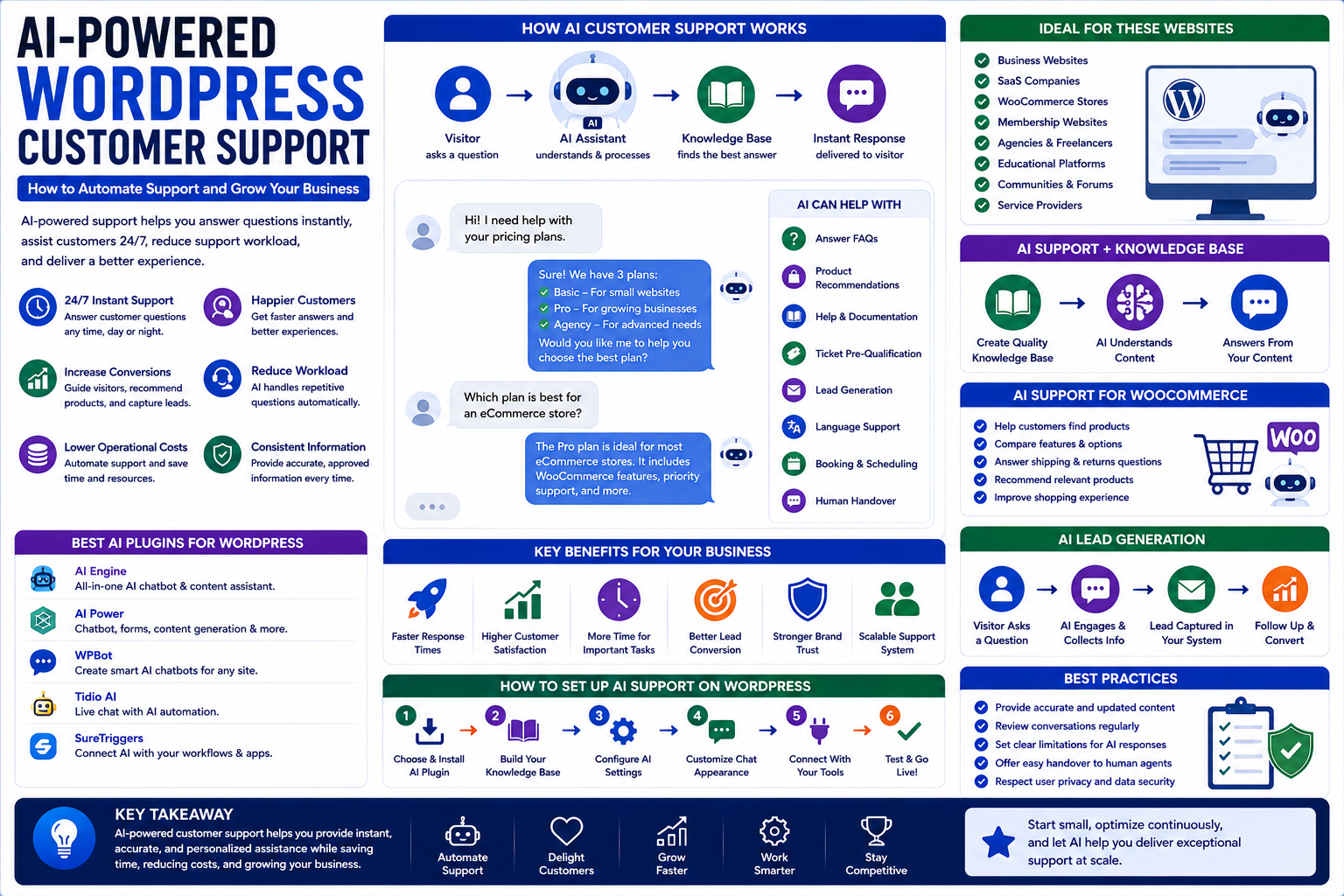
AI-Powered WordPress Customer Support: How to Automate Support and Grow Your Business
Introduction
Customer expectations are changing rapidly.
People want answers quickly. They do not always want to wait for an email response or search through dozens of website pages to find basic information.
This is one reason artificial intelligence is becoming increasingly important for customer support.
For WordPress websites, AI can be used to create automated support experiences that answer questions, guide visitors, recommend resources, collect leads, and assist customers.
An AI-powered WordPress customer support system can become particularly useful for businesses that receive questions outside normal working hours.
It can support:
Business websites
Agencies
Online stores
Membership websites
Educational platforms
Service providers
WordPress communities
For Themekaddora, this topic brings together AI, WordPress, plugins, customer experience, marketing, automation, and business growth.
What Is AI-Powered Customer Support?
AI-powered customer support uses artificial intelligence to help businesses communicate with website visitors and customers.
An AI assistant can potentially:
Answer common questions
Explain products
Recommend content
Guide users
Collect information
Qualify leads
Assist with troubleshooting
Direct users to support resources
Unlike a traditional static FAQ, an AI assistant can respond conversationally.
Why Add AI Support to a WordPress Website?
Traditional customer support often depends on:
Visitor
↓
Contact Form
↓
Support Team
↓
Response
This can work well, but response times may vary.
An AI assistant can provide another layer:
Visitor
↓
AI Assistant
↓
Instant Answer
↓
Human Support When Needed
This does not necessarily mean replacing the support team.
Instead, AI can handle repetitive questions while humans focus on more complex situations.
AI Chatbots vs Traditional Chatbots
Traditional chatbots often depend on predefined rules.
For example:
User: What are your business hours?
Bot: Choose an option.
User: Pricing?
Bot: Choose an option.
AI chatbots can use natural language to understand questions more flexibly.
However, AI systems still require proper configuration and monitoring.
AI WordPress Plugins
WordPress plugins can make it easier to integrate AI features into websites.
Depending on the plugin and service, features may include:
AI chat
Content assistance
Knowledge-base search
Lead collection
Automated replies
Product recommendations
Support automation
Before installing an AI plugin, review:
Compatibility
Data handling
AI provider
Pricing
Performance
Security
Support
Customization options
AI Support and Knowledge Bases
An AI assistant is only as useful as the information it can access.
Businesses should create a reliable knowledge base containing information such as:
Product details
Pricing
Policies
FAQs
Documentation
Shipping information
Support instructions
The AI system can then use approved information to answer common questions.
Why Content Quality Matters
Suppose a company has outdated information about its refund policy.
If the AI system uses that information, customers may receive incorrect answers.
This is why AI customer support requires regular content maintenance.
Businesses should review their:
FAQs
Documentation
Product information
Policies
Pricing
Support articles
AI Customer Support for WooCommerce
WooCommerce stores can use AI to assist customers during the shopping journey.
An AI assistant could help visitors:
Find products
Compare products
Understand features
Answer shipping questions
Explain return policies
Recommend related products
For example:
Customer: I need a laptop bag for business travel.
An AI assistant could ask about size, material, style, and budget before suggesting relevant products.
AI Product Recommendations
AI can help personalize product discovery.
Instead of making customers browse dozens of categories, an AI assistant can ask questions about what they need.
The process may look like:
Customer Need
↓
AI Questions
↓
Product Suggestions
↓
Product Page
↓
Purchase
This can make product discovery more conversational.
AI Lead Generation
AI support can also become a marketing tool.
A visitor might ask:
How can your agency help my business?
The AI assistant can explain services and potentially collect:
Name
Company
Project requirements
The lead can then be passed to the sales team.
This turns customer support technology into a potential lead-generation channel.
AI Lead Qualification
Not every lead has the same value.
An AI assistant can ask qualifying questions such as:
What service do you need?
What is your project size?
What is your timeline?
What type of business do you operate?
The answers can help the sales team prioritize conversations.
AI Support and Marketing
Customer support and marketing are increasingly connected.
A visitor may enter a website looking for information but become interested in a product or service after receiving useful guidance.
For example:
Visitor
↓
Question
↓
AI Answer
↓
Relevant Resource
↓
Product or Service
↓
Lead
A helpful support experience can therefore contribute to marketing performance.
AI Chatbots for Service Businesses
Service businesses often receive repetitive questions.
Examples include:
What services do you offer?
How much does it cost?
How long does a project take?
Do you work internationally?
How can I contact your team?
An AI assistant can handle basic questions while directing serious inquiries to the appropriate team.
AI Support for SaaS Websites
SaaS companies often have complex products.
AI support can help users understand:
Features
Plans
Setup
Integrations
Documentation
Troubleshooting
For SaaS businesses, AI can also guide users toward relevant documentation instead of requiring support staff to answer every basic question manually.
AI and WordPress Documentation
WordPress websites can contain large amounts of documentation.
For example:
Tutorials
Knowledge bases
Product guides
Developer documentation
FAQs
An AI assistant can make this information easier to search conversationally.
Instead of asking users to browse multiple categories, they can ask a direct question.
AI Support Outside Business Hours
One major benefit of AI is availability.
A website may receive visitors:
At night
On weekends
During holidays
From different time zones
An AI assistant can provide basic information whenever visitors need it.
This is particularly useful for international businesses.
AI Does Not Replace Human Support
AI should not handle every customer situation.
Human support remains important for:
Complaints
Refund disputes
Complex technical issues
Sensitive situations
Unusual requests
High-value customers
A good support system knows when to hand a conversation to a human.
Human Handoff
A useful AI support workflow can look like:
AI Assistant
↓
Understands Problem
↓
Attempts Basic Solution
↓
Problem Requires Human
↓
Support Agent
This creates a balance between automation and human expertise.
AI Support and Website Accessibility
AI interfaces should also be accessible.
Consider:
Keyboard navigation
Screen reader compatibility
Clear text
Visible focus states
Accessible buttons
Mobile usability
An AI chatbot should not become an accessibility barrier.
AI Support and Website Performance
AI chat features can introduce additional scripts and network requests.
This means businesses should consider performance when adding an AI assistant.
Test:
Page loading
Mobile performance
Script impact
Third-party requests
Interaction responsiveness
A useful AI feature should not significantly damage the overall website experience.
AI Customer Support and Privacy
AI support may process customer messages and potentially personal information.
Businesses should understand:
What data is collected
Where it is processed
How long it is stored
Who can access it
Whether third-party AI providers receive it
What privacy requirements apply
Avoid collecting information that is unnecessary for the support experience.
Security Considerations
AI customer support systems should be treated as part of the website's security environment.
Businesses should consider:
Access controls
Plugin security
API key protection
Data exposure
Administrator permissions
Regular updates
API credentials should never be exposed publicly in frontend code when they are intended to remain private.
AI Hallucinations
One of the challenges of AI support is that AI systems can sometimes produce incorrect information.
This is especially dangerous when answering questions about:
Pricing
Refunds
Legal policies
Product specifications
Technical instructions
Businesses should provide reliable source information and configure the AI system carefully.
For important answers, human escalation should remain available.
Create an AI Support Knowledge Base
Before launching an AI assistant, organize your content.
Useful categories may include:
Products
Features, pricing, specifications.
Services
Packages, processes, timelines.
Support
Common problems and solutions.
Policies
Refunds, privacy, shipping, terms.
Company
About, contact information, locations.
A structured knowledge base makes AI support easier to manage.
AI Support Analytics
Businesses should measure how the AI assistant performs.
Useful metrics may include:
Conversations
Questions answered
Human handoffs
Lead submissions
Product clicks
Conversions
Unanswered questions
Customer satisfaction
One especially useful metric is the number of questions the AI cannot answer.
These questions can reveal gaps in your documentation.
AI Support as a Content Research Tool
AI conversations can reveal what visitors actually want to know.
Suppose visitors repeatedly ask:
How do I migrate my WordPress website?
That may indicate an opportunity to create a detailed migration guide.
The process becomes:
Customer Question
↓
AI Conversation
↓
Identify Content Gap
↓
Create Article
↓
Improve Knowledge Base
This can connect customer support with content marketing.
AI Support and SEO
AI support itself is not a substitute for SEO.
However, conversations can reveal questions that people care about.
Those questions can inspire:
Blog posts
FAQs
Tutorials
Guides
Landing pages
This can strengthen a broader content strategy.
Common AI Customer Support Mistakes
1. Launching AI Without Reliable Information
Incorrect knowledge leads to poor answers.
2. Trying to Automate Everything
Some conversations require human judgment.
3. Ignoring Privacy
Customer conversations can contain valuable personal information.
4. Not Monitoring Conversations
AI performance needs ongoing review.
5. Forgetting Mobile Users
The chatbot should work well on smaller screens.
6. Adding Too Many Features
A simple, useful assistant can be better than a complicated one.
7. Ignoring Performance
Third-party AI scripts can affect page performance.
8. Not Providing Human Escalation
Customers should have a way to reach a human when necessary.
How to Add AI Customer Support to WordPress
Step 1: Define the Purpose
Decide what the AI assistant should accomplish.
Step 2: Identify Common Questions
Review support emails, forms, chats, and FAQs.
Step 3: Create a Knowledge Base
Organize accurate information.
Step 4: Choose an AI Solution
Select a suitable WordPress plugin or external integration.
Step 5: Configure the Assistant
Define its role, information sources, and limitations.
Step 6: Add Human Escalation
Provide a clear path to human support.
Step 7: Test the System
Ask real-world questions before launch.
Step 8: Monitor Conversations
Look for incorrect or incomplete answers.
Step 9: Improve the Knowledge Base
Add information based on unanswered questions.
Step 10: Measure Results
Track support efficiency, leads, engagement, and customer outcomes.
AI WordPress Customer Support Checklist
Before launching an AI assistant, check:
Purpose is clearly defined
Common questions are documented
Knowledge base is accurate
AI solution is compatible with WordPress
Privacy requirements are reviewed
Security is considered
Human escalation is available
Mobile experience is tested
Accessibility is considered
Performance is monitored
Conversations are reviewed
Conversion tracking is configured where appropriate
AI responses are regularly improved
Why Choose Themekaddora?
1. WordPress-Focused Knowledge
Themekaddora provides information about themes, plugins, development, maintenance, and website management.
2. AI and Technology Topics
Readers can explore practical applications of artificial intelligence and modern web technologies.
3. Marketing Insights
The platform connects technology with SEO, content marketing, lead generation, and digital growth.
4. Business Perspective
AI is discussed not only as a technology but also as a tool for improving business operations.
5. Practical Learning
Themekaddora aims to explain complex concepts in a clear and useful way.
6. Growing Digital Knowledge Hub
Themekaddora brings WordPress, AI, technology, SEO, marketing, and business together in one expanding resource.
Conclusion
AI-powered customer support is becoming an increasingly useful feature for modern WordPress websites.
It can help businesses answer common questions, provide information outside normal working hours, generate leads, support online stores, guide users, and reduce repetitive support tasks.
But successful AI support requires more than installing a chatbot.
Businesses need:
Accurate information
A strong knowledge base
Secure integrations
Privacy considerations
Human escalation
Performance testing
Ongoing monitoring
AI should make customer support more useful, not more frustrating.
For Themekaddora, AI-powered WordPress customer support represents an important intersection between WordPress, plugins, artificial intelligence, marketing, SEO, technology, and business.
The future of website support is likely to be increasingly intelligent—but the best experiences will combine automation with human understanding.
Frequently Asked Questions
1. What is AI-powered WordPress customer support?
It is a customer support system that uses artificial intelligence to answer questions, guide visitors, provide information, and automate certain support tasks on a WordPress website.
2. Can I add an AI chatbot to WordPress?
Yes. AI chat functionality can be integrated into WordPress through plugins, external services, APIs, or custom development.
3. Can AI chatbots generate leads?
Yes. An AI assistant can potentially collect visitor information and qualify leads when configured for lead generation.
4. Can AI support WooCommerce customers?
Yes. AI can help customers find products, understand product information, answer common shipping questions, and provide guidance during the shopping journey.
5. Can AI replace customer support agents?
AI can automate repetitive questions, but human support remains important for complex, sensitive, or unusual customer situations.
6. How can I prevent incorrect AI answers?
Use reliable information sources, maintain an accurate knowledge base, monitor conversations, define the AI's limitations, and provide human escalation when necessary.
7. Can AI customer support improve marketing?
Yes. AI can help answer product questions, guide visitors toward relevant resources, collect leads, and support parts of the customer journey.
8. Can AI conversations help with SEO?
AI conversations can reveal questions and content gaps that may inspire useful blog posts, FAQs, guides, and tutorials. They do not replace a complete SEO strategy.
9. Does an AI chatbot slow down WordPress?
It can, depending on how it is implemented. Third-party scripts and external requests should be tested to ensure they do not significantly affect website performance.
10. Why Choose Themekaddora?
Themekaddora combines WordPress resources with content about themes, plugins, AI, technology, SEO, marketing, business, and website development.
Comments (0)