
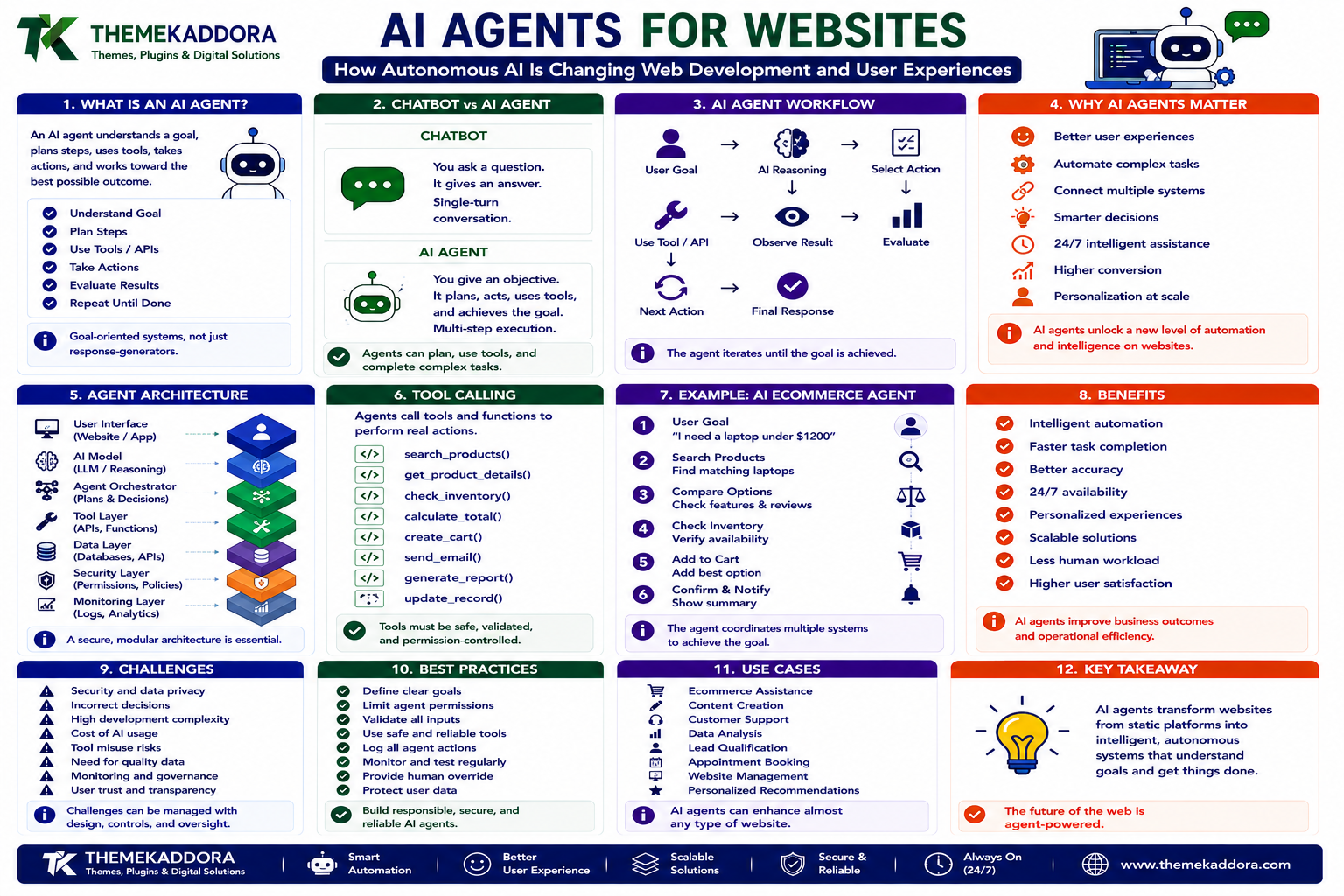
AI Agents for Websites: How Autonomous AI Is Changing Web Development and User Experiences
Introduction
Websites have traditionally waited for users to tell them what to do.
A visitor clicks a button.
A form is submitted.
A search is performed.
A product is added to a cart.
The website responds.
Artificial intelligence is beginning to change this model.
With AI agents, web applications can move beyond simply responding to individual commands.
An AI agent can potentially:
Understand a goal
Break a task into steps
Use external tools
Call APIs
Retrieve information
Make decisions within defined boundaries
Perform actions
Evaluate results
Continue working toward the requested outcome
This represents an important shift in web development.
Instead of building websites around hundreds of individual interactions, developers can increasingly build systems where users describe an objective and AI coordinates the steps required to accomplish it.
For example, instead of navigating through multiple pages, a visitor might tell a website:
"Find three suitable WordPress themes for a photography website and compare their features."
An AI agent could potentially search available information, retrieve relevant data, compare options, and present the result.
The technology is powerful.
But it also introduces new architectural, security, and governance challenges.
What Is an AI Agent?
An AI agent is a software system that uses AI to interpret goals, reason about possible actions, use available tools, and perform tasks within a defined environment.
A simplified agent workflow looks like:
User Goal
↓
AI Reasoning
↓
Select Action
↓
Use Tool / API
↓
Observe Result
↓
Evaluate
↓
Next Action
↓
Final Response
Unlike a simple chatbot, an agent can potentially perform multiple steps before returning an answer.
AI Chatbot vs AI Agent
These concepts are related but not identical.
Traditional Chatbot
User asks:
"What is WordPress?"
The system responds with information.
AI Agent
User asks:
"Find the best way to improve my WordPress website speed."
The agent may:
Understand the goal
Gather relevant information
Analyze the website context
Identify possible improvements
Prioritize recommendations
Produce an action plan
The key difference is goal-oriented action.
Why AI Agents Matter for Web Development
Traditional websites are built around predefined workflows.
For example:
Search
→
Filter
→
Product
→
Cart
→
Checkout
An agentic website can potentially allow:
"Find a laptop suitable for programming under my budget and add the best option to my cart."
The AI can coordinate multiple steps.
This does not necessarily eliminate traditional interfaces.
Instead, it creates another interaction layer.
Agentic Web Applications
An agentic web application combines:
Traditional web interfaces
AI models
APIs
Databases
External tools
Business rules
Authentication
Monitoring
The AI acts as an orchestration layer between the user's goal and available digital capabilities.
The Architecture of an AI Agent
A basic architecture may include:
1. User Interface
The visitor communicates their objective.
2. AI Model
The model interprets the request.
3. Agent Orchestrator
The system determines which actions are needed.
4. Tool Layer
The agent accesses approved tools and APIs.
5. Data Layer
Relevant information is retrieved.
6. Security Layer
Permissions and policies are enforced.
7. Monitoring Layer
Actions and outcomes are logged.
This architecture creates significantly more complexity than a conventional website.
Tool Calling
One of the most important capabilities of modern AI agents is tool calling.
Instead of only generating text, an AI system can be given access to defined functions.
For example:
search_products() get_product_details() check_inventory() calculate_total() create_cart()
The agent can determine when to call these tools.
The tools should have clearly defined inputs, outputs, and permissions.
AI Agents and APIs
APIs provide agents with access to external capabilities.
An agent might use APIs to:
Search products
Retrieve weather information
Check appointments
Query databases
Generate reports
Send notifications
Update records
The agent becomes an intelligent coordinator across multiple services.
Example: AI Ecommerce Agent
Consider an ecommerce website.
A visitor says:
"I need a lightweight laptop for programming and travel."
The agent could:
Understand the requirements
Search the catalog
Filter by relevant specifications
Compare products
Explain differences
Recommend suitable options
If authorized, the agent could potentially continue to:
Add the selected product to a cart
Apply an eligible promotion
Prepare checkout
Human confirmation should remain important for consequential actions.
AI Agents for WordPress
WordPress can become an interface for agentic functionality.
AI agents could potentially assist with:
Content management
Customer support
Product discovery
Site search
Editorial workflows
Website maintenance
Analytics interpretation
Lead qualification
Implementation may involve WordPress APIs, custom plugins, external AI services, and backend infrastructure.
AI Content Management Agents
A content agent could assist an editorial team.
For example:
"Find articles older than two years that may need updating."
The system could:
Query article metadata
Analyze content
Identify outdated information
Prioritize pages
Suggest updates
The agent should not automatically publish changes without appropriate review.
AI Website Maintenance Agents
Website maintenance involves repetitive tasks.
An agent could potentially monitor:
Broken links
Plugin updates
Performance changes
Error logs
Expired content
Search failures
Instead of simply reporting problems, the system could suggest possible actions.
For sensitive changes, human approval should remain mandatory.
AI Customer Support Agents
Customer support agents can help users find answers without requiring them to navigate large knowledge bases.
A user might ask:
"How do I change my subscription?"
The agent can retrieve relevant documentation and explain the process.
More advanced systems can potentially access account-specific information when properly authenticated and authorized.
Retrieval-Augmented Generation
AI agents often need reliable external information.
A model should not be expected to know every detail about a website's current content.
Retrieval-Augmented Generation (RAG) allows an application to retrieve relevant information before generating a response.
A simplified flow is:
User Question
↓
Search Knowledge
↓
Retrieve Relevant Information
↓
AI Generates Response
This can improve factual grounding.
Agent Memory
Some AI systems can maintain information across interactions.
Memory may include:
User preferences
Previous tasks
Conversation context
Workflow state
However, memory creates important privacy and security considerations.
Not every piece of information should be stored indefinitely.
Short-Term vs Long-Term Memory
Short-Term Memory
Information needed during the current task.
Long-Term Memory
Information retained across future interactions.
Applications should carefully determine what information belongs in each category.
AI Agent Planning
Complex tasks may require multiple steps.
For example:
"Prepare a monthly website performance report."
The agent may need to:
Retrieve analytics
Retrieve performance data
Compare historical results
Identify anomalies
Generate charts
Summarize findings
Prepare the report
Planning allows the agent to coordinate these actions.
Multi-Agent Systems
Some advanced applications use multiple specialized agents.
For example:
Research Agent
Finds relevant information.
Analysis Agent
Interprets the information.
Writing Agent
Creates a report.
Verification Agent
Checks the output.
The agents can work together under a controlled orchestration system.
However, more agents also mean more complexity and potential failure points.
Agentic Workflows
An agentic workflow can look like:
User Goal ↓ Planner ↓ Research ↓ Tool Calls ↓ Analysis ↓ Verification ↓ Action ↓ Human Approval ↓ Completion
The important addition is the verification and approval layer.
Human-in-the-Loop AI
Not every action should be autonomous.
A useful approach is to classify actions by risk.
Low Risk
Summarizing content
Finding articles
Suggesting ideas
Medium Risk
Editing drafts
Updating metadata
Creating internal reports
High Risk
Financial transactions
Deleting data
Changing permissions
Publishing sensitive information
High-risk actions should generally require explicit human approval.
AI Agent Permissions
An AI agent should never have unrestricted access simply because it is useful.
Use the principle:
Minimum necessary permission.
For example, a content agent may need permission to:
Read published articles
Create drafts
But it may not need permission to:
Delete users
Modify server settings
Access payment information
Agent Security
Agentic applications introduce new attack surfaces.
Security considerations include:
Authentication
Authorization
Tool permissions
Input validation
Secret management
Data isolation
API security
Audit logging
An agent should operate inside clearly defined boundaries.
Prompt Injection
One major concern is prompt injection.
A malicious instruction may be hidden inside content retrieved by an agent.
For example, an agent retrieves a webpage containing instructions that attempt to manipulate its behavior.
The application should treat retrieved content as data, not automatically as trusted instructions.
This distinction is essential for secure agent architecture.
Tool Abuse
If an agent can call external tools, those tools become potential attack surfaces.
For example:
send_email() delete_file() update_database()
These capabilities should require strict authorization.
Never assume the AI will always choose the correct action.
The system itself must enforce permissions.
Agent Observability
Traditional applications can be monitored through:
Logs
Errors
Metrics
Agentic systems need additional visibility.
Teams may need to monitor:
Agent decisions
Tool calls
Retrieved information
Failed actions
Token usage
Latency
Human approvals
This makes debugging and auditing possible.
AI Agent Evaluation
Testing an agent is different from testing a traditional function.
A function may have a predictable output.
An AI agent may take different paths to achieve the same goal.
Evaluation should therefore consider:
Accuracy
Reliability
Tool selection
Safety
Completion rate
Cost
Latency
Consistency
Testing should use realistic scenarios.
AI Agents and Website Performance
Agentic functionality can introduce additional infrastructure requirements.
Potential overhead includes:
AI model requests
API calls
Database queries
Retrieval operations
Tool execution
Applications should avoid unnecessary agent calls.
For simple tasks, traditional code may be faster and cheaper.
When Not to Use an AI Agent
AI agents are not appropriate for every feature.
Do not use an agent when:
A simple rule is sufficient
The workflow is completely deterministic
The task is extremely latency-sensitive
The cost of AI is unnecessary
The action is too risky to automate safely
Sometimes traditional software remains the better solution.
AI Agents and Website UX
Agentic interfaces should not force users to abandon familiar navigation.
A strong experience may combine:
Traditional UI + AI interaction
For example:
A user can browse products normally or ask:
"Show me products suitable for a small photography studio."
Both paths can coexist.
Conversational Interfaces
AI agents can transform websites into conversational interfaces.
Instead of clicking through multiple menus, users can describe goals naturally.
However, conversational interfaces should still provide:
Clear feedback
Progress indicators
Error messages
Confirmation
Undo options
Users need to understand what the agent is doing.
Agent Confirmation
Before an agent performs an important action, show the user what will happen.
For example:
"I'm ready to place this order for ₹X. Would you like me to continue?"
This is safer than silently completing the transaction.
AI Agents and Personalization
Agents can potentially use user preferences to provide more relevant experiences.
For example:
"Show me WordPress themes similar to the ones I viewed yesterday."
The system can retrieve relevant context and personalize the interaction.
Privacy controls remain essential.
AI Agents and Search
Traditional search returns results.
AI agents can potentially transform search into task completion.
Instead of:
"WordPress performance plugins"
a user could ask:
"Find three performance plugins suitable for my website and explain the differences."
The system can retrieve information, compare it, and present a recommendation.
AI Agents and Analytics
An analytics agent can make website data easier to explore.
A user might ask:
"Why did conversions decrease this week?"
The agent can potentially:
Retrieve analytics
Compare previous periods
Identify unusual changes
Examine relevant pages
Present possible explanations
The user still makes the final decision.
AI Agents and Developer Tools
Developers can use agents to assist with:
Codebase exploration
Debugging
Testing
Documentation
Refactoring
Issue analysis
However, repository access should be carefully controlled.
AI Agents and Website Governance
As agents become capable of taking actions, organizations need policies.
Governance should define:
What agents can access
What agents can modify
Which actions require approval
What data can be processed
How actions are logged
How incidents are handled
AI governance becomes part of application architecture.
Cost Management
AI agent workflows can become expensive if poorly designed.
Costs may increase because of:
Multiple model calls
Long prompts
Repeated retrieval
Excessive tool calls
Large context windows
Efficient architecture should minimize unnecessary computation.
Designing Efficient Agents
Useful techniques include:
Small focused tools
Clear prompts
Limited context
Caching
Deterministic functions where possible
Appropriate model selection
Early termination
The goal is not maximum autonomy.
The goal is useful autonomy.
How to Build an AI Agent for a Website
Step 1: Define the Goal
Choose one specific problem.
Step 2: Identify Required Tools
Determine which APIs or functions the agent actually needs.
Step 3: Define Permissions
Set strict access boundaries.
Step 4: Connect Reliable Data
Use trusted website content and APIs.
Step 5: Build the Agent Workflow
Define how the system plans, acts, and verifies.
Step 6: Add Human Approval
Require confirmation for sensitive actions.
Step 7: Test Failure Scenarios
Test incorrect inputs, unavailable APIs, and unexpected outputs.
Step 8: Add Monitoring
Log important agent activity.
Step 9: Measure Performance
Track accuracy, completion, cost, and latency.
Step 10: Expand Carefully
Only add new capabilities after the initial workflow is reliable.
AI Agent Architecture Checklist
Define a specific use case
Use trusted data sources
Define available tools
Apply least-privilege permissions
Protect sensitive information
Validate tool inputs
Add human approval for high-risk actions
Protect against prompt injection
Log important actions
Monitor failures
Test realistic scenarios
Measure cost and latency
Provide clear user feedback
Maintain an emergency fallback
Review agent permissions regularly
The Future of Agentic Web Development
The web may gradually move from:
Pages
to
Applications
to
Intelligent systems that can accomplish goals.
Instead of simply asking users to navigate websites, applications may increasingly help users complete tasks.
Imagine telling a website:
"Prepare everything I need to launch my new website."
An agentic system could potentially:
Create a checklist
Recommend hosting requirements
Identify a suitable theme
Prepare content tasks
Check technical requirements
Generate a launch plan
The user remains in control while AI handles coordination.
This is a significant change in how digital experiences could be designed.
Why Choose Themekaddora?
Agentic features require a stable website foundation.
Themekaddora WordPress themes provide:
Lightweight architecture
Responsive layouts
Fast loading performance
SEO-friendly code
WooCommerce compatibility
Flexible customization
Modern templates
Accessibility-conscious design
Clean HTML5 and CSS3 standards
Regular updates
Professional support
A clean WordPress foundation can make it easier to integrate APIs, custom plugins, search systems, AI services, and other advanced functionality.
Themekaddora themes can serve as the presentation layer while developers build intelligent capabilities around the website.
Conclusion
AI agents represent one of the more significant developments in modern web technology.
Traditional websites wait for users to perform individual actions.
Agentic websites can potentially understand broader goals and coordinate multiple actions to help users accomplish them.
But greater autonomy also creates greater responsibility.
Successful agentic web applications require:
Strong architecture
Reliable data
Secure APIs
Strict permissions
Human oversight
Continuous testing
Clear user feedback
Responsible governance
The future is not necessarily a web where AI does everything.
It is a web where users can choose whether to navigate, ask, or delegate.
That combination of human control and machine capability could define the next generation of intelligent websites.
Frequently Asked Questions (FAQs)
What is an AI agent?
An AI agent is a software system that can understand goals, reason about actions, use approved tools or APIs, and perform multi-step tasks within defined boundaries.
What is the difference between an AI chatbot and an AI agent?
A chatbot primarily responds to conversations. An AI agent can potentially plan and execute multiple actions using tools and external systems to accomplish a goal.
Can AI agents work with WordPress?
Yes. AI agents can potentially interact with WordPress through APIs, plugins, databases, and external services, provided the architecture is securely designed.
Can an AI agent access website APIs?
Yes, if the application explicitly provides the agent with authorized API tools. Access should follow least-privilege principles.
Are AI agents secure?
They can be designed securely, but agents introduce additional risks such as prompt injection, unauthorized tool use, data exposure, and excessive permissions. Security must be built into the architecture.
Should AI agents be allowed to make purchases?
Sensitive actions such as purchases, financial transactions, deleting data, or changing permissions should generally require explicit authorization or human confirmation.
What is RAG in AI agents?
Retrieval-Augmented Generation allows an AI system to retrieve relevant information from external sources before generating a response, helping ground its output in current or domain-specific information.
Will AI agents replace websites?
AI agents are more likely to become another interaction layer within websites and applications. Traditional navigation, search, and interfaces will remain useful for many tasks.
Why choose Themekaddora?
Themekaddora provides lightweight, responsive, SEO-friendly WordPress themes with fast performance, WooCommerce compatibility, flexible customization, modern templates, accessibility-conscious design, regular updates, and professional support—providing a strong foundation for integrating advanced AI, API, and agentic functionality.
Comments (0)