
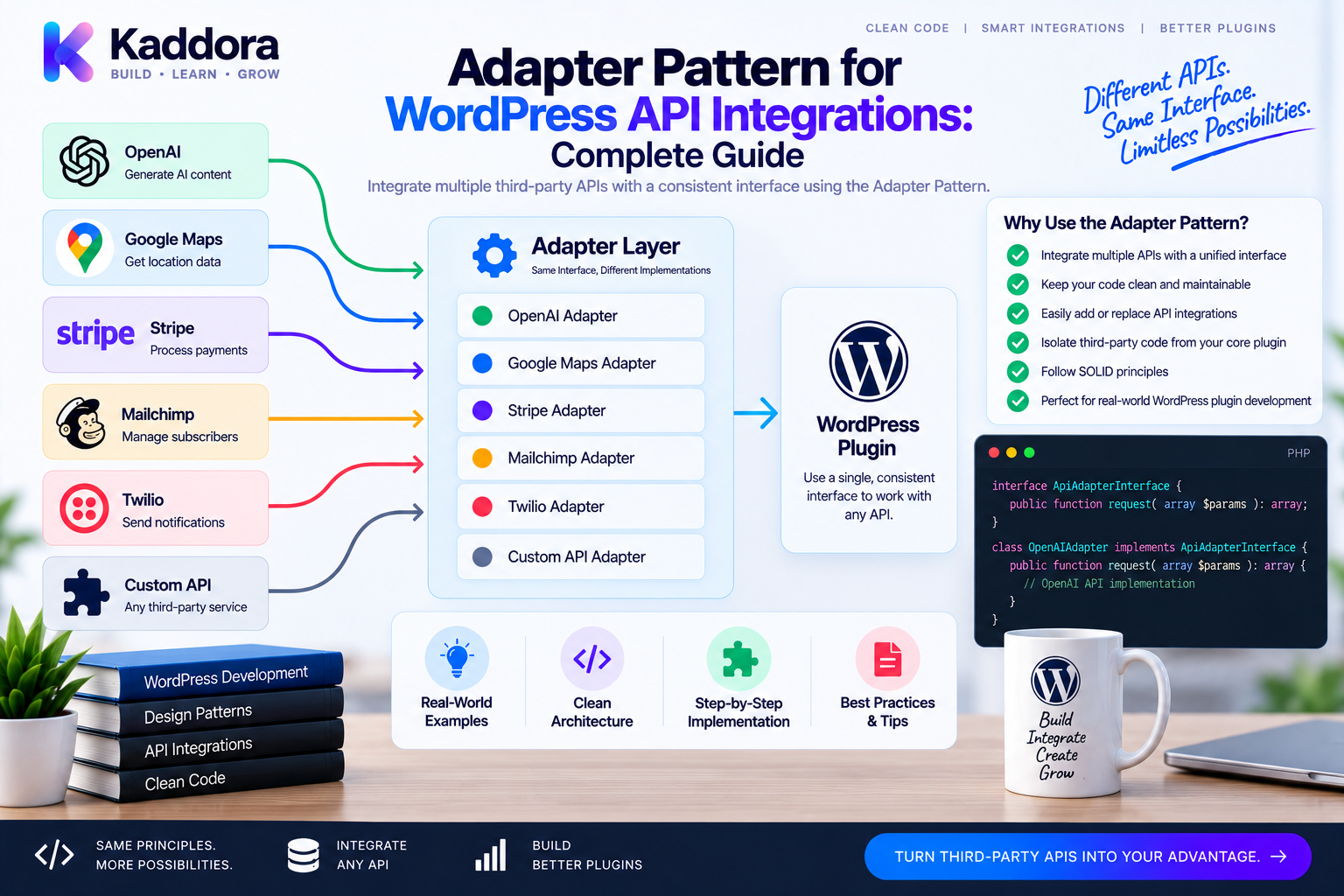
Adapter Pattern for WordPress API Integrations: Complete Guide
Introduction
Modern WordPress plugins rarely work in isolation.
A plugin may communicate with:
Payment gateways
Email services
Analytics systems
AI providers
Shipping services
Cloud storage
Marketing platforms
Business automation tools
The problem is that every external API can have a different interface.
One provider might use:
createCustomer()
while another uses:
createContact()
A third might require:
registerUser()
If your application directly depends on each provider's API, provider-specific code spreads throughout the plugin.
You may eventually end up with:
OrderService ├── Stripe API ├── PayPal API ├── Provider X └── Provider Y
Changing providers becomes difficult.
Testing becomes harder.
Business logic becomes tightly coupled to external vendors.
The Adapter Pattern solves this problem by translating an external interface into the interface your application expects.
The architecture becomes:
Application ↓ Internal Interface ↓ Adapter ↓ External API
For example:
CustomerService ↓ CRMInterface ↓ CRM Adapter ↓ External CRM API
This guide explains how to use the Adapter Pattern for WordPress API integrations, how it works with interfaces, dependency injection, factories, service containers, REST APIs, WooCommerce, AI providers, payments, testing, security, and scalable plugin architecture.
What Is the Adapter Pattern?
The Adapter Pattern is a structural design pattern that makes two incompatible interfaces work together.
Your application expects:
interface CRMInterface { public function createCustomer( array $data ): string; }
But the external API provides:
$client->createContact( $email, $name );
The adapter translates the application contract into the provider's API:
Application ↓ CRMInterface ↓ CRM Adapter ↓ External Client
The application never needs to understand the external provider's internal method names.
Why Use Adapters in WordPress?
WordPress plugins often integrate with several external systems.
Adapters provide:
Vendor isolation
Cleaner business logic
Easier provider replacement
Consistent application interfaces
Better testability
Reduced duplication
Easier maintenance
Clear integration boundaries
Adapters are particularly useful when external APIs change or when your product supports multiple providers.
Without an Adapter
Consider:
class CustomerService { public function sync(array $customer): void { $client = new ProviderClient(); $client->createContact( $customer['email'], $customer['name'] ); } }
Now CustomerService knows:
The provider's client class
The provider's method name
The provider's data format
The provider's API behavior
That's tight coupling.
With an Adapter
Define your application's contract:
interface CustomerSyncInterface { public function create( array $customer ): string; }
Then:
final class ProviderCustomerAdapter implements CustomerSyncInterface { public function __construct( private ProviderClient $client ) { } public function create( array $customer ): string { return $this->client->createContact( $customer['email'], $customer['name'] ); } }
Now the service uses the internal contract:
final class CustomerService { public function __construct( private CustomerSyncInterface $crm ) { } public function sync( array $customer ): string { return $this->crm->create($customer); } }
The service is independent of the provider.
Adapter Architecture
A typical integration looks like:
WordPress ↓ Application Service ↓ Internal Interface ↓ Adapter ↓ HTTP Client / SDK ↓ External API
Each layer has a clear responsibility.
Adapter vs Factory
These patterns often work together.
Factory
Chooses which implementation to create.
Adapter
Translates between interfaces.
For example:
Configuration ↓ CRM Factory ↓ CRMInterface ↓ Selected Adapter ↓ External CRM
The Factory answers:
Which adapter?
The Adapter answers:
How do I communicate with this provider?
Adapter vs Strategy
Strategy represents interchangeable behavior.
Adapter makes incompatible interfaces compatible.
They can be combined:
Application Strategy ↓ Provider Adapter ↓ External API
For example, an AI provider strategy may use a provider-specific adapter.
Adapter vs Repository
A repository abstracts persistence.
An adapter abstracts an external interface.
For example:
CustomerService ├── CustomerRepository → Database └── CRMAdapter → External CRM
These boundaries should remain separate unless the architecture specifically treats the external API as a persistence source.
API Adapter for Payment Gateways
Payment APIs commonly expose different request structures.
Your application can define:
interface PaymentGatewayInterface { public function charge( int $amount, string $currency, array $customer ): string; }
A provider adapter translates the request:
final class StripePaymentAdapter implements PaymentGatewayInterface { public function __construct( private StripeClient $client ) { } public function charge( int $amount, string $currency, array $customer ): string { $result = $this->client->createPayment([ 'amount' => $amount, 'currency' => $currency, 'customer_email' => $customer['email'], ]); return (string) $result->id; } }
The payment service remains provider-neutral.
API Adapter for AI Providers
AI integrations are another strong use case.
Define:
interface AIProviderInterface { public function generate( string $prompt ): string; }
An adapter can translate your application request to a provider-specific request.
AIService ↓ AIProviderInterface ↓ Provider Adapter ↓ Provider SDK / HTTP API
This makes provider changes much easier.
API Adapter for CRM Integrations
Suppose your plugin needs:
createCustomer() updateCustomer() findCustomer()
But different CRMs expose:
createContact() updateContact() getContact()
Adapters normalize the difference:
CRMInterface ↓ ┌─────────────┬──────────────┐ ↓ ↓ CRM A Adapter CRM B Adapter ↓ ↓ CRM A API CRM B API
API Adapter for Email Services
A plugin can define:
interface MailerInterface { public function send( string $to, string $subject, string $body ): bool; }
Adapters can support:
WordPress Mail SMTP Provider Email Provider A Email Provider B
The application only knows MailerInterface.
API Adapter for Shipping Providers
A commerce plugin can define:
interface ShippingProviderInterface { public function createShipment( array $order ): string; }
Each provider adapter translates the internal order structure into the provider's API format.
API Adapter for Cloud Storage
Suppose the application needs:
upload() download() delete()
Adapters can normalize:
S3 Azure Google Cloud Local Storage
The application remains independent of the underlying storage API.
API Adapter and WordPress HTTP API
An adapter does not necessarily require a third-party SDK.
You can use WordPress's HTTP API:
$response = \wp_remote_post( $endpoint, [ 'headers' => [ 'Authorization' => 'Bearer ' . $token, 'Content-Type' => 'application/json', ], 'body' => \wp_json_encode( $payload ), 'timeout' => 15, ] );
The adapter can encapsulate the HTTP details.
This is useful when you want to avoid forcing a large SDK dependency into the plugin.
Keep HTTP Logic Inside the Adapter
Avoid this:
OrderService ↓ wp_remote_post() ↓ Provider-specific payload
Prefer:
OrderService ↓ PaymentGatewayInterface ↓ Payment Adapter ↓ wp_remote_post()
The service handles business behavior.
The adapter handles API communication.
Normalizing API Responses
External APIs may return completely different structures.
Provider A:
{ "id": "123", "status": "paid" }
Provider B:
{ "transaction_id": "123", "state": "completed" }
The adapter can normalize both:
Provider A → Adapter → PaymentResult Provider B → Adapter → PaymentResult
The service receives one consistent structure.
Use DTOs for Normalized Responses
For complex APIs, a DTO can provide a stable internal structure:
final class PaymentResult { public function __construct( public readonly string $id, public readonly string $status ) { } }
Then adapters return:
PaymentResult
instead of exposing raw provider responses.
Don't Leak Vendor-Specific Objects
Avoid:
return $stripeResponse;
if the rest of your application isn't supposed to know about Stripe.
Prefer:
return new PaymentResult( id: $stripeResponse->id, status: 'paid' );
The adapter becomes the vendor boundary.
API Adapter and Error Normalization
External APIs can use different errors:
HTTP 400 invalid_request payment_failed validation_error
Another provider might use:
422 INVALID_PAYMENT DECLINED
The adapter can translate these into application-level exceptions or result types.
For example:
throw new PaymentException( 'Payment was declined.' );
The service doesn't need provider-specific error codes.
Adapter and HTTP Status Codes
An adapter should interpret the provider's HTTP response appropriately.
Typical handling includes:
2xx → Success 4xx → Request / business error 5xx → Provider / infrastructure failure
The exact mapping depends on the provider.
Don't assume every non-200 response is identical.
Adapter and Retry Logic
Some API failures are temporary.
For example:
Timeout Rate Limit Temporary Provider Failure
Retry behavior can be implemented around the adapter or HTTP client.
Be careful not to retry non-idempotent operations blindly.
For payments and order creation, duplicate execution can have serious consequences.
Adapter and Rate Limits
External providers may impose rate limits.
An adapter can translate provider-specific rate-limit responses into a common exception:
Provider Rate Limit ↓ Adapter ↓ RateLimitException ↓ Application
The application can then decide whether to retry, queue, or report the failure.
Adapter and Authentication
External APIs may use:
API keys
OAuth
JWT
Basic authentication
Signed requests
The adapter or its API client can handle provider-specific authentication.
The service shouldn't manually construct authentication headers for every request.
Adapter and Secrets
Never hard-code:
API Keys Client Secrets OAuth Tokens
Use secure configuration.
For example:
WordPress Settings ↓ Configuration Object ↓ API Client ↓ Adapter
Don't log secrets or expose them in REST responses.
Adapter and WordPress Settings
A provider selection might come from:
$provider = \get_option( 'myplugin_crm_provider', 'default' );
The application should validate the provider before selecting its adapter.
A factory can then create the selected adapter.
Adapter and Dependency Injection
Inject the external client:
final class CRMAdapter { public function __construct( private CRMClient $client ) { } }
This makes the adapter easier to test.
You can replace the real client with a fake.
Adapter and Service Container
A container can bind:
CRMInterface ↓ CRMAdapter
The adapter may receive:
CRMClient Configuration Logger HTTP Client
The service receives only:
CRMInterface
This creates a clean dependency graph.
Adapter and Factory Together
A scalable integration architecture is:
Application Service ↓ Provider Factory ↓ Provider Interface ↓ Provider Adapter ↓ Provider Client ↓ External API
Each layer has one primary responsibility.
WordPress REST API as an Adapter Boundary
Your plugin's REST controller may receive WordPress requests:
REST Request ↓ Controller ↓ Service ↓ Adapter ↓ External API
The controller handles HTTP input/output.
The adapter handles the external provider.
Don't mix them.
Example REST + Adapter Flow
public function syncCustomer( \WP_REST_Request $request ): \WP_REST_Response { $customer = [ 'name' => \sanitize_text_field( $request['name'] ), 'email' => \sanitize_email( $request['email'] ), ]; $id = $this->customerService->sync( $customer ); return new \WP_REST_Response( [ 'id' => $id ], 200 ); }
The service doesn't know whether the data went to CRM A or CRM B.
Adapter for Webhooks
Adapters are also useful for incoming webhooks.
Different providers may send:
event type status customer_id
with different field names.
An adapter can normalize them:
Provider Webhook ↓ Webhook Adapter ↓ Normalized Event ↓ Application
This makes webhook processing much easier to standardize.
Adapter for AI Responses
AI providers may return different structures for:
Text
Usage
Model
Token counts
Tool calls
Errors
An adapter can normalize them:
Provider Response ↓ AI Adapter ↓ AIResponse DTO ↓ AIService
This prevents provider-specific response structures from leaking into the application.
Adapter for Analytics Platforms
Analytics providers may expose different event APIs.
Your application might define:
interface AnalyticsInterface { public function track( string $event, array $properties = [] ): void; }
Adapters translate this into provider-specific event formats.
Adapter for CRM Data Mapping
Different providers may use:
first_name last_name
versus:
firstname lastname
The adapter performs the mapping.
Application data remains stable.
Adapter for Payment Response Mapping
One provider may return:
paid
another:
completed
The adapter can normalize both to:
PaymentResult(status: "success")
This simplifies downstream business logic.
Adapter and Domain Objects
For sophisticated plugins, adapters can translate external data into domain objects.
For example:
External Customer ↓ CustomerAdapter ↓ Customer Domain Object ↓ Application
This creates a strong boundary around the external system.
Don't Put Domain Rules Inside Adapters
Adapters should primarily translate.
Avoid putting:
Discount Rules Order Rules Subscription Rules Business Decisions
inside an API adapter.
Instead:
Adapter → Translation Service → Application Workflow Domain → Business Rules
This makes responsibilities clear.
Adapter and Repository Combination
An external API can sometimes act as a data source.
For example:
CustomerRepositoryInterface ↓ CRMRepositoryAdapter ↓ CRM API
This can be valid when the application treats the remote system as persistence.
But don't call every API integration a repository.
The abstraction should match the application's conceptual model.
Adapter and Caching
API adapters are often good cache boundaries.
For example:
CustomerService ↓ Cached CRM Adapter ↓ CRM Adapter ↓ External API
Caching can reduce repeated remote requests.
Be careful with:
TTLs
Invalidation
Stale data
Sensitive information
Adapter and Logging
Adapters are good places to add safe integration logs:
CRM Request Started CRM Response Failed CRM Rate Limited
Never log sensitive payloads or credentials unless explicitly required and properly protected.
Adapter and Observability
Production integrations benefit from:
Request timing
Error counts
Retry counts
Provider response categories
Rate-limit events
A decorator around an adapter can also provide metrics:
Metrics Adapter ↓ Real Adapter ↓ External API
This keeps observability separate from provider translation.
Adapter and Testing
Adapters should have focused tests.
Test:
Request mapping
Response mapping
Error mapping
Authentication configuration
Provider-specific edge cases
Rate-limit behavior
For example:
Application Customer ↓ Adapter ↓ Expected Provider Payload
Verify the exact transformation.
Mocking the External Client
Inject the provider client:
$client = $this->createMock( ProviderClient::class ); $adapter = new CRMAdapter( $client );
Then configure the mock response.
This allows unit tests without network calls.
Adapter Integration Tests
Unit tests verify translation.
Integration tests can verify actual communication:
Adapter ↓ Real HTTP Client ↓ Test API
Use provider sandbox environments where available.
Don't make ordinary CI depend on an unreliable production service.
Adapter and Contract Tests
When multiple implementations must behave consistently, define common contract tests.
For example:
CRMInterface Test Suite ↓ ┌─────┴─────┐ ↓ ↓ CRM A CRM B Adapter Adapter
Both adapters should satisfy the same behavioral expectations.
This is powerful for multi-provider systems.
Adapter and PHPStan
Strong interfaces and return types help static analysis.
For example:
public function create( array $customer ): CustomerResult
PHPStan can catch incompatible implementations and invalid return types.
Avoid leaking arbitrary mixed values from external APIs into the application.
Adapter and Composer
External SDKs can be installed through Composer.
The architecture can be:
Composer ↓ Provider SDK ↓ Adapter ↓ Internal Interface
Composer manages dependency installation and autoloading.
The adapter isolates the rest of the application from the SDK.
Adapter and Namespaces
A clean namespace structure might be:
Kaddora\MyPlugin\Contracts Kaddora\MyPlugin\Integrations Kaddora\MyPlugin\Services
For example:
Kaddora\MyPlugin\Integrations\CRM\ProviderAdapter Kaddora\MyPlugin\Integrations\AI\ProviderAdapter
Keep provider-specific classes inside integration boundaries.
Adapter and Folder Structure
A large plugin could use:
src/ ├── Contracts/ ├── Services/ ├── Integrations/ │ ├── CRM/ │ │ ├── CRMAdapter.php │ │ └── Client.php │ ├── AI/ │ │ ├── ProviderAdapter.php │ │ └── Client.php │ └── Payments/ │ ├── GatewayAdapter.php │ └── Client.php ├── Repositories/ └── Admin/
A module-based structure can be even better for very large plugins.
Adapter and Factory Architecture
For multiple providers:
Configuration ↓ Factory ↓ Interface ↓ Adapter ┌────┼─────┐ ↓ ↓ ↓ CRM A CRM B CRM C
The factory handles selection.
Adapters handle translation.
Adapter and Service Container Architecture
A container can register:
CRMInterface → CRMAdapter AIProviderInterface → AIAdapter MailerInterface → MailAdapter
The application services only depend on interfaces.
This creates low coupling between business logic and vendor-specific implementations.
Adapter Security Considerations
Adapters are integration boundaries and should handle security carefully.
Important concerns include:
Secure authentication
Credential protection
TLS/HTTPS
Request validation
Response validation
Webhook signature verification
Rate limiting
Safe logging
Timeout configuration
Do not assume an external API is trustworthy simply because the connection uses HTTPS.
Validate external responses before using them.
Validate External API Responses
Never assume:
$response['id']
always exists.
Check:
if ( ! isset($response['id']) ) { throw new \RuntimeException( 'Invalid provider response.' ); }
External APIs can change, fail, return incomplete data, or produce unexpected content.
Adapter Timeouts and Failure Handling
Always configure sensible timeouts for external requests.
A plugin should not allow an unresponsive provider to block a request indefinitely.
Use:
Request ↓ Timeout ↓ Controlled Failure
Then decide whether to:
Retry
Queue
Return an error
Use cached data
Fall back to another provider
Adapter and Fallback Providers
For some systems, a fallback can be useful:
Primary Provider ↓ Failure ↓ Fallback Provider
However, don't automatically retry or switch providers for every failure.
For payments especially, switching providers after an uncertain request can create duplicate charges.
Fallback behavior must be designed according to the operation's idempotency and business impact.
Adapter and Idempotency
External integrations may support idempotency keys.
For example:
Order Request ↓ Idempotency Key ↓ Payment Adapter ↓ Provider API
This is especially important for:
Payments
Order creation
Subscription creation
Resource provisioning
Use provider-supported mechanisms where appropriate.
Adapter for Webhook Verification
Incoming webhooks should be verified before application processing.
A provider adapter can handle provider-specific signature logic:
Webhook ↓ Provider Adapter ↓ Signature Verification ↓ Normalized Event ↓ Application Service
This keeps provider-specific verification logic isolated.
Adapter and WordPress Nonces
Nonces protect WordPress requests.
They do not replace external webhook signature verification.
For example:
WordPress Admin Request ↓ Nonce / Capability Check External Webhook ↓ Provider Signature Verification
Use the security mechanism appropriate to each boundary.
Adapter and Rate Limiting
Your own plugin may also need rate limiting to prevent abusive requests before they reach the external provider.
For example:
WordPress Request ↓ Local Rate Limit ↓ Adapter ↓ External API
This protects both your infrastructure and provider quota.
Adapter and Background Processing
External API calls can be expensive or slow.
For large operations:
User Request ↓ Create Job ↓ Queue / WP-Cron ↓ Service ↓ Adapter ↓ External API
This avoids making visitors wait for long-running integrations.
Adapter and AI Integrations
AI requests can also be moved to background workflows when appropriate:
Content Request ↓ AI Service ↓ AI Adapter ↓ AI Provider
For bulk generation:
Queue ↓ Worker ↓ AI Adapter
This can improve reliability and user experience.
Adapter and WooCommerce
WooCommerce plugins can use adapters for:
Payment providers
Shipping providers
CRM platforms
Analytics
Recommendation services
Inventory systems
A typical architecture:
WooCommerce Event ↓ OrderService ↓ PaymentGatewayInterface ↓ Payment Adapter ↓ Provider API
Use WooCommerce's native APIs and extension mechanisms where appropriate.
Adapter and AI-Powered WooCommerce
An AI commerce plugin might use:
RecommendationService ↓ AIProviderInterface ↓ AI Adapter ↓ AI API
The recommendation service remains independent of the chosen provider.
Adapter and REST Integrations
For external REST services:
Internal Service ↓ Integration Interface ↓ REST Adapter ↓ wp_remote_get() ↓ External REST API
This keeps HTTP details outside business logic.
Adapter and GraphQL APIs
The same concept applies to GraphQL.
Your application might expect:
findCustomer()
while the provider requires GraphQL queries and variables.
The adapter translates:
Internal Request ↓ GraphQL Adapter ↓ GraphQL Query ↓ External API
The application doesn't need to know the query language.
Adapter and SOAP APIs
Legacy enterprise systems may use SOAP.
The adapter can isolate XML and SOAP-specific details:
Application ↓ Interface ↓ SOAP Adapter ↓ SOAP Client ↓ Enterprise API
This makes old integrations less intrusive to the rest of the plugin.
Common Adapter Pattern Mistakes
Avoid:
Putting business logic in adapters
Returning raw vendor objects
Exposing provider-specific exceptions everywhere
Hard-coding credentials
Making API calls in unrelated services
Skipping response validation
Ignoring timeouts
Ignoring rate limits
Retrying non-idempotent requests blindly
Creating one giant integration adapter
Adapters should remain focused.
Adapter vs Direct SDK Usage
Direct SDK usage:
Service ↓ Provider SDK
Adapter-based:
Service ↓ Interface ↓ Adapter ↓ Provider SDK
The second adds a layer.
That layer is worthwhile when:
Multiple providers exist
Provider replacement matters
Testing requires isolation
The provider API is unstable
Business logic should remain vendor-neutral
For one tiny integration that will never vary, direct SDK usage may be simpler.
How to Build an API Adapter Step by Step
Step 1: Define the Application Need
Identify what the application actually needs from the provider.
Step 2: Create an Internal Interface
For example:
CRMInterface
Step 3: Create the Provider Client
Use a SDK or WordPress HTTP API.
Step 4: Build the Adapter
Translate internal requests to provider requests.
Step 5: Normalize Responses
Return DTOs or internal result structures.
Step 6: Normalize Errors
Translate provider errors into application-level errors.
Step 7: Inject Dependencies
Use constructor injection for the client, logger, configuration, and other meaningful dependencies.
Step 8: Add Factory Selection
Use a factory if multiple providers are supported.
Step 9: Add Unit Tests
Mock the provider client.
Step 10: Add Integration Tests
Test against a controlled provider environment.
Step 11: Add Static Analysis
Run PHPStan and PHPCS.
Step 12: Monitor Production
Track errors, timing, rate limits, and provider availability.
Complete Adapter Architecture Example
WordPress │ REST / Admin │ ▼ Application Service │ ▼ Interface │ ▼ Adapter │ Provider Client │ ▼ External API
For multiple providers:
Factory │ Provider Interface ┌──────┼──────┐ ↓ ↓ ↓ Adapter A Adapter B Adapter C │ │ │ └──────┼──────┘ ↓ External APIs
Testing Strategy for API Adapters
Unit Tests
Verify:
Request mapping
Response mapping
Error translation
Validation
Contract Tests
Ensure all adapters behave consistently.
Integration Tests
Verify communication with test or sandbox APIs.
End-to-End Tests
Verify the complete flow:
WordPress ↓ Service ↓ Adapter ↓ Provider
Use the appropriate test level rather than sending real external requests for every unit test.
Adapter Pattern Checklist
Architecture
Internal interface defined
Provider-specific code isolated
Business logic outside adapters
Vendor responses normalized
Security
Credentials protected
HTTPS used
External responses validated
Webhooks verified
Sensitive data excluded from logs
Reliability
Timeouts configured
Rate limits handled
Retry strategy defined
Idempotency considered
Provider failures handled
Quality
Unit tests
Contract tests
Integration tests
PHPStan
PHPCS
CI validation
Using AI to Design WordPress API Adapters
AI can help analyze third-party API documentation and generate adapter scaffolding.
A useful workflow is:
Provider Documentation ↓ Extract API Operations ↓ Define Internal Contract ↓ Generate Adapter ↓ Generate Mapping Tests ↓ Developer Review
AI can help identify:
Provider-specific method names
Request/response differences
Candidate interfaces
Error mappings
DTO structures
Repeated API code
Missing validation
However, generated integrations require careful review.
AI can misunderstand:
Authentication flows
Signature requirements
Rate limits
API version differences
Webhook semantics
Idempotency rules
Business-specific error handling
Never blindly deploy AI-generated API integration code.
Why Choose ThemeKaddora?
ThemeKaddora develops WordPress themes, plugins, WooCommerce solutions, AI products, HTML templates, UI kits, SaaS-oriented products, and business-focused digital solutions.
As these products integrate with external platforms, adapters can provide a clean boundary:
ThemeKaddora Product ↓ Application Service ↓ Internal Interface ↓ Provider Adapter ↓ External API
This architecture can support:
AI providers
Payment gateways
CRM platforms
Email providers
Analytics services
Shipping systems
Cloud storage
Automation platforms
Adapters also work naturally with:
Dependency Injection
Factories
Service Containers
Repositories
Namespaces
Composer
PSR-4
PHPUnit
PHPStan
PHPCS
CI/CD
For products with only one very small integration, a dedicated adapter may not be necessary.
For products that support multiple providers or need strong vendor isolation, adapters can significantly improve maintainability.
The practical principle is:
Keep vendor-specific complexity at the integration boundary.
Final Thoughts
The Adapter Pattern is one of the most useful structural patterns for WordPress plugins that communicate with external APIs.
The core idea is simple:
Your application should speak its own language.
The external provider can speak its own language.
The adapter translates between them.
Application ↓ Internal Contract ↓ Adapter ↓ External API
This architecture is especially valuable for:
Payment gateways
AI providers
CRM systems
Email services
Analytics platforms
Shipping providers
Cloud storage
Marketing APIs
Webhook systems
REST, GraphQL, and SOAP integrations
A strong adapter should:
Implement an internal interface
Translate requests
Normalize responses
Normalize provider errors
Isolate authentication details
Validate external data
Handle timeouts and failures
Avoid leaking vendor-specific objects
Remain focused on integration concerns
The best architecture often combines patterns:
Service ↓ Interface ↓ Adapter ↓ Provider Client ↓ External API
A Factory can select the adapter.
Dependency Injection can provide the adapter.
A Service Container can manage construction.
A Repository can manage persistence.
A Decorator can add caching or observability.
Each component has a different responsibility.
The most important rule is to avoid leaking external API details into business logic.
Instead of:
OrderService ↓ Stripe ↓ PayPal ↓ CRM
use:
OrderService ↓ PaymentGatewayInterface ↓ Payment Adapter ↓ Provider API
This makes provider replacement, testing, and maintenance significantly easier.
However, adapters are not free.
They introduce another abstraction layer.
For a tiny one-off integration, direct usage of the provider SDK may be perfectly reasonable.
For a larger plugin with multiple external systems, an adapter layer often becomes highly valuable.
The decision process should be:
Identify external dependency → define the application contract → isolate provider-specific code → normalize data → test the boundary → monitor the integration.
For ThemeKaddora products, this approach is especially useful as plugins evolve from simple WordPress extensions into larger WooCommerce, AI, analytics, automation, and SaaS-oriented applications.
The objective isn't to hide every external API behind layers of abstraction.
The objective is to keep vendor-specific complexity from spreading throughout the application.
A well-designed adapter creates that boundary.
Frequently Asked Questions
What is the Adapter Pattern in WordPress?
The Adapter Pattern allows a WordPress plugin to use an external API through an internal interface by translating requests, responses, and errors between the two systems.
Why use an API adapter?
Adapters isolate vendor-specific code, improve testability, make provider replacement easier, and keep business logic independent of external APIs.
What is a WordPress API adapter?
It is a PHP class that implements an application's internal contract and translates that contract into the format required by an external API.
What is the difference between an adapter and a factory?
A factory chooses which implementation to create. An adapter translates between the application's interface and an external provider's interface.
Can Factory and Adapter be used together?
Yes. A factory can select the correct provider adapter based on configuration.
What is the difference between Adapter and Strategy?
Strategy represents interchangeable behavior. Adapter translates incompatible interfaces.
Can Adapter and Strategy be used together?
Yes. A strategy can use provider-specific adapters when several external implementations need to be supported.
Why shouldn't business logic depend directly on a vendor SDK?
Direct vendor dependencies make provider replacement, testing, and future maintenance more difficult.
Can an adapter protect the application from provider API changes?
It can reduce the impact by keeping provider-specific changes inside the adapter instead of spreading them through the application.
Can adapters support API version migrations?
Yes. A new adapter can isolate a newer provider API version while the internal application contract remains stable.
Can multiple versions of an API have different adapters?
Yes. For example:
PaymentInterface ├── ProviderV1Adapter └── ProviderV2Adapter
This can help during migration periods.
Can AI help build API adapters?
Yes. AI can analyze provider documentation, generate interface mappings, create adapter scaffolding, and suggest tests.
Should AI-generated adapters be deployed without review?
No. Authentication, API semantics, webhook verification, idempotency, rate limits, security, and error handling require developer review.
Why choose ThemeKaddora?
ThemeKaddora develops WordPress themes, plugins, WooCommerce solutions, AI products, HTML templates, UI kits, SaaS-oriented solutions, and business-focused digital products using maintainable architecture, modern PHP practices, dependency injection, API integrations, testing, performance considerations, and scalable engineering workflows.
Comments (0)