
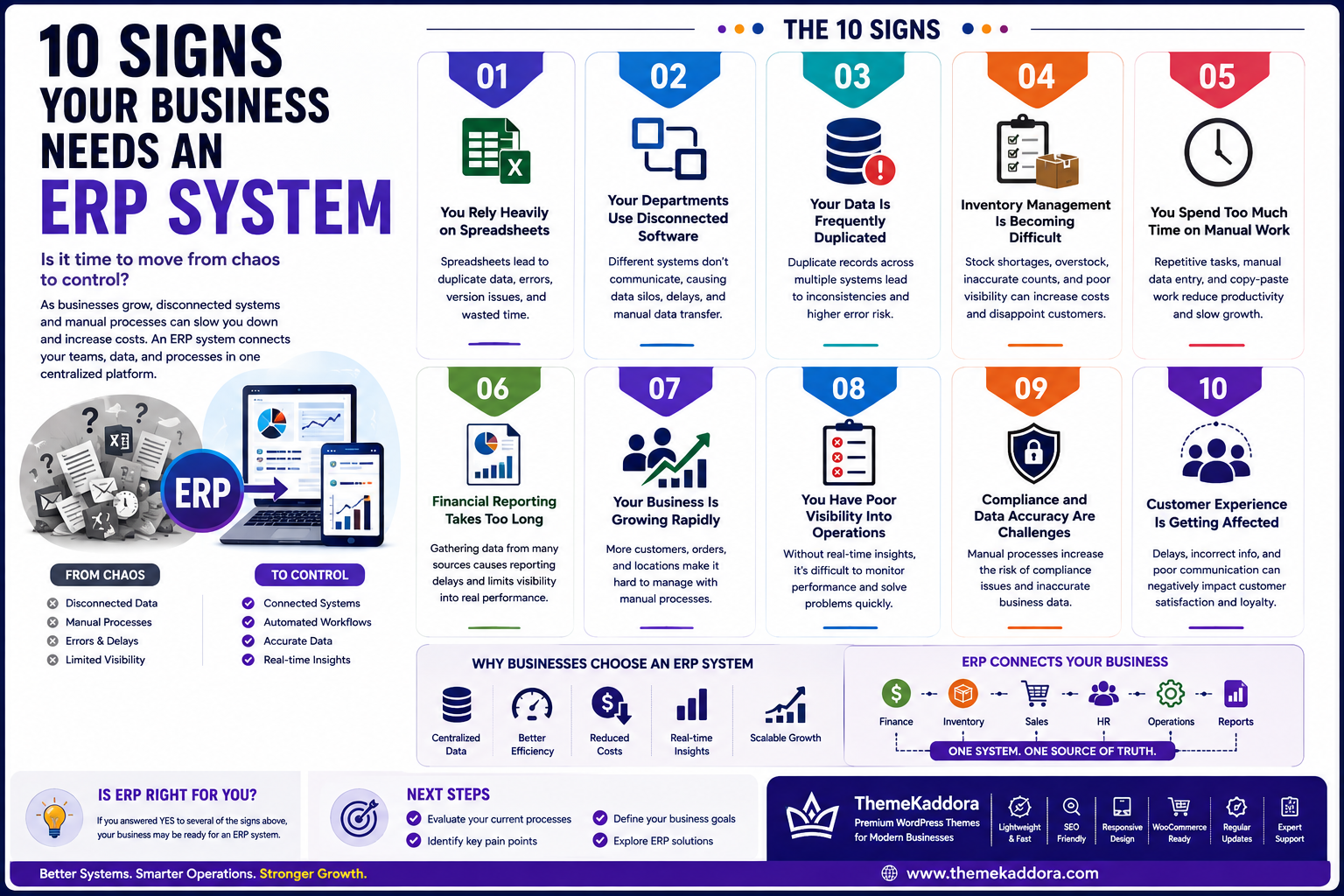
10 Signs Your Business Needs an ERP System
Introduction
As a business grows, managing daily operations becomes increasingly complex. What worked when a company had a small team and a limited number of customers may no longer work when operations expand.
Businesses often start with spreadsheets, email, separate applications, and manual processes. These tools can be useful during the early stages, but eventually they can create data silos, repetitive work, communication problems, reporting delays, and operational inefficiencies.
This is where an Enterprise Resource Planning (ERP) system can make a significant difference.
An ERP system connects important business functions such as finance, inventory, purchasing, human resources, sales, and operations through a centralized platform. Instead of managing each department separately, businesses can create a connected environment where information flows between teams.
But how do you know when your business actually needs ERP software?
There is no single point at which every company must implement an ERP system. However, several warning signs indicate that existing tools and processes may no longer be sufficient.
In this guide, we'll explore 10 important signs that your business may need an ERP system, along with practical considerations for deciding whether ERP is the right next step.
1. What Is an ERP System?
An Enterprise Resource Planning (ERP) system is business management software that connects multiple departments and processes through a centralized platform.
Depending on the organization, an ERP system may include modules for:
Finance and accounting
Inventory
Procurement
Human resources
Payroll
Manufacturing
Supply chain management
Project management
Reporting and analytics
The primary purpose of ERP is to help businesses manage their operations using connected data and standardized processes.
Instead of having one system for accounting, another for inventory, and spreadsheets for reporting, an ERP can bring these functions together.
2. Your Business Relies Heavily on Spreadsheets
Spreadsheets are useful business tools, but relying on them for critical operations can eventually create problems.
If employees regularly use spreadsheets to manage:
Inventory
Customer information
Financial records
Employee data
Purchase orders
Sales reports
Business performance
your organization may be reaching the point where a centralized ERP system could provide greater efficiency.
Spreadsheets can result in duplicated information, version-control problems, accidental changes, and manual data entry.
An ERP provides a centralized environment where authorized employees can access consistent business information.
3. Your Departments Use Disconnected Software
Another major warning sign is the use of multiple applications that do not communicate effectively with each other.
For example:
The sales team may use one application, the finance team another, and the warehouse may maintain its own inventory system.
Employees then have to manually transfer information between systems.
This can lead to:
Data duplication
Communication delays
Incorrect information
Manual reconciliation
Slower decision-making
An ERP can connect many of these business functions through a shared database and integrated workflows.
4. Your Data Is Frequently Duplicated
If the same customer, product, supplier, or transaction information is entered into several systems, your business may have a data management problem.
For example, a customer might have different information in:
CRM
Accounting software
Sales spreadsheets
Customer support software
When information changes in one location, employees may need to update it manually everywhere else.
A centralized ERP environment can reduce unnecessary duplication and create a more consistent source of business information.
5. Inventory Management Is Becoming Difficult
Inventory problems can become increasingly expensive as a company grows.
Warning signs include:
Frequent stock shortages
Overstocking
Difficulty tracking warehouse inventory
Incorrect stock counts
Delayed purchase orders
Poor visibility across locations
Difficulty identifying fast-moving products
ERP inventory modules can provide real-time visibility into stock levels, purchasing, warehouse movements, and product availability.
For businesses dealing with physical products, better inventory visibility can significantly improve operational efficiency.
6. Financial Reporting Takes Too Long
If management has to wait days or weeks to understand the company's financial position, existing systems may not provide sufficient visibility.
Manual financial reporting can require employees to collect information from multiple sources, verify the data, and create reports manually.
An ERP can connect financial information with other business operations and provide dashboards and reports based on centralized data.
This can help management understand revenue, expenses, cash flow, profitability, and other important business metrics more efficiently.
7. Employees Spend Too Much Time on Repetitive Work
Employees should spend their time solving problems, serving customers, improving products, and making strategic decisions—not repeatedly copying data between systems.
Common repetitive activities include:
Manual data entry
Report preparation
Invoice creation
Purchase approvals
Inventory updates
Employee record updates
Email notifications
Data reconciliation
ERP systems can automate many of these processes using predefined workflows.
Reducing repetitive administrative work can improve productivity while allowing employees to focus on higher-value responsibilities.
8. Management Lacks Real-Time Visibility
One of the biggest challenges businesses face as they grow is the inability to see what is happening across the organization in real time.
Managers may have to collect information from different departments before they can answer basic questions such as:
How much inventory do we currently have?
What are our current sales?
Which invoices are outstanding?
What are our biggest expenses?
Which products are performing best?
How many orders are pending?
What is our current cash position?
When information is scattered across spreadsheets and separate applications, preparing accurate reports can take hours or even days.
An ERP system can bring operational information together through centralized dashboards and reporting tools.
With better visibility, management can identify problems earlier and make decisions based on current business information rather than outdated reports.
9. Customer Service Is Becoming Difficult
Customer expectations continue to increase. Customers want quick answers, accurate order information, reliable delivery updates, and personalized support.
Customer service becomes difficult when employees cannot easily access the information they need.
For example, a customer may contact your support team asking about an order. The support employee may need to check several systems to find:
Customer information
Order status
Payment status
Inventory availability
Shipping information
Previous interactions
This fragmented approach can increase response times and frustrate customers.
An integrated ERP environment can connect operational data and provide employees with better visibility into orders, inventory, invoices, and other business information.
When combined with CRM software, businesses can create an even more complete view of customer relationships and operations.
10. Your Business Is Growing Rapidly
Growth is a positive sign, but rapid growth can expose weaknesses in existing systems.
Processes that worked for 10 employees may not work for 100 employees.
Similarly, managing a few dozen orders manually may be possible, while managing thousands of orders requires automation and centralized systems.
Signs that growth is creating operational problems include:
Increasing administrative workload
More employees entering the same information
Growing numbers of customers and orders
Multiple warehouses or locations
More complex financial reporting
Increasing supplier relationships
Difficulty maintaining consistent processes
An ERP system can provide a scalable foundation for managing larger volumes of data, users, transactions, and business operations.
The goal is not simply to implement ERP because the company is growing. The goal is to ensure that technology can keep pace with the organization's growth.
11. Your Existing Software Cannot Scale
Another major warning sign is when your current software solutions no longer support your business requirements.
You may notice that:
Important features are missing
Systems cannot integrate properly
Performance is declining
Reporting capabilities are limited
Adding users is difficult
Multiple locations are difficult to manage
Custom workflows are impossible
Data cannot easily move between systems
Continuing to add separate tools to solve every new problem can create an increasingly complicated technology environment.
At some point, replacing disconnected systems with a more integrated ERP platform may be more efficient than continuously adding new applications.
What Happens If You Delay ERP Implementation?
Not every business needs ERP immediately. However, delaying the decision when operational problems are already affecting growth can create additional costs.
Potential consequences include:
Increasing Manual Work
As transaction volumes increase, employees may spend more time entering and reconciling information manually.
More Data Errors
More manual data entry can increase the possibility of incorrect records and inconsistent information.
Slower Decision-Making
Management may struggle to access accurate information quickly.
Higher Operational Costs
Employees may spend valuable time performing tasks that could be automated.
Poor Customer Experience
Delays caused by disconnected systems can affect order processing and customer support.
Difficult Business Scaling
A collection of disconnected tools can become increasingly difficult to maintain as the organization grows.
The solution is not necessarily to implement ERP immediately. Instead, businesses should evaluate their processes, identify operational bottlenecks, and determine whether an ERP system can solve those problems effectively.
How to Prepare for ERP Implementation
A successful ERP implementation starts long before the software is installed.
1. Identify Business Problems
Start by documenting the problems you want ERP to solve.
For example:
Inventory inaccuracies
Slow reporting
Manual approvals
Data duplication
Poor financial visibility
2. Map Existing Processes
Document how information currently moves between departments.
This helps identify unnecessary steps and opportunities for automation.
3. Define Requirements
Create a list of essential ERP capabilities, such as:
Finance
Inventory
HR
Procurement
Sales
Reporting
Workflow automation
Integrations
Separate essential features from optional features.
4. Involve Employees
Employees who use the system every day understand operational challenges better than anyone else.
Involving them early can improve adoption and reduce resistance to change.
5. Plan Data Migration
Determine which existing data should be transferred into the new ERP system and how it should be cleaned before migration.
6. Establish Measurable Goals
Define measurable outcomes such as:
Reduce manual data entry
Improve reporting speed
Reduce inventory errors
Shorten approval times
Improve operational visibility
Clear goals make it easier to measure the success of implementation.
Common ERP Selection Mistakes
Choosing the wrong ERP can create unnecessary complexity and expense.
Avoid these common mistakes:
Choosing Based Only on Price
The cheapest solution may not provide the functionality or scalability your business needs.
Ignoring Customization Requirements
Every business has unique workflows. Make sure the system can accommodate important operational requirements.
Neglecting Integrations
Your ERP may need to connect with CRM, payment gateways, e-commerce platforms, accounting tools, HR systems, or other applications.
Underestimating Training
Employees need adequate training before and after implementation.
Trying to Automate Everything Immediately
Start with high-impact processes and expand gradually.
Not Planning for Growth
Choose a system that can support your future requirements, not only your current needs.
Why Choose ThemeKaddora?
At ThemeKaddora, we understand that ERP is not simply another software application. It becomes part of the way a business operates.
Businesses may require different combinations of:
ERP
CRM
HRMS
Inventory management
Business automation
Workflow automation
AI-powered tools
SaaS applications
Custom business software
The right solution should be designed around actual business workflows, operational requirements, and future growth.
ThemeKaddora focuses on technology solutions that help businesses reduce manual work, connect information, improve operational visibility, and build scalable digital processes.
Conclusion
An ERP system can be a powerful foundation for a growing business, but the decision to implement one should be based on real operational requirements.
If your business relies heavily on spreadsheets, uses disconnected software, struggles with duplicated data, has inventory problems, experiences slow financial reporting, or spends too much time on repetitive work, it may be time to evaluate ERP.
The need becomes even more apparent when management lacks real-time visibility, customer service becomes difficult, business growth creates operational pressure, or existing software can no longer scale.
However, ERP implementation should not be treated as a quick technology upgrade. Businesses should first understand their processes, define their requirements, involve employees, plan data migration, and establish measurable goals.
The right ERP system can help create a connected business environment where information flows more efficiently between departments, repetitive processes are automated, and decision-makers have better access to business data.
Ultimately, the goal of ERP is not simply to add more software. The goal is to build a more efficient, connected, and scalable business.
Frequently Asked Questions
1. How do I know if my business needs an ERP system?
Common signs include heavy spreadsheet usage, disconnected software, duplicated data, inventory problems, slow reporting, repetitive manual work, poor visibility, rapid growth, and systems that cannot scale.
2. Is ERP suitable for small businesses?
Yes. Small businesses can benefit from ERP when operational complexity begins increasing. However, the system should be appropriately sized for the organization's requirements and budget.
3. Can ERP replace spreadsheets?
ERP can replace spreadsheets for many core operational processes by providing centralized data, workflows, reporting, and automation. Spreadsheets can still be useful for specific analysis and temporary tasks.
4. Does ERP improve inventory management?
Yes. ERP inventory modules can provide better visibility into stock levels, warehouse movements, purchasing, reorder requirements, and product availability.
5. Can ERP automate repetitive tasks?
Yes. ERP systems can automate processes such as approvals, invoicing, purchasing, notifications, reporting, inventory updates, and other rule-based activities.
6. How long does ERP implementation take?
Implementation time varies depending on the size of the organization, number of modules, integrations, customization requirements, data migration, and employee training needs.
7. What should I consider when choosing ERP software?
Consider functionality, scalability, security, integrations, customization, usability, implementation requirements, support, data migration, and total cost of ownership.
8. Should a business customize its ERP?
Customization can be useful when important business processes cannot be handled effectively through standard functionality. However, unnecessary customization can increase complexity and maintenance requirements.
9. Can ERP integrate with CRM software?
Yes. ERP and CRM systems can be integrated to connect customer, sales, order, financial, inventory, and operational information.
10. Why choose ThemeKaddora for business technology solutions?
ThemeKaddora focuses on ERP, CRM, HRMS, AI, automation, SaaS, and custom business solutions designed around business workflows, operational requirements, and growth objectives.
Comments (0)