
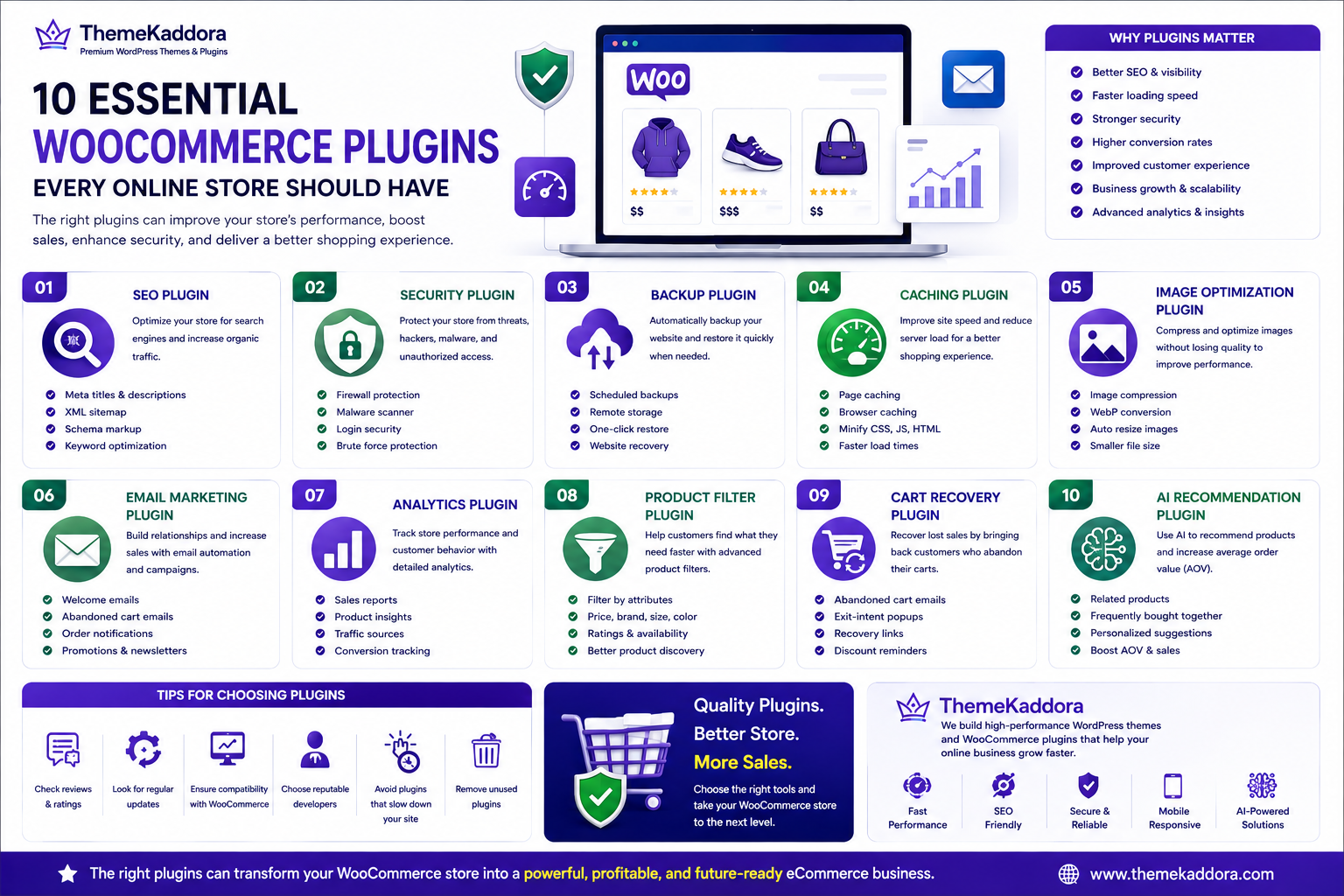
10 Essential WooCommerce Plugins Every Online Store Should Have
Introduction
WooCommerce is one of the most powerful eCommerce platforms available, but its true strength lies in its flexibility. While WooCommerce provides everything you need to create an online store, plugins allow you to extend its functionality and customize your website according to your business needs.
From improving search engine rankings and increasing website speed to recovering abandoned carts and strengthening security, the right plugins can significantly improve your store's performance and customer experience. However, installing too many plugins—or choosing poorly coded ones—can negatively impact speed, security, and reliability.
The key is selecting high-quality plugins that solve real business problems while keeping your store fast, secure, and easy to manage.
In this guide, we'll explore ten essential WooCommerce plugins that every online store should consider to improve performance, boost sales, and create a better shopping experience.
Why WooCommerce Plugins Matter
Every online store has unique requirements. Plugins allow you to add features without rebuilding your website from scratch.
Benefits include:
Better SEO
Faster loading speeds
Stronger security
Improved customer experience
Higher conversion rates
Marketing automation
Advanced analytics
Business scalability
Instead of installing dozens of plugins, focus on high-quality tools that provide measurable value.
1. SEO Plugin
Search engine optimization helps customers discover your products through Google and other search engines.
A quality SEO plugin helps you:
Optimize meta titles and descriptions
Generate XML sitemaps
Improve schema markup
Analyze keyword usage
Manage redirects
Optimize social sharing
Popular choices include Yoast SEO and Rank Math. These plugins simplify SEO management and help improve organic visibility.
2. Security Plugin
Online stores handle sensitive customer information, making security a top priority.
A security plugin can help protect your website from:
Malware
Brute-force login attempts
Spam
Unauthorized access
File modifications
Common WordPress vulnerabilities
Combine a trusted security plugin with strong passwords, SSL certificates, and regular updates for maximum protection.
3. Backup Plugin
Unexpected issues such as hacking, server failures, or accidental changes can result in data loss.
A backup plugin allows you to:
Schedule automatic backups
Store backups remotely
Restore your website quickly
Protect customer and order data
Regular backups are one of the simplest ways to reduce downtime and recover from unexpected problems.
4. Caching Plugin
Caching stores frequently used website files, allowing pages to load much faster for returning visitors.
Benefits include:
Faster page loading
Improved Core Web Vitals
Reduced server load
Better user experience
Higher search engine rankings
Choose a caching solution that is compatible with WooCommerce and supports dynamic content such as shopping carts and checkout pages.
5. Image Optimization Plugin
Product images are essential for conversions, but oversized images can significantly slow down your website.
An image optimization plugin helps by:
Compressing images without noticeable quality loss
Converting images to modern formats like WebP
Automatically resizing uploads
Reducing bandwidth usage
Improving page speed
Optimized images contribute to faster loading times, better SEO, and an improved shopping experience.
6. Email Marketing Plugin
Email marketing remains one of the highest-converting digital marketing channels for eCommerce businesses. A reliable email marketing plugin helps you engage customers before and after they make a purchase.
Useful features include:
Welcome emails
Abandoned cart reminders
Order confirmations
Product recommendations
Promotional campaigns
Customer segmentation
Automating these emails saves time while increasing repeat purchases and customer loyalty.
7. Analytics Plugin
Understanding customer behavior is essential for growing your WooCommerce store.
A good analytics plugin provides insights into:
Sales performance
Best-selling products
Customer acquisition
Conversion rates
Traffic sources
Revenue trends
By regularly reviewing analytics, you can make data-driven decisions that improve your store's performance and profitability.
8. Product Filter Plugin
As your product catalog grows, helping customers quickly find what they're looking for becomes increasingly important.
A product filter plugin allows shoppers to filter products by:
Category
Price
Brand
Size
Color
Rating
Availability
Custom attributes
Advanced filtering improves the user experience, reduces frustration, and increases the likelihood of a purchase.
9. Cart Recovery Plugin
Cart abandonment is a common challenge for online stores. A cart recovery plugin helps bring customers back to complete their purchases.
Key features include:
Automated reminder emails
Exit-intent popups
Recovery links
Discount code reminders
Follow-up campaigns
Recovering even a small percentage of abandoned carts can significantly increase your store's revenue.
10. AI Recommendation Plugin
Artificial intelligence is transforming eCommerce by providing personalized shopping experiences.
An AI recommendation plugin can:
Suggest related products
Display "Frequently Bought Together" items
Recommend products based on browsing history
Personalize offers for returning customers
Increase Average Order Value (AOV)
Relevant recommendations improve customer satisfaction while encouraging larger purchases.
Tips for Choosing WooCommerce Plugins
Installing too many plugins can slow down your website and create compatibility issues. Choose plugins carefully based on your business needs.
Before installing a plugin, consider:
Active installations
User ratings and reviews
Regular updates
Compatibility with the latest WordPress and WooCommerce versions
Developer reputation
Performance impact
Quality documentation and support
Always remove plugins that you no longer use to keep your store lightweight and secure.
Why Choose ThemeKaddora?
At ThemeKaddora, we build high-performance WordPress themes and WooCommerce plugins designed to help online businesses grow.
Our solutions focus on:
Lightweight, optimized code
Fast loading speeds
Mobile-first responsive design
SEO-friendly architecture
WooCommerce compatibility
Secure development
Easy customization
AI-powered business automation
Whether you're starting a new online store or scaling an existing one, ThemeKaddora provides reliable tools that improve performance, user experience, and conversions.
Conclusion
The right WooCommerce plugins can transform a basic online store into a fast, secure, and high-converting eCommerce business. From improving SEO and protecting customer data to recovering abandoned carts and delivering personalized product recommendations, each plugin plays an important role in your store's success.
Rather than installing every plugin you find, focus on solutions that solve real business problems and work well together. Regularly review your site's performance, remove unnecessary plugins, and keep everything updated to ensure a smooth shopping experience.
By combining WooCommerce with high-quality themes and plugins from ThemeKaddora, you can build an online store that is optimized for speed, search engines, and long-term business growth.
Frequently Asked Questions
1. How many plugins should I install on my WooCommerce store?
There is no fixed limit. Install only the plugins you genuinely need, and prioritize quality over quantity.
2. Can too many plugins slow down WooCommerce?
Yes. Poorly coded or unnecessary plugins can reduce performance and create compatibility issues.
3. Which plugin is most important for SEO?
A dedicated SEO plugin helps optimize your store for search engines by managing metadata, XML sitemaps, schema, and more.
4. Why is a backup plugin necessary?
Backups protect your website from data loss caused by server failures, hacking attempts, or accidental changes.
5. Do I need a caching plugin?
Yes. A WooCommerce-compatible caching plugin can significantly improve page speed and user experience.
6. Are image optimization plugins worth it?
Absolutely. Optimized images reduce loading times, improve SEO, and provide a smoother shopping experience.
7. How does AI improve WooCommerce sales?
AI-powered recommendations personalize the shopping experience, helping customers discover relevant products and increasing Average Order Value.
8. Should I remove unused plugins?
Yes. Removing inactive or unnecessary plugins improves security, reduces maintenance, and can enhance performance.
9. How often should I update plugins?
Update plugins regularly after creating a backup to ensure security, compatibility, and access to new features.
10. Why choose ThemeKaddora?
ThemeKaddora develops fast, secure, SEO-friendly WordPress themes and WooCommerce plugins that help businesses improve performance, increase conversions, and scale confidently.
Comments (0)